I went to Espressif's website, and found the Tools page:
So the first item there ("Flash Download Tools (ESP8266 & ESP32)") is the what I need?
Then,
regarding the Firmware to flash, I found this page:
SDKs & Demos:
Is this the correct place?
There is 1 option there for ESP32 (not relevant for me),
and 14 options for ESP8266..
Half are with "RTOS", and half with "NON-OS",
so I assume the correct one for me is "ESP8266 NONOS SDK V3.0.0".
When I click the Download icon on the right, I get to a Github page.
The page lets you download the Source Code, but I don't see any compiled binaries..
Does Espressif let you download compiled binaries?
If not, how can I compile it myself?
card5:
Great, thank you very much.
So I choose "ESP8266 NonOS AT Bin V1.7.1" there.
Is it both SDK+AT, or just AT and I need additional thing for the SDK?
it is the binary of AT configuration to flash plus other binaries that should be flashed with it into different regions of the flash memory. the instructions are in the reference.
the Flash Download Tool will set the parameters, but you will need to know the flash size to set the addresses. you can use the big green button without files configured for 'download'. it will only detect the settings then
So now that I have both the Flashing tool, and the Binary that I need,
allow me please to verify the steps from here..
Connect the computer to an FTDI Adapter, and connect the FTDI Adapter to the ESP8266 module that I have.
(this means connecting only 4 wires in total: 5v,Gnd, TX,RX - exactly how it is connected now,
when I run AT Commands on it)
Change the Switch from "UART" to "Program".
and now the important steps that I never done yet:
Run the Flash tool
Verify the COM Port #, and BaudRate on the bottom part of the window
Click the big green button, to have the Flash tool auto-set the parameters, according to my module
In the Download section of the Flash tool, enter 4 Filenames, and 4 Addresses
Click "Start".
and if all went well, change the Switch back from "Program" to "UART".
That's it, or did I miss something?
Will the big green button in Step 5 set all the parameters that I need, except the 4 Binaries and 4 Addresses?
looks good.
the advantage of the 5V adapter PCB is that it can be powered from USB 5 V through the FTDI or Nano. the 3.3 V pin of the FTDI/Nano is week for esp8266. I have a similar adapter board with 12F, but my doesn't have the program switch and reset button.
OK, going to try it now, hopefully it'll succeed..
Juraj:
The advantage of the 5V adapter PCB is that it can be powered from USB 5v through the FTDI or Nano.
The 3.3v pin of the FTDI/Nano is week for esp8266.
Yeah, that's why I bought it.
I am an ATmega328 person, not happy to leave it for other Microcontrollers,
so this module takes care of the conversion of both the Power and the Logics.
Juraj: I have a similar adapter board with 12F, but my doesn't have the program switch and reset button.
Cool, it looks amazingly similar in terms of layout and even printing on the PCB..
card5:
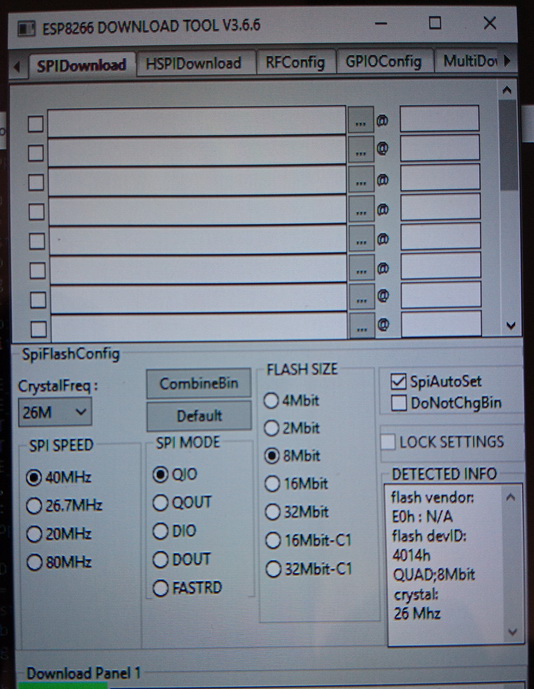
OK I ran the Flash tool, with the module in Program mode,
and I set the COM Port and Baud Rate.
Apparantly the green rectangle isn't clickable..
So I clicked the "START" button near it,
and after several seconds, there is some info synchronized to the window:
On the "Detected Info" panel,
look how it says there "8Mbit",
is that really bit, or Byte?
Does this affect the type of AT binary that I can install?
check the SpiAutoSet box.
8 Mbit would be 1 MB. it is unusual for ESP-12F.
did the tool set the 16 Mbit selection?
the Espressif build of the AT firmware doesn't fit into 1 MB. you would have to use AT 1.6 or an alternative build. for my WiFiEspAT library, which requires AT 1.7 you could use GitHub - loboris/ESP8266_AT_LoBo: New ESP8266 AT-Firmware with many added features, but I don't know the instructions for flashing it from Windows. on Linux it was simple
It was the default, when the Flash tool loaded,
it did not change after I clicked Start button,
probably because the SPIAutoSet checkbox was not selected..
Juraj:
check the SpiAutoSet box.
OK,
I now selected the SPIAutoSet checkbox, and then clicked "START",
and now the Flash Size panel was auto selected with "8Mbit"..
By comparing the 2 screenshots above,
it seems that the SPIAutoSet checkbox only affected the "Flash Size" panel,
it chose 8Mbit.
Other panels did not change their value..
Juraj:
8 Mbit would be 1 MB. it is unusual for ESP-12F.
I can contact the creator of this module (called "Open-Smart") and verify the memory size..
I will do it now.
Juraj:
The Espressif build of the AT firmware doesn't fit into 1 MB.
You would have to use AT 1.6 or an alternative build.
So for this size of memory the latest version is v1.6?
Hmm OK
Well it is better than my v0.40 AT.. So it still is a progress.
I downloaded AT v1.6.2,
and inside I found the readme.md file.
For my Flash size - 8Mb, I see these data as relevant:
So I went to enter 4 lines in the top part of the window (Filenames, and Addresses).
There is only 1 problem:
From the 3 files circled above,
I can find blank.bin in the exracted files from the ZIP,
but I cannot find eagle.flash.bin and eagle.irom0text.bin.
In some tutorial that I found on Youtube,
the files eagle.flash.bin and eagle.irom0text.bin should be inside a folder called bin\at\noboot,
the problem is that when extracting v1.6.2, bin\at\ doesn't have a noboot folder inside it.
I tried searching for these 2 files in all other sub-folders from the extracted ZIP,
but they seem not to exist..
That's despite the fact that the readme.md file clearly mentions them, and mentions 8Mbit, under Non-Boot mode.
I then thought maybe it's not in v1.6.2, but in v1.6,
so I downloaded and checked both v1.6.1, and v1.6,
and in them too, there is no "noboot" folder..