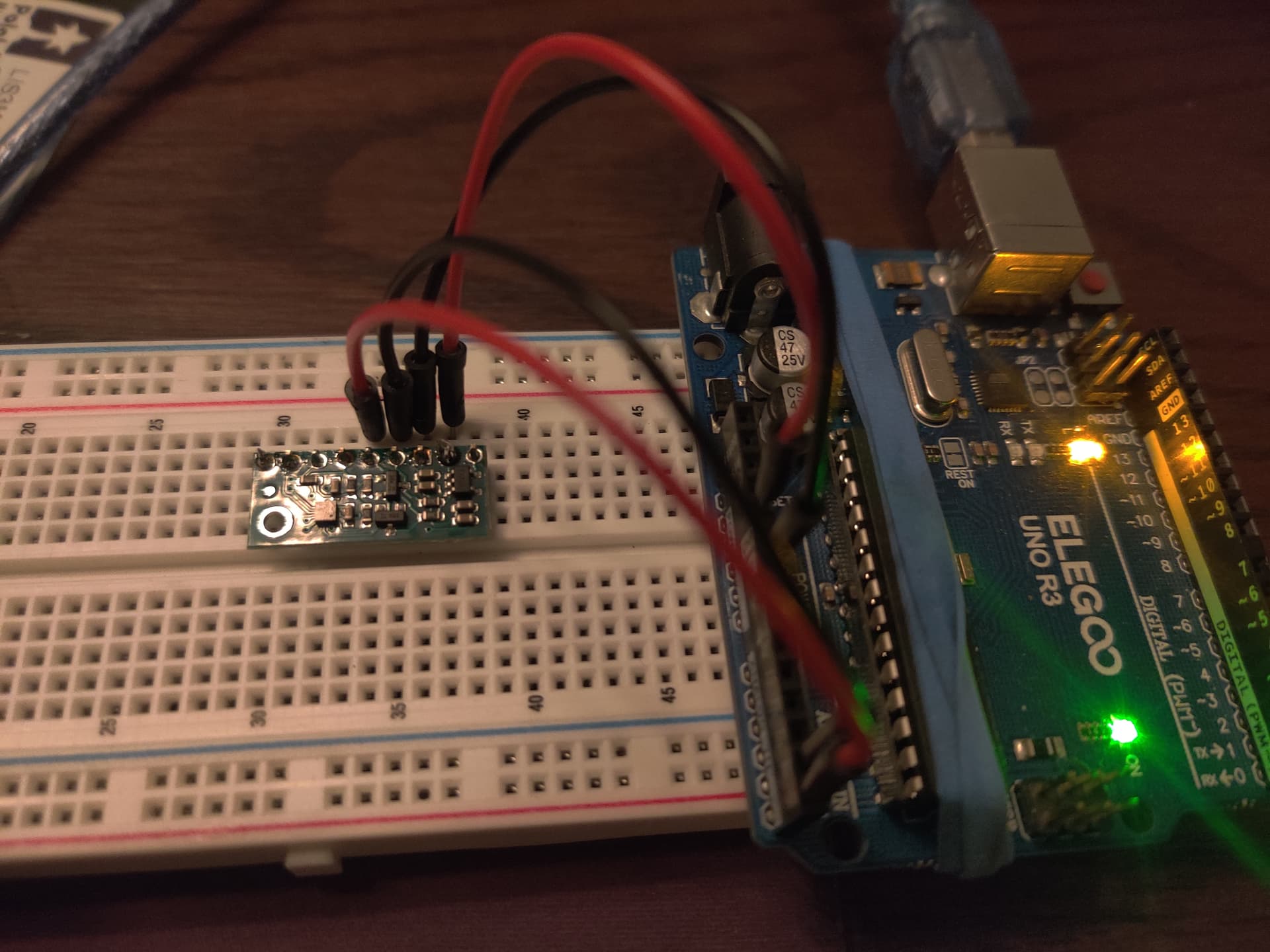
Ok I am back to working on this project. I do not have it running properly yet. Here is the latest code I am working with:
//-----C A R  D E T E C T O R-------for automatic gate-------------------
//FEB 15, 2025

//Detect presence of vehicle by sensing change in earth's magnetic field

/*Hardware
     --Arudino Nano
     --LIS3MDL board from Pololu
     --SPDT relay with diode
*/

/*------NOTES----------------------------------------------------------
     FEB 16, 2025                  Added buzzer for audible testing.
*/

//-----INCLUDE LIBRARIES---------------------------------------------------
#include <Wire.h>
#include <LIS3MDL.h>

LIS3MDL mag;                       //Make object to communicate with LIS3MDL library

//-----Standard Variables---------------------------------------------------
const int relayPin = 7;           //Define relay pin
int led = 13;                     //Define pin 13 to turn off onboard LED
                                  //MIGHT consider using 13 as relay pin
const int buzzer = 3;             //Buzzer used for prototyping/testing only. Comment out for final project
int sound = 900;                 //Set buzzer frequency. 4000 is easy to hear.
int buzzTime = 350;               //Set buzz time

bool relayTriggered = false;      //Keep up with relay state. Relay on or off.

//-----Magnetometer Measuring Items-----------------------------------------
const int numReadings = 150;      //Get a number of readings to average together
float magXOffset = 0.0;           //Get offsets to calibrate magnetometer
float magYOffset = 0.0;
float magZOffset = 0.0;

long magXSum = 0, magYSum = 0, magZSum = 0;       //Get axis info
float avgMagX;                                    //Average X, Y, and Z axes
float avgMagY;
float avgMagZ;

int readingsCount = 0;                            // Counter for the number of readings to average

//-----Math Formulas---Formulated in loop-------------------------------------
float avgMagnitude;                               //Average X, Y, and Z into one average value
float comparativeValue;                           //Value to comapre to threshold
float threshold;                                  //Trigger relay if far away from magnetometer
float calibratedAvgValue;                         //Determined in calibrateMagnetometer() and used to determine trigger thresholds

//-----Timing-------------------------------------------------------------------
const int printDelay = 200;                       //Delay between serial prints
const int readingInterval = 1;                    //Interval between readings
unsigned long previousReadingMillis = 0;          //Store the last time a reading was taken. For Reading mag
unsigned long relayTimer = 0;                     //Relay trigger timing
const int relayDelay = 2000;                      //Amount of time relay is on in milliseconds
unsigned long previousResetMillis = 0;            //Store last time magnitude reset happened
const int resetDelay = 2000;                      //Reset avgMagnitudes every 1 seconds

//-----Low-pass filter variables--------------------------------------------------
//Smooth out readings by eliminating highest mag and lowest mag reading
float filteredX = 0.0;
float filteredY = 0.0;
float filteredZ = 0.0;
float cutoff = 0.1;                              /* Cutoff frequency (how aggressive the filter is).
                                                  Smaller number = more aggresive but more lag*/

//-----E N D  O F  V A R I A B L E S----------------------------------------------

void setup() {
  Serial.begin(9600);                             //Start Serial monitor
  Wire.begin();                                   //Initiate I2C comms

  pinMode(led, OUTPUT);                           //Turn off on board pin 13 LED. MIGHT use
  digitalWrite(led, LOW);                         //for relay so LED lights when relay is triggered

  pinMode(buzzer, OUTPUT);                        //Set up buzzer. Comment out for final project


  if (!mag.init()) {                              //Tell me if program can't find magnetometer
    Serial.println("Failed to detect the LIS3MDL magnetometer.");
    while (1)
      ;
  }

  mag.enableDefault();                            //Default library values

  calibrateMagnetometer();

  pinMode(relayPin, OUTPUT);
  digitalWrite(relayPin, LOW);
}

void calibrateMagnetometer() {
  long magXSum = 0, magYSum = 0, magZSum = 0;
  const int calibrationReadings = 500;
  for (int i = 0; i < calibrationReadings; i++) {
    mag.read();
    magXSum += mag.m.x;
    magYSum += mag.m.y;
    magZSum += mag.m.z;
    delay(2);
  }

  magXOffset = magXSum / calibrationReadings;
  magYOffset = magYSum / calibrationReadings;
  magZOffset = magZSum / calibrationReadings;

  calibratedAvgValue = sqrt(magXOffset * magXOffset + magYOffset * magYOffset + magZOffset * magZOffset);
}

//-----E N D  O F  S E T U P------------------------------------------------------

void loop() {
  unsigned long currentReadingMillis = millis();                 //Start timer to collect readings

  if (currentReadingMillis - previousReadingMillis >= readingInterval) {
    previousReadingMillis = currentReadingMillis;

    mag.read();
    // Apply low-pass filter
    filteredX = filteredX + cutoff * (mag.m.x - filteredX);
    filteredY = filteredY + cutoff * (mag.m.y - filteredY);
    filteredZ = filteredZ + cutoff * (mag.m.z - filteredZ);

    // Calculate magnitude of filtered values

    magXSum += (filteredX - magXOffset);                         // Add the filtered values to the sums for averaging later
    magYSum += (filteredY - magYOffset);
    magZSum += (filteredZ - magZOffset);

    readingsCount++;                                             //increment reading count
  }

  if (readingsCount >= numReadings) {                            //When numReadings had been reached...
    avgMagX = magXSum / numReadings;
    avgMagY = magYSum / numReadings;
    avgMagZ = magZSum / numReadings;

    avgMagnitude = sqrt(sq(avgMagX) + sq(avgMagY) + sq(avgMagZ)); //Get avgMagnitude

    comparativeValue = sq(avgMagnitude)*4;                        //Compare to threshold

    magXSum = 0;                                                  // Reset sums after averaging
    magYSum = 0;
    magZSum = 0;
    readingsCount = 0;                                            // Reset readings counter

    threshold = calibratedAvgValue*30;
  }

  //-----RELAY TRIGGER CONTROL---------------------------------------------

  if (comparativeValue > threshold && !relayTriggered) {

    //digitalWrite(relayPin, HIGH);
    digitalWrite(led, HIGH);
    tone (buzzer, sound, buzzTime);
    relayTriggered = true;
    relayTimer = millis();
    avgMagnitude = 0;
  }

  if (relayTriggered) {
    unsigned long currentRelayMillis = millis();
    if (currentRelayMillis - relayTimer >= relayDelay) {
      //digitalWrite(relayPin, LOW);
      digitalWrite(led, LOW);
      noTone(buzzer);
      relayTriggered = false;
    }
  }

  if (avgMagnitude < threshold && !relayTriggered) {
    //digitalWrite(relayPin, LOW);
    digitalWrite(led, LOW);
  }

  //-----RESET MAGNITUDES TO PREVENT CREEPING UP OVER TIME---------------------------
  if (!relayTriggered) {
    unsigned long currentResetMillis = millis();
    if (currentResetMillis - previousResetMillis >= resetDelay) {
      previousResetMillis = currentResetMillis;
      avgMagnitude = 0;
    }
  }

  //-----DO SERIAL PRINTS-----COMMENT OUT FOR FINAL UPLOADED CODE-------------------
  unsigned long checkPrintTime = millis();
  static unsigned long oldPrintTime;
  if (checkPrintTime - oldPrintTime >= printDelay) {
    oldPrintTime = checkPrintTime;
    Serial.print("calibratedAvgValue=  ");
    Serial.print(calibratedAvgValue);
    //Serial.print("  nearThresh= ");
    //Serial.print(nearThreshold);
    Serial.print("  Thresh=  ");
    Serial.print(threshold);
    Serial.print("  AvgMag= ");
    Serial.print(avgMagnitude);
   // Serial.print("  AvgOfAvgs= ");
   // Serial.print(avgOfAverages);
    Serial.print("  ComparativeValue= ");
    Serial.println(comparativeValue);
  }
}
And here is a screenshot of a few serial printouts:
calibratedAvgValue=  3348.01  Thresh=  100440.28  AvgMag= 83.48  ComparativeValue= 27876.00
calibratedAvgValue=  3348.01  Thresh=  100440.28  AvgMag= 111.40  ComparativeValue= 49640.00
calibratedAvgValue=  3348.01  Thresh=  100440.28  AvgMag= 111.45  ComparativeValue= 49688.00
calibratedAvgValue=  3348.01  Thresh=  100440.28  AvgMag= 85.09  ComparativeValue= 28964.00
calibratedAvgValue=  3348.01  Thresh=  100440.28  AvgMag= 116.20  ComparativeValue= 54008.00
calibratedAvgValue=  3348.01  Thresh=  100440.28  AvgMag= 125.64  ComparativeValue= 63140.00
calibratedAvgValue=  3348.01  Thresh=  100440.28  AvgMag= 92.36  ComparativeValue= 34124.00
calibratedAvgValue=  3348.01  Thresh=  100440.28  AvgMag= 93.55  ComparativeValue= 35008.00
calibratedAvgValue=  3348.01  Thresh=  100440.28  AvgMag= 93.55  ComparativeValue= 35008.00
calibratedAvgValue=  3348.01  Thresh=  100440.28  AvgMag= 95.26  ComparativeValue= 36296.00
calibratedAvgValue=  3348.01  Thresh=  100440.28  AvgMag= 133.93  ComparativeValue= 71748.01
calibratedAvgValue=  3348.01  Thresh=  100440.28  AvgMag= 122.40  ComparativeValue= 59928.00
calibratedAvgValue=  3348.01  Thresh=  100440.28  AvgMag= 107.50  ComparativeValue= 46224.00
calibratedAvgValue=  3348.01  Thresh=  100440.28  AvgMag= 124.92  ComparativeValue= 62424.00
calibratedAvgValue=  3348.01  Thresh=  100440.28  AvgMag= 114.17  ComparativeValue= 52136.00
calibratedAvgValue=  3348.01  Thresh=  100440.28  AvgMag= 0.00  ComparativeValue= 33876.00
calibratedAvgValue=  3348.01  Thresh=  100440.28  AvgMag= 130.28  ComparativeValue= 67892.01
calibratedAvgValue=  3348.01  Thresh=  100440.28  AvgMag= 120.77  ComparativeValue= 58340.00
And here is some of my reasoning behind the coding you see:
#1- I am calibrating in the setup because I have determined that different locations will have different values. I have used the serial monitor and restarted the arduino all over my place. The different calibratedAvgValue has ranged from around 3000 up to 8000. So instead of just having an arbitrary threshold value, I want it calibrated to the exact location that it will be used in. This idea seems to work during testing.
#2- I am using the higher comparativeValue because it seems to be easier to fine tune the threshold using larger numbers.
#3- And speaking of threshold this is the battle and has been the battle...I am resetting the avgMagnitude every couple of seconds to zero BECAUSE the readings creep higher over time, causing false alarms. It might run 2 minutes without a false alarm. Or it might run 2 hours without a false alarm. But it WILL eventually have a false alarm. Resetting to zero does seem to help but is not failproof.
In the screenshot of the serial monitor, you can see readings all over the map. The avgMagnitude 0.00 is probably due to resetting it every two seconds. I could not catch it in time BUT twice in about a minute the comparativeValue HAD to have creeped over the threshold value because I heard the beeps while I was doing something else. (That is why I put the buzzer on it. So I can do other tasks and not have to monitor the monitor or LED.) That means it got over 100,440.28 with no change in the environment around it.
Is this normal?? Am I expecting to much precision and should I just set my threshold higher and live with it? Or is the L1S3MDL unstable? Or am I just absolutely horribly doing something wrong? It seems like no matter where I set the threshold value (within reason, obviously I cannot max it out or it won't work at all), at some point it is going to trigger itself without an environmental input. There has to be some unseen environmental input.
I want it to be as sensitive as possible so I can detect as far as possible, but without the false alarms. Is the code ok and I just need to increase the threshold until I quit getting false alarms? I am good with that. I just want to make sure I am not barking up the wrong tree here.
I have tried with the USB hooked to the computer and also with a battery pack out in the yard away from any influence. I get the same results every time. False alarms.
Any thoughts?
Thanks