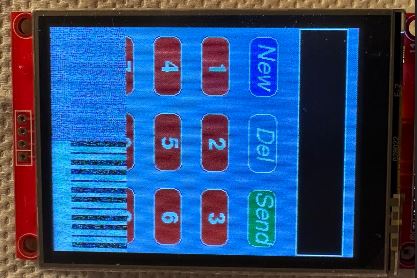
Hi all.
the picture shown that the 2.8" TFT 240XRBGX320 can't show full size, put here because of the TFT is new ordered from:
code:
/*
  The TFT_eSPI library incorporates an Adafruit_GFX compatible
  button handling class, this sketch is based on the Arduin-o-phone
  example.

  This example diplays a keypad where numbers can be entered and
  send to the Serial Monitor window.

  The sketch has been tested on the ESP8266 (which supports SPIFFS)

  The minimum screen size is 320 x 240 as that is the keypad size.
*/

// The SPIFFS (FLASH filing system) is used to hold touch screen
// calibration data

#include "FS.h"

#include <SPI.h>
#include <TFT_eSPI.h>      // Hardware-specific library

TFT_eSPI tft = TFT_eSPI(); // Invoke custom library

// This is the file name used to store the calibration data
// You can change this to create new calibration files.
// The SPIFFS file name must start with "/".
#define CALIBRATION_FILE "/TouchCalData1"

// Set REPEAT_CAL to true instead of false to run calibration
// again, otherwise it will only be done once.
// Repeat calibration if you change the screen rotation.
#define REPEAT_CAL true

// Keypad start position, key sizes and spacing
#define KEY_X 40 // Centre of key
#define KEY_Y 96
#define KEY_W 62 // Width and height
#define KEY_H 30
#define KEY_SPACING_X 18 // X and Y gap
#define KEY_SPACING_Y 20
#define KEY_TEXTSIZE 1   // Font size multiplier

// Using two fonts since numbers are nice when bold
#define LABEL1_FONT &FreeSansOblique12pt7b // Key label font 1
#define LABEL2_FONT &FreeSansBold12pt7b    // Key label font 2

// Numeric display box size and location
#define DISP_X 1
#define DISP_Y 10
#define DISP_W 238
#define DISP_H 50
#define DISP_TSIZE 3
#define DISP_TCOLOR TFT_CYAN

// Number length, buffer for storing it and character index
#define NUM_LEN 12
char numberBuffer[NUM_LEN + 1] = "";
uint8_t numberIndex = 0;

// We have a status line for messages
#define STATUS_X 120 // Centred on this
#define STATUS_Y 65

// Create 15 keys for the keypad
char keyLabel[15][5] = {"New", "Del", "Send", "1", "2", "3", "4", "5", "6", "7", "8", "9", ".", "0", "#" };
uint16_t keyColor[15] = {TFT_RED, TFT_DARKGREY, TFT_DARKGREEN,
                         TFT_BLUE, TFT_BLUE, TFT_BLUE,
                         TFT_BLUE, TFT_BLUE, TFT_BLUE,
                         TFT_BLUE, TFT_BLUE, TFT_BLUE,
                         TFT_BLUE, TFT_BLUE, TFT_BLUE
                        };

// Invoke the TFT_eSPI button class and create all the button objects
TFT_eSPI_Button key[15];

//------------------------------------------------------------------------------------------

void setup() {
  // Use serial port
  Serial.begin(9600);

  // Initialise the TFT screen
  tft.init();

  // Set the rotation before we calibrate
  tft.setRotation(1);

  // Calibrate the touch screen and retrieve the scaling factors
  touch_calibrate();

  // Clear the screen
  tft.fillScreen(TFT_BLACK);

  // Draw keypad background
  tft.fillRect(0, 0, 240, 320, TFT_DARKGREY);

  // Draw number display area and frame
  tft.fillRect(DISP_X, DISP_Y, DISP_W, DISP_H, TFT_BLACK);
  tft.drawRect(DISP_X, DISP_Y, DISP_W, DISP_H, TFT_WHITE);

  // Draw keypad
  drawKeypad();
}

//------------------------------------------------------------------------------------------

void loop(void) {
  uint16_t t_x = 0, t_y = 0; // To store the touch coordinates

  // Pressed will be set true is there is a valid touch on the screen
  bool pressed = tft.getTouch(&t_x, &t_y);

  // / Check if any key coordinate boxes contain the touch coordinates
  for (uint8_t b = 0; b < 15; b++) {
    if (pressed && key[b].contains(t_x, t_y)) {
      key[b].press(true);  // tell the button it is pressed
    } else {
      key[b].press(false);  // tell the button it is NOT pressed
    }
  }

  // Check if any key has changed state
  for (uint8_t b = 0; b < 15; b++) {

    if (b < 3) tft.setFreeFont(LABEL1_FONT);
    else tft.setFreeFont(LABEL2_FONT);

    if (key[b].justReleased()) key[b].drawButton();     // draw normal

    if (key[b].justPressed()) {
      key[b].drawButton(true);  // draw invert

      // if a numberpad button, append the relevant # to the numberBuffer
      if (b >= 3) {
        if (numberIndex < NUM_LEN) {
          numberBuffer[numberIndex] = keyLabel[b][0];
          numberIndex++;
          numberBuffer[numberIndex] = 0; // zero terminate
        }
        status(""); // Clear the old status
      }

      // Del button, so delete last char
      if (b == 1) {
        numberBuffer[numberIndex] = 0;
        if (numberIndex > 0) {
          numberIndex--;
          numberBuffer[numberIndex] = 0;//' ';
        }
        status(""); // Clear the old status
      }

      if (b == 2) {
        status("Sent value to serial port");
        Serial.println(numberBuffer);
      }
      // we dont really check that the text field makes sense
      // just try to call
      if (b == 0) {
        status("Value cleared");
        numberIndex = 0; // Reset index to 0
        numberBuffer[numberIndex] = 0; // Place null in buffer
      }

      // Update the number display field
      tft.setTextDatum(TL_DATUM);        // Use top left corner as text coord datum
      tft.setFreeFont(&FreeSans18pt7b);  // Choose a nicefont that fits box
      tft.setTextColor(DISP_TCOLOR);     // Set the font colour

      // Draw the string, the value returned is the width in pixels
      int xwidth = tft.drawString(numberBuffer, DISP_X + 4, DISP_Y + 12);

      // Now cover up the rest of the line up by drawing a black rectangle.  No flicker this way
      // but it will not work with italic or oblique fonts due to character overlap.
      tft.fillRect(DISP_X + 4 + xwidth, DISP_Y + 1, DISP_W - xwidth - 5, DISP_H - 2, TFT_BLACK);

      delay(10); // UI debouncing
    }
  }
}

//------------------------------------------------------------------------------------------

void drawKeypad()
{
  // Draw the keys
  for (uint8_t row = 0; row < 5; row++) {
    for (uint8_t col = 0; col < 3; col++) {
      uint8_t b = col + row * 3;

      if (b < 3) tft.setFreeFont(LABEL1_FONT);
      else tft.setFreeFont(LABEL2_FONT);

      key[b].initButton(&tft, KEY_X + col * (KEY_W + KEY_SPACING_X),
                        KEY_Y + row * (KEY_H + KEY_SPACING_Y), // x, y, w, h, outline, fill, text
                        KEY_W, KEY_H, TFT_WHITE, keyColor[b], TFT_WHITE,
                        keyLabel[b], KEY_TEXTSIZE);
      key[b].drawButton();
    }
  }
}

//------------------------------------------------------------------------------------------

void touch_calibrate()
{
  uint16_t calData[5];
  uint8_t calDataOK = 0;

  // check file system exists
  if (!SPIFFS.begin()) {
    Serial.println("Formating file system");
    SPIFFS.format();
    SPIFFS.begin();
  }

  // check if calibration file exists and size is correct
  if (SPIFFS.exists(CALIBRATION_FILE)) {
    if (REPEAT_CAL)
    {
      // Delete if we want to re-calibrate
      SPIFFS.remove(CALIBRATION_FILE);
    }
    else
    {
      File f = SPIFFS.open(CALIBRATION_FILE, "r");
      if (f) {
        if (f.readBytes((char *)calData, 14) == 14)
          calDataOK = 1;
        f.close();
      }
    }
  }

  if (calDataOK && !REPEAT_CAL) {
    // calibration data valid
    tft.setTouch(calData);
  } else {
    // data not valid so recalibrate
    tft.fillScreen(TFT_BLACK);
    tft.setCursor(20, 0);
    tft.setTextFont(2);
    tft.setTextSize(1);
    tft.setTextColor(TFT_WHITE, TFT_BLACK);

    tft.println("Touch corners as indicated");

    tft.setTextFont(1);
    tft.println();

    if (REPEAT_CAL) {
      tft.setTextColor(TFT_RED, TFT_BLACK);
      tft.println("Set REPEAT_CAL to false to stop this running again!");
    }

    tft.calibrateTouch(calData, TFT_MAGENTA, TFT_BLACK, 15);

    tft.setTextColor(TFT_GREEN, TFT_BLACK);
    tft.println("Calibration complete!");

    // store data
    File f = SPIFFS.open(CALIBRATION_FILE, "w");
    if (f) {
      f.write((const unsigned char *)calData, 14);
      f.close();
    }
  }
}

//------------------------------------------------------------------------------------------

// Print something in the mini status bar
void status(const char *msg) {
  tft.setTextPadding(240);
  //tft.setCursor(STATUS_X, STATUS_Y);
  tft.setTextColor(TFT_WHITE, TFT_DARKGREY);
  tft.setTextFont(0);
  tft.setTextDatum(TC_DATUM);
  tft.setTextSize(1);
  tft.drawString(msg, STATUS_X, STATUS_Y);
}

//------------------------------------------------------------------------------------------