2.42" OLED SSD1309 with U8GLIB

It has been working for some time now.

But I have run into an issue:

When powered by USB - all is good.

When powered via the VIn connector the display is black until I push the reset button.

Anyone an idea?

Should I try chukovskij´s idea?

Any input appreciated

Mike

Solution:

Connect Display RES to a pin of your choice - I am using #5

void setup() {   
  pinMode( 5, OUTPUT);  // RES Pin Display
  digitalWrite( 5, LOW);
  delay (500);
  digitalWrite( 5, HIGH);
  u8g2.begin();   // Start OLED
}

Works ok when powered via USB or VIn Plug

1 Like

I picked up one of these black pcb displays to work with a esp32 but I can't seem to get anything from it. I have a couple of questions:

CS: Connect to ground or leave floating?
DC: This is the address right? What address if held high and what address if held low?

RES: Connecting to a pullup enough or does it actually need to be reset?

I am using the u82lib

I have removed R4 and bridged R3 and R5.

I have tried both the HW I2C and software with a reset pin but I can't get any response. Does anyone have sample code for esp32 they could post? Thanks!

Consider to use u8g2 if possible.

CS is the chip select line. Connect the CS input of the display with any available GPIO pin and provide the pin number to the u8g constructor.

DC is the data / command line. It indicated, whether a command or same data is about to be transfered. Connect the DC input of the display with any available GPIO pin and provide the pin number to the u8g constructor.

If you have to connect CS and DC, then this is a SPI interface!

Oliver

Thank you for the response. The display is identical looking the black pcb a few posts up. After much tinkering I was able to figure it out.

The display can be SPI or I2C. I was trying to do I2C and for that the modifications are to remove R4 and jumper R3 and R5.

I had the normal 4.7k pullups on the SDA and SCL.

In order for the display to function:

10K pullup on the RST. THIS DISPLAY REQUIRES THE RESET. Pick an IO of your choice.

In I2C mode the DC line is your address. The displays I received are x78 or x7A. If you pull DC low it will be at x78 and tied high is x7A (not the x3C that have been reported elsewhere).

The CS line seem to not matter if its floating or tied low but I have tied to ground. Here is my sample code that works (ESP32). Hopefully it will help someone else out as this was hours of head scratching for me. LoL

#include "U8g2lib.h"
#include <Wire.h> //Library for I2C interface

//HW i2C is 22 for SCL and 21 for SDA


U8G2_SSD1309_128X64_NONAME0_F_HW_I2C u8g2(U8G2_R0, /* reset=*/ 23); 


byte mycounter=0;
String mystring;


void setup() {
delay(1000);
  

  //u8g2.setI2CAddress(0x78);  //if DC is pulled low
  u8g2.setI2CAddress(0x7A);  //if DC is pulled high
u8g2.setBusClock(1500000);
  u8g2.begin();
  u8g2.setFont(u8g_font_6x10);
}

void loop() {
  drawOLED_1();
  delay(1000);
  if(mycounter<200){
      mycounter=mycounter+1;
  }else{
    mycounter=0;
  }
}

void drawOLED_1(void) {
  //char buffer[10];
  u8g2.clearBuffer(); // clear the internal memory

  u8g2.setFont(u8g2_font_ncenB08_tr);

  u8g2.drawStr(0, 10, "LINE1");
  u8g2.drawStr(0, 20, "LINE2");
  u8g2.drawStr(0, 30, "LINE3");
  u8g2.drawStr(0, 40, "LINE4");
  mystring=String(mycounter);


  u8g2.setCursor(0, 50);
 u8g2.print(mystring);
  

  u8g2.sendBuffer();
}
1 Like

zdravke:
Thanks, we are getting somewhere. I assumed that R13 and R15 should be the same value as R17. Now I have replaced both with 0R. I also pulled RES with 10K up to Vcc, and I am getting response from 0x3C. Should it be pulled with lower value?

Nothing yet on the screen though. At some point I got something, but not sure which combination of params was it.

U8GLIB is too slow over I2C so I was hoping that SSD1306Ascii could be made to work with it.

david_prentice:
I2C is not unreasonable. I would use Adafruit_SSD1306 library first. But I am sure that u8g would be fine too.

First step is to check DC. Does it have an existing 10k pulldown on the pcb? It is essential that DC has a stable value. Otherwise it will not know whether it is 0x3C or 0x3D.

As a general rule, a 128x64 monochrome is always going to be fast. There is only 1kB of data to repaint the whole screen.

David.

Hi mates,

I know the thread is old, but I want exponation my solution for a future people have the same problem with this display, because the manufacture don't gift any information o datasheet.

I'm working with same dislplay of Zdravke:

http://www.befr.ebay.be/itm/181943860429

Now, I have the display working properly in I2C with the library "Adafruit_SSD1306 library". David_prentice is right, first you need to remove R17 and put 0R in R13 and R15. About CS pin, the display works if you put to GND or not, both is correct, for example I put 0R in R18 it's the same that CS pin to GND, and it's working perfectly. About RES pin needs connect to the Arduino output pin, and you can put one resistor of 10k pull-up to 5Vcc (I did). About DC pin is the adress of display in the bus I2C, in this case if you use "Adafruit_SSD1306 library", you need to a put pull-up of 10K to 5Vcc, because if:

DC connect to GND, adress is 0x3C
DC connect to 5Vcc, adress is 0x3D

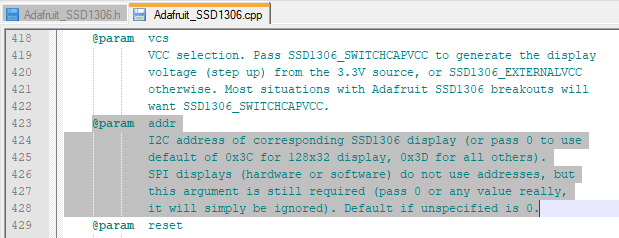
The "Adafruit_SSD1306 library" default use 0x3C for 128x32 display and 0x3D for all others, then we use de 0x3D because the display is 128x64.

Summary if you use this display in I2C and "Adafruit_SSD1306 library":

-R17 = Remove
-R13 = 0R
-R15 = 0R
-R18 = 0R (CS pin to GND)
-RES = connect to Arduino Output pin with a 10K pull-up
-DC = connect a 10K pull-up. (adress=0x3D)

I hope help somebody about this thread.

Charlie

DirecciónDisplayI2C.png

spyder0069:
. . .
In I2C mode the DC line is your address. The displays I received are x78 or x7A. If you pull DC low it will be at x78 and tied high is x7A (not the x3C that have been reported elsewhere).

You are confusing the 7-bit address of 0x3C with the shifted 8-bit version of 0x78. Convert those two numbers to binary and you will see how they are related.

Take a look at this explanation.

Don

spyder0069:
Thank you for the response. The display is identical looking the black pcb a few posts up. After much tinkering I was able to figure it out.

The display can be SPI or I2C. I was trying to do I2C and for that the modifications are to remove R4 and jumper R3 and R5.

I had the normal 4.7k pullups on the SDA and SCL.

In order for the display to function:

10K pullup on the RST. THIS DISPLAY REQUIRES THE RESET. Pick an IO of your choice.

In I2C mode the DC line is your address. The displays I received are x78 or x7A. If you pull DC low it will be at x78 and tied high is x7A (not the x3C that have been reported elsewhere).

The CS line seem to not matter if its floating or tied low but I have tied to ground. Here is my sample code that works (ESP32). Hopefully it will help someone else out as this was hours of head scratching for me. LoL

#include "U8g2lib.h"

#include <Wire.h> //Library for I2C interface

//HW i2C is 22 for SCL and 21 for SDA

U8G2_SSD1309_128X64_NONAME0_F_HW_I2C u8g2(U8G2_R0, /* reset=*/ 23);

byte mycounter=0;
String mystring;

void setup() {
delay(1000);

//u8g2.setI2CAddress(0x78);  //if DC is pulled low
  u8g2.setI2CAddress(0x7A);  //if DC is pulled high
u8g2.setBusClock(1500000);
  u8g2.begin();
  u8g2.setFont(u8g_font_6x10);
}

void loop() {
  drawOLED_1();
  delay(1000);
  if(mycounter<200){
      mycounter=mycounter+1;
  }else{
    mycounter=0;
  }
}

void drawOLED_1(void) {
  //char buffer[10];
  u8g2.clearBuffer(); // clear the internal memory

u8g2.setFont(u8g2_font_ncenB08_tr);

u8g2.drawStr(0, 10, "LINE1");
  u8g2.drawStr(0, 20, "LINE2");
  u8g2.drawStr(0, 30, "LINE3");
  u8g2.drawStr(0, 40, "LINE4");
  mystring=String(mycounter);

u8g2.setCursor(0, 50);
u8g2.print(mystring);

u8g2.sendBuffer();
}

Bought the same display, tried exact steps above, no worky. It does announce itself as 0x3C on the bus when RES is pulled up with 10K, but that's about as far as it goes. I connected it to pin D6 on Nano and have put "6" as reset pin in your code, not sure if that part is correct.

I suggest that you follow Charlie_Tech's post (and anything from olikraus)

There should be nothing difficult with using SSD1309. It is fairly similar to SSD1306.

  1. configure pcb for SPI or I2C.
  2. use correct constructor
  3. it is only 128x64. So you can afford to use a full buffer in SRAM (1kB) even on Uno.

David.

Charlie_Tech:
RES = connect to Arduino Output pin with a 10K pull-up

I don't get it - connect RES to arduino output and do what with it? Do you send anything in the code to that output? If not, why connect it to output in the first place? If yes, why omit that part?

Finally it works! I connected RST to arduino nano RST and SSD1306Ascii lib works as it should without having to use extra IO pin for RST.

To summarize very shortly what needs to be done, for diymore.cc OLED:

R4 - remove
R3, R5, R7 - 0R (short with blob of solder)
DC - connect to VCC with 10K resistor (pullup)
RES - connect to VCC with 10K resistor (pullup)
RES - connect to RST on Arduino.

Similarly, same applies for display in first post, only resistor markings are different.

Now on to the next one:

https://www.aliexpress.com/item/32949625501.html

Has anyone tried this one, cheapest on aliexpress? Resistors listed for I2C operation seem to be missing altogether from back of the display photo :slight_smile:

It looks as if you move R8 from the SPI position to the I2C position.

Is R8 mounted ?
Does your pcb match the photo in the link ?

You have the OLED on your desk. Just try it.

I find the datasheet a little confusing.

8.1 MCU Interface selection

The diff between 4-wire and I2C is linking D1, D2 and tying CS low.

You can simplify the number of resistors to change by putting a pull-down on CS and DC.
Then I2C selection just needs to link D2,D1. CS, DC can be left as n.c.

Incidentally, if there is a pull-up on RES you can leave as n.c.

David.

david_prentice:
It looks as if you move R8 from the SPI position to the I2C position.

Is R8 mounted ?
Does your pcb match the photo in the link ?

You have the OLED on your desk. Just try it.

I find the datasheet a little confusing. The diff between 4-wire and I2C is linking D1, D2 and tying CS low.

You can simplify the number of resistors to change by putting a pull-down on CS and DC.
Then I2C selection just needs to link D2,D1. CS, DC can be left as n.c.

Incidentally, if there is a pull-up on RES you can leave as n.c.

David.

I don't have it, I wondered if someone had it and tried it.

If your displays are working for you, be happy.

Yes, it would be interesting to know how they have wired the module on that particular display.
I have enough displays. I am not rushing to buy another one.

And I would feel more comfortable with a library written for SSD1309 and not the SSD1306. There are several minor differences between the two devices.

David.

Great!!, I'm happy for you zdravke.

Only I want to report one small thing. After try my display with the configuration I posted:

Charlie_Tech:
Hi mates,

I know the thread is old, but I want exponation my solution for a future people have the same problem with this display, because the manufacture don't gift any information o datasheet.

I'm working with same dislplay of Zdravke:

http://www.befr.ebay.be/itm/181943860429

Now, I have the display working properly in I2C with the library "Adafruit_SSD1306 library". David_prentice is right, first you need to remove R17 and put 0R in R13 and R15. About CS pin, the display works if you put to GND or not, both is correct, for example I put 0R in R18 it's the same that CS pin to GND, and it's working perfectly. About RES pin needs connect to the Arduino output pin, and you can put one resistor of 10k pull-up to 5Vcc (I did). About DC pin is the adress of display in the bus I2C, in this case if you use "Adafruit_SSD1306 library", you need to a put pull-up of 10K to 5Vcc, because if:

DC connect to GND, adress is 0x3C
DC connect to 5Vcc, adress is 0x3D

The "Adafruit_SSD1306 library" default use 0x3C for 128x32 display and 0x3D for all others, then we use de 0x3D because the display is 128x64.

Summary if you use this display in I2C and "Adafruit_SSD1306 library":

-R17 = Remove
-R13 = 0R
-R15 = 0R
-R18 = 0R (CS pin to GND)
-RES = connect to Arduino Output pin with a 10K pull-up
-DC = connect a 10K pull-up. (adress=0x3D)

I hope help somebody about this thread.

Charlie

I saw some displacements in the image printed on the display. The solution was connect the DC pin directly to Vcc, without pull-ups. With this modification my display works properly for long time, (likes 30 days consecutive without problems). Whit the pull-up resistor, in second day consecutive the image was displacemented.

I explain my aplication: I use the display to visualize some sensors of a chicken egg incubator. This application must be works between 21 and 35 days consecutive, for this reason I detected this problem in the image of the display.

Summarizing....., the correct configuration for this display for the "Adafruit_SSD1306 library" is the same of my last post but the DC pin connect directly to Vcc:

-R17 = Remove
-R13 = 0R
-R15 = 0R
-R18 = 0R (CS pin to GND)
-RES = connect to Arduino Output pin with a 10K pull-up
-DC = Vcc. (adress=0x3D)

I hope help somebody :slight_smile:

Charlie_Tech.

And now solution without connection to RST pin on Arduino:

R4 - remove
R3, R5, R7 - 0R (short with blob of solder)
DC - connect to VCC with 10K resistor (pullup)
RES - connect to VCC with 10K resistor (pullup)
RES - connect to GND with 10uF cap (keeps RES low during display power up)

1 Like

Hello again,

I tried connect the RES pin of display with the zdravke configuration, I think is the best solution, i agree with him, becasue with this configuration you have other pin from arduino free.

I do the same configuration finally:

-R17 = Remove
-R13 = 0R
-R15 = 0R
-R18 = 0R (CS pin to GND)
-RES = connect to Vcc with 10K resistor (pullup) and connect with 10uF capacitor to GND
-DC = 10k resistor pullup. (adress=0x3D).

Thanks zdravke for this solution,

I have the black DiyMore SSD1309 and I was able to get this working with I2C using the tips above. I wanted to share my steps so it may help someone else.

Remove R4 (I didn't reuse the resistor)
Bridge R3, R5, R7
RES -> reset on arduino
SDA -> SDA
SCL -> SCL
VCC -> 3v (or 5v if you are using a 5v board)
GND ->GND

I didn't have the mess with pullups, everything just worked.