noiasca:
in other words:
We know that this library is working.
If it doesn't work for you - you either have a wrong wiring or damaged parts.
I cannot deny the logic of your words.
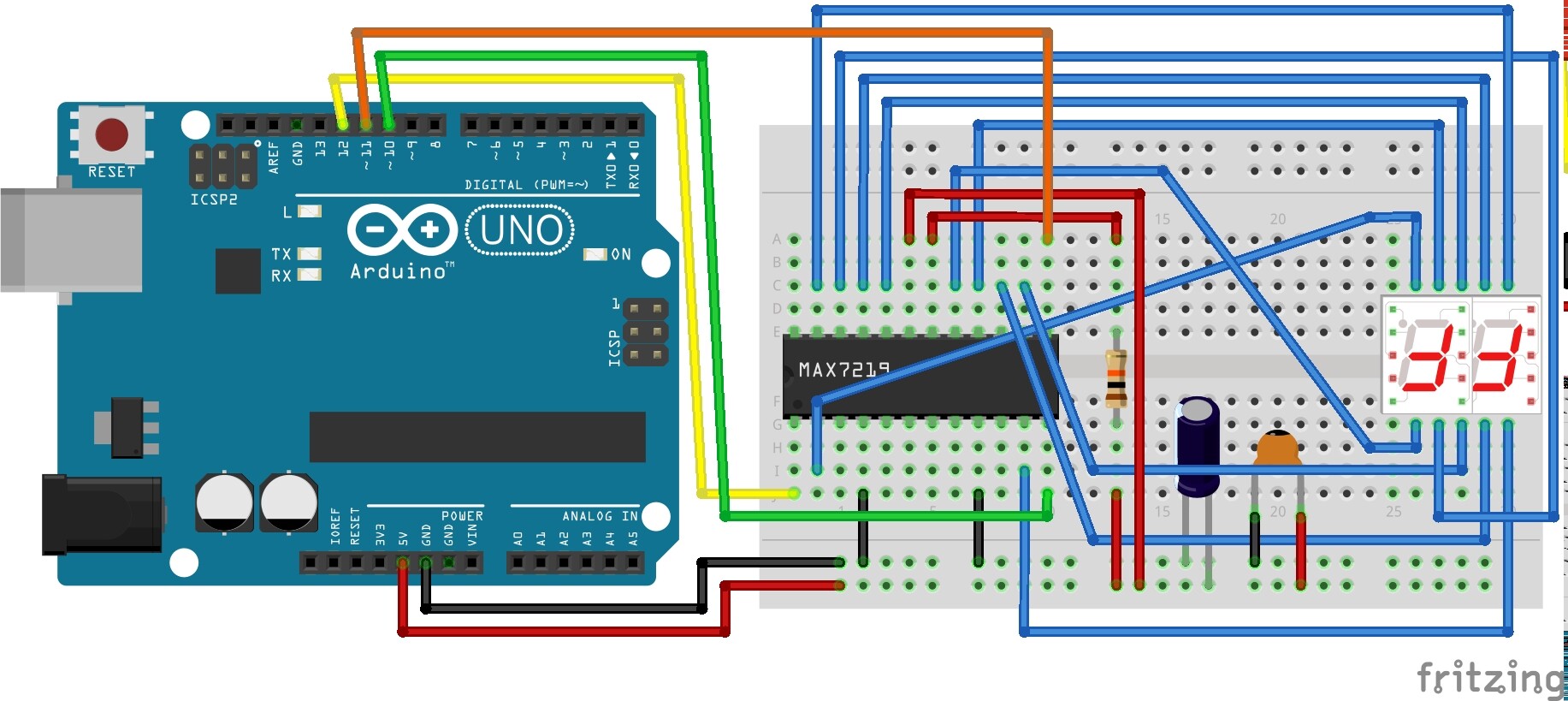
So if we go with that, could a display be damaged such that (A) it works fine with I wire directly from Arduino to display with no MAX chip (which I discuss here: Controlling 10-pin 2-digit 7-segment Display with shift register. - #8 by cdrk - LEDs and Multiplexing - Arduino Forum) and then (B) it fails confusingly when paired with a MAX chip?
The following code is my test of the LedControl library functions. It's a bit long and remedial, but I prove that each segment will light up on command. They just won't always light up in every grouping I ask for. Some groupings work. Some don't.
/*
   an attempt to better understand the LedControl Library
   for use with a 2-digit 7-segment display
   https://www.arduino.cc/reference/en/libraries/ledcontrol/
   http://wayoda.github.io/LedControl/pages/software

   setRow(int addr, int row, byte value);
   setColumn(int addr, int column, byte value);
   setLed(int addr, int row, int col, boolean state);
   setDigit(int addr, int digit, byte value, boolean dp);

*/
#include "binary.h"
#include "LedControl.h"
LedControl lc = LedControl(12, 11, 10, 1);

unsigned long delaytime = 500;

void setup() {
  lc.shutdown(0, false);
  lc.setIntensity(0, 4);
  lc.clearDisplay(0);
}

// ------------- setRow(int addr, int row, byte value);
void test_setRow() {
  lc.setRow(0, 0, B00011101);
  lc.setRow(0, 1, B01100011);
  delay(delaytime);
  lc.setRow(0, 0, B01100011);
  lc.setRow(0, 1, B00011101);
  delay(delaytime);
  lc.clearDisplay(0);
}
// cycle through each segment; verifies each segment works
void cycleThru_setRow() {
  lc.setRow(0, 0, B10000000); // dp
  lc.setRow(0, 1, B10000000);
  delay(delaytime);
  lc.setRow(0, 0, B00000000); // blank
  lc.setRow(0, 1, B00000000);
  delay(delaytime);
  lc.setRow(0, 0, B10000000); // dp
  lc.setRow(0, 1, B10000000);
  delay(delaytime);
  lc.setRow(0, 0, B01000000); // A
  lc.setRow(0, 1, B01000000);
  delay(delaytime);
  lc.setRow(0, 0, B00100000); // B
  lc.setRow(0, 1, B00100000);
  delay(delaytime);
  lc.setRow(0, 0, B00010000); // C
  lc.setRow(0, 1, B00010000);
  delay(delaytime);
  lc.setRow(0, 0, B00001000); // D
  lc.setRow(0, 1, B00001000);
  delay(delaytime);
  lc.setRow(0, 0, B00000100); // E
  lc.setRow(0, 1, B00000100);
  delay(delaytime);
  lc.setRow(0, 0, B00000010); // F
  lc.setRow(0, 1, B00000010);
  delay(delaytime);
  lc.setRow(0, 0, B00000001); // G
  lc.setRow(0, 1, B00000001);
  delay(delaytime);
  lc.clearDisplay(0);
}

// ------------- setColumn(int addr, int column, byte value);
void test_setColumn() {
  lc.setColumn(0, 1, B01000000); // left (tens)
  lc.setColumn(0, 6, B01000000);
  // lc.setColumn(0, 5, B01000000); // add this line and it fails
  lc.setColumn(0, 0, B11000000); // both left and right digits
  lc.setColumn(0, 7, B11000000);
  lc.setColumn(0, 4, B10000000); // right (ones)
  lc.setColumn(0, 3, B10000000);
  delay(delaytime);
  lc.clearDisplay(0);
}

// ------------- setLed(int addr, int row, int col, boolean state);
void test_setLed() { // setLed(addr, row, col, boolean state);
  for (int i = 0; i < 9; i++) {
    lc.setLed(0, 0, i, true);
    lc.setLed(0, 1, i, true);
    delay(delaytime);
    lc.setLed(0, 0, i, false);
    lc.setLed(0, 1, i, false);
  }
  delay(delaytime);
  lc.clearDisplay(0);
}

// ------------- setDigit(int addr, int digit, byte value, boolean dp);
void test_setDigit() { // display "41"
  lc.setDigit(0, 1, 4, false); // left digit
  lc.setDigit(0, 0, 1, false); // right digit
  delay(delaytime);
  lc.clearDisplay(0);
}
void test_printNumber(int n) {
  int ones;
  int tens;
  ones = n % 10;
  n = n / 10;
  tens = n % 10;
  n = n / 10;
  lc.setDigit(0, 1, (byte)tens, false);
  lc.setDigit(0, 0, (byte)ones, false);
  delay(delaytime);
  lc.clearDisplay(0);
}

void loop() {
  test_setLed();
  test_setColumn();
  //  cycleThru_setRow();
  test_setRow();
  // if test_setDigit() or test_printNumber() are first in loop()
  // then loop() fails, but loop() works  if these two are down here.
  test_setDigit();
  test_printNumber(72); // change this to "76" and digits go dark evermore.
}
I really don't know what to conclude. But I thank you BOTH for your help.
Actually, at the bottom of the code above, in the loop(); function I point out that the arrangement of the functions called influences the success of the display. Could that be a clue?
void loop() {
  test_setLed();
  test_setColumn();
  //  cycleThru_setRow();
  test_setRow();
  // if test_setDigit() or test_printNumber() are first in loop()
  // then loop() fails, but loop() works  if these two are down here.
  test_setDigit();
  test_printNumber(72); // change this to "76" and digits go dark evermore.
}