Hi everyone. Need some help. We have 3 digits 7 segment display, 3 shift register and 4 push buttons. The 1st button should be increment by 1, and the 2nd button should be for decrement by 1,the 3rd button is for increment by 2 and the 4th (last) button should be for reset button (reset the display of 3 digits 7 segment diplay to zero (0)). Please help me. Here is the my code as of now. Thank you for you help much appreciated.
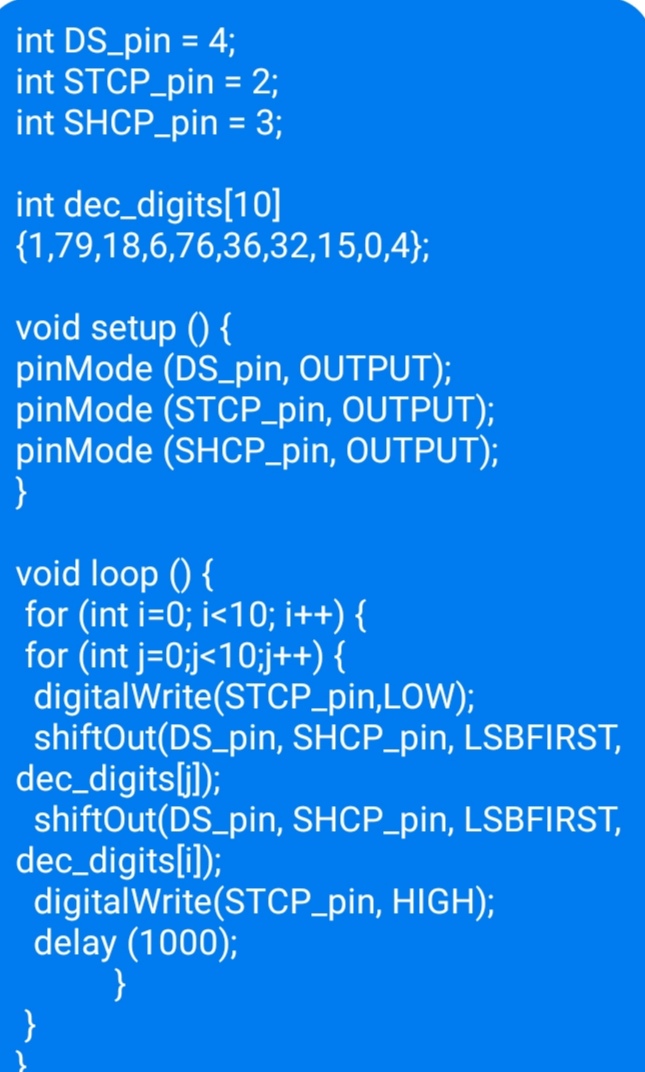
Images of code are not ideal. Please post code properly. Read the forum guidelines to see how to properly post code and some information on how to make a good post.
Use the IDE autoformat tool (ctrl-t or Tools, Auto format) before posting code in code tags.
1 Like
Hi, this is copy of my code.
</>
int DS_pin = 4;
int STCP_pin = 2;
int SHCP_pin = 3;
int dec_digits[10] {1,79,18,6,76,36,32,15,0,4};
void setup ()
{
pinMode (DS_pin, OUTPUT);
pinMode (STCP_pin, OUTPUT);
pinMode (SHCP_pin, OUTPUT);
}
void loop ()
{
for (int i=0; i<10; i++)
{
for (int j=0;j<10;j++)
{
digitalWrite(STCP_pin,LOW);
shiftOut(DS_pin, SHCP_pin, LSBFIRST, dec_digits[j]);
shiftOut(DS_pin, SHCP_pin, LSBFIRST, dec_digits[i]);
digitalWrite(STCP_pin, HIGH);
delay (1000);
}
}
}
Hi, @knoahzeki
Welcome to the forum.
Please read the post at the start of any forum , entitled "How to use this Forum".
As asked by @groundFungus a copy of your code in tags would be helpful.
Also a copy of your circuit diagram and what model Arduino are you using?
What does your code do at the moment?
Thanks.. Tom... 


Hi Tom,
As of now here is the copy of my diagram. I need some help to have a function on my 4 push buttons. As I mentioned above. The 1st button should be increment by 1, 2nd button should be decrement by 2, 3rd button should be increment by 2 and the last 4th button should be reset the display of 3digits 7 srgment.

Code </>...
int DS_pin = 4;
int STCP_pin = 2;
int SHCP_pin = 3;
int dec_digits[10] {1,79,18,6,76,36,32,15,0,4};
void setup () {
pinMode (DS_pin, OUTPUT);
pinMode (STCP_pin, OUTPUT);
pinMode (SHCP_pin, OUTPUT);
}
void loop () {
for (int i=0; i<10; i++) {
for (int j=0;j<10;j++) {
digitalWrite(STCP_pin,LOW);
shiftOut(DS_pin, SHCP_pin, LSBFIRST, dec_digits[j]);
shiftOut(DS_pin, SHCP_pin, LSBFIRST, dec_digits[i]);
digitalWrite(STCP_pin, HIGH);
delay (1000);
}
}
}
Here is your code formatted with the autoformat tool and posted in code tags.
int DS_pin = 4;
int STCP_pin = 2;
int SHCP_pin = 3;

int dec_digits[10] {1, 79, 18, 6, 76, 36, 32, 15, 0, 4};

void setup ()
{
   pinMode (DS_pin, OUTPUT);
   pinMode (STCP_pin, OUTPUT);
   pinMode (SHCP_pin, OUTPUT);
}

void loop ()
{
   for (int i = 0; i < 10; i++)
   {
      for (int j = 0; j < 10; j++)
      {
         digitalWrite(STCP_pin, LOW);
         shiftOut(DS_pin, SHCP_pin, LSBFIRST, dec_digits[j]);
         shiftOut(DS_pin, SHCP_pin, LSBFIRST, dec_digits[i]);
         digitalWrite(STCP_pin, HIGH);
         delay (1000);
      }
   }
}
To edit your post to put the code in code tags, highlight all of the code and click the </> in the menubar.
Sounds like you want to display a number from 000 to 999 rather than using nested loops to count from 00 to 99. To do that you just need to split the number into three digits:
int hundredsDigit = (number / 100) % 10;
int tensDigit = (number / 100) % 10;
int unitsDigit = number % 10;
Thank you.
Hi @johnwasser thank you for helping, can you create for me a code for my diagram? Yes, as you mentioned. The logic of my program should be count from 000 to 999 using the 4 push buttons.
This is my project which obeys @knoahzeki's algorithm.
1. The connection diagram among switches and display devices.
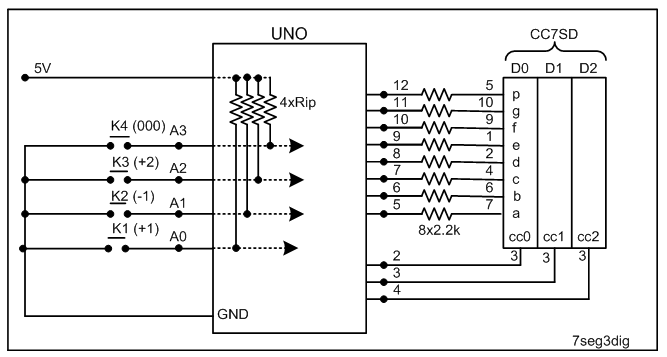
Figure-1:
2. Sketch (not tested)
#include<SevSeg.h>
SevSeg sevSeg;           //create object sevSeg

int numberToShow = 0;

void setup()
{
  pinMode(A0, INPUT_PULLUP);
  pinMode(A1, INPUT_PULLUP);
  pinMode(A2, INPUT_PULLUP);
  pinMode(A3, INPUT_PULLUP);
  //-------------------------
  byte segDPins[] = {5, 6, 7, 8, 9, 10, 11, 12};//DPin-5 = seg-a, …, DPin-12 = seg-p
  byte ccDPins[] = {2, 3, 4};   //DPin-2 = cc0, DPin-3 = cc1, DPin-3 = cc2
  sevSeg.begin(COMMON_CATHODE, 3, ccDPins, segDPins, false, false, false, true);
  sevSeg.setNumber(numberToShow, 0, LOW); //arg1 = 0 - 999; arg2 = no decimal point; arg3=base-10
}

void loop()
{
  if (digitalRead(A0) == LOW)
  {
    numberToShow++;
  }

  if (digitalRead(A1) == LOW)
  {
    numberToShow--;
  }
  if (digitalRead(A2) == LOW)
  {
    numberToShow = numberToShow + 2;
  }

  if (digitalRead(A3) == LOW)
  {
    numberToShow = 0;
  }
  sevSeg.setNumber(numberToShow, 0, LOW);  //update database
  sevSeg.refreshDisplay();  //keep refreshing display
}
You have to add debouncing capacitors between inputs and +5V, otherwise you'll get multiple counts!
Alternately, the Debounce.h Library could be added in the sketch to implemnt software debouncing for the buttons.
There are thousands of examples for using buttons to trigger actions. Here is an example I wrote that does state change detection and debounce. It happens to be for three buttons but you can change the first two lines to make it work for 4 buttons.
const byte ButtonCount = 3;
const byte ButtonPins[ButtonCount] = {2, 3, 4};
const unsigned long DebounceTime = 30;

boolean ButtonWasPressed[ButtonCount];  // Defaults to 'false'
unsigned long ButtonStateChangeTime = 0; // Debounce timer common to all buttons

void setup()
{
  Serial.begin(115200);

  for (byte i = 0; i < ButtonCount; i++)
  {
    pinMode (ButtonPins[i], INPUT);  // External pull-down
  }
}

void loop()
{
  unsigned long currentTime = millis();

  // Update the buttons
  for (byte i = 0; i < ButtonCount; i++)
  {
    boolean buttonIsPressed = digitalRead(ButtonPins[i]) == HIGH;  // Active HIGH

    // Check for button state change and do debounce
    if (buttonIsPressed != ButtonWasPressed[i] &&
        currentTime - ButtonStateChangeTime > DebounceTime)
    {
      // Button state has changed
      ButtonStateChangeTime = currentTime;
      ButtonWasPressed[i] = buttonIsPressed;
      if (ButtonWasPressed[i])
      {
        // Button i was just pressed
        switch (i)
        {
        case 0: // First button
            break;
        case 1: // Second button
            break;
        case 2: // Third button
            break;
        }
      }
      else
      {
        // Button i was just released
      }
    }
  }
}
if you're looking for code to drive the displays, look at the MultiFunction Shield, its library and its schematic

Sketch of Post-10 is repeated with software debouncng fo the buttons: K1, K2, K3, and K4.
#include<Debounce.h>
Debounce K1(A0);
Debounce K2(A1);
Debounce K3(A2);
Debounce K4(A3);

#include<SevSeg.h>
SevSeg sevSeg;           //create object sevSeg

int numberToShow = 0;

void setup()
{
  pinMode(A0, INPUT_PULLUP);
  pinMode(A1, INPUT_PULLUP);
  pinMode(A2, INPUT_PULLUP);
  pinMode(A3, INPUT_PULLUP);
  //-------------------------
  byte segDPins[] = {5, 6, 7, 8, 9, 10, 11, 12};//DPin-5 = seg-a, …, DPin-12 = seg-p
  byte ccDPins[] = {2, 3, 4};   //DPin-2 = cc0, DPin-3 = cc1, DPin-3 = cc2
  sevSeg.begin(COMMON_CATHODE, 3, ccDPins, segDPins, false, false, false, true);
  sevSeg.setNumber(numberToShow, 0, LOW); //arg1 = 0 - 999; arg2 = no decimal point; arg3=base-10
}

void loop()
{
  if (!K1.read()  == LOW)  //negate; because, there is internal pull-up resistor.
  {
    numberToShow++;
  }

  if (!K2.read() == LOW)
  {
    numberToShow--;
  }
  if (!K3.read() == LOW)
  {
    numberToShow = numberToShow + 2;
  }

  if (!K4.read() == LOW)
  {
    numberToShow = 0;
  }
  sevSeg.setNumber(numberToShow, 0, LOW);  //update database
  sevSeg.refreshDisplay();  //keep refreshing display
}
This topic was automatically closed 180 days after the last reply. New replies are no longer allowed.