32U4/Leonardo bootloader with Arduino as ISP

I am trying to Flash a custom 32U4 board with a Leonardo bootloader using a UNO as an ISP In the Arduino IDE following the following guide: Installing an Arduino Bootloader - SparkFun Learn I get the following error:

avrdude: Yikes! Invalid device signature.
Double check connections and try again, or use -F to override
this check.

Error while burning bootloader.

Am I getting this error because I am using a UNO as an ISP? Or is it because I need to do some manual configuration and set the 32U4 to use the external crystal first?

Thanks.

Post the actual FULL error, and schematic. No, the bootloading process does this!

Had to figure out how to post the full error first....

C:\Program Files (x86)\Arduino\hardware\tools\avr/bin/avrdude -CC:\Program Files (x86)\Arduino\hardware\tools\avr/etc/avrdude.conf -v -patmega32u4 -cstk500v1 -PCOM9 -b19200 -e -Ulock:w:0x3F:m -Uefuse:w:0xcb:m -Uhfuse:w:0xd8:m -Ulfuse:w:0xff:m

avrdude: Version 6.3-20190619
Copyright (c) 2000-2005 Brian Dean, http://www.bdmicro.com/
Copyright (c) 2007-2014 Joerg Wunsch

System wide configuration file is "C:\Program Files (x86)\Arduino\hardware\tools\avr/etc/avrdude.conf"

Using Port : COM9
Using Programmer : stk500v1
Overriding Baud Rate : 19200
AVR Part : ATmega32U4
Chip Erase delay : 9000 us
PAGEL : PD7
BS2 : PA0
RESET disposition : dedicated
RETRY pulse : SCK
serial program mode : yes
parallel program mode : yes
Timeout : 200
StabDelay : 100
CmdexeDelay : 25
SyncLoops : 32
ByteDelay : 0
PollIndex : 3
PollValue : 0x53
Memory Detail :

Block Poll Page Polled
Memory Type Mode Delay Size Indx Paged Size Size #Pages MinW MaxW ReadBack


eeprom 65 20 4 0 no 1024 4 0 9000 9000 0x00 0x00
flash 65 6 128 0 yes 32768 128 256 4500 4500 0x00 0x00
lfuse 0 0 0 0 no 1 0 0 9000 9000 0x00 0x00
hfuse 0 0 0 0 no 1 0 0 9000 9000 0x00 0x00
efuse 0 0 0 0 no 1 0 0 9000 9000 0x00 0x00
lock 0 0 0 0 no 1 0 0 9000 9000 0x00 0x00
calibration 0 0 0 0 no 1 0 0 0 0 0x00 0x00
signature 0 0 0 0 no 3 0 0 0 0 0x00 0x00

Programmer Type : STK500
Description : Atmel STK500 Version 1.x firmware
Hardware Version: 2
Firmware Version: 1.18
Topcard : Unknown
Vtarget : 0.0 V
Varef : 0.0 V
Oscillator : Off
SCK period : 0.1 us

avrdude: AVR device initialized and ready to accept instructions

Reading | ################################################## | 100% 0.02s

avrdude: Device signature = 0xffffff (probably .avr8x_mega) (retrying)

Reading | ################################################## | 100% 0.02s

avrdude: Device signature = 0xffffff (probably .avr8x_mega) (retrying)

Error while burning bootloader.
Reading | ################################################## | 100% 0.02s

avrdude: Device signature = 0xffffff (probably .avr8x_mega)
avrdude: Yikes! Invalid device signature.
Double check connections and try again, or use -F to override
this check.

avrdude done. Thank you.

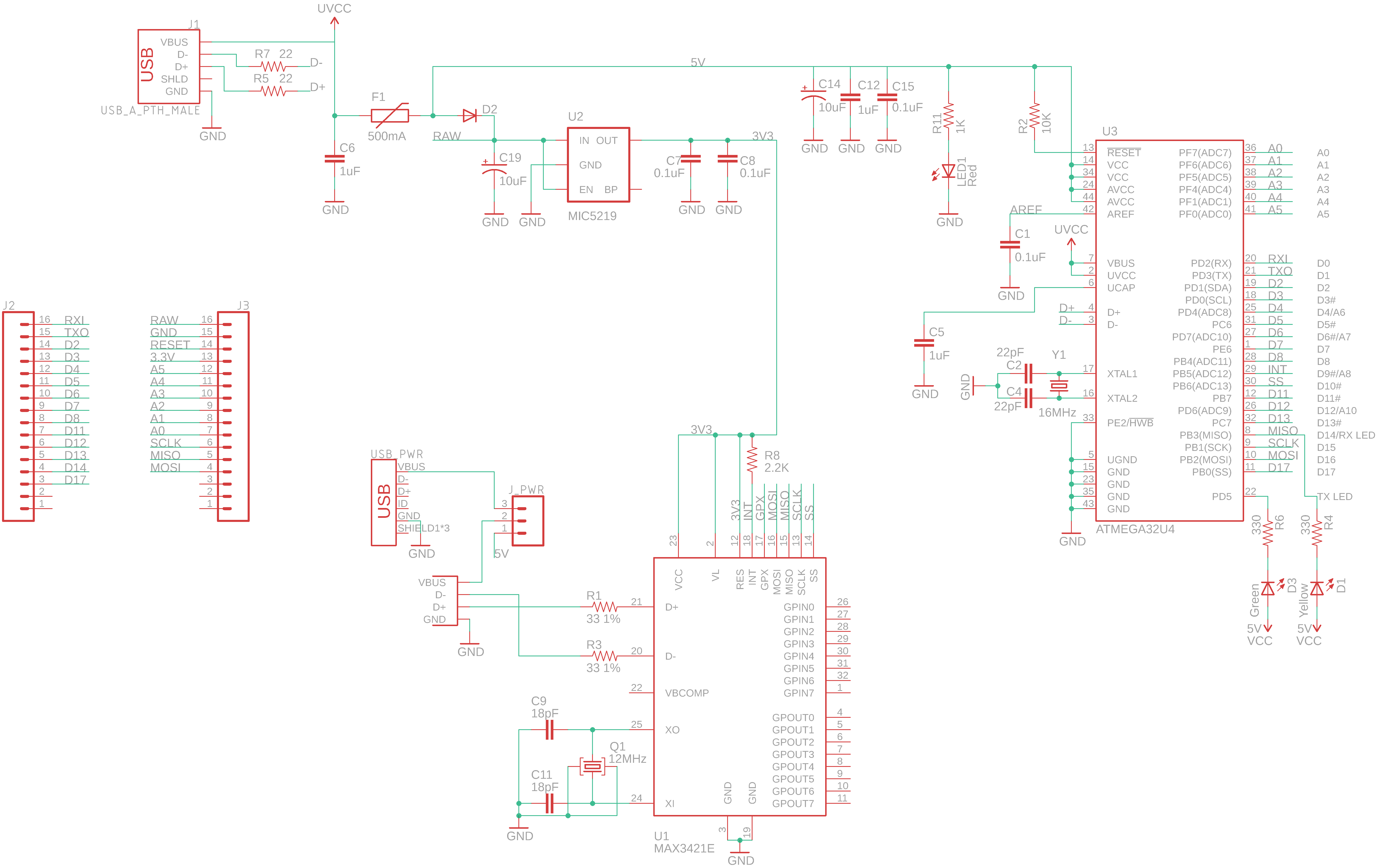
Schematic of my board is too large to embed here, can be found at: http://www.kbob.org/Pictures/Artsy/Other/Other/USBuino.png
Though is basically a copy of a pro micro with a few extras.

The MAX3421E is not powered during the attempted flashing process.

To make extra sure, I went in and cut the MOSI and MISO connections to the MAX3421, but the error persists.

Confirm using a multimeter the connections from your header to the chip for, MISO,MOSI,SCK & RESET.

missdrew:
Confirm using a multimeter the connections from your header to the chip for, MISO,MOSI,SCK & RESET.

Did that, no problems there. Also completely removed the MAX 3421 chip just to make sure. Cut the Clock line to the Max as well just incase something is shorting it, now I have only a direct connection to the 32U4 from MISO MOSI and CLK. No caps or anything else along those lines.
Tried to measure the crystal frequency, but apparently my oscilloscope is broken :frowning:

Is it possible to still use the internal frequency Generator even if there is an external crystal attached? can I modify the avrdude command:

C:\Program Files (x86)\Arduino\hardware\tools\avr/bin/avrdude -CC:\Program Files (x86)\Arduino\hardware\tools\avr/etc/avrdude.conf -v -patmega32u4 -cstk500v1 -PCOM9 -b19200 -e -Ulock:w:0x3F:m -Uefuse:w:0xcb:m -Uhfuse:w:0xd8:m -Ulfuse:w:0xff:m

to do that?

Nope, the chip is not being recognised to get that far!

Check your soldering for shorts! Measure your 5V line.

Take a photo or scan the pcb, make sure it is well lit & in focus.

You also don't mention the RESET has been tested as connected directly to the RESET pin.

Been going over it with a Microscope, havet seen any issues, will need to check with a multimeter. Though after I desoldered the MAX3421 I noticed the error message changed from 0xffffffff to 0x00000000 So I am guessing there was some issue there :frowning: unfortunately I really cant tell what it is.

Quote from: missdrew on Today at 03:06 pm

Confirm using a multimeter the connections from your header to the chip for, MISO,MOSI,SCK & RESET.

Did that, no problems there.

Been going over it with a Microscope, havet seen any issues, will need to check with a multimeter.

So what is it? Have you tested with a meter or not?

missdrew:
So what is it? Have you tested with a meter or not?

I have tested from pin to Chip with Multi meter, but I need to check for shorts with all other connectors.

But back to my earlier question:

Is it possible to still use the internal frequency Generator even if there is an external crystal attached?

I would like to remove this as a possible error source first.

Yes, that is how the chip comes from the factory.

This topic was automatically closed 120 days after the last reply. New replies are no longer allowed.