Hi everyone,
I´m working on a 7" TFT screen (SSD1963) and have no idea how to connect it to Arduino Mega.
Could anybody help me?
Thanks
Hi everyone,
I´m working on a 7" TFT screen (SSD1963) and have no idea how to connect it to Arduino Mega.
Could anybody help me?
Thanks
bacedo:
Hi everyone,I´m working on a 7" TFT screen (SSD1963) and have no idea how to connect it to Arduino Mega.
Could anybody help me?Thanks
Hi
See attachment file for different connection types depending about your jumper settings.
It's for 5" TFT display but the connections are equal.
Hint: Double check your display's VDD (which one is it 5V or 3.3V) and don't try to power backlight led with arduino regulators.
TommiP
ER-TFTM050-2_Arduino_Interfacing.pdf (72.5 KB)
TommiP:
and don't try to power backlight led with arduino regulators.TommiP
Hi TommiP - can you elaborate on why not to power with Arduino 3.3v?
Look at the 3.3V regulator on a Mega.
Look at the 3.3V regulator on a Due.
Look at the 3.3V regulator on the display pcb.
Then think about the USB port on your PC.
Or unpowered USB hub.
A 7 inch backlight takes a lot of current e.g. 300mA-800mA
The Arduino and TFT controller only take 20-50mA
David.
I'm asking because while using a 3.5" tft (ili9???) I noticed recently on one of them that when I connect 3.3v from the MEGA the screen displays perfectly with no dipping in backlight, but the touch is very errattic and the bottom half of the screen does not react at all. When I remove the 3.3v lead completely the touch function works perfectly, but the screen dips and brightens a lot.
I've not looked into this much more, but do you have any ideas on this?
Go on. 279 posts. Please post links to your 3.5 inch and your 7 inch display.
Or post clear photos of the pcb.
Then you can get an intelligent answer..
David.
Still waiting for my first 7" to arrive, just reading up on it in the meantime. But here it is:
https://www.aliexpress.com/item/32451057718.html?spm=a2g0s.9042311.0.0.5bb84c4dp9Rsae
The 3.5tft that has the issue with 3.3V is this one:
Thanks for the links.
The 7 inch pcb photo is unclear. Post a real photo when it arrives. I will tell you how to connect it.
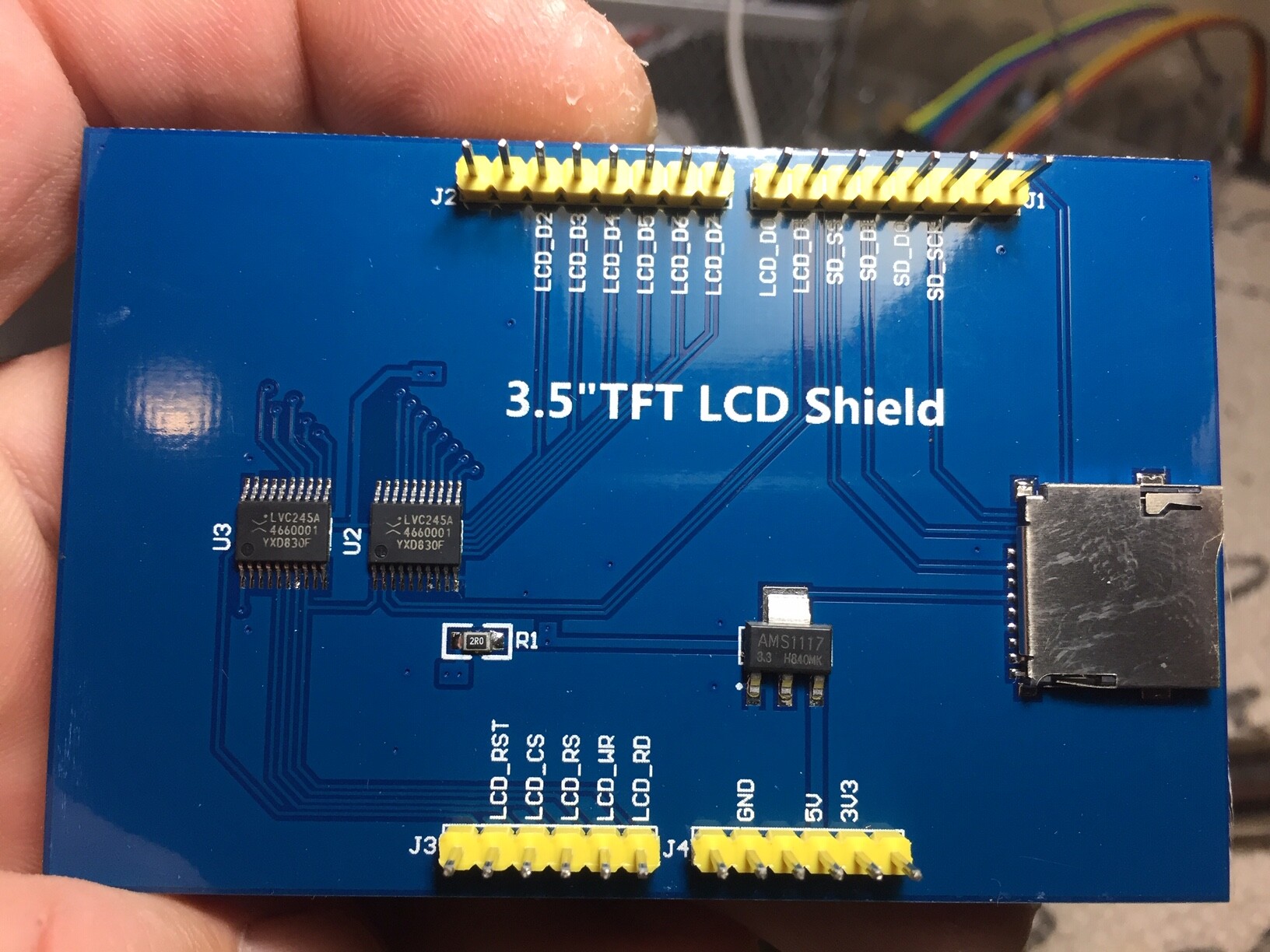
The 3.5 inch is clear. It is a new Mcufriend pcb without an AMS1117-3.3 regulator.
I would NEVER use this with a Uno or Mega. But Zero or Due have slightly bigger 3.3V regulators.
I still think that Mcufriend should not be trusted any more.
If you connect the 3.3V pin to 5V the screen will be damaged.
David.
Thanks for the info. Would it make a difference if I supply a seperate 3.3v power supply for the tft?
What 3.5" tft would you suggest as a good / cost effective option to use with MEGA and UNO?
And when looking at slightly bigger screens like 7", any specific models you'd suggest?
I recently bought a couple of these: are they better to work with? I've not been able to get the touch working.
Your shields look fine.
There is no LED series resistor. So the backlight might draw a high current.
Does the screen feel warm or hot to your wrist ?
From the maker's point of view LVC245 are slightly more expensive than HC245.
An AMS1117 is more expensive than no AMS1117.
Not only will it cost more to assemble but they will not get the "replacement sales" for a burned out display, Uno / Mega.
David.
David, on this same screen - ili9846 - when drawing with touchTouch_shield_kbv.ino the drawing appears as mirrored. Y-values are good, just the left and right is swapped. I used Touchscreen_calibr_native to get the pin numbers and calibration values.
What do I change in the code to fix this?
david_prentice:
Your shields look fine.
- they have AMS1117-3.3 regulator of a sensible size to handle the backlight LED
- they have LVC245 buffers which are input voltage tolerant.
- I am guessing that it is ILI9481 or ILI9486 controller.
There is no LED series resistor. So the backlight might draw a high current.
Does the screen feel warm or hot to your wrist ?David.
Yes it is ILI9486.
Doesn't feel warm at all.
In which case you have an excellent display.
David.
Problem is that the supplier sends them in thin plastic bags and they normally arrive with half of them cracked and bent pins.
Could you look at post #11 for me?
A quick fix is to change this line:
xpos = map(tp.x, TS_LEFT, TS_RT, 0, tft.width());
to this:
xpos = 340 - map(tp.x, TS_LEFT, TS_RT, 0, tft.width());
But is there I'm something I'm missing with the wiring that would fix this without the need to change the code? I'm thinking of my existing devices that currently work without this little addition, and the need to keep track when uploading the main sketch to devices that use this screen.
If your glass is cracked ask for a REFUND.
The Touch will never work with a cracked glass.
The shop will learn to use foam packing.
The customers will be happy.
If you have an unbroken screen run MCUFRIEND_kbv Calibration on a Uno.
David.
david_prentice:
If your glass is cracked ask for a REFUND.
The Touch will never work with a cracked glass.
The shop will learn to use foam packing.
The customers will be happy.If you have an unbroken screen run MCUFRIEND_kbv Calibration on a Uno.
David.
It is a bad Ebay seller. Some have been refunded, on other shipments they fooled me by buying time and once the 60 day (or however long) resolution period is over ebay just couldn't be bothered. These specific tft's are cheap and I've not found another supplier for the exact same screen at that price.
I hooked one up to one of my systems today and it seems to work much better than those red 3.5" mcufriend I've been using.
Yes, the Blue shield seems to have the correct components.
So it should work properly (unlike the crap Red Mcufriend pcb )