Arduino Detecting Wrong Button Press Randomly

I'm trying to build a little Simon Says game, where the arduino will flash an increasingly long sequence of colours at you, and you have to repeat the colour sequence back.

So I have it generating and extending the sequence properly, and the LED flashes to display the current sequence correctly, but when you are repeating the code back (using a set of three push-buttons, it will somehow just randomly register that you pressed a different button than you did. It seems to be like a 70/30 shot as to whether it will detect the correct button.

I've rewired it over and over, and can't see any issue.

Is there perhaps a problem in my section of code where I'm waiting for a button press in the loop function?

int redOut = 18;
int greenOut = 19;
int blueOut = 20;
int redPress = 21;
int greenPress = 22;
int bluePress = 23;

int buzzerOut = 13;

int lastPress = NULL;

int sequence[30];
//int currentSequenceMax;
int currentSequenceLocation;

int currentNumberOfColours;


void addToSequence()
{

  sequence[currentNumberOfColours] = random(redOut,blueOut +1);
  currentNumberOfColours++;
  currentSequenceLocation = 0; //We've just added a colour, so start from the beginning
}

void displaySequence()
{
  for(int x = 0; x <= currentNumberOfColours; x++)
  {
    if(sequence[x] != 0)
    {
      digitalWrite(sequence[x], HIGH);
      delay(500);
      digitalWrite(sequence[x], LOW);
      delay(500);
    }
    else
    {
      break;
    }
  }
}

void setup() {
  // put your setup code here, to run once:
  
  Serial.begin(9600);
  pinMode(redPress, INPUT);
  pinMode(greenPress, INPUT);
  pinMode(bluePress, INPUT);
  currentNumberOfColours = 0;
  currentSequenceLocation = 0;
  
  for(int x = 0; x < 30; x++)
  {
    sequence[x] = 0;
  }
  
  digitalWrite(redOut, HIGH);
  digitalWrite(greenOut, HIGH);
  digitalWrite(blueOut, HIGH);
  delay(200);
  digitalWrite(redOut, LOW);
  digitalWrite(greenOut, LOW);
  digitalWrite(blueOut, LOW);
  delay(200);
  digitalWrite(redOut, HIGH);
  digitalWrite(greenOut, HIGH);
  digitalWrite(blueOut, HIGH);
  delay(200);
  digitalWrite(redOut, LOW);
  digitalWrite(greenOut, LOW);
  digitalWrite(blueOut, LOW);
  addToSequence();
  delay(1000);
  //createTestSequence();
  displaySequence();
}


void loop() {
  // put your main code here, to run repeatedly:
  
  //lastPress = 0;
  int req = sequence[currentSequenceLocation];
  
  //wait for the player to press something
  while(digitalRead(redPress) == HIGH || digitalRead(greenPress) == HIGH || digitalRead(bluePress) == HIGH)
  {
  }
  while (digitalRead(redPress) == LOW && digitalRead(greenPress) == LOW && digitalRead(bluePress) == LOW) {

    if (digitalRead(redPress) == HIGH) {
      Serial.println("RED PRESSED");
      lastPress = redOut;
      digitalWrite(redPress, LOW);
      //digitalWrite(redOut, LOW);
      break;
    }

    else if (digitalRead(bluePress) == HIGH) {

      Serial.println("BLUE PRESSED");
      lastPress = blueOut;
      digitalWrite(bluePress, LOW);
      //digitalWrite(redOut, LOW);
      break;
    }

    else if (digitalRead(greenPress) == HIGH) {

      Serial.println("GREEN PRESSED");
      lastPress = greenOut;
      digitalWrite(greenPress, LOW);
      //digitalWrite(redOut, LOW);
      break;
    }
  }
  
  /*if(lastPress == 23)
  {
    lastPress = 20;
  }
  else if(lastPress == 22)
  {
    lastPress = 19;
  }
  else if(lastPress == 21)
  {
    lastPress = 18;
  }*/
  
  if(lastPress == req)
  {
    Serial.println(lastPress);
    Serial.println(req);
    digitalWrite(greenOut, HIGH);
    delay(500);
    digitalWrite(greenOut, LOW);
    currentSequenceLocation++;
  }
  else
  {
    Serial.println(lastPress);
    Serial.println(req);
    digitalWrite(redOut, HIGH);
    delay(500);
    digitalWrite(redOut, LOW);
    setup();
  }
  
  if(currentSequenceLocation == currentNumberOfColours)
  {
    addToSequence();
    delay(1000);
    displaySequence();
  }
  

  //digitalWrite(redOut, HIGH);
}

What you're looking at in my very limited circuit diagram skills is this:
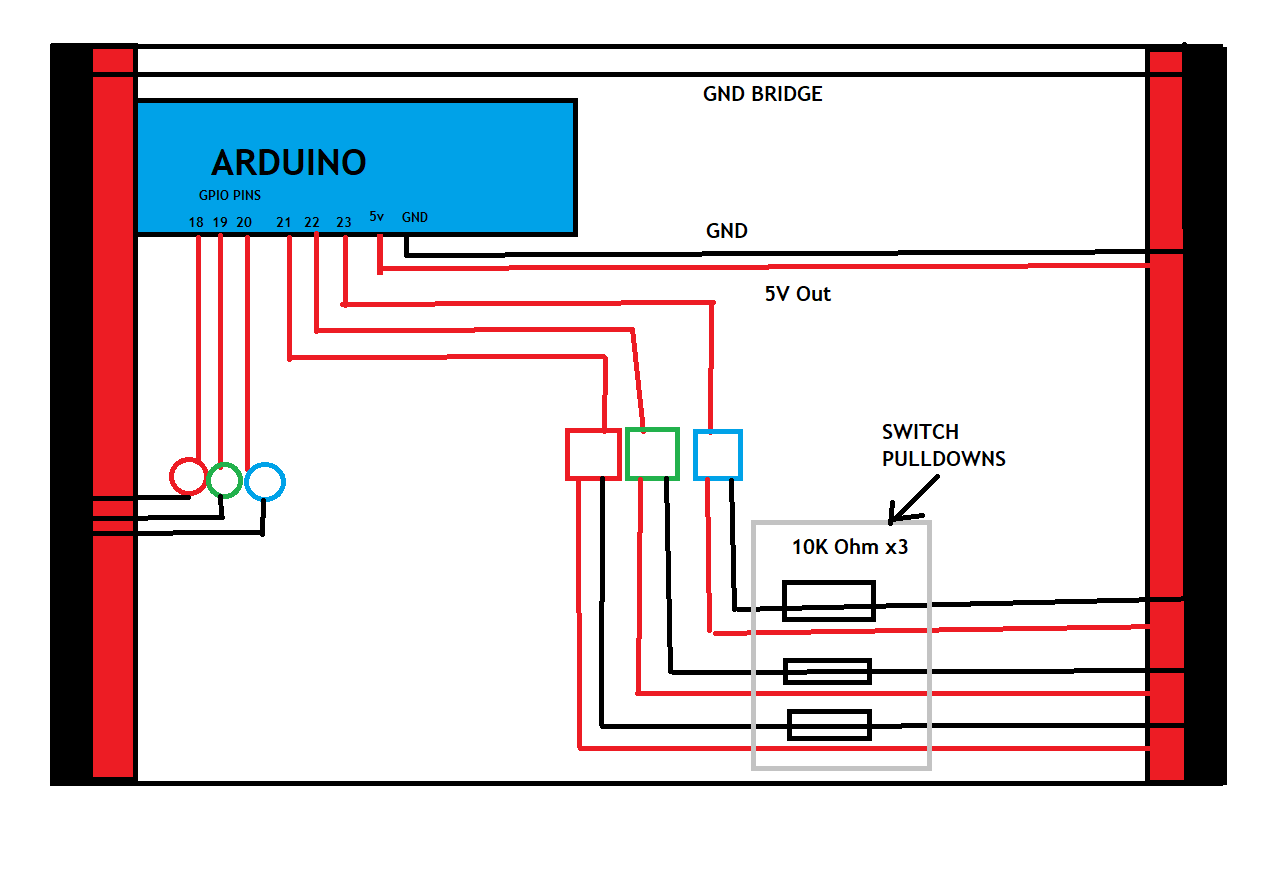
cool. show your setup.

  pinMode(redPress, INPUT);
  pinMode(greenPress, INPUT);
  pinMode(bluePress, INPUT);

my guess, you has no resistors on buttons. so they are just like antenna if not pressed.
if i am right, than change to this

  pinMode(redPress, INPUT_PULLUP);
  pinMode(greenPress, INPUT_PULLUP);
  pinMode(bluePress, INPUT_PULLUP);

what? you try write to button?

    if (digitalRead(redPress) == HIGH) {
      Serial.println("RED PRESSED");
      lastPress = redOut;
      digitalWrite(redPress, LOW);
      break;
    }

Also, the buttons must be connected from input pin to GND, not Vcc.

Hello kutuup

Welcome to the worldbest forum.

Yes, the ussage of the delay() function will block the execution of sketch.

Line  35:       delay(500);
	Line  37:       delay(500);
	Line  64:   delay(200);
	Line  68:   delay(200);
	Line  72:   delay(200);
	Line  77:   delay(1000);
	Line 142:     delay(500);
	Line 151:     delay(500);
	Line 159:     delay(1000);

How to make it different:
Take view into the BlinkWithoutDelay example of the IDE how to design blockfree timer modules.
To do so you have to rearange the sketch using the IPO model.

INPUT: button debounce and read
PROCESSING: make action state based on button state 
OUTPUT: run led sequences based on this action states

Do you have experience with programming in C++?

The task can easily be realised with an object.
A structured array contains all the information, such as the pin addresses for the I/O devices, as well as the information for the timing.
A single service, called method, takes care of this information and initiates the intended action.
The structured array makes the sketch scalable until all I/O pins are used up without having to adapt the code for the service.
It is cool stuff, isn´t it?

I could give a small example, but the user StefanL38 has forbidden me to publish C++ examples here in the forum.

Have a nice day and enjoy coding in C++.

1 Like

Hi, @kutuup
Welcome to the forum.

Thanks for using code tags. :+1:

Can we please have a circuit diagram?
An image of a hand drawn schematic will be fine, include ALL power supplies, component names and pin labels.

As mentioned in earlier posts, we need to see how you have wired your buttons.

Thanks.. Tom.. :smiley: :+1: :coffee: :australia:

that it why i said:

show your setup.

Updated with photos. A lot of your suggestions sound plausible.

It would have been better to add the photos in a new post rather than editing the original post. It upsets the flow of the topic.

You need to have current limiting resistors in series with your LEDs.

Not a good thing to do, any changes need to be in new posts. all you have done is confused the thread for any body wanting to use this to fix their problem.

An image of a hand drawn schematic will be fine, include ALL power supplies, component names and pin labels.

Do you have a DMM?

Thanks.. Tom.. :smiley: :+1: :coffee: :australia:

i currently looking your sketch and not really understand how this game should acting.
i think after start (power up, reset) only one combination is in the sequence, then it showing and then player press some button, if it not identical to current combination then start from beginning of current array or complete new array?
well if player press right button then (if this was last comb in seq)new combination is added, shown complete sequence or (if this was not last comb in seq) go to next comb and awaiting presses

Hi,
Can you add the orange and black links shown on your image.

Tom... :smiley: :+1: :coffee: :australia:

Hi Tom, I forgot to add those, sorry! The left ground rail is all one rail internally to the breadboard so it doesn't need a link, same with the right. Only the right 5v line is linked as I'm not using the left hand one.

Sorry, I'll keep that in mind in future.

I do indeed have a DMM. Where do you suggest I measure? Sorry, I'm just starting out with learning electronics :S

Hiya!

Yes, I have extensive experience with C++ (although this code would have you believe otherwise lol)

This is just a quick and dirty linear script for now for sanity testing before I convert it to a better structure, most notably actually using objects rather than just free-floating global variables lol

Once I have the reason the buttons are misbehaving figured out, then I plan to move on to doing the LOT of refinement needed XD

Whoa. Hang on. I have no idea why I did that lol must have had a brain fart! :S

i have some short cut made, but its not done. waiting for your input

const int redOut = 18;
const int greenOut = 19;
const int blueOut = 20;
const int redPress = 21;
const int greenPress = 22;
const int bluePress = 23;
const int buzzerOut = 13;
bool lastPress = false;

uint8_t sequence[30]={0};
uint8_t currentSequenceLocation=0;
uint8_t Index;
#define istRedTasteAn (digitalRead(redPress))
#define istGreenTasteAn (digitalRead(greenPress))
#define istBlueTasteAn (digitalRead(bluePress))
#define RedLED_An digitalWrite(redOut, HIGH)
#define RedLED_Aus digitalWrite(redOut, LOW)
#define GreenLED_An digitalWrite(greenOut, HIGH)
#define GreenLED_Aus digitalWrite(greenOut, LOW)
#define BlueLED_An digitalWrite(blueOut, HIGH)
#define BlueLED_Aus digitalWrite(blueOut, LOW)


void addToSequence(){
  sequence[Index] = random(redOut,blueOut +1);
  Index++;
  currentSequenceLocation = 0; //We've just added a colour, so start from the beginning
}

void displaySequence(){
  for(uint8_t x = 0; x <= Index; x++)  {
    if(sequence[x] != 0)    {
      digitalWrite(sequence[x], HIGH);
      delay(500);
      digitalWrite(sequence[x], LOW);
      delay(500);
    }    else break;
     }
}

void setup() {
  Serial.begin(9600);
  pinMode(redPress, INPUT);
  pinMode(greenPress, INPUT);
  pinMode(bluePress, INPUT);
  Index = 0;
  currentSequenceLocation = 0;
  
  RedLED_An;
  GreenLED_An;
  BlueLED_An;
  delay(200);
  RedLED_Aus;
  GreenLED_Aus;
  BlueLED_Aus;
  delay(200);
  RedLED_An;
  GreenLED_An;
  BlueLED_An;
  delay(200);
  RedLED_Aus;
  GreenLED_Aus;
  BlueLED_Aus;
  addToSequence();
  delay(1000);
  //createTestSequence();
  displaySequence();
}


void loop() {
  uint8_t req = sequence[currentSequenceLocation];
  uint8_t ButtonStates =istRedTasteAn <<2 | istGreenTasteAn <<1 | istBlueTasteAn;

  if(ButtonStates == 7)return;  //wait for the player to press something
  
  while (istRedTasteAn == LOW && istGreenTasteAn == LOW && istBlueTasteAn == LOW) {
    if (istRedTasteAn == HIGH) {
      Serial.println("RED PRESSED");
      lastPress = redOut;
      digitalWrite(redPress, LOW);
      //RedLED_Aus;
      break;
    }
    else if (istBlueTasteAn == HIGH) {

      Serial.println("BLUE PRESSED");
      lastPress = blueOut;
      digitalWrite(bluePress, LOW);
      //RedLED_Aus;
      break;
    }
    else if (istGreenTasteAn == HIGH) {
      Serial.println("GREEN PRESSED");
      lastPress = greenOut;
      digitalWrite(greenPress, LOW);
      //RedLED_Aus;
      break;
    }
  }
  
  if(lastPress == req)  {
    Serial.println(lastPress);
    Serial.println(req);
    GreenLED_An;
    delay(500);
    GreenLED_Aus;
    currentSequenceLocation++;
  }
  else  {
    Serial.println(lastPress);
    Serial.println(req);
    RedLED_An;
    delay(500);
    RedLED_Aus;
    setup();
  }
  
  if(currentSequenceLocation == Index)  {
    addToSequence();
    delay(1000);
    displaySequence();
  }
}

Hi,
Can I suggest you forget your code for the moment AND write some simple code that just reads the buttons and puts the results out on the IDE monitor.
Forget debounce, just RAW data.

Lets get the hardware sorted first?
I hope you wrote your code in stages and you already have some code to test your buttons.

As you wrote your code, at what stage did this problem occur?

Thanks.. Tom.. :smiley: :+1: :coffee: :australia:

This topic was automatically closed 180 days after the last reply. New replies are no longer allowed.