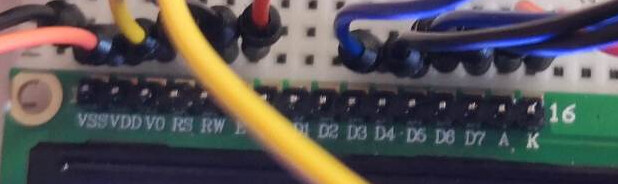
Hello, i have a problem on displaying things on the arduino's lcd. It only shows white boxes instead of the text i ask for.
My code is this:
#include <LiquidCrystal.h> // includes the LiquidCrystal Library
LiquidCrystal lcd(1, 2, 4, 5, 6, 7); // Creates an LCD object. Parameters: (rs, enable, d4, d5, d6, d7)

void setup() {
lcd.begin(16,2); // Initializes the interface to the LCD screen, and specifies the dimensions (width and height) of the display }
}

void loop() {
lcd.print("Arduino"); // Prints "Arduino" on the LCD
delay(3000); // 3 seconds delay
lcd.setCursor(2,1); // Sets the location at which subsequent text written to the LCD will be displayed
lcd.print("LCD Tutorial");
delay(3000);
lcd.clear(); // Clears the display
lcd.blink(); //Displays the blinking LCD cursor
delay(4000);
lcd.setCursor(7,1);
delay(3000);
lcd.noBlink(); // Turns off the blinking LCD cursor
lcd.cursor(); // Displays an underscore (line) at the position to which the next character will be written
delay(4000);
lcd.noCursor(); // Hides the LCD cursor
lcd.clear(); // Clears the LCD screen
}
#include <LiquidCrystal.h> // includes the LiquidCrystal Library
LiquidCrystal lcd(1, 2, 4, 5, 6, 7); // Creates an LCD object. Parameters: (rs, enable, d4, d5, d6, d7)
void setup() {
lcd.begin(16,2); // Initializes the interface to the LCD screen, and specifies the dimensions (width and height) of the display }
}
void loop() {
lcd.print("Arduino"); // Prints "Arduino" on the LCD
delay(3000); // 3 seconds delay
lcd.setCursor(2,1); // Sets the location at which subsequent text written to the LCD will be displayed
lcd.print("LCD Tutorial");
delay(3000);
lcd.clear(); // Clears the display
lcd.blink(); //Displays the blinking LCD cursor
delay(4000);
lcd.setCursor(7,1);
delay(3000);
lcd.noBlink(); // Turns off the blinking LCD cursor
lcd.cursor(); // Displays an underscore (line) at the position to which the next character will be written
delay(4000);
lcd.noCursor(); // Hides the LCD cursor
lcd.clear(); // Clears the LCD screen
}
#include <LiquidCrystal.h> // includes the LiquidCrystal Library
LiquidCrystal lcd(1, 2, 4, 5, 6, 7); // Creates an LCD object. Parameters: (rs, enable, d4, d5, d6, d7)
void setup() {
lcd.begin(16,2); // Initializes the interface to the LCD screen, and specifies the dimensions (width and height) of the display }
}
void loop() {
lcd.print("Arduino"); // Prints "Arduino" on the LCD
delay(3000); // 3 seconds delay
lcd.setCursor(2,1); // Sets the location at which subsequent text written to the LCD will be displayed
lcd.print("LCD Tutorial");
delay(3000);
lcd.clear(); // Clears the display
lcd.blink(); //Displays the blinking LCD cursor
delay(4000);
lcd.setCursor(7,1);
delay(3000);
lcd.noBlink(); // Turns off the blinking LCD cursor
lcd.cursor(); // Displays an underscore (line) at the position to which the next character will be written
delay(4000);
lcd.noCursor(); // Hides the LCD cursor
lcd.clear(); // Clears the LCD screen
}
I moved your topic to an appropriate forum category @spiros99.
In the future, please take some time to pick the forum category that best suits the subject of your topic. There is an "About the _____ category" topic at the top of each category that explains its purpose.
Are the header pins soldered to the LCD display? Hard to tell from the photo.
Have you tried replacing jumpers? Sometimes they will break inside the insulation, or may not make good contact with the breadboard.
With pin 1 connected to the LCD your code may not be uploading properly. If you really need to use that pin then try disconnecting pin 1 while you are uploading and then reconnect to test the code.