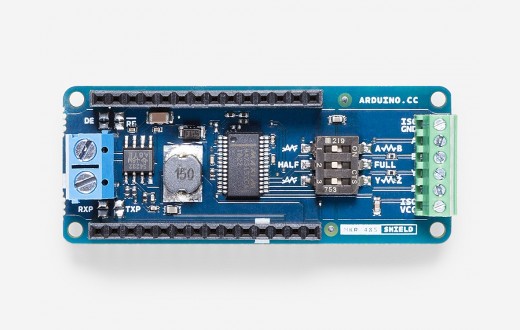
You can plug your shield right in to the top of the MKR Board and all the necessary connections between the board and the shield will be made for you.
joyce10:
ISO GND connected to GND of the Modbus RTU server
Y connected to A/Y of the Modbus RTU client
Z connected to B/Z of the Modbus RTU client
On the MKR 485 Shield, there is a green screw terminal block. There are labels printed on the shield's PCB that identify each terminal. They are a little hard to read because the green terminal block partially covers them. So you need to connect wires from the terminals labeled "ISO GND", "Y", and "Z" on the MKR 485 shield to the connectors marked "GND", "A"/"Y", and "B"/"Z" on the device used as the Modbus RTU client.
joyce10:
FULL set to OFF
There is a switch on the MKR 485 Shield that is labeled "HALF" on one side and "FULL" on the other side. You should move the switch to the "HALF" position.
joyce10:
Z // Y set to OFF
There is a switch on the MKR 485 Shield that is labeled "Z // Y" on one side and "//" with a line drawn through it on the other side. You should move the switch to the "//" with a line drawn through it side.