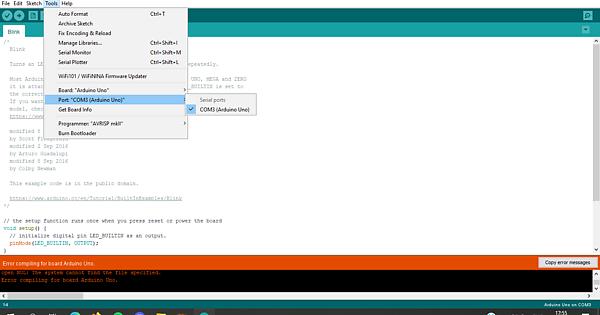
In device manager, under the port section there's a "serial USB-device(COM3)" being detected. If I take out the Arduino, my computer makes the sound typical to unplugging an USB device, yet for some reason the port mentions a "serial USB-device" instead of the name "Arduino Uno". If I try to run a sketch in the Arduino IDE, I get this error:
open NUL: The system cannot find the file specified.
Error compiling for board Arduino Uno.
The "ON" LED is working and the "L" LED keeps blinking ever since i plugged in the Arduino
I bought the Arduino from a supposely official amazon page, should I assume that it is a chinese copy and I need to use the ch340 usb driver? From what I read on the forum, chinese copies don't get recognised by Windows and mine kind of does? Any help is appreciated
The port behavior sounds normal. What version of Windows are you running? I believe Windows 10 has ch340 driver support and you'd be getting some sort of device not recognized message otherwise.
The "open NUL" sounds like a compilation time error. You will probably get the same if you try to compile without up load in the Arduino IDE.
All my UNOs are Chinese clones. I have the correct drivers installed for my clones and Win10 says "USB-SERIAL CH340 (COM3)". I think i'm correct in saying that you will only get "Arduino UNO" with an official Arduino board as the USB-Serial interface chip (the ATMEGA16 on the official board) passes this identifying text over the USB. The clones that use the CH340 USB-Serial interface chip don't do this.
I installed it and nothing changed.. even before installing it on the IDE I'm able to find the correct port(even though it has a different name from the one in device manager as you can see in the 2 pictures : Imgur: The magic of the Internet)
And no matter what I do I get the compilation error
A compilation error is different from an upload failure and is due to an error in the sketch .
Always go back to basics and up load blink and see if that works .
The screenshot in post #5 shows that you're running a 1.8.20 Hourly Build of the Arduino IDE.
I'd recommend you uninstall and reinstall with the release version 1.8.19 from here: https://www.arduino.cc/en/software, unless there's a good reason for you to be running the development (and probably buggy) version of the IDE.
I think you're seeing the manifestation of an IDE installation problem.
I installed the version you linked, and now at the very least device manager shows the correct name of the Arduino.. but i still can't run any example and I get the same error
I'm going to ask you to post some additional information that might help us to identify the problem.
Please do this:
When you encounter an error, you'll see a button on the right side of the orange bar in the Arduino IDE: Copy error messages. Click that button.
Open a forum reply here by clicking the Reply button.
Click the </> icon on the post composer toolbar.
This will add the forum's code block markup (```) to your reply to make sure the error messages are correctly formatted.