When uploading my arduino code, it continually uploads, and never finishes. And if it does, it shoots out a ton of errors. Here they are:

Request for Detailed Information Hardware & Software
I’m not sure I can help without seeing exactly what you have in front of you. To assist you effectively, please provide the following:
Addressing Your Issue:
You can spend weeks spinning your wheels, or you might get lucky and solve your problem quickly. To avoid unnecessary delays, it’s crucial to provide an annotated schematic of your circuit as you have it wired, showing all connections, including power, ground, and power supplies. I recommend it be in English, you can translate before posting if needed.
Why Detailed Information Matters:
**Annotated Schematics: These are essential because they show exactly how your circuit is set up. Without them, it's difficult for anyone to understand what you’ve done, which makes troubleshooting nearly impossible. Fritzing diagrams or unclear pictures are not enough.
Technical Information: Many modules look similar and may even have the same name, but they can function differently. This is why we always ask for links to detailed technical information—not just sales pages like those on Amazon, which often lack the specifics we need. Be sure to tell us which Arduino you are using and what you have selected in the tools menu.
Post your Software Without that we do not have a clue as to how it is expected to operate. Also tell us which Arduino you are using they are not the same. Be sure to use code tags, they make it clear and concise.
Show All Connections: It’s important to include every connection, especially power, ground and power sources in your schematic. Missing these details makes it hard to determine if a setup issue might be causing your problem.
Posting Errors I post them using code tags. I simply select the complete printout enter a ctl C to capture then in code tags I paste it. Screen shots are normally not readable.
My Process:
When I see a question, I spend a moment assessing it. If it’s missing critical information, I might ask for it. However, if it's repeatedly lacking important details, I may assume the questioner is not serious and move on to another query.
What You Need to Consider:
We don’t know your skill level or what resources you have available. If you’re missing key technical details or seem unprepared, it may indicate that you need to spend more time learning the basics before starting your project.
Providing the right information upfront will help you get the best possible assistance and avoid the frustration of running into dead ends. Let us help you by sharing what you have clearly and completely!
Try reading this: How to get the best out of this forum, it appears you have not read it at this point.
Sorry for the lack of details, I will try now to give as much information as I can. For starters, the specific microcontroller I have is a RexQualis. (connected to arduino uno in ide, and using Using Arduino ide) Here is the circuit schematic for the blinking led for simplicity:
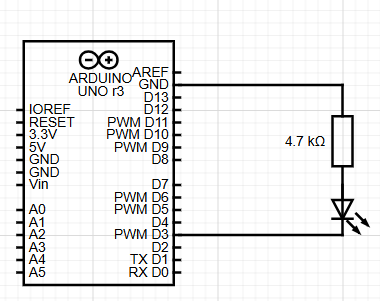
And here is the code:
void setup() {
 pinMode(3, OUTPUT);
}

void loop() {
 digitalWrite(3, HIGH);
 delay(1000);

 digitalWrite(3, LOW);
 delay(1000);
}
Now, the specific problem that I am having is whenever I try uploading the code from the arduino ide, it compiles fine, but it never stops uploading. I am assuming this doesn't have anything to do with the provided code and schematic, because uploading worked completely fine when i first got it 2 days ago with this exact same code. This specific problem just came up when working with an IR reciever. I clicked reload board data in tools, and it seemed to stop working after that. It also only shows com 3 every time I put it in a new port. And when I go to device manager, it again only shows com 3 when I input the usb cable into
my computer. Here are the errors that come up when I go to, and upload
File>Preferences>showVerboseOutputduring>upload:
avrdude: Version 6.3-20190619
         Copyright (c) 2000-2005 Brian Dean, http://www.bdmicro.com/
         Copyright (c) 2007-2014 Joerg Wunsch

         System wide configuration file is "C:\Users\adria\AppData\Local\Arduino15\packages\arduino\tools\avrdude\6.3.0-arduino17/etc/avrdude.conf"

         Using Port                    : COM3
         Using Programmer              : arduino
         Overriding Baud Rate          : 115200
avrdude: stk500_recv(): programmer is not responding
avrdude: stk500_getsync() attempt 1 of 10: not in sync: resp=0x35
If you need any more information ask me. I tried finding a technical datasheet for the exact RexQualis module I have, but I couldn't find any. If it is completely necessary for solving the problem, I will search deeper. Thank you for your time.
At this point I can only take a SWAG (Scientific Wild Assuming Guess).
Your circuit will not work, the LED is backwards and the resistor should be a lower value for 5V. Not sure if you can refer to it as '3' or 'D3', you can try both. The only other thing I can suggest is try a shorter cable, if that does not work I would try to exchange it for one that does. I went to there web site and could not find anything. Good Luck!
You're not the only one with that clone board.
See this page.
Leo..
I’ve been searching, and I’ve found that maybe the problem is with the bootloader, and if I reburned it with another arduino it could work.
Did you correct the LED error?
And your ‘schematic’ has no power supply! One of the important requirements listed by @gilshultz in post #2.
Yeah, I kind of made that schematic pretty quickly. The actual circuit is correct, because I’m able to connect it to 5 volts, and the led turns on
That should be the last thing you should be exploring.
More likely is that your Pc/laptop isn't recognising the USB<>Serial chip.
Fake Arduinos could be using a CH340 that your OS doesn't recognise withour re-installing it's driver.
Leo..
Do you have an alternative Arduino that you can try?
Also check Device Manager and tell us what driver is being used.
I've had this issue with a pro mini. You might have to reupload the bootloader from another arduino that does work.
I just got another arduino, (nano) today, and successfully uploaded it, and reburned the bootloader, then tried doing a basic program, and still gave me the same exact error. So I just decided to use the arduino nano, because that one worked, thank you.
I don’t follow. “Same error” … but “worked”?
EDIT: Never had your reply to this:
"Also check Device Manager and tell us what driver is being used."
I do agree with @Terrypin that you should check you device manager. Also, could be an issue with the uno's USB port. Glad you can work with the nano tho