Hello All,
i have a issue with a sketch on a Arduino Uno R3 (even tried on Arduino Nano).
I display some stuff on a 8x32 LED Matrix.
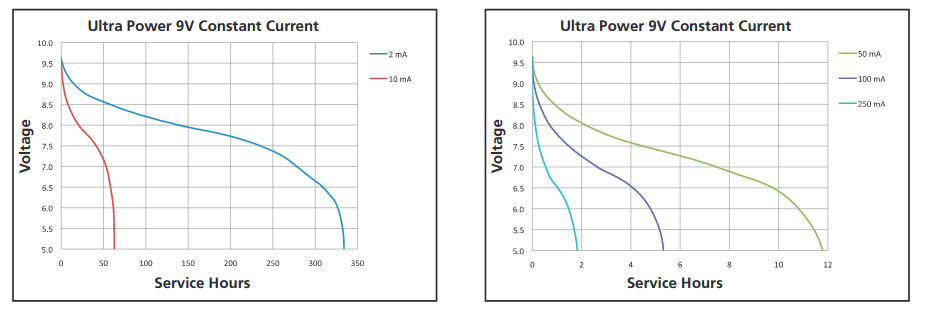
The Arduino is powered by a 9V Block battery.
When i let it run it just freezes after around 20 minutes.
It does not happen when plugged into USB on my PC.
But it is not low power of the battery because when i unplug the battery for some time it works again when plugging the battery back on.
I suspect it´s a problem with the code. As if RAM is full.
I crawled this (and other) forums, trying different solutions but nothing helps.
Help would be highly appreciated because its for a costume for my daughter for next monday.
Here is the code (it has the pin definition for the NANO in it):
#include <MD_MAX72xx.h>
#include <SPI.h>
#include <avr/wdt.h>

#define  delay_t  1  // in milliseconds

#define HARDWARE_TYPE MD_MAX72XX::FC16_HW
#define MAX_DEVICES 4

//Hardware SPI Arduino UNO
//CLK Pin  > 13 SCK
//Data Pin > 11 MOSI

#define CS_PIN    10

// Hardware SPI connection
MD_MAX72XX mx = MD_MAX72XX(HARDWARE_TYPE, CS_PIN, MAX_DEVICES);

byte four[8] = {0x00, 0x1c, 0x36, 0x36, 0x3e, 0x36, 0x36, 0x00};
byte three[8] = {0x00, 0xcf, 0xcf, 0x86, 0x86, 0x86, 0x86, 0x00};
byte two[8] = {0x00, 0xe3, 0xf3, 0xb1, 0xb1, 0xf1, 0xe1, 0x00};
byte one[8] = {0x00, 0x60, 0x61, 0x61, 0x61, 0x79, 0x78, 0x00};

byte fourout[8] = {0xff, 0xe3, 0xc9, 0xc9, 0xc1, 0xc9, 0xc9, 0xff};
byte threeout[8] = {0xff, 0x30, 0x30, 0x79, 0x79, 0x79, 0x79, 0xff};
byte twoout[8] = {0xff, 0x1c, 0x0c, 0x4e, 0x4e, 0x0e, 0x1e, 0xff};
byte oneout[8] = {0xff, 0x9f, 0x9e, 0x9e, 0x9e, 0x86, 0x87, 0xff};

void setup() {
  mx.begin();
  mx.control(MD_MAX72XX::INTENSITY, 0);
  mx.clear();
  }

void loop() {
  drawShapeLotta1();
  drawShapeLotta2();

  delay(10);
}

void drawShapeLotta1() {
  for (int i = 0; i <= 7; i++) {
    mx.setRow(0, 0, i, four[i]);
  }
  delay(delay_t);
  for (int i = 0; i <= 7; i++) {
    mx.setRow(1, 1, i, three[i]);
  }
  delay(delay_t);
  for (int i = 0; i <= 7; i++) {
    mx.setRow(2, 2, i, two[i]);
  }
  delay(delay_t);
  for (int i = 0; i <= 7; i++) {
    mx.setRow(3, 3, i, one[i]);
  }

  delay(200);
  mx.clear();
}

void drawShapeLotta2() {
  for (int i = 0; i <= 7; i++) {
    mx.setRow(0, 0, i, fourout[i]);
  }
  delay(delay_t);
  for (int i = 0; i <= 7; i++) {
    mx.setRow(1, 1, i, threeout[i]);
  }
  delay(delay_t);
  for (int i = 0; i <= 7; i++) {
    mx.setRow(2, 2, i, twoout[i]);
  }
  delay(delay_t);
  for (int i = 0; i <= 7; i++) {
    mx.setRow(3, 3, i, oneout[i]);
  }

  delay(200);
  mx.clear();
}