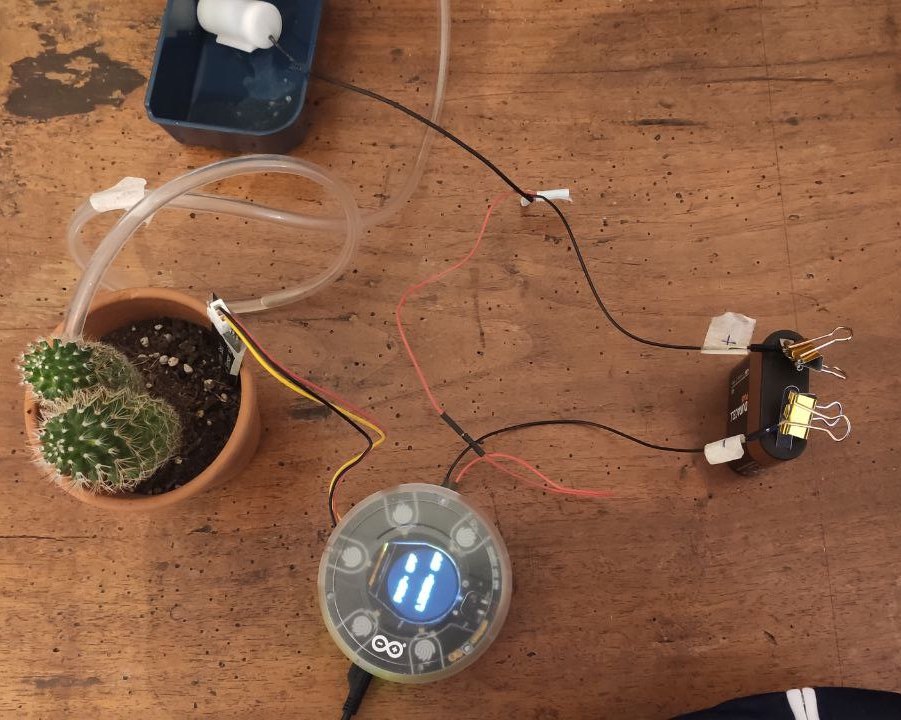
Good morning,
I'm working with an Arduino mkr wifi 1010 coupled to a mkr carrier. I implemented a code to control a waterpump (relay) for a smart garden. However, I noticed that if I power it with the USB port of my laptop I don't have problem. Unfornutaley. if I power the Arduino with an electric outlet in the wall, thorugh a battery charger of the phone, I have some problems. In the specific, after a certain time the Arduino resets itself (turn off and then again on). And this can happen several times in a day, causing several iussues in the project. For example, every time it turns on, it initialises all the sensors on the carrier (also the relay). But in this way the relay (i.e. the waterpump) gives water for a fraction of second.
Do you have some ideas to solve my problem?
I don't think that is a software problem, but I attach here the sketch anyway. Moreover. I attach also some pictures about the setup.
Thanks in advance,
Lorenzo
// Arduino_MKRIoTCarrier - Version: 1.0.2
#include <Arduino_MKRIoTCarrier.h>

#include "thingProperties.h"
MKRIoTCarrier carrier;

String waterPumpState;
String lightState;
int moistPin = A5;

int wateringTime=5000; //ns
int t = 0;
int dry = 1023;
int wet = 0;

uint32_t lightsOn = carrier.leds.Color(82, 118, 115);
uint32_t lightsOff = carrier.leds.Color(0, 0, 0);

//_______
void setup() {

  // Initialize serial and wait for port to open:
  Serial.begin(9600);
  //while (!Serial);

  // Defined in thingProperties.h
  initProperties();

  //Connect to Arduino IoT Cloud
  ArduinoCloud.begin(ArduinoIoTPreferredConnection);
  setDebugMessageLevel(2);
  ArduinoCloud.printDebugInfo();

  //Wait to get cloud connection to init the carrier
  while (ArduinoCloud.connected() != 1) {
    ArduinoCloud.update();
    delay(500);
  }

  CARRIER_CASE = true;
  carrier.begin();
  carrier.display.setRotation(0);
  delay(500);

  waterpump = false;
  carrier.Relay1.close();
  waterPumpState = "PUMP: OFF";
  updateScreen();

  delay(1500);
}

//_______
void loop() {

  ArduinoCloud.update();

  //read temperature and humidity
  temperature = carrier.Env.readTemperature();
  humidity = carrier.Env.readHumidity();

  //read raw moisture value
  int raw_moisture = analogRead(moistPin);

  //map raw moisture to a scale of 0 - 100
  moisture = map(raw_moisture, wet, dry, 100, 0);

  //read ambient light
  while (!carrier.Light.colorAvailable()) {
    delay(5);
  }
  int none;
  carrier.Light.readColor(none, none, none, light);

  if (waterpump == false){
    t = 0;
    carrier.Relay1.close();
  }

  if (waterpump == true) {
    carrier.Relay1.open();
    t = t + 1000;
  }

  if (t >= wateringTime){
    waterpump = false;
    waterPumpState = "PUMP: OFF";
    updateScreen();
  }

  delay(1000);
}


//Update displayed Info
void updateScreen() {
  carrier.display.fillScreen(ST77XX_BLACK);
  carrier.display.setTextColor(ST77XX_WHITE);
  carrier.display.setTextSize(3);

  carrier.display.setCursor(40, 50);
  carrier.display.print(waterPumpState);

  carrier.display.setCursor(40, 130);
  carrier.display.print(lightState);
}


void onWaterpumpChange()  {
  if (waterpump == true) {
    waterPumpState = "PUMP: ON";
  }
  if (waterpump == false) {
    waterPumpState = "PUMP: OFF";
  }
  updateScreen();
}

void onMessageChange()  {
  if (waterpump == true) {
    message = "WARNING: PUMP HIGH!!";
  }
}
/*
  Since LightState is READ_WRITE variable, onLightStateChange() is
  executed every time a new value is received from IoT Cloud.
*/
void onLightStateChange()  {
    if (light_state == true) {
    carrier.leds.fill(lightsOn, 0, 5);
    carrier.leds.show();
    lightState = "LIGHTS: ON";
  } else {
    carrier.leds.fill(lightsOff, 0, 5);
    carrier.leds.show();
    lightState = "LIGHTS: OFF";
  }
  updateScreen();
}