Asasasawsdewr34t54yt54

#include <Wire.h>
#include <LiquidCrystal_I2C.h>
#include "thingProperties.h"

LiquidCrystal_I2C lcd(0x27, 16, 2);

// Pines y constantes
const int pinSensor= 32; // pin analogico parta el sensor
const int pinBomba = 4; // Pin digital para el relè
const float valorSeco = 4095.0; // Sensor al aire
const float valorHumedo = 2000.0; //Sensor sumergido

// Variables
float temperatura = 0.0;

void setup() {
Serial.begin(115200);
// This delay gives the chance to wait for a Serial Monitor without blocking if none is found
delay(1500);

pinMode(pinBomba, OUTPUT);
digitalWrite(pinBomba,HIGH);
delay(10000);

// Pantalla LCD
Wire.begin(21, 22); //SDA, SCL para ESP32
lcd.init();
lcd.backlight();

// Mensaje 1: Bienvenida
lcd.setCursor(0, 0);
lcd.print(" Bienvenidos");
lcd.setCursor (0, 1);
lcd.print("Proyecto");
delay(3000);

lcd.clear();

//Mensaje 2: Participaciòn estudiantil
lcd.setCursor(0, 0);
lcd.print("Paticipaciòn");
lcd.setCursor(0, 1);
lcd.print("Estudiantil");
delay(3000);
lcd.clear();

// Inicializaciòn de variables en la nube
initProperties();
ArduinoCloud.begin(ArduinoIoTPreferredConnection);

setDebugMessageLevel(2);
ArduinoCloud.printDebugInfo();
}

void loop() {
ArduinoCloud.update();
// Your code here
//Lectura y càlculo de humedad
float lectura = analogRead(pinSensor);
float humedadCalculada = 100.0 * (valorSeco-lectura) / (valorSeco - valorHumedo);
humedadCalculada = constrain(humedadCalculada, 0.0, 100.0);
sensorHumedad= humedadCalculada;

// Càlculo de temperatura relativa estimada
temperatura = 40.0 - (sensorHumedad * 0.3);

// Mostrar por Serial
Serial.print("Lectura: ");
Serial.print(lectura);
Serial.print(" Humedad: ");
Serial.print(sensorHumedad);
Serial.print(" % Temp: ");
Serial.print(temperatura);
Serial.print(" C");
Serial.print(" umbral: ");
Serial.print(umbralHUM);
Serial.println(" %");

//Mostrar en pantalla LCD
lcd.setCursor(0, 0);
lcd.print("Humedad: ");
lcd.print(sensorHumedad, 1); // 1 son los decimales
lcd.print("% ");

lcd.setCursor(0, 1);
lcd.print("Temp: ");
lcd.print(temperatura, 1);
lcd.print( (char)223); // sìmbolo °
lcd.print("C ");

// Control automatico de la bomba
if(sensorHumedad < umbralHUM) {
digitalWrite(pinBomba, LOW); // Activa la bomba (activo en LOW)
bomba = true;
} else {
digitalWrite(pinBomba, HIGH); // Apaga bomba
bomba= false;
}

delay(2000);
}

// Funciones de cambio desde el IoT Cloud
/*
Since UmbralHum is READ_WRITE variable, onUmbralHumChange() is
executed every time a new value is received from IoT Cloud.
*/
void onUmbralHumChange() {
// Add your code here to act upon UmbralHum change
}

/*
Since Bomba is READ_WRITE variable, onBombaChange() is
executed every time a new value is received from IoT Cloud.
*/
void onBombaChange() {
// Add your code here to act upon Bomba change
}

G…good job :+1:

Welcome to the forum

Please follow the advice given in the link below when posting code, in particular the section entitled 'Posting code and common code problems'

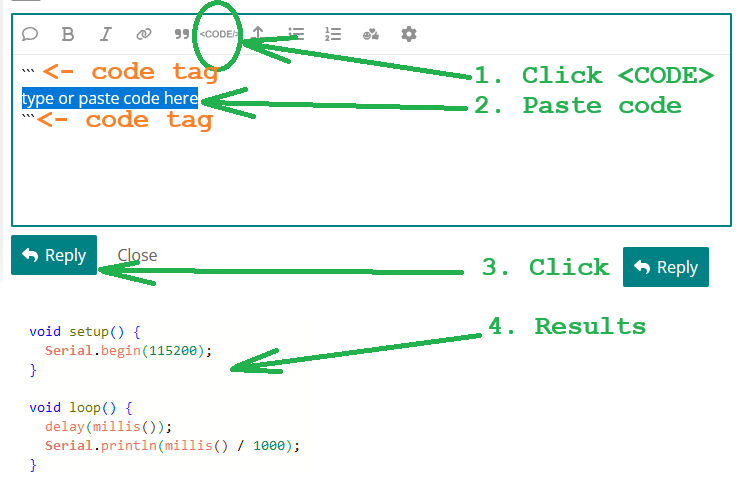
Use code tags (the < CODE/ > icon above the compose window) to make it easier to read and copy for examination

Please post your full sketch, using code tags when you do

Posting your code using code tags prevents parts of it being interpreted as HTML coding and makes it easier to copy for examination

In my experience the easiest way to tidy up the code and add the code tags is as follows

Start by tidying up your code by using Tools/Auto Format in the IDE to make it easier to read. Then use Edit/Copy for Forum and paste what was copied in a new reply. Code tags will have been added to the code to make it easy to read in the forum thus making it easier to provide help.

Do you have a question ?

You misspelled the topic title.

Put code between <CODE> tags

You should participate and answer questions.

What humidity reading device do you have that just puts out a voltage level for humidity and doesn't use a library to read the device registers? float lectura = analogRead(pinSensor); That seems to be a temperature sensor.

Some characters with diacritical marks can not be used on the LCD screen. Your ò in Paticipaciòn should be replaced with another letter, like o.

You need to assign a "type" to these three...

float sensorHumedad = humedadCalculada;
float umbralHUM;
bool bomba;

umbralHUM is never calculated, so it never moves from zero, making the relay is always on.

These two functions are never called... and they are empty.

void onUmbralHumChange() {}
void onBombaChange() {}

Your relay should be connected to an external, right-sized, power source, not the ESP32.

Perhaps you need to look at your Cloud connection and thingsPropertay.h ... because the after the above changes, your sketch works.

#include <Wire.h>
#include <LiquidCrystal_I2C.h>
#include "thingProperties.h"

LiquidCrystal_I2C lcd(0x27, 16, 2);

// Pines y constantes
const int pinSensor = 32; // pin analogico parta el sensor
const int pinBomba = 4; // Pin digital para el relè
const float valorSeco = 4095.0; // Sensor al aire
const float valorHumedo = 2000.0; //Sensor sumergido
float umbralHUM; // ADD THIS
bool bomba; // ADD THIS

// Variables
float temperatura = 0.0;

void setup() {
  Serial.begin(115200);
  // This delay gives the chance to wait for a Serial Monitor without blocking if none is found
  delay(1500);

  pinMode(pinBomba, OUTPUT);
  digitalWrite(pinBomba, HIGH);
  delay(10000);

  // Pantalla LCD
  Wire.begin(21, 22); //SDA, SCL para ESP32
  lcd.init();
  lcd.backlight();

  // Mensaje 1: Bienvenida
  lcd.setCursor(0, 0);
  lcd.print(" Bienvenidos");
  lcd.setCursor (0, 1);
  lcd.print("Proyecto");
  delay(3000);

  lcd.clear();

  //Mensaje 2: Participaciòn estudiantil
  lcd.setCursor(0, 0);
  lcd.print("Paticipaciòn");
  lcd.setCursor(0, 1);
  lcd.print("Estudiantil");
  delay(3000);
  lcd.clear();

  // Inicializaciòn de variables en la nube
  initProperties();
  ArduinoCloud.begin(ArduinoIoTPreferredConnection);
  setDebugMessageLevel(2);
  ArduinoCloud.printDebugInfo();
}

void loop() {
  ArduinoCloud.update();
  // Your code here
  //Lectura y càlculo de humedad
  // lectura = analogRead(pinSensor);
  float lectura = analogRead(pinSensor); // CHANGE THIS
  float humedadCalculada = 100.0 * (valorSeco - lectura) / (valorSeco - valorHumedo);
  humedadCalculada = constrain(humedadCalculada, 0.0, 100.0);
  float sensorHumedad = humedadCalculada;

  // Càlculo de temperatura relativa estimada
  temperatura = 40.0 - (sensorHumedad * 0.3);

  // Mostrar por Serial
  Serial.print("Lectura: ");
  Serial.print(lectura);
  Serial.print(" Humedad: ");
  Serial.print(sensorHumedad);
  Serial.print(" % Temp: ");
  Serial.print(temperatura);
  Serial.print(" C");
  Serial.print(" umbral: ");
  Serial.print(umbralHUM);
  Serial.println(" %");

  //Mostrar en pantalla LCD
  lcd.setCursor(0, 0);
  lcd.print("Humedad: ");
  lcd.print(sensorHumedad, 1); // 1 son los decimales
  lcd.print("% ");

  lcd.setCursor(0, 1);
  lcd.print("Temp: ");
  lcd.print(temperatura, 1);
  lcd.print( (char)223); // sìmbolo °
  lcd.print("C ");

  // Control automatico de la bomba
  if (sensorHumedad < umbralHUM) {
    digitalWrite(pinBomba, LOW); // Activa la bomba (activo en LOW)
    bomba = true;
  } else {
    digitalWrite(pinBomba, HIGH); // Apaga bomba
    bomba = false;
  }
  delay(2000);
}

// Funciones de cambio desde el IoT Cloud
/*
  Since UmbralHum is READ_WRITE variable, onUmbralHumChange() is
  executed every time a new value is received from IoT Cloud.
*/
void onUmbralHumChange() {
  // Add your code here to act upon UmbralHum change
}

/*
  Since Bomba is READ_WRITE variable, onBombaChange() is
  executed every time a new value is received from IoT Cloud.
*/
void onBombaChange() {
  // Add your code here to act upon Bomba change
}

@bhgtbnyh ,

I moved your topic to an appropriate forum category .

In the future, when creating a topic please take some time to pick the forum category that best suits the subject of your topic. There is an "About the _____ category" topic at the top of each category that explains its purpose.

This is an important part of responsible forum usage, as explained in the "How to get the best out of this forum" guide. The guide contains a lot of other useful information. Please read it.

Thanks in advance for your cooperation.

Please edit your topic title so it makes sense.
In the post itself, please give a description of your problem. Also mention which board you're using and any other relevant details (which sensor etc.).

The code has comments in Spanish; if you're more comfortable writing in Spanish you can flag your opening post (use the flag icon marked below) and ask a moderator to move it to the Spanish category.
image

Well, given the nonsensical subject, the unformatted code, and the missing question, in my opinion the appropriate category should be the trash. :smiling_face_with_sunglasses:

Okay, I get it! After hours of analysis, research, and trial and error, my solution is pretty simple and straightforward.:

Basdhjasjdhj asd899j dssdskd popsdafodpsdf! Just hdshpiuti and gophukyrself and you're done!

That's why I love this forum. Helpers put the effort in :+1:

Indeed. Must have taken many hours to crack that encryption algorithm!

Looks like the cat helped.

a7

Definitely sinister.