Hi there,
Currently undertaking a project in which i'm looking to display a QR code via an Oled display. I'm looking to achieve this through converting a png of a generated qr code and then converting it into bitmap code. I have had success getting the image onto the screen and while the image has scaled correctly horizontally, vertically it's stretching to twice the length it should be and is only displaying the upper half of the image (see attached image named screen distort)
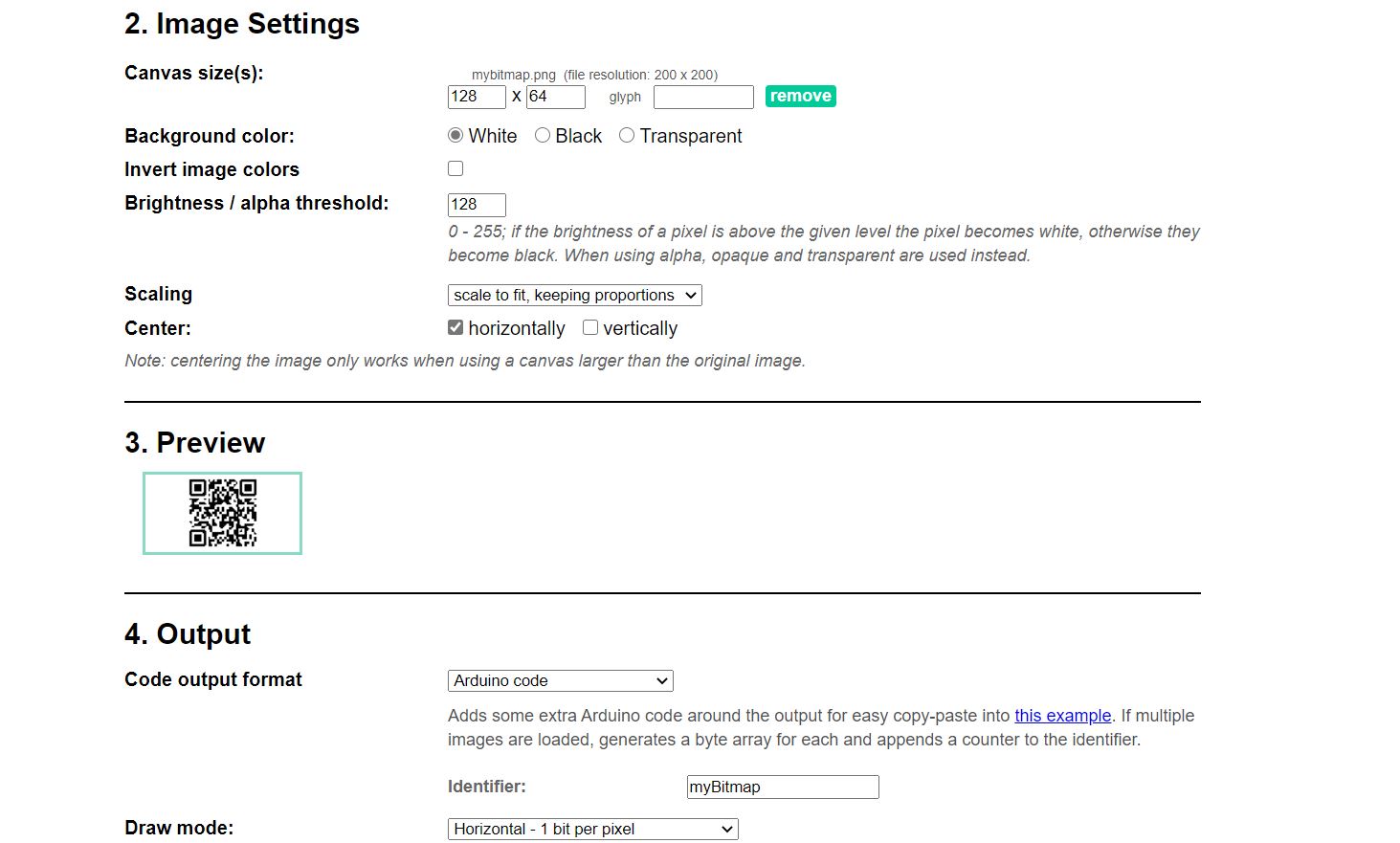
I've tried playing around with all of the settings in the Image2CPP tool and while I can adjust the canvas size to fit the whole image onto the screen, it's half the size i want and still distorted vertically, or I can adjust the image to scale properly to half the screen size but it displays two qr codes side by side instead of one. I have also tried changing the screen address from 0x3c to 0x3d in case i was using the wrong one but no luck there.
here is the code im using;
#include <SPI.h>
#include <Wire.h>
#include <Adafruit_GFX.h>
#include <Adafruit_SSD1306.h>
#define OLED_RESET 4
Adafruit_SSD1306 display(OLED_RESET);
const unsigned char myBitmap [] PROGMEM = {
0xff, 0xff, 0xff, 0xff, 0xff, 0xff, 0xff, 0xff, 0xff, 0xff, 0xff, 0xff, 0xff, 0xff, 0xff, 0xff,
0xff, 0xff, 0xff, 0xff, 0xff, 0xff, 0xff, 0xff, 0xff, 0xff, 0xff, 0xff, 0xff, 0xff, 0xff, 0xff,
0xff, 0xff, 0xff, 0xff, 0xff, 0xff, 0xff, 0xff, 0xff, 0xff, 0xff, 0xff, 0xff, 0xff, 0xff, 0xff,
0xff, 0xff, 0xff, 0xff, 0xff, 0xff, 0xff, 0xff, 0xff, 0xff, 0xff, 0xff, 0xff, 0xff, 0xff, 0xff,
0xff, 0xff, 0xff, 0xff, 0xf0, 0x00, 0x77, 0x61, 0x98, 0x3e, 0x00, 0x0f, 0xff, 0xff, 0xff, 0xff,
0xff, 0xff, 0xff, 0xff, 0xf0, 0x00, 0x36, 0x61, 0x98, 0x1c, 0x00, 0x0f, 0xff, 0xff, 0xff, 0xff,
0xff, 0xff, 0xff, 0xff, 0xf3, 0xff, 0x38, 0x01, 0xe1, 0xec, 0xff, 0xcf, 0xff, 0xff, 0xff, 0xff,
0xff, 0xff, 0xff, 0xff, 0xf3, 0xff, 0x38, 0x01, 0xe1, 0xec, 0xff, 0xcf, 0xff, 0xff, 0xff, 0xff,
0xff, 0xff, 0xff, 0xff, 0xf3, 0x03, 0x30, 0x7f, 0xe7, 0x9c, 0xc0, 0xcf, 0xff, 0xff, 0xff, 0xff,
0xff, 0xff, 0xff, 0xff, 0xf3, 0x03, 0x30, 0x7f, 0xe7, 0xbc, 0xc0, 0xcf, 0xff, 0xff, 0xff, 0xff,
0xff, 0xff, 0xff, 0xff, 0xf3, 0x03, 0x30, 0x66, 0x78, 0x7c, 0xc0, 0xcf, 0xff, 0xff, 0xff, 0xff,
0xff, 0xff, 0xff, 0xff, 0xf3, 0x03, 0x30, 0x66, 0x78, 0x7c, 0xc0, 0xcf, 0xff, 0xff, 0xff, 0xff,
0xff, 0xff, 0xff, 0xff, 0xf3, 0x03, 0x37, 0x86, 0x18, 0x04, 0xc0, 0xcf, 0xff, 0xff, 0xff, 0xff,
0xff, 0xff, 0xff, 0xff, 0xf3, 0x03, 0x37, 0x86, 0x18, 0x04, 0xc0, 0xcf, 0xff, 0xff, 0xff, 0xff,
0xff, 0xff, 0xff, 0xff, 0xf3, 0xff, 0x3e, 0x19, 0xe7, 0x84, 0xff, 0xcf, 0xff, 0xff, 0xff, 0xff,
0xff, 0xff, 0xff, 0xff, 0xf3, 0xfe, 0x3e, 0x19, 0xe7, 0x84, 0x7f, 0xcf, 0xff, 0xff, 0xff, 0xff,
0xff, 0xff, 0xff, 0xff, 0xf0, 0x00, 0x36, 0x66, 0x66, 0x64, 0x00, 0x0f, 0xff, 0xff, 0xff, 0xff,
0xff, 0xff, 0xff, 0xff, 0xf8, 0x00, 0x76, 0x66, 0x46, 0xe6, 0x00, 0x1f, 0xff, 0xff, 0xff, 0xff,
0xff, 0xff, 0xff, 0xff, 0xff, 0xff, 0xfe, 0x67, 0x81, 0xe7, 0xff, 0xff, 0xff, 0xff, 0xff, 0xff,
0xff, 0xff, 0xff, 0xff, 0xff, 0xff, 0xfe, 0x23, 0x81, 0xe7, 0xff, 0xff, 0xff, 0xff, 0xff, 0xff,
0xff, 0xff, 0xff, 0xff, 0xf0, 0x0f, 0x36, 0x01, 0x81, 0xf3, 0xc0, 0xcf, 0xff, 0xff, 0xff, 0xff,
0xff, 0xff, 0xff, 0xff, 0xfc, 0x1f, 0xf6, 0x20, 0x07, 0xb0, 0xc1, 0xff, 0xff, 0xff, 0xff, 0xff,
0xff, 0xff, 0xff, 0xff, 0xfc, 0x3f, 0xf6, 0x60, 0x07, 0x90, 0xc3, 0xff, 0xff, 0xff, 0xff, 0xff,
0xff, 0xff, 0xff, 0xff, 0xfc, 0xf0, 0x70, 0x00, 0xc3, 0xf0, 0x30, 0x3f, 0xff, 0xff, 0xff, 0xff,
0xff, 0xff, 0xff, 0xff, 0xfc, 0xf0, 0x30, 0x01, 0xe1, 0xf0, 0x30, 0x3f, 0xff, 0xff, 0xff, 0xff,
0xff, 0xff, 0xff, 0xff, 0xf8, 0x0f, 0xf8, 0x3f, 0xff, 0xe7, 0xff, 0xcf, 0xff, 0xff, 0xff, 0xff,
0xff, 0xff, 0xff, 0xff, 0xf0, 0x0f, 0xf8, 0x7f, 0xff, 0xe7, 0xff, 0xcf, 0xff, 0xff, 0xff, 0xff,
0xff, 0xff, 0xff, 0xff, 0xfc, 0x03, 0x00, 0x66, 0x78, 0xf3, 0xb3, 0x3f, 0xff, 0xff, 0xff, 0xff,
0xff, 0xff, 0xff, 0xff, 0xfc, 0x03, 0x00, 0x66, 0x78, 0x73, 0x33, 0x3f, 0xff, 0xff, 0xff, 0xff,
0xff, 0xff, 0xff, 0xff, 0xf0, 0xf3, 0x8f, 0x86, 0x60, 0x30, 0x30, 0x3f, 0xff, 0xff, 0xff, 0xff,
0xff, 0xff, 0xff, 0xff, 0xf0, 0xf3, 0xcf, 0x86, 0x60, 0x10, 0x30, 0x3f, 0xff, 0xff, 0xff, 0xff,
0xff, 0xff, 0xff, 0xff, 0xf3, 0xcf, 0x06, 0x19, 0xe7, 0x84, 0xf3, 0x0f, 0xff, 0xff, 0xff, 0xff,
0xff, 0xff, 0xff, 0xff, 0xf3, 0xcf, 0x02, 0x19, 0xe7, 0x84, 0xf3, 0x0f, 0xff, 0xff, 0xff, 0xff,
0xff, 0xff, 0xff, 0xff, 0xff, 0xcc, 0xc1, 0x9e, 0x07, 0x90, 0xcf, 0x0f, 0xff, 0xff, 0xff, 0xff,
0xff, 0xff, 0xff, 0xff, 0xff, 0xcc, 0xc1, 0x9e, 0x07, 0x90, 0xcf, 0x0f, 0xff, 0xff, 0xff, 0xff,
0xff, 0xff, 0xff, 0xff, 0xff, 0x3c, 0x37, 0xe6, 0x18, 0x07, 0x0f, 0x0f, 0xff, 0xff, 0xff, 0xff,
0xff, 0xff, 0xff, 0xff, 0xff, 0x3c, 0x77, 0xe6, 0x18, 0x07, 0x8f, 0x0f, 0xff, 0xff, 0xff, 0xff,
0xff, 0xff, 0xff, 0xff, 0xff, 0x0f, 0xfe, 0x7e, 0x79, 0x83, 0xf3, 0xcf, 0xff, 0xff, 0xff, 0xff,
0xff, 0xff, 0xff, 0xff, 0xff, 0x0f, 0xfe, 0x7e, 0x79, 0x83, 0xf3, 0xcf, 0xff, 0xff, 0xff, 0xff,
0xff, 0xff, 0xff, 0xff, 0xf3, 0xf0, 0x0e, 0x78, 0x00, 0x73, 0xff, 0xff, 0xff, 0xff, 0xff, 0xff,
0xff, 0xff, 0xff, 0xff, 0xfb, 0xe0, 0x0e, 0x38, 0x00, 0x73, 0xff, 0xff, 0xff, 0xff, 0xff, 0xff,
0xff, 0xff, 0xff, 0xff, 0xff, 0x03, 0xc6, 0x18, 0x18, 0x63, 0xc0, 0x3f, 0xff, 0xff, 0xff, 0xff,
0xff, 0xff, 0xff, 0xff, 0xff, 0x03, 0xc2, 0x18, 0x38, 0x61, 0xc0, 0x7f, 0xff, 0xff, 0xff, 0xff,
0xff, 0xff, 0xff, 0xff, 0xfc, 0xfc, 0x31, 0xf8, 0x7e, 0x60, 0x0f, 0xff, 0xff, 0xff, 0xff, 0xff,
0xff, 0xff, 0xff, 0xff, 0xff, 0xfc, 0x71, 0xfc, 0xf8, 0xe0, 0x07, 0xff, 0xff, 0xff, 0xff, 0xff,
0xff, 0xff, 0xff, 0xff, 0xff, 0xff, 0xf1, 0xff, 0xf9, 0xe7, 0xc3, 0x3f, 0xff, 0xff, 0xff, 0xff,
0xff, 0xff, 0xff, 0xff, 0xf8, 0x00, 0x79, 0xff, 0xe7, 0x86, 0xc7, 0x3f, 0xff, 0xff, 0xff, 0xff,
0xff, 0xff, 0xff, 0xff, 0xf0, 0x00, 0x39, 0xfe, 0x67, 0x84, 0xcf, 0x3f, 0xff, 0xff, 0xff, 0xff,
0xff, 0xff, 0xff, 0xff, 0xf3, 0xfe, 0x3e, 0x00, 0x67, 0x87, 0xcf, 0xdf, 0xff, 0xff, 0xff, 0xff,
0xff, 0xff, 0xff, 0xff, 0xf3, 0xff, 0x3e, 0x00, 0x67, 0x87, 0xcf, 0xcf, 0xff, 0xff, 0xff, 0xff,
0xff, 0xff, 0xff, 0xff, 0xf3, 0x03, 0x3e, 0x0f, 0xe0, 0x40, 0x0c, 0xff, 0xff, 0xff, 0xff, 0xff,
0xff, 0xff, 0xff, 0xff, 0xf3, 0x03, 0x3e, 0x1f, 0xe0, 0x60, 0x0c, 0xff, 0xff, 0xff, 0xff, 0xff,
0xff, 0xff, 0xff, 0xff, 0xf3, 0x03, 0x37, 0x99, 0x98, 0x67, 0x0c, 0xcf, 0xff, 0xff, 0xff, 0xff,
0xff, 0xff, 0xff, 0xff, 0xf3, 0x03, 0x37, 0x99, 0x98, 0x67, 0x0c, 0xcf, 0xff, 0xff, 0xff, 0xff,
0xff, 0xff, 0xff, 0xff, 0xf3, 0x03, 0x30, 0x66, 0x60, 0x13, 0xff, 0xcf, 0xff, 0xff, 0xff, 0xff,
0xff, 0xff, 0xff, 0xff, 0xf3, 0x03, 0x30, 0x66, 0x60, 0x13, 0xff, 0xcf, 0xff, 0xff, 0xff, 0xff,
0xff, 0xff, 0xff, 0xff, 0xf3, 0xff, 0x33, 0xe1, 0xfe, 0x63, 0xc3, 0x3f, 0xff, 0xff, 0xff, 0xff,
0xff, 0xff, 0xff, 0xff, 0xf3, 0xff, 0x33, 0xe1, 0xfe, 0x61, 0xc3, 0x3f, 0xff, 0xff, 0xff, 0xff,
0xff, 0xff, 0xff, 0xff, 0xf0, 0x00, 0x31, 0x9f, 0xe7, 0xe0, 0xcf, 0x3f, 0xff, 0xff, 0xff, 0xff,
0xff, 0xff, 0xff, 0xff, 0xf0, 0x00, 0x71, 0x9f, 0xe7, 0xe0, 0xcf, 0x3f, 0xff, 0xff, 0xff, 0xff,
0xff, 0xff, 0xff, 0xff, 0xff, 0xff, 0xff, 0xff, 0xff, 0xff, 0xff, 0xff, 0xff, 0xff, 0xff, 0xff,
0xff, 0xff, 0xff, 0xff, 0xff, 0xff, 0xff, 0xff, 0xff, 0xff, 0xff, 0xff, 0xff, 0xff, 0xff, 0xff,
0xff, 0xff, 0xff, 0xff, 0xff, 0xff, 0xff, 0xff, 0xff, 0xff, 0xff, 0xff, 0xff, 0xff, 0xff, 0xff,
0xff, 0xff, 0xff, 0xff, 0xff, 0xff, 0xff, 0xff, 0xff, 0xff, 0xff, 0xff, 0xff, 0xff, 0xff, 0xff
};
void setup() {
display.begin(SSD1306_SWITCHCAPVCC, 0x3c);
display.clearDisplay();
delay(2000);
}
void loop() {
display.drawBitmap(0,0,myBitmap, 128,64,WHITE);
display.display();
}
I have attached an image of the Image2Cpp settings i've used, if anyone can offer any help on this issue it would be greatly appreciated!
Thanks