Borken LCD or wrong wiring?

Hello to everyone! New on arduino and on the forum as well. I am having a little issue with my LCD trying the sample "Hello world + clock".
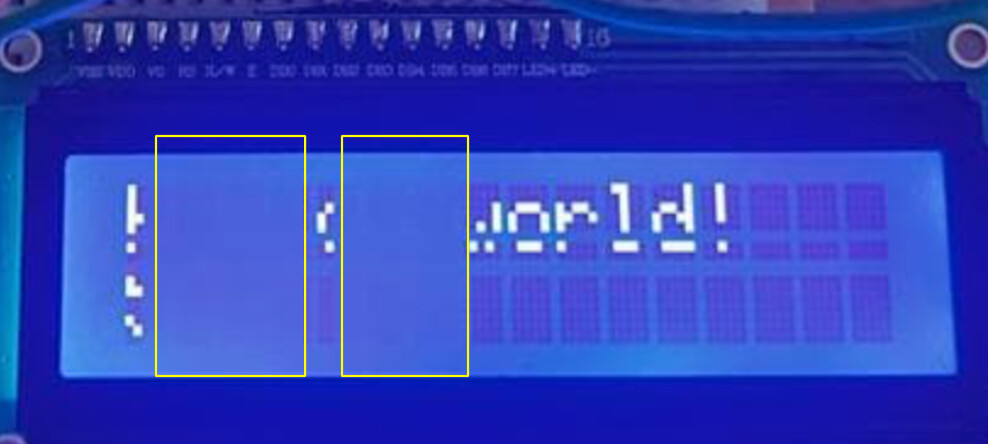
As you can see in the image my display it's not showing all the characters. Is there something wrong in the wiring? I checked 1200 times but i am still getting this.

Thanks to everyone!

Welcome to the forum

It is all but impossible to see how the display is wired from your 'photo and even if we could then we don't know how it is programmed

Please post your sketch and a wiring diagram of your project. A 'photo of a hand drawn circuit is good enough

same wiring and same code as the following:

Its part from an arduino starter kit, that weeks ago was working well

thanks

fede

Check every connection, particularly the ones to the breadboard

That looks like a bad display. What happens if you press on the display?

when i press liquid moves like old calculators

is there any way to check if the lcd is in good condition?

I agree... that display looks stuffed.

Don't you get all technical on us, now.

The technical term is the part is FUCT.

Future Use Completely Terminated

The absence of anything in these areas of the screen, would indicate there are some serious issues with the display, most likely hardware related and not able to be fixed..

Building on the OP's (presumably unintentional) misspelling in the thread title, I'd go with "borked".

image

OK sounds that then my display is FUCT.

Now, final question, is there any possibility of me, doing wrong wiring, the one who fucted the display?

Should I need to take any special consideration in this? Like doing wiring with my USB disconnected? Lol

Thanks

Fede

No, I don't think so. The issue is not between you and the display... there's something broken between the driver chip and the LCD itself.

Absolutely not. :grin:

It is indeed, "borked" (slight spelling mistake in your subject line, not "borken").

So here's the experiment, since it is otherwise entirely useless: With considerable care, note the six bent metal lugs on the back of the module.


With pliers, if you carefully straighten them, you can release the display from the PCB. Note the two pink "Zebra strips" connecting the LCD to the PCB.

Check that they are clean, straight and undamaged. You need to re-seat them in precisely the correct position as you place the PCB back over the lugs and carefully bend the lugs just sufficient to hold it together again. Then re-test the display. If it works, re-set the lugs as original, otherwise you can try again.

You may be lucky! :face_with_raised_eyebrow:

Hello federext

Check the solderings.

grafik

Have a nice day and enjoy programming in C++ and learning.
Дайте миру шанс!

Not a bad idea, but entirely irrelevant to the faulty module. :roll_eyes:

Well, if you're in the habit of working on the circuit (connecting, rewiring fu-ups, etc) without removing power from the board, then the answer is
ABSOLUTELY.
Do not wire your circuits while they're powered. It's just a bad, bad, habit, and will sooner or later let out the magic smoke. Sometimes, you don't even get to see the smoke when it escapes, and you end up with things that just 'don't work right, don't know what happened'. See the display you've got for a good example.
C

Do you know Mr. Murphy ?
And the principle of the greatest meanness ?

Did you note the "Lol" on @federext's quote? :sunglasses:

The fact that the display at least partially shows the desired text indicates that contrast, communication with the display and the code is functioning correctly. A poor contact, even intermittent, could not be responsible for the display shown.

The fault is mechanical; not electrical.