I bought some new atmega328p chips from DigiKey, no boot loader. I tried burning the boot loader w/ a Genuine UNO and a ZIF hat. Got the "Expected signature for ATmega328P is 1E 95 0F Double check chip, or use -F to override this check.". This set up works for older 328 chips, but not the new 328p. Where can I get a boot burner that works on new 328p chips?
Hi @jeff51. I'm going to ask you to provide the full verbose output from a "Burn Bootloader" operation.
 This procedure is not intended to solve the problem. The purpose is to gather more information.
Please do this:
- Select File > Preferences... (or Arduino IDE > Settings... for macOS users) from the Arduino IDE menus.
The "Preferences" dialog will open. - Check the box next to Show verbose output during: ☐ upload in the "Preferences" dialog.
ⓘ This preference applies to "Burn Bootloader" operations in addition to uploads. - Click the "OK" button.
The "Preferences" dialog will close. - Attempt a "Burn Bootloader" operation, just the same as you did before.
- Wait for the "Burn Bootloader" operation to fail.
- You will see a "Error while burning the bootloader: ..." notification at the bottom right corner of the Arduino IDE window. Click the "COPY ERROR MESSAGES" button in that notification.
- Open a reply here on this forum topic by clicking the "Reply" button.
- Click the
<CODE/>icon on the post composer toolbar.
This will add the forum's code block markup (```) to your reply to make sure the error messages are correctly formatted.
- Press the Ctrl+V keyboard shortcut (Command+V for macOS users).
This will paste the error output from the upload into the code block. - Move the cursor outside of the code block markup before you add any additional text to your reply.
- Click the "Reply" button to publish the post.

Take a few minutes to look at Nick Gammons' article on burning bootloaders.
I Googled gammon.au burn bootloader.
It's a bit old now, but gives a good insight.
Is that a 328P, or a 328PB - it matters!
"C:\Users\ei69j\AppData\Local\Arduino15\packages\arduino\tools\avrdude\6.3.0-arduino17/bin/avrdude" "-CC:\Users\ei69j\AppData\Local\Arduino15\packages\arduino\tools\avrdude\6.3.0-arduino17/etc/avrdude.conf" -v -patmega328p -cstk500v1 -PCOM7 -b19200 -e -Ulock:w:0x3F:m -Uefuse:w:0xFD:m -Uhfuse:w:0xDE:m -Ulfuse:w:0xFF:m

avrdude: Version 6.3-20190619
         Copyright (c) 2000-2005 Brian Dean, http://www.bdmicro.com/
         Copyright (c) 2007-2014 Joerg Wunsch

         System wide configuration file is "C:\Users\ei69j\AppData\Local\Arduino15\packages\arduino\tools\avrdude\6.3.0-arduino17/etc/avrdude.conf"

         Using Port                    : COM7
         Using Programmer              : stk500v1
         Overriding Baud Rate          : 19200
         AVR Part                      : ATmega328P
         Chip Erase delay              : 9000 us
         PAGEL                         : PD7
         BS2                           : PC2
         RESET disposition             : dedicated
         RETRY pulse                   : SCK
         serial program mode           : yes
         parallel program mode         : yes
         Timeout                       : 200
         StabDelay                     : 100
         CmdexeDelay                   : 25
         SyncLoops                     : 32
         ByteDelay                     : 0
         PollIndex                     : 3
         PollValue                     : 0x53
         Memory Detail                 :

                                  Block Poll               Page                       Polled
           Memory Type Mode Delay Size  Indx Paged  Size   Size #Pages MinW  MaxW   ReadBack
           ----------- ---- ----- ----- ---- ------ ------ ---- ------ ----- ----- ---------
           eeprom        65    20     4    0 no       1024    4      0  3600  3600 0xff 0xff
           flash         65     6   128    0 yes     32768  128    256  4500  4500 0xff 0xff
           lfuse          0     0     0    0 no          1    0      0  4500  4500 0x00 0x00
           hfuse          0     0     0    0 no          1    0      0  4500  4500 0x00 0x00
           efuse          0     0     0    0 no          1    0      0  4500  4500 0x00 0x00
           lock           0     0     0    0 no          1    0      0  4500  4500 0x00 0x00
           calibration    0     0     0    0 no          1    0      0     0     0 0x00 0x00
           signature      0     0     0    0 no          3    0      0     0     0 0x00 0x00

         Programmer Type : STK500
         Description     : Atmel STK500 Version 1.x firmware
         Hardware Version: 2
         Firmware Version: 1.18
         Topcard         : Unknown
         Vtarget         : 0.0 V
         Varef           : 0.0 V
         Oscillator      : Off
         SCK period      : 0.1 us

avrdude: AVR device initialized and ready to accept instructions

Reading | ################################################## | 100% 0.03s

avrdude: Device signature = 0x1e9514
avrdude: Expected signature for ATmega328P is 1E 95 0F
         Double check chip, or use -F to override this check.

avrdude done.  Thank you.

Failed chip erase: uploading error: exit status 1

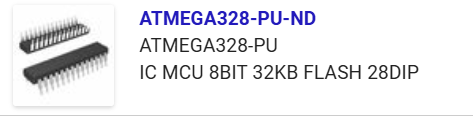
Seems this is a case of its not a P type given its marked PU and Looking around on the web I found this mentiond a few times ;
" base model ATMega328 (no suffix) and the ATMega328PU, both of which yield a 0x1e9514 signature instead of the expected 0x1E950F "
2 Likes
You have the ATmega328, not the ATmega328P (the pico power version). You wanted
You can still use the ICs you have. Use the MiniCore coreplatform, and choose the "328 / 328A" variant of "ATmega328".