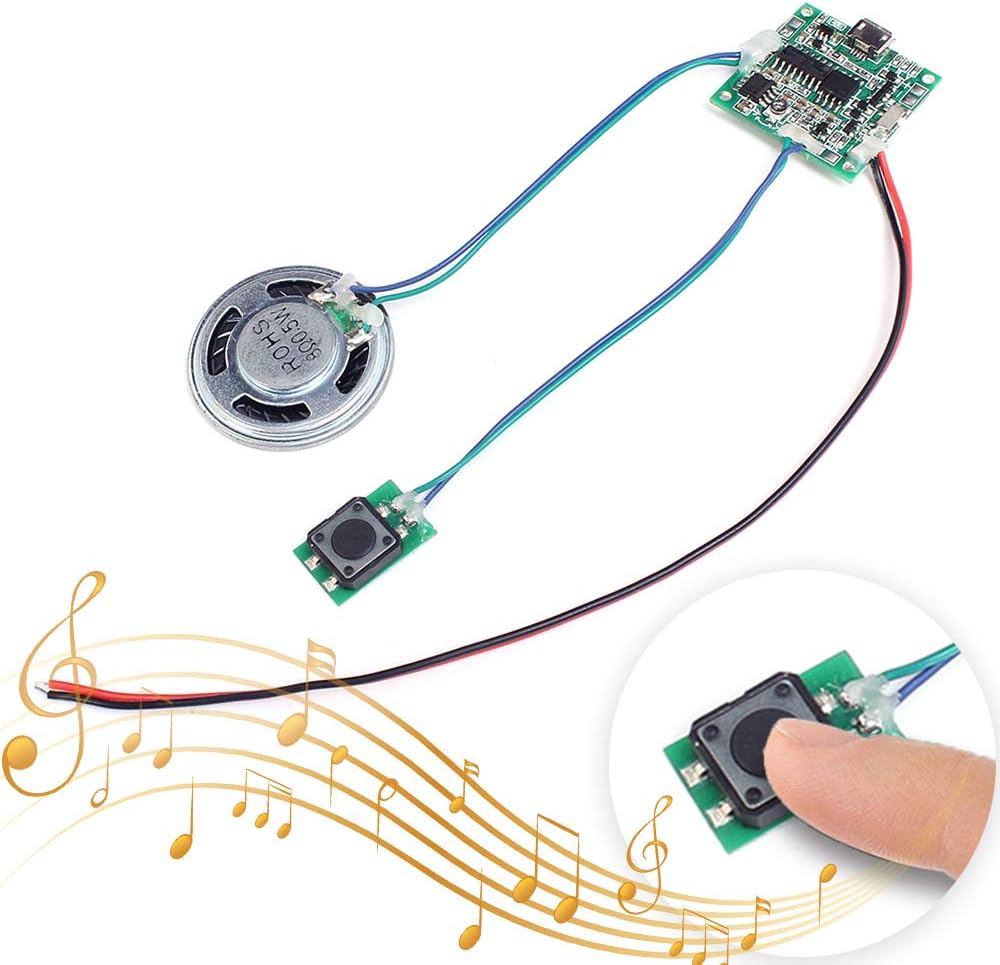
Hello all, I am using the following board to produce a sound file: Amazon.com: Icstation Recordable Sound Module, Button Control Sound Chip 8M MP3 WAV Music Voice Player Programmable Board with Speaker for DIY Birthday Music Box Greeting Card Present : Electronics
It works really well, however, I would like to bypass the manual pushbutton and trigger the sound file automatically with a Digital pin from the Arduino UNO. I did cut the pushbutton off and if I touch the wires together (Blue/Green) the sound is triggered properly. I am welcome to any ideas. Eventually, a toggle switch will be added to trigger the sound, but I have to understand how to bypass this Pushbutton and create the the connection between these two cables using just the Arduino if possible.
I am powering the sound board with the 5V from the Arduino, and tried connecting the Blue/Green cables to a digital pin and common ground - But that seems to be disrupting the function of other devices such as LED or the toggle switch itself. Any help is appreciated.
The simplest way to do what you want would be to wire normally open relay contacts in parallel with the switch and control the relay with an Arduino
Thanks for replying. I’ve done something similar before - But I am struggling to find a 5V Relay with a Coil Current of less than 40mA and I am trying my best to avoid an external power supply for this project. Do you know of any?
Thanks again, I really appreciate it.
Let's try a different approach.
Are either of the pins of the switch connected directly to GND or 5V ?
Toggle switch is only connected to GND - it is the only common connection between the Sound and switch. The terminals for the SPDT switch go into digital pins on the Arduino Uno.
Looks like this is the user manual: https://www.icstation.com/product_document/Download/10060_User_Manual.pdf
What I would try is to use a transistor or optocoupler.
Note that there is a difference in connections regarding H/L between the second image in the opening post and the H/L TTL mode in the manual.
It must be connected to 2 places for it to work so I don't understand what you are saying
Which pushbutton input are you try to control with an Arduino and what are its contacts connected to ?
I think I may have confused you by talking about a Toggle switch I wanted to add to trigger the sound, but the original problem is solving how to eliminate the pushbutton and assigning that function to the Arduino. So instead of the pushbutton which is Manual, what can I use to eliminate that pushbutton and trigger the sound automatically.
Please answer the question as to what the pushbutton is connected to. There are pads labelled Low level trigger and High level trigger. Which, if any of them is the pushbutton connected to and where does the other pushbutton contact go to ?
I am trying to establish whether connecting one of them to GND or 5V will trigger the sound
If you are going to use an UNO board the connection is simple.
- GND of UNO to GND of the player.
- A pin of your choice from UNO to the PL pin of the player if you want it to trigger with a LOW signal (from UNO) or to the PH pin if you want it to trigger with a HIGH signal.
Thanks to all of those who helped. Ultimately what worked was getting an external 5V power supply for the Speaker module. The PL is then plugged into a Digital pin, and the GND goes to common on Arduino. The code I was given on the Reddit sub to drive the speaker works perfectly:
// setup
pinMode( PIN, INPUT );
digitalWrite( PIN, LOW ); // never set pin HIGH

// activation
pinMode( PIN, OUTPUT ); // short pin to ground
delay(500); // simulated press
pinMode( PIN, INPUT ); // release pin