Cambiar sketch de ARDUINO MICRO a PRO MICRO

Hola gente soy nuevo en el foro de Arduino y les quería preguntar si me ayuda con este proyecto
quiero hacer lo que dice el titulo el proyecto esta echo para Arduino micro pero se que también se lo puede hacer en el pro micro la idea seria volver a hacer la foto del esquema con las conexiones para la pro micro y seguramente también seria cambiar el código porque hay pines que en la pro micro no existen hago todo esto porque en mi país no se consiguen las Arduino micro .

esta es la foto de las conexiones

featured_preview_Wiring_Buttons_Rotaries

este el codigo

//htek-h002 F1 Steering Wheel
//Based on the Buttonbox sketch from Amstudio and the Nextionmicrobridge which can be found at "C:\Program Files (x86)\SimHub\_Addons\NextionMicroBridge"
//ThronEisvogel
//15.01.2022

#include <Keypad.h>
#include <Joystick.h>
#include <Adafruit_NeoPixel.h>
#define INCLUDE_WS2812B 
#define ENABLE_PULLUPS
#define NUMROTARIES 3 //How many rotary encoders
#define NUMBUTTONS 22 //How many buttons
#define NUMROWS 3 //How many rows
#define NUMCOLS 4 //How many columns
int maxpressedButtons= 1; //Maximum amount of buttons being pressed at the same, use 1 when not using a button matrix with diodes

// How many leds
#define WS2812B_RGBLEDCOUNT 16
// Data pin
#define WS2812B_DATAPIN 11
// 0 left to right, 1 right to left
#define WS2812B_RIGHTTOLEFT 1

//Button arrangement for a 4x4 matrix
byte buttons[NUMROWS][NUMCOLS] = {
  {0,1,2},
  {3,4,5},
  {6,7,8},
  {9,10,11},
};

struct rotariesdef {
  byte pin1;
  byte pin2;
  int ccwchar;
  int cwchar;
  volatile unsigned char state;
};

rotariesdef rotaries[NUMROTARIES] {
  {2,3,12,13,0},
  {4,5,14,15,0}, //First digit stands for the first pin, second digit stands for the second pin
  {6,7,16,17,0},
  {8,9,18,19,0},
  {10,12,20,21,0}, 
};

#define DIR_CCW 0x10
#define DIR_CW 0x20
#define R_START 0x0

#ifdef HALF_STEP
#define R_CCW_BEGIN 0x1
#define R_CW_BEGIN 0x2
#define R_START_M 0x3
#define R_CW_BEGIN_M 0x4
#define R_CCW_BEGIN_M 0x5

const unsigned char ttable[6][4] = {
  // R_START (00)
  {R_START_M,            R_CW_BEGIN,     R_CCW_BEGIN,  R_START},
  // R_CCW_BEGIN
  {R_START_M | DIR_CCW, R_START,        R_CCW_BEGIN,  R_START},
  // R_CW_BEGIN
  {R_START_M | DIR_CW,  R_CW_BEGIN,     R_START,      R_START},
  // R_START_M (11)
  {R_START_M,            R_CCW_BEGIN_M,  R_CW_BEGIN_M, R_START},
  // R_CW_BEGIN_M
  {R_START_M,            R_START_M,      R_CW_BEGIN_M, R_START | DIR_CW},
  // R_CCW_BEGIN_M
  {R_START_M,            R_CCW_BEGIN_M,  R_START_M,    R_START | DIR_CCW},
};
#else
#define R_CW_FINAL 0x1
#define R_CW_BEGIN 0x2
#define R_CW_NEXT 0x3
#define R_CCW_BEGIN 0x4
#define R_CCW_FINAL 0x5
#define R_CCW_NEXT 0x6

const unsigned char ttable[7][4] = {
  // R_START
  {R_START,    R_CW_BEGIN,  R_CCW_BEGIN, R_START},
  // R_CW_FINAL
  {R_CW_NEXT,  R_START,     R_CW_FINAL,  R_START | DIR_CW},
  // R_CW_BEGIN
  {R_CW_NEXT,  R_CW_BEGIN,  R_START,     R_START},
  // R_CW_NEXT
  {R_CW_NEXT,  R_CW_BEGIN,  R_CW_FINAL,  R_START},
  // R_CCW_BEGIN
  {R_CCW_NEXT, R_START,     R_CCW_BEGIN, R_START},
  // R_CCW_FINAL
  {R_CCW_NEXT, R_CCW_FINAL, R_START,     R_START | DIR_CCW},
  // R_CCW_NEXT
  {R_CCW_NEXT, R_CCW_FINAL, R_CCW_BEGIN, R_START},
};
#endif

byte rowPins[NUMROWS] = {13,18,19}; //Row-pins on the Arduino Micro/Pro Micro
byte colPins[NUMCOLS] = {20,21,22,23}; //Column-pins on the Arduino Micro/Pro Micro

Keypad steeringwheel = Keypad( makeKeymap(buttons), rowPins, colPins, NUMROWS, NUMCOLS); 

Joystick_ Joystick(JOYSTICK_DEFAULT_REPORT_ID, 
  JOYSTICK_TYPE_JOYSTICK, NUMBUTTONS, 0,
  false, false, false, false, false, false,
  false, false, false, false, false);

Adafruit_NeoPixel WS2812B_strip = Adafruit_NeoPixel(WS2812B_RGBLEDCOUNT, WS2812B_DATAPIN, NEO_GRB + NEO_KHZ800);
bool LedsDisabled = false;
byte r, g, b;
void ReadLeds() {
  while (!Serial.available()) {}
  WS2812B_strip.setBrightness(Serial.read());

  for (int i = 0; i < WS2812B_RGBLEDCOUNT; i++) {
    while (!Serial.available()) {}
    r = Serial.read();
    while (!Serial.available()) {}
    g = Serial.read();
    while (!Serial.available()) {}
    b = Serial.read();
    if (WS2812B_RIGHTTOLEFT > 0)
      WS2812B_strip.setPixelColor(WS2812B_RGBLEDCOUNT - 1 - i, r, g, b);
    else {
      WS2812B_strip.setPixelColor(i, r, g, b);
    }
    WriteToComputer();
  }
  WS2812B_strip.show();

  for (int i = 0; i < 3; i++) {
    while (!Serial.available()) {}
    Serial.read();
  }
}

static long baud = 9600;
static long newBaud = baud;

void lineCodingEvent(long baud, byte databits, byte parity, byte charFormat)
{
  newBaud = baud;
}

int readSize = 0;
int endofOutcomingMessageCount = 0;
int messageend = 0;
String command = "";

void setup() {
  Joystick.begin();
  rotary_init();
  pinMode(LED_BUILTIN, OUTPUT);

  Serial.begin(baud);
  Serial1.begin(baud);

  #ifdef INCLUDE_WS2812B
    WS2812B_strip.begin();
    WS2812B_strip.setPixelColor(0, 0, 0, 0);
    WS2812B_strip.show();
  #endif
  }

void loop() { 

  CheckAllEncoders();

  CheckAllButtons();

  UpdateBaudRate();

  while (Serial.available()) {
    WriteToComputer();
    #ifdef INCLUDE_WS2812B
    char c = (char)Serial.read();
    if (!LedsDisabled) {

      if (messageend < 6) {
        if (c == (char)0xFF) {
          messageend++;
        }
        else {
          messageend = 0;
        }
      }

      if (messageend >= 3 && c != (char)(0xff)) {
        command += c;
        while (command.length() < 5) {
          WriteToComputer();

          while (!Serial.available()) {}
          c = (char)Serial.read();
          command += c;
        }

        if (command == "sleds") {
          ReadLeds();
        }
        if (command == "dleds") {
          DisableLeds();
        }
        else {
          Serial1.print(command);
        }
        command = "";
        messageend = 0;
      }
      else {
        Serial1.write(c);
      }
    }
    else {
      Serial1.write(c);
    }
#else
    char c = (char)Serial.read();
    Serial1.write(c);
#endif

    }

   WriteToComputer();

}

void WriteToComputer() {
  while (Serial1.available()) {
    char c = (char)Serial1.read();
    Serial.write(c);
  }
}

void UpdateBaudRate() {
  // Update baudrate if required
  newBaud = Serial.baud();
  if (newBaud != baud) {
    baud = newBaud;
    Serial1.end();
    Serial1.begin(baud);
  }
}

void DisableLeds() {
  LedsDisabled = true;
  Serial.write("Leds disabled");
}

void CheckAllButtons(void) {
      if (steeringwheel.getKeys())
    {
       for (int i=0; i<maxpressedButtons; i++)   
        {
           if ( steeringwheel.key[i].stateChanged )   
            {
            switch (steeringwheel.key[i].kstate) {  
                    case PRESSED:
                    case HOLD:
                              Joystick.setButton(steeringwheel.key[i].kchar, 1);
                              break;
                    case RELEASED:
                    case IDLE:
                              Joystick.setButton(steeringwheel.key[i].kchar, 0);
                              break;
            }
           }   
         }
     }
}


void rotary_init() {
  for (int i=0;i<NUMROTARIES;i++) {
    pinMode(rotaries[i].pin1, INPUT);
    pinMode(rotaries[i].pin2, INPUT);
    #ifdef ENABLE_PULLUPS
      digitalWrite(rotaries[i].pin1, HIGH);
      digitalWrite(rotaries[i].pin2, HIGH);
    #endif
  }
}


unsigned char rotary_process(int _i) {
   unsigned char pinstate = (digitalRead(rotaries[_i].pin2) << 1) | digitalRead(rotaries[_i].pin1);
  rotaries[_i].state = ttable[rotaries[_i].state & 0xf][pinstate];
  return (rotaries[_i].state & 0x30);
}

void CheckAllEncoders(void) {
  for (int i=0;i<NUMROTARIES;i++) {
    unsigned char result = rotary_process(i);
    if (result == DIR_CCW) {
      Joystick.setButton(rotaries[i].ccwchar, 1); delay(50); Joystick.setButton(rotaries[i].ccwchar, 0);
    };
    if (result == DIR_CW) {
      Joystick.setButton(rotaries[i].cwchar, 1); delay(50); Joystick.setButton(rotaries[i].cwchar, 0);
    };
  }
}
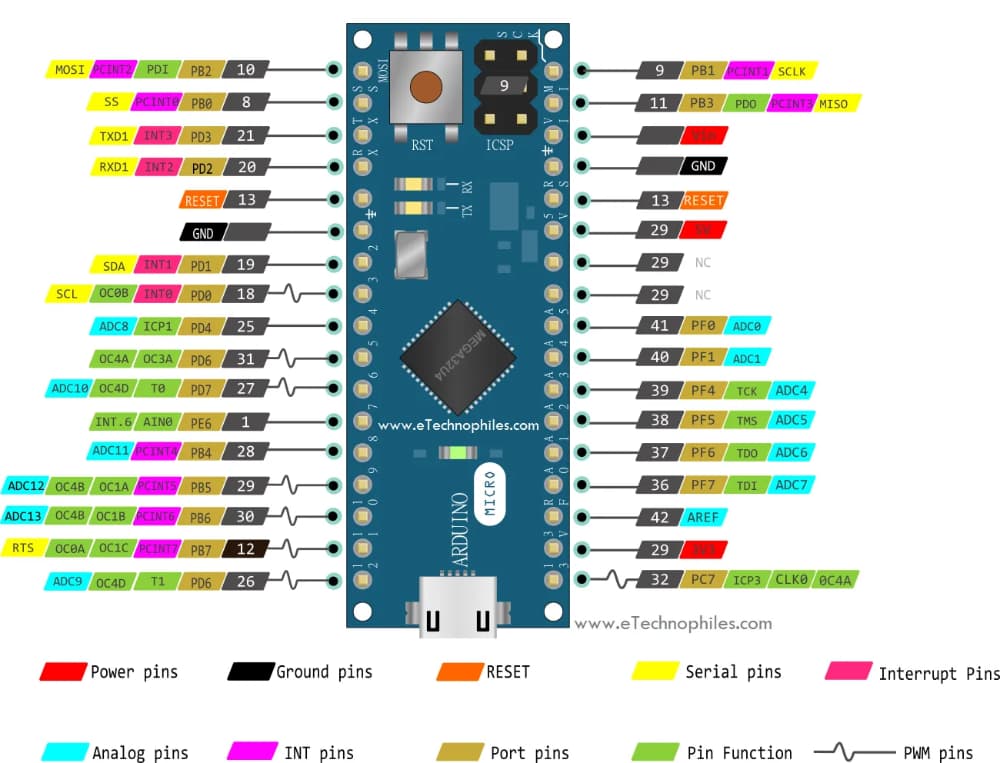
No puedes convertir algo de un microcontrolador que tiene tantos pines a otro que tiene menos.

1 Like

te agradezco la respuesta ...
nunca se me dio por contar los pines que usa el proyecto y ver si la pro micro tiene la cantidad de pines que necesita.... gracias por el dato igual.

No lo tiene. No tienes muchas opciones, tal vez un Blue Pill de STM32.

1 Like

alguien me podria dar una mano.... quiero cargar este codigo en una arduino micro y me tira este error

Aparte de adjuntar el código y los errores como corresponde, lee esto que escribí hace rato

Perfecto, ahora edita tu post y adjunta el código de acuerdo a las Normas del Foro en Español, punto 7. También usa la opción "Autoformato" del menú "Herramientas" de la IDE antes de copiar el código así nos facilitas su lectura.

Estés el código... Y no entiendo mucho lo que me querés decir Use code tags to format code for the forum

Código:

//BUTTON BOX
//Arduino Micro
//Tested in WIN10 + Assetto Corsa


#include <Keypad.h>
#include <Joystick.h>
#include <Mouse.h>

#define ENABLE_PULLUPS
#define NUMROTARIES 4
#define NUMBUTTONS 15
#define NUMROWS 3
#define NUMCOLS 5

int horzPin = A5;  // Analog output of horizontal joystick pin
int vertPin = A4;  // Analog output of vertical joystick pin
int selPin = 13;  // select button pin of joystick

int vertZero, horzZero;  // Stores the initial value of each axis, usually around 512
int vertValue, horzValue;  // Stores current analog output of each axis
const int sensitivity = 200;  // Higher sensitivity value = slower mouse, should be <= about 500
int mouseClickFlag = 0;

byte buttons[NUMROWS][NUMCOLS] = {
  {0,1,2,3,4},
  {5,6,7,8,9},
  {10,11,12,13,14},
 
  };

struct rotariesdef {
  byte pin1;
  byte pin2;
  int ccwchar;
  int cwchar;
  volatile unsigned char state;
};

rotariesdef rotaries[NUMROTARIES] {
  {1,0,15,16,0},
  {2,3,17,18,0},
  {4,5,19,20,0},
  {6,7,21,22,0},

};

#define DIR_CCW 0x10
#define DIR_CW 0x20
#define R_START 0x0

#ifdef HALF_STEP
#define R_CCW_BEGIN 0x1
#define R_CW_BEGIN 0x2
#define R_START_M 0x3
#define R_CW_BEGIN_M 0x4
#define R_CCW_BEGIN_M 0x5
const unsigned char ttable[6][4] = {
  // R_START (00)
  {R_START_M,            R_CW_BEGIN,     R_CCW_BEGIN,  R_START},
  // R_CCW_BEGIN
  {R_START_M | DIR_CCW, R_START,        R_CCW_BEGIN,  R_START},
  // R_CW_BEGIN
  {R_START_M | DIR_CW,  R_CW_BEGIN,     R_START,      R_START},
  // R_START_M (11)
  {R_START_M,            R_CCW_BEGIN_M,  R_CW_BEGIN_M, R_START},
  // R_CW_BEGIN_M
  {R_START_M,            R_START_M,      R_CW_BEGIN_M, R_START | DIR_CW},
  // R_CCW_BEGIN_M
  {R_START_M,            R_CCW_BEGIN_M,  R_START_M,    R_START | DIR_CCW},
};
#else
#define R_CW_FINAL 0x1
#define R_CW_BEGIN 0x2
#define R_CW_NEXT 0x3
#define R_CCW_BEGIN 0x4
#define R_CCW_FINAL 0x5
#define R_CCW_NEXT 0x6

const unsigned char ttable[7][4] = {
  // R_START
  {R_START,    R_CW_BEGIN,  R_CCW_BEGIN, R_START},
  // R_CW_FINAL
  {R_CW_NEXT,  R_START,     R_CW_FINAL,  R_START | DIR_CW},
  // R_CW_BEGIN
  {R_CW_NEXT,  R_CW_BEGIN,  R_START,     R_START},
  // R_CW_NEXT
  {R_CW_NEXT,  R_CW_BEGIN,  R_CW_FINAL,  R_START},
  // R_CCW_BEGIN
  {R_CCW_NEXT, R_START,     R_CCW_BEGIN, R_START},
  // R_CCW_FINAL
  {R_CCW_NEXT, R_CCW_FINAL, R_START,     R_START | DIR_CCW},
  // R_CCW_NEXT
  {R_CCW_NEXT, R_CCW_FINAL, R_CCW_BEGIN, R_START},
};
#endif

byte rowPins[NUMROWS] = {A3,A2,A1};
byte colPins[NUMCOLS] = {A8,A9,A10,11,A11};

Keypad buttbx = Keypad( makeKeymap(buttons), rowPins, colPins, NUMROWS, NUMCOLS);

Joystick_ Joystick(JOYSTICK_DEFAULT_REPORT_ID,
  JOYSTICK_TYPE_JOYSTICK, 32, 0,
  true, true, true, true, true, true,
  true, true, true, true, true);

void setup() {
pinMode(A0, INPUT); //Hetzelfde als const int & int pot =
  Joystick.begin();
  rotary_init();
  pinMode(horzPin, INPUT);  // Set both analog pins as inputs
  pinMode(vertPin, INPUT);
  pinMode(selPin, INPUT);  // set button select pin as input
  digitalWrite(selPin, HIGH);  // Pull button select pin high
  delay(1000);  // short delay to let outputs settle
  vertZero = analogRead(vertPin);  // get the initial values
  horzZero = analogRead(horzPin);  // Joystick should be in neutral position when reading these

}

const int pinToButtonMap = A0;

void loop() {

  vertValue = analogRead(vertPin) - vertZero;  // read vertical offset
  horzValue = analogRead(horzPin) - horzZero;  // read horizontal offset

  if (vertValue != 0)
    Mouse.move(0, vertValue/sensitivity, 0);  // move mouse on y axis
  if (horzValue != 0)
    Mouse.move(horzValue/sensitivity, 0, 0);  // move mouse on x axis

  if ((digitalRead(selPin) == 0) && (!mouseClickFlag))  // if the joystick button is pressed
  {
    mouseClickFlag = 1;
    Mouse.press(MOUSE_LEFT);  // click the left button down
  }
  else if ((digitalRead(selPin))&&(mouseClickFlag)) // if the joystick button is not pressed
  {
    mouseClickFlag = 0;
    Mouse.release(MOUSE_LEFT);  // release the left button
  }

int pot = analogRead(A0);
int mapped = map(pot,0,1023,0,255);
{Joystick.setThrottle(mapped);}

  CheckAllEncoders();

  CheckAllButtons();

}

void CheckAllButtons(void) {
      if (buttbx.getKeys())
    {
       for (int i=0; i<LIST_MAX; i++)
        {
           if ( buttbx.key[i].stateChanged )
            {
            switch (buttbx.key[i].kstate) {
                    case PRESSED:
                    case HOLD:
                              Joystick.setButton(buttbx.key[i].kchar, 1);
                              break;
                    case RELEASED:
                    case IDLE:
                              Joystick.setButton(buttbx.key[i].kchar, 0);
                              break;
            }
           }
         }
     }
}


void rotary_init() {
  for (int i=0;i<NUMROTARIES;i++) {
    pinMode(rotaries[i].pin1, INPUT);
    pinMode(rotaries[i].pin2, INPUT);
    #ifdef ENABLE_PULLUPS
      digitalWrite(rotaries[i].pin1, HIGH);
      digitalWrite(rotaries[i].pin2, HIGH);
    #endif
  }
}


unsigned char rotary_process(int _i) {
   unsigned char pinstate = (digitalRead(rotaries[_i].pin2) << 1) | digitalRead(rotaries[_i].pin1);
  rotaries[_i].state = ttable[rotaries[_i].state & 0xf][pinstate];
  return (rotaries[_i].state & 0x30);
}

void CheckAllEncoders(void) {
  for (int i=0;i<NUMROTARIES;i++) {
    unsigned char result = rotary_process(i);
    if (result == DIR_CCW) {
      Joystick.setButton(rotaries[i].ccwchar, 1); delay(50); Joystick.setButton(rotaries[i].ccwchar, 0);
    };
    if (result == DIR_CW) {
      Joystick.setButton(rotaries[i].cwchar, 1); delay(50); Joystick.setButton(rotaries[i].cwchar, 0);
    };
  }
}`

`

Moderador:
Lo que te pedía era que leyeras las normas pero creo que me cansaré de pedirlo asi que por esta única vez lo edité por ti. No habrá 2da vez.
Normas del foro
Códigos y/o errores debn postearse usando etiquetas de código.
Vas a edición, selecciona todo el código que has publicado, lo cortas y das luego click en (<CODE/>) y pegas el código.


le pido mil disculpas señor.... no va a volver a pasar ...me encanta el mundo este de Arduino, pero se me hace muy difícil hasta el foro de Arduino estaba haciendo un simple volante de fórmula uno, pero no resulto tan simple.
a la hora de cargar el código en la Arduino me tira el error de la foto, pero no sé por qué lo único que quería es si me podían explicar porque me tiraba ese error.

Supongo que no leíste lo que te pasé en #6 sino ya habrías entendido porqué dió esos errores.
El código de la foto está castellanizado entonces es incorrecto.

Volvé a compilar el código correcto (el que adjuntaste en #9) y adjuntá los errores nuevamente (si es que hay errores) pero correctamente, como texto no una captura de pantalla.

Y revisá la configuración del traductor de tu navegador porque en las Normas del Foro en Español no hay frases como "Use code tags to format code for the forum". :wink:

gracias por la respuesta amigo Tenes razón el código estaba traducido ya puse el código correcto en ingles y el problema era por la librería del joystick no era la correcta.

This topic was automatically closed 180 days after the last reply. New replies are no longer allowed.