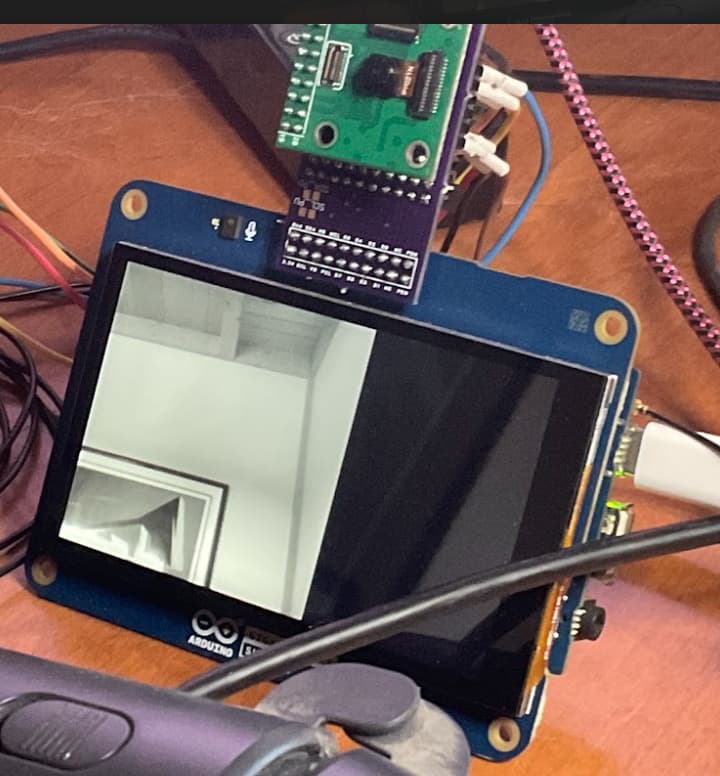
Camera/Arducam_dvp: possible resolution > QVGA?

I am wondering if it is possible on the GIGA to use any of the Arducam Cameras supported on the GIGA in any of the resolutions > QVGA. That is the following resolutions are defined:

  // CAMERA_R160x120     = 0,   /* QQVGA Resolution   */
  // CAMERA_R320x240     = 1,   /* QVGA Resolution    */
  // CAMERA_R320x320     = 2,   /* 320x320 Resolution */
  // CAMERA_R640x480     = 3,   /* VGA                */
  // CAMERA_R800x600     = 5,   /* SVGA               */
  // CAMERA_R1600x1200   = 6,   /* UXGA               */
  // CAMERA_RMAX                /* Sentinel value */

Right now I am trying with the GC2145 that hardware wise goes up to 1600x1200.
I have it currently mounted using a simple Adapter I did a while ago for another board to rotate the camera 90 degrees, like:

I have a simple sketch, that striped down the sample sketch to only have one framebuffer object and display it on the screen. If image size with is <=480, simply swap the bytes. If > 480, I compress the image down to 480x480 to display it.

#include "arducam_dvp.h"
#include "Arduino_H7_Video.h"
#include "dsi.h"
#include "SDRAM.h"

// This example only works with Greyscale cameras (due to the palette + resize&rotate algo)
#define ARDUCAM_CAMERA_GC2145

#ifdef ARDUCAM_CAMERA_HM01B0
#include "Himax_HM01B0/himax.h"
HM01B0 himax;
Camera cam(himax);
#define IMAGE_MODE CAMERA_GRAYSCALE
#elif defined(ARDUCAM_CAMERA_HM0360)
#include "Himax_HM0360/hm0360.h"
HM0360 himax;
Camera cam(himax);
#define IMAGE_MODE CAMERA_GRAYSCALE
#elif defined(ARDUCAM_CAMERA_OV767X)
#include "OV7670/ov767x.h"
// OV7670 ov767x;
OV7675 ov767x;
Camera cam(ov767x);
#define IMAGE_MODE CAMERA_RGB565
#elif defined(ARDUCAM_CAMERA_GC2145)
#include "GC2145/gc2145.h"
GC2145 galaxyCore;
Camera cam(galaxyCore);
#define IMAGE_MODE CAMERA_RGB565
#endif

// The buffer used to capture the frame
FrameBuffer fb;

// The buffer used to rotate and resize the frame
Arduino_H7_Video Display(800, 480, GigaDisplayShield);

void blinkLED(uint32_t count = 0xFFFFFFFF) {
  pinMode(LED_BUILTIN, OUTPUT);
  while (count--) {
    digitalWrite(LED_BUILTIN, LOW);   // turn the LED on (HIGH is the voltage level)
    delay(50);                        // wait for a second
    digitalWrite(LED_BUILTIN, HIGH);  // turn the LED off by making the voltage LOW
    delay(50);                        // wait for a second
  }
}

uint32_t palette[256];

void setup() {
  // Init the cam QVGA, 30FPS
  while (!Serial && millis() < 4000) {}
  Serial.begin(115200);
  galaxyCore.debug(Serial);
  // CAMERA_R160x120     = 0,   /* QQVGA Resolution   */
  // CAMERA_R320x240     = 1,   /* QVGA Resolution    */
  // CAMERA_R320x320     = 2,   /* 320x320 Resolution */
  // CAMERA_R640x480     = 3,   /* VGA                */
  // CAMERA_R800x600     = 5,   /* SVGA               */
  // CAMERA_R1600x1200   = 6,   /* UXGA               */
  // CAMERA_RMAX                /* Sentinel value */
  #define CAMERA_WIDTH 640
  #define CAMERA_HEIGHT 480
  if (!cam.begin(CAMERA_R640x480, IMAGE_MODE, 30)) {
    blinkLED();
  }
  galaxyCore.printRegs();

  // Setup the palette to convert 8 bit greyscale to 32bit greyscale
  for (int i = 0; i < 256; i++) {
    palette[i] = 0xFF000000 | (i << 16) | (i << 8) | i;
  }


  Display.begin();

  if (IMAGE_MODE == CAMERA_GRAYSCALE) {
    dsi_configueCLUT((uint32_t *)palette);
  }
  // big enough for full screen.
  #if CAMERA_WIDTH > 320
  uint8_t *fb_buf = (uint8_t *)((((uint32_t)SDRAM.malloc(CAMERA_WIDTH * CAMERA_HEIGHT * 2 + 31)) + 31) & 0xfffffff0l);
  memset(fb_buf, 0, CAMERA_WIDTH * CAMERA_HEIGHT * 2);
  fb.setBuffer(fb_buf);
  #endif
  Serial.print("FB Buffer: ");

  // clear the display (gives a nice black background)
  dsi_lcdClear(0);
  dsi_drawCurrentFrameBuffer();
  dsi_lcdClear(0);
  dsi_drawCurrentFrameBuffer();
}

inline uint16_t HTONS(uint16_t x) {
  return (((x >> 8) & 0x00FF) | ((x << 8) & 0xFF00));
}

void loop() {

  // Grab frame and write to another framebuffer
    SCB_CleanInvalidateDCache();
  if (cam.grabFrame(fb, 3000) == 0) {

    // double the resolution and transpose (rotate by 90 degrees) in the same step
    // this only works if the camera feed is 320x240 and the area where we want to display is 640x480
    uint16_t *frame_in = (uint16_t *)fb.getBuffer();
    SCB_CleanInvalidateDCache();
    //for (int ii = 0; ii < (1600 * 1200); ii++) frame_in[ii] = HTONS(frame_in[ii]);
    // lets clip the image to 480x480
    #if CAMERA_WIDTH < 480
    for (int ii = 0; ii < (CAMERA_WIDTH * CAMERA_HEIGHT); ii++) frame_in[ii] = HTONS(frame_in[ii]);
    SCB_CleanInvalidateDCache();
    dsi_lcdDrawImage((void *)fb.getBuffer(), (void *)dsi_getCurrentFrameBuffer(), CAMERA_WIDTH, CAMERA_HEIGHT, IMAGE_MODE == CAMERA_GRAYSCALE ? DMA2D_INPUT_L8 : DMA2D_INPUT_RGB565);
    #else
    for (int y = 0; y < 480; y++) {
      for (int x = 0; x < 480; x++) {
        frame_in[y * 480 + x] = HTONS(frame_in[y * CAMERA_WIDTH + x]);
      }
    }
    dsi_lcdDrawImage((void *)fb.getBuffer(), (void *)dsi_getCurrentFrameBuffer(), 480, 480, IMAGE_MODE == CAMERA_GRAYSCALE ? DMA2D_INPUT_L8 : DMA2D_INPUT_RGB565);
    #endif
    dsi_drawCurrentFrameBuffer();
  } else {
    blinkLED(20);
  }
}

Note: currently I only have it setup for GC2145 camera will try one or more others soon.

First issue: SDRAM - can it be used for camera frame buffer? That is when I was testing the GC2145 at 320x240 but was still using the SDRAM, I would get strange frames: It would go from normal looking one like:
image
To ones that were screwed up like:
image
Note: could be issue with camera and how it is dealing with brighter light around it, but I saw a lot less of an effect when I put in the #if:

  #if CAMERA_WIDTH > 320
  uint8_t *fb_buf = (uint8_t *)((((uint32_t)SDRAM.malloc(CAMERA_WIDTH * CAMERA_HEIGHT * 2 + 31)) + 31) & 0xfffffff0l);
  memset(fb_buf, 0, CAMERA_WIDTH * CAMERA_HEIGHT * 2);
  fb.setBuffer(fb_buf);
  #endif

To leave the frame buffer into normal memory. There is still camera effects where the images alternate from lower intensity to higher... Probably some of the auto... settings.

So again wondering if there is an issue with SDRAM? I did see this open issue:
SDRAM memory write corruption · Issue #797 · arduino/ArduinoCore-mbed (github.com)

Camera code: Assuming that the memory works, have any of these camera code bases been tested on any higher resolutions like VGA?

There looks like there may be a few other code bases for these cameras where the camera register settings are different, including:

Also wondering if there needs to be more control over the speed of the capture. For example on these cameras code base it ignores the setting of frame rate. Maybe would work better when in SDRAM if one could slow it down...

Better place to ask questions?
Is there a better place to ask questions about, these different questions and their integration with the GIGA?

Thanks
Kurt

It looks like the OV7675 works better on the sketch than the GC2145.
At least it can show the 480x480 from SDRAM...

Waving hand near it or the like, can cause the image to go screwy like:

But assuming camera issue... Sometimes it will recover back to normal, other times...

Updated to try ARDUCAM_CAMERA_HM0360

Works at 480x480

But...

It it's orientation is 180 degrees from the other two cameras.
Aargh...

I noticed in the header file there is the method:
cam.setHorizontalMirror(true);

It compiles but does not link...
So looks like another unimplemented function:

Next up see if the methods in hm360.h is implemented:

        int setVerticalFlip(bool flip_enable);
        int setHorizontalMirror(bool mirror_enable);

EDIT1:
Well they exist in the .cpp file :smiley:
But:

int HM0360::setVerticalFlip(bool flip_enable)
{
  return -1;
}

int HM0360::setHorizontalMirror(bool mirror_enable)
{
  return -1;
}

But don't do anything :frowning:

EDIT2
HM1B0 works at 320x240 same orientation as HM0360. And the two methods are also not implemented.

Note 320x240 is the size of the sensor so ...

I know... I am mostly just talking to myself :wink:

But I have a fork/branch of Arducam_dvp up on github:

Where it now has implementations for the missing methods. Most of it was extracted from the mbed nicla code base, from the camera class.

I still have some debug code in there that allows me to print out the registers, with a lot of the logical names for them.

I also made a version of the: Camera class example sketch: CameraCaptureZoomPan,
that compiles for the GIGA, but instead of sending the data over serial port it displays it on the screen. It starts the camera in full resolution 1600x1200 and sets up pan/zoom for 320x240
And each time you enter something in the Serial Monitor, it moves pans the picture over by 100 and when end of row goes to next row (down 100)...

CameraCaptureZoomPan_giga.ino (5.7 KB)

Yesterday I thought I would ask the question on the Nicla Vision forum as they use similar camera...

Looks like it may not be possible.

Thanks@Merlin513, well at least we are now have it limping along on a Teensy MicroMod

(Captured 640x480), displayed on ILI9488 (480x320) :smiley:

One bright side, is that the HM030 does appear to work at VGA configuration.

I probably should display more of the image here...

Note: I am using my own adapter that rotates the camera 90 degrees. With this camera it is showing upside down and inverted... So I implemented the functions to allow for horizontal and vertical flipping...

Current sketch:

#include "arducam_dvp.h"
#include "Arduino_H7_Video.h"
#include "dsi.h"
#include "SDRAM.h"

// This example only works with Greyscale cameras (due to the palette + resize&rotate algo)
//#define ARDUCAM_CAMERA_GC2145
#define ARDUCAM_CAMERA_HM0360

#ifdef ARDUCAM_CAMERA_HM01B0
#include "Himax_HM01B0/himax.h"
HM01B0 himax;
Camera cam(himax);
#define IMAGE_MODE CAMERA_GRAYSCALE
#elif defined(ARDUCAM_CAMERA_HM0360)
#include "Himax_HM0360/hm0360.h"
HM0360 himax;
Camera cam(himax);
#define IMAGE_MODE CAMERA_GRAYSCALE
#elif defined(ARDUCAM_CAMERA_OV767X)
#include "OV7670/ov767x.h"
// OV7670 ov767x;
OV7675 ov767x;
Camera cam(ov767x);
#define IMAGE_MODE CAMERA_RGB565
#elif defined(ARDUCAM_CAMERA_GC2145)
#include "GC2145/gc2145.h"
GC2145 galaxyCore;
Camera cam(galaxyCore);
#define IMAGE_MODE CAMERA_RGB565
#endif

// The buffer used to capture the frame
FrameBuffer fb;

// The buffer used to rotate and resize the frame
Arduino_H7_Video Display(800, 480, GigaDisplayShield);

void blinkLED(uint32_t count = 0xFFFFFFFF) {
  pinMode(LED_BUILTIN, OUTPUT);
  while (count--) {
    digitalWrite(LED_BUILTIN, LOW);   // turn the LED on (HIGH is the voltage level)
    delay(50);                        // wait for a second
    digitalWrite(LED_BUILTIN, HIGH);  // turn the LED off by making the voltage LOW
    delay(50);                        // wait for a second
  }
}

uint32_t palette[256];

void setup() {
  // Init the cam QVGA, 30FPS
  while (!Serial && millis() < 4000) {}
  Serial.begin(115200);
  //galaxyCore.debug(Serial);
  // CAMERA_R160x120     = 0,   /* QQVGA Resolution   */
  // CAMERA_R320x240     = 1,   /* QVGA Resolution    */
  // CAMERA_R320x320     = 2,   /* 320x320 Resolution */
  // CAMERA_R640x480     = 3,   /* VGA                */
  // CAMERA_R800x600     = 5,   /* SVGA               */
  // CAMERA_R1600x1200   = 6,   /* UXGA               */
  // CAMERA_RMAX                /* Sentinel value */
  #define CAMERA_WIDTH 640
  #define CAMERA_HEIGHT 480

  Serial.print("Giga Camera shield direct start: ");
  Serial.print(CAMERA_WIDTH, DEC);
  Serial.print(" ");
  Serial.println(CAMERA_HEIGHT, DEC);
  if (!cam.begin(CAMERA_R640x480, IMAGE_MODE, 15)) {
    blinkLED();
  }
  //galaxyCore.printRegs();
  #if defined(ARDUCAM_CAMERA_HM0360)
  cam.setVerticalFlip(true);
  // Mirrors the image horizontally
  cam.setHorizontalMirror(true);
  #endif
  // Setup the palette to convert 8 bit greyscale to 32bit greyscale
  for (int i = 0; i < 256; i++) {
    palette[i] = 0xFF000000 | (i << 16) | (i << 8) | i;
  }


  Display.begin();

  if (IMAGE_MODE == CAMERA_GRAYSCALE) {
    dsi_configueCLUT((uint32_t *)palette);
  }
  // big enough for full screen.
  #if CAMERA_WIDTH > 320
  #if defined(ARDUCAM_CAMERA_HM0360)
  Serial.println("Before malloc"); Serial.flush();
  uint8_t *fb_buf = (uint8_t *)((((uint32_t)malloc(CAMERA_WIDTH * CAMERA_HEIGHT + 32)) + 32) & 0xffffffe0l);
  Serial.println("After malloc");
  Serial.print("FB Buffer: ");
  Serial.println((uint32_t)fb_buf, HEX);
  #else
  uint8_t *fb_buf = (uint8_t *)((((uint32_t)SDRAM.malloc(CAMERA_WIDTH * CAMERA_HEIGHT * 2 + 32)) + 32) & 0xffffffe0l);
  memset(fb_buf, 0, CAMERA_WIDTH * CAMERA_HEIGHT * 2);
  #endif

  fb.setBuffer(fb_buf);
  Serial.print("FB Buffer: ");
  Serial.println((uint32_t)fb_buf, HEX);
  #endif

  // clear the display (gives a nice black background)
  dsi_lcdClear(0);
  dsi_drawCurrentFrameBuffer();
  dsi_lcdClear(0);
  dsi_drawCurrentFrameBuffer();
}

inline uint16_t HTONS(uint16_t x) {
  return (((x >> 8) & 0x00FF) | ((x << 8) & 0xFF00));
}

void loop() {

  // Grab frame and write to another framebuffer
    SCB_CleanInvalidateDCache();
  if (cam.grabFrame(fb, 3000) == 0) {

    // double the resolution and transpose (rotate by 90 degrees) in the same step
    // this only works if the camera feed is 320x240 and the area where we want to display is 640x480
    SCB_CleanInvalidateDCache();
    #if CAMERA_WIDTH < 480
    #ifdef ARDUCAM_CAMERA_HM0360
    #else
    for (int ii = 0; ii < (CAMERA_WIDTH * CAMERA_HEIGHT); ii++) frame_in[ii] = HTONS(frame_in[ii]);
    #endif
    SCB_CleanInvalidateDCache();
    dsi_lcdDrawImage((void *)fb.getBuffer(), (void *)dsi_getCurrentFrameBuffer(), CAMERA_WIDTH, CAMERA_HEIGHT, IMAGE_MODE == CAMERA_GRAYSCALE ? DMA2D_INPUT_L8 : DMA2D_INPUT_RGB565);
    #else
    #ifdef ARDUCAM_CAMERA_HM0360
    uint8_t *frame_in = (uint8_t *)fb.getBuffer();
    for (int y = 0; y < 480; y++) {
      for (int x = 0; x < 480; x++) {
        frame_in[y * 480 + x] = frame_in[y * CAMERA_WIDTH + x];
      }
    #else
    uint16_t *frame_in = (uint16_t *)fb.getBuffer();
    for (int y = 0; y < 480; y++) {
      for (int x = 0; x < 480; x++) {
        frame_in[y * 480 + x] = HTONS(frame_in[y * CAMERA_WIDTH + x]);
      }
    #endif  
    }
    dsi_lcdDrawImage((void *)fb.getBuffer(), (void *)dsi_getCurrentFrameBuffer(), 480, 480, IMAGE_MODE == CAMERA_GRAYSCALE ? DMA2D_INPUT_L8 : DMA2D_INPUT_RGB565);
    #endif
    dsi_drawCurrentFrameBuffer();
  } else {
    blinkLED(20);
    static uint8_t error_count = 10;
    if (error_count) {
      Serial.println("Failed to read frame");
      error_count--;
    }
  }
}

Quick update: It now appears like the OV7675 will run in VGA mode with the framebuffer in the SDRAM :smiley:

I finished with most of my playing now with the Ardcam_dvp library, where I filled in several of the APIs in the Camera class with the Nicla Vision Camera code. Added in some debug code to easier see what the register settings are.

I created a Pull Request for it:

With this Pull I added two examples:
The first simply tries to load a frame and display it like the Camera library example. The main difference is that I do not use a second buffer to rotate and stretch it up to 640 by 480 to display. And if the camera frame size has a width > 480, I truncate the returned data to 480x480.

I also ported the Camera example CameraCaptureZoomPan that only worked on the nicla, to run on this library with the GC2145 library, but instead of sending the data over Serial to host, to display, I display it on the screen...

I have no idea if/when these changes might be pulled in. But if anyone wishes to play with it, it is up in the fork/branch mentioned back in post #4