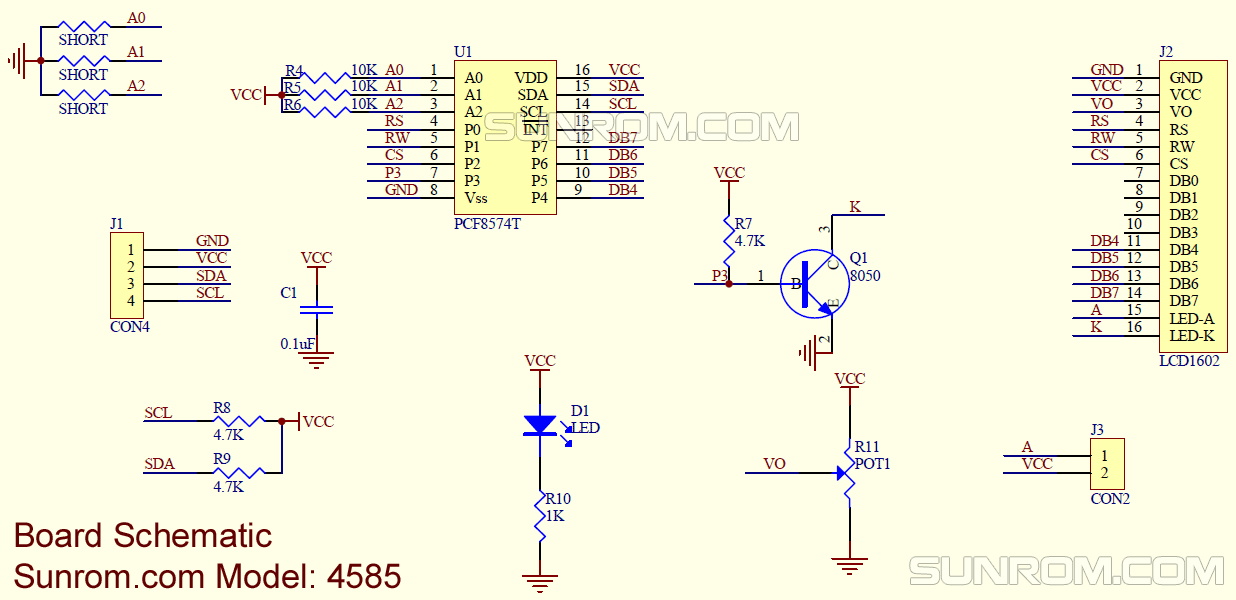
Can the LCD display initialization time be reduced?

Hello everyone,

I am using a 16x2 LCD display in one of my projects. I have connected the i2c module to the display and using the "LiquidCrystal_I2C.h" library. Additionally, I have a keypad for entering the code and unlocking my box. As my system is running on a battery, therefore, I cut off the power to all the devices connected to the MCU and put it into a deep sleep. Now, to wake the system up, I simply press the # button and then am ready to put the code again. The problem is, when the MCU wakes up, the display should be initialized. And that initialization takes around 1 and half a second. My question is, can this delay be reduced? If yes, then how? I would like to reduce it as much as possible.

Thank you.

I do not know why it would take that long to initialize the display. There are more than one LiquidCrystal_I2C libraries. The one that you are using may be slower than others. My suggestion would be to try the hd44780 library. I know that it is faster at writing to the display so it may be faster to initialize. The library is available through the IDE library manager. In my opinion it is the best currently available. If you have trouble integrating it into your code, post your code and I will help fix it, though it is really easy.

Are you using any custom characters for the display?

Are you perhaps using an actual hardware reset to wake the system up?

That would cause the bootloader to activate and wait over one second to anticipate a code upload. :upside_down_face:

No no, I am sure about it. I am using <avr/sleep.h> library to sleep the MCU and wake it up by pressing # button.

Yes. I am.

I assume you are calling the library init() or begin() function to re-initialize the interface and LCD.
If so, I can say with 100% certainty that the hd44780 library hd44780_I2Cexp i/o class will be much faster at initialization.
Not only are the LCD instructions & characters sent to the LCD about 3X faster when using the hd44780 library but the LiquidCrystal_I2C library initialization code has an added intentional 1 second delay in it. i.e. delay(1000)
No clue why.
I have seen many things in various LCD libraries that don't make sense or are unnecessary.

If you want even more time reduction/speed and your wiring is short and clean, you could run the i2c bus at 400kHz instead of the default 100kHz.
When you do that, the hd44780_I2Cexp i/o class over i2c through the pcf8574 i/o expander will outperform the LiquidCrytal library which is using direct pin control

--- bill

Hi @bperrybap, exactly I am calling the lcd.init() when the system wakes up. And YES, there is almost 1 second delay for the lcd to initialize. Ok, so I should switch to hd44780 lib, right as @groundFungus has also recommended. Will give it a try and see if I get success. By the way, can I take out this delay(1000) from the libarary? Thank you for the input.

This is a short version of my code, that I am using currently.

#include <avr/sleep.h>
#include <Keypad.h>
#include <SPI.h>
#include <Wire.h>
#include <LiquidCrystal_I2C.h>
#define powerPin0         0
#define interruptPin      2
#define redLED            A0
#define greenLED          A1
#define Password_Length   8
char enteredPassword [Password_Length];
unsigned long int userPassword;
byte data_count       = 0;
byte led_blink        = 0;
bool wokeUP           = true;
bool blinking         = true;
unsigned long currentMillis  = 0;
unsigned long previousMillis = 0;
const long interval          = 60000;
const byte ROWS = 4;
const byte COLS = 3;
char hexaKeys[ROWS][COLS] = {
  {'1', '2', '3'},
  {'4', '5', '6'},
  {'7', '8', '9'},
  {'*', '0', '#'}
};
byte rowPins[ROWS] = {3, 4, 2, 6};
byte colPins[COLS] = {7, 8, 9};
Keypad customKeypad = Keypad(makeKeymap(hexaKeys), rowPins, colPins, ROWS, COLS);
LiquidCrystal_I2C lcd(0x27, 16, 2);

void setup() {
  pinMode(redLED, OUTPUT);
  pinMode(greenLED, OUTPUT);
  pinMode(powerPin0, OUTPUT);
  digitalWrite(powerPin0, HIGH);
  lcd.init();
  lcd.backlight();
}

void loop() {
  Buzzer();                                                                               // 2 buzzer sounds when system starts
  lcd.setCursor(0, 0);
  lcd.print("Code");
  char customKey = customKeypad.getKey();
  if (customKey) {
    previousMillis = currentMillis;
    enteredPassword[data_count] = customKey;
    lcd.setCursor(data_count, 1);
    lcd.print(enteredPassword[data_count]);
    digitalWrite(greenLED, HIGH);
    delay(50);
    digitalWrite(greenLED, LOW);
    data_count++;
  }
  if (data_count == Password_Length - 1) {
    lcd.clear();
    delay(100);
    userPassword = atol(enteredPassword);
    if (userPassword == 1234567) {
      lcd.setCursor(0, 0);
      lcd.print("OK");
      delay(1000);
      lcd.clear();
      lcd.setCursor(0, 0);
      lcd.print("Going to");
      lcd.setCursor(0, 1);
      lcd.print("Sleep");
      delay(1000);
      Going_To_Sleep();
      led_blink = 0;
      clearData();
      lcd.init();
      lcd.clear();
    } else {
      lcd.setCursor(0, 0);
      lcd.print("Wrong");
      delay(1000);
      lcd.clear();
      clearData();
    }
  }
  if (wokeUP == true) {                                                                       // call sleep function if inactive for 1 minute
    systemInactiveSleep();
  }
}

void Buzzer() {
  if (blinking) {
    while (led_blink < 2) {
      digitalWrite(greenLED, HIGH);
      delay(50);
      digitalWrite(greenLED, LOW);
      delay(50);
      led_blink++;
    }
    blinking = false;
  }
}


void systemInactiveSleep() {
  currentMillis = millis();
  if (currentMillis - previousMillis >= interval) {
    previousMillis = currentMillis;
    Going_To_Sleep();
    led_blink = 0;
    clearData();
    lcd.init();
    lcd.clear();
  }
}

void clearData() {
  wokeUP = true;
  currentMillis = millis();
  previousMillis = millis();
  while (data_count != 0) {
    enteredPassword[data_count--] = 0;
  }
  return;
}

void Going_To_Sleep() {
  sleep_enable();
  attachInterrupt(0, wakeUp, LOW);
  set_sleep_mode(SLEEP_MODE_PWR_DOWN);
  delay(1000);
  digitalWrite(greenLED, LOW);
  pinMode(interruptPin, INPUT_PULLUP);
  pinMode(9, OUTPUT);
  digitalWrite(9, LOW);
  digitalWrite(powerPin0, LOW);                                                                             
  sleep_cpu();
}

void wakeUp() {
  sleep_disable();
  detachInterrupt(0);
  blinking = true;
  digitalWrite(9, INPUT);
  digitalWrite(powerPin0, HIGH);
}

How are you handling power to the LCD?
Are you powering the LCD using an Arduino pin?
If so have you verified that the total power when the backlight is on is within spec?

Not sure what your power requirement are but most of the LCD backpacks have an led on them that is on all the time if there is power. You may want to remove that.

Also, you will want to disconnect the one leg of the contrast that connects to VCC. The way the LCD is designed you don't need that connection to create a voltage divider. Cutting that connection will save a few milliamps of current draw.

Also the LiquidCrystal_I2C library did not implement LCD API 1.0 on() and off() functions.
In that library the functions technically were implemented but they do nothing.
What they are supposed to do is off() turns off the backlight and puts the LCD in lower power mode which turns off the pixels.
The on() function turns everything back on.
If you do this, the display does not have to be initialized and what was on the display will return to the display.
The hd44780 library does implement this.
That said, you will want to measure the current draw in lower power mode to see if it is low enough and make sure the pot modification was done.

--- bill

I am using arduino pro mini and yes, I am using one of its pins to cut of the Vcc of the LCD. And yes, I have made the current in limits for the pin even though I am using the backlight. Actually, before going to sleep, I cut Vcc of the LCD and hence, the LCD draws zero current. As soon as, I wake up the system I need to reinitialize the LCD otherwise I see some garbage on the LCD. And that initiliazation is my problem, it takes time and I don't want that. As soon as the system wakes up, I need to put the code, I don't want to wait for the LCD to turn ON, in other words, I don't need to wait for almost 2 seconds so that I can put the code and see it on the display.

Half a milliamp actually. :grin:

If you are indeed switching off the LCD display, you should connect the backlight and LCD proper to separate Arduino pins. While - given the standard value of "R8" on a 1602 display of "101" or 100 Ohms - the backlight draws only less than 25 mA, it will substantially pull down the voltage on an Arduino pin so it would be undesirable to use that same voltage for the LCD contrast.

If using a "backpack" as it seems you are, then you can remove the jumper and connect the pin that connects to the anode of the backlight, directly to 5 V while you power the backpack itself from an Arduino pin to shut it down (but of course remove the "pilot" LED resistor which has no purpose in a finished design). Cutting the offending connection from Vcc to the potentiometer on a backpack is tricky. Without that connection, the LCD itself draws only about a milliamp anyway and the PCF8574 not much either.


"J3" or "CON2" is the jumper in question.

I was going to say a Nano but of course that wastes current in the USB interface, A Pro Mini is obviously correct. :+1:

????

Sorry, it is a mistake. its actually pinMode(9, INPUT). :slight_smile:

Hi Bill, I am trying to start with the hd44780 library and print the hello world but unfortunately, it won't work. The i2c module is connected to the lcd so, it's simply sda, scl, vcc and ground connection. The i2c address is 0x27, so I changed it in the sketch. I am just seeing in the first row the solid rectangular blocks. The sketch:

#include <Wire.h>
#include <hd44780.h>
#include <hd44780ioClass/hd44780_HC1627_I2C.h> // i2c LCD i/o class header

const int i2c_addr = 0x27;
hd44780_HC1627_I2C lcd(i2c_addr); // use device at this address


// LCD geometry
const int LCD_COLS = 16;
const int LCD_ROWS = 2;
void setup()
{
int status;

	// initialize LCD with number of columns and rows: 
	// hd44780 returns a status from begin() that can be used
	// to determine if initalization failed.
	// the actual status codes are defined in <hd44780.h>
	// See the values RV_XXXX
	//
	// looking at the return status from begin() is optional
	// it is being done here to provide feedback should there be an issue
	//
	status = lcd.begin(LCD_COLS, LCD_ROWS);
	if(status) // non zero status means it was unsuccesful
	{
		// begin() failed so blink error code using the onboard LED if possible
		hd44780::fatalError(status); // does not return
	}

	// Print a message to the LCD
	lcd.print("Hello, World!");
}

void loop() {}

Can you please tell me what am I doing wrong?

Hi @groundFungus I have posted my code in comment number 9, I would like to replace the LiquidCrystal_I2C library with hd44780 library. It looks a bit complex to me. Need your help to run my sketch with the new library to see if that would solve my issue. Thanks

Here you go. I just added the right IO class and fixed the constructor. You do not need to include the I2C address. The library will automatically find the address and the LCD to backpack pin mapping. Now works on my Uno and 1602 I2C enabled LCD.

#include <Wire.h>
#include <hd44780.h>
//#include <hd44780ioClass/hd44780_HC1627_I2C.h> // i2c LCD i/o class header
#include <hd44780ioClass/hd44780_I2Cexp.h> // i2c expander i/o class header

const int i2c_addr = 0x27;
//hd44780_HC1627_I2C lcd(i2c_addr); // use device at this address
hd44780_I2Cexp lcd; // declare lcd object: auto locate & auto config expander chip

// LCD geometry
const int LCD_COLS = 16;
const int LCD_ROWS = 2;

void setup()
{
   int status;

   // initialize LCD with number of columns and rows:
   // hd44780 returns a status from begin() that can be used
   // to determine if initalization failed.
   // the actual status codes are defined in <hd44780.h>
   // See the values RV_XXXX
   //
   // looking at the return status from begin() is optional
   // it is being done here to provide feedback should there be an issue
   //
   status = lcd.begin(LCD_COLS, LCD_ROWS);
   if (status) // non zero status means it was unsuccesful
   {
      // begin() failed so blink error code using the onboard LED if possible
      hd44780::fatalError(status); // does not return
   }
   
   // Print a message to the LCD
   lcd.print("Hello, World!");
}

void loop() {}

Perfect. Yes, IO class and constructor was wrong. It is working now and am able to run with my code. Just need to fix one thing now.

if (data_count == Password_Length - 1) {
    lcd.clear();
    delay(100);
    userPassword = atol(enteredPassword);
    if (userPassword == 1234567) {
      lcd.setCursor(0, 0);
      lcd.print("OK");
      delay(1000);
      lcd.clear();
      lcd.setCursor(0, 0);
      lcd.print("Going to");
      lcd.setCursor(0, 1);
      lcd.print("Sleep");
      delay(1000);
      Going_To_Sleep();
      led_blink = 0;
      clearData();


      lcd.init();            // i have removed it from the code
      lcd.clear();
    }

So, after the system wakes up, I need to initialize the lcd, right? Because before going to sleep I had cut the Vcc to the LCD and it had turned off. Now, upon wake up, the LCD is powered on but I need to initalize it because without initilization, I test with my code and lcd is not behaving as it should. I tried to used that int Status, status = lcd.begin(LCD_COLS, LCD_ROWS); but it didn't help. How can I fix this?

I am not sure what the question is. To initialize the display you use lcd.begin(LCD_COLS, LCD_ROWS);. If you remove power from the LCD, it will need to be re-initialized with begin(). You do not need the status unless you want to confirm that the LCD is re-initialized and working.

How about the suggestions of @bperrybap in reply #10 to use the off() and on() functions instead of powering the LCD completely down?

Ok, so the VCC pin of the display is connected to one of the GPIO of the Arduino. As I am using my system on a battery, therefore, I want to cut power to all the peripherals before the Arduino goes into sleep mode. And when the Arduino wakes up, the peripherals like the display are turned back ON. But the problem is, when the display is ON, I see some garbage things. I called the function lcd.begin(LCD_COLS, LCD_ROWS); but that didn't fix it. However, the liquidcrystal library worked when I called the lcd.init(); function.

I didn't use the off() and on() functions, but probably in with off() function the display will still consume some power.