can't active DFPlayer with a transistor

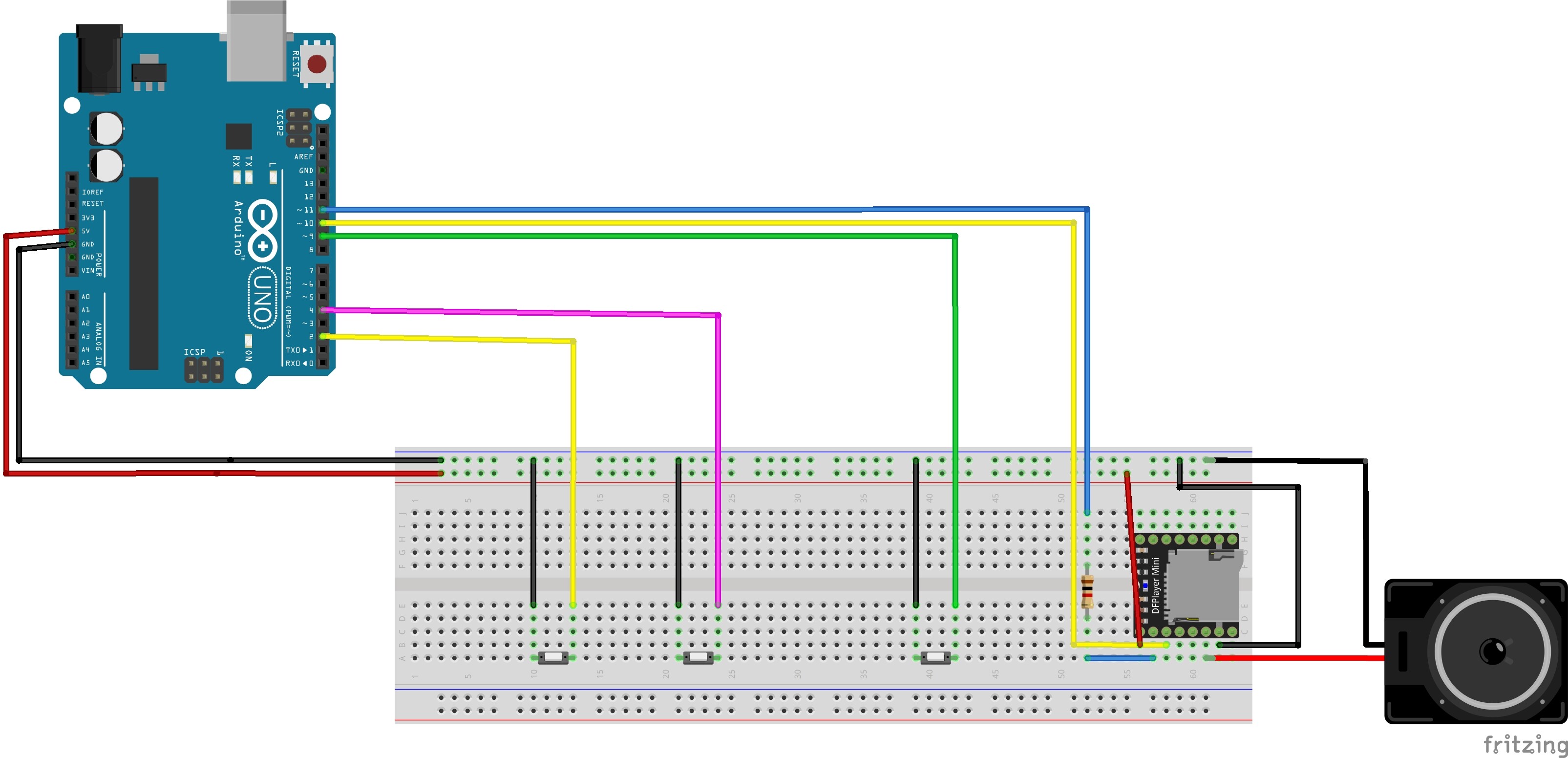
Hey all :slight_smile: I am trying for three days already to active my DFPlayer through a transistor in order to save some power but I can't make it to work unfortunately, for some reason I don't get any base current... I connect the DFPlayer to serial mode, TX & RX pins, GND, 5V and the speaker. When I try to connect pin 7 to the base I don't get any current, no matter which resistor I use ( I started with 18KOhm and get down to as low as 15 Ohm, not even once I got a base current). I tried it both with NPN and with PNP, both didn't work. In both cases I got around Vce = 4.5V. I have no idea why it can happen and be very happy to have you guys's advice. Thank you all in advance :slight_smile:

The sketch (which is just my experimenting sketch in order to make it work) is for the NPN transistor, in the second one with the PNP I used digitalWrite ( transistor, LOW) instead

#include "Arduino.h"
#include "SoftwareSerial.h"
#include "DFRobotDFPlayerMini.h"


SoftwareSerial mySoftwareSerial(10, 11); // RX, TX
DFRobotDFPlayerMini myDFPlayer;
void printDetail(uint8_t type, int value);


int transistor = 7 ;


void setup()
{


  pinMode (transistor, OUTPUT) ;
  digitalWrite (transistor, HIGH) ;
  mySoftwareSerial.begin(9600);
  Serial.begin(115200);


  if (!myDFPlayer.begin(mySoftwareSerial)) {  //Use softwareSerial to communicate with mp3.
    Serial.println(F("Unable to begin:"));
    Serial.println(F("1.Please recheck the connection!"));
    Serial.println(F("2.Please insert the SD card!"));
    while (true) {
      delay(0); // Code to compatible with ESP8266 watch dog.
    }
  }
  Serial.println(F("DFPlayer Mini online."));


  myDFPlayer.volume(20);  //Set volume value. From 0 to 30
  myDFPlayer.play(1);  //Play the first mp3
}


void loop()
{
  static unsigned long timer = millis();


  if (millis() - timer > 2000) {
    timer = millis();
    myDFPlayer.next();  //Play next mp3 every 3 second.
  }
}

Did you try the sleep option of the player?
Leo..

Please post a schematic, a list of this connected to that is useless. Also phots of what you have done is helpful.

Really though you need a MOSFET.

Low side switching is problematic as well.

Wawa's suggestion is by far the best idea.

I added my scheme here, you can't really see it in there but the transistor is NPN (fits to the sketch from the first post). I remember I tried to use the sleeping function of the DFPlayer and it still gave a current of 30mA, which is why I decided to use a transistor instead of it. I will try that again because it doesn't make any sense that I will get the same current. I will try that again with the library from the post you sent, thanks :slight_smile:

I added the picture with the led to show what I did (I know it's connected wrong in the sketch, sorry). In this configuration the led turned on but the DFPlayer didn't played. I had no measurable base current and no measurable emitter current (which is super weird and something I don't understand. I am pretty sure I measured it the right way). The led took 2.9V, the transistor 1.2V. In the configuration without the led the transistor took all the voltage

What will be the difference if I use MOSFET instead of BJT ? I kind of spend around 10 hours on that so I will be super grateful if you know why it didn't work. Maybe the sleeping function will work at the end but I still want to know what happend here. If you want me to do some experiments and post here the results I'll definitely do it. Thanks :slight_smile:

ohh sorry, I forgot to add values to the resistors. The one which is connected to the RX pin of the DFPlayer (pin 11 from the Arduino) is 1000 Ohm. The resistor that goes to the base is 18KOhm, although, like I said, I changed it and nothing really changed.

RX/TX pins are "normally HIGH".
Therefore you should switch ground of the module, not supply.
If you don't, then the module could still be powered through the data pins (bad).
Leo..

Thank you :slight_smile: I understand what you say although I think that's not the issue because we also tried this configuration (the picture "wiring") and it didn't work.

I tried the new library and it actually works way better, thank you for the recommendation. The sleeping function doesn't work though, I find it a bit weird. The power consumption is 280mA, both when it plays and when it allegedly sleeps. I added down here the parts in the code which involves the sleeping function of the DFPlayer, it is not my full code and therefore the code down here might look a bit weird. It goes with the picture which I called "wiring 2"). I suppose I made the sleeping function good, there's not much place for mistakes here, so why does my DFPlayer consumes almost 300mA when it sleeps ?

#include <DFPlayerMini_Fast.h>
#include "Arduino.h"
#include "SoftwareSerial.h"
#include "LowPower.h"
DFPlayerMini_Fast myDFPlayer;


const int wakeUpPin = 2;
int buttonStart = 3 ;
int transistorPin = 8 ;
SoftwareSerial mySoftwareSerial(10, 11); // RX, TX 11 Resistor
int switchFolderButton = 12 ;

boolean sleeping = true ;
boolean countingDown = false ;


int randomNumber ;


boolean playShort = true ;


int numberFilesLongFolder  ;
int numberFilesShortFolder  ;


static unsigned long timer ;
static unsigned long busyCount;
int busyCountInterval =  5000 ;
int sleepingCountInterval = 5000 ;
int busyState ;

//start
void playRandom (int folder, int randomNumber) {
  myDFPlayer.playFolder(folder, randomNumber);  //Play file
}


//switch folder from short file -> long file or long -> short
void switchDirectory () {
  playShort = !playShort ;
}
void wakeUp()
{
}
void setup()
{
  Serial.begin (4800) ;
  mySoftwareSerial.begin(9600);
  myDFPlayer.begin (mySoftwareSerial) ;


  pinMode(wakeUpPin, INPUT);
  digitalWrite (wakeUpPin, HIGH) ;


  pinMode (buttonStart, INPUT) ;
  digitalWrite (buttonStart, HIGH);

  pinMode (switchFolderButton, INPUT) ;
  digitalWrite (switchFolderButton, HIGH);

  pinMode (transistorPin, OUTPUT) ;
  digitalWrite (transistorPin, LOW);


  busyCount = 0 ;
}


void loop()
{
  attachInterrupt(0, wakeUp, LOW);


  LowPower.powerDown(SLEEP_FOREVER, ADC_OFF, BOD_OFF);


  detachInterrupt(0);


  // wake up & start
  if (!digitalRead (wakeUpPin) && sleeping) {
    delay (50) ;
    if (!digitalRead (wakeUpPin) && sleeping) {
      digitalWrite (wakeUpPin, LOW) ;
      digitalWrite (transistorPin, HIGH);


      // it doesn't work if the command shows up only once
      numberFilesShortFolder = myDFPlayer.numTracksInFolder(1) ;
      numberFilesLongFolder = myDFPlayer.numTracksInFolder(2) ;
      numberFilesShortFolder = myDFPlayer.numTracksInFolder(1) ;
      numberFilesLongFolder = myDFPlayer.numTracksInFolder(2) ;


      sleeping = false ;
      if (playShort) {
        randomNumber = random (1, (numberFilesShortFolder + 1)) ;
        playRandom(1, randomNumber) ;
      }
      else {
        randomNumber = random (1, (numberFilesLongFolder + 1) ) ;
        playRandom(2, randomNumber);  //Play file
      }
      delay (200) ;
    }
  }


  if (!digitalRead(buttonStart) ) {
    delay (50) ;
    if (!digitalRead(buttonStart) ) {
      if (playShort) {
        randomNumber = random (1, numberFilesShortFolder + 1) ;
        playRandom(1, randomNumber) ;
      }


      else {
        randomNumber = random (1, numberFilesLongFolder + 1) ;
        playRandom(2, randomNumber);  //Play file
      }
      delay (200) ;
    }
  }
    }
  }


  //switch folder
  if (!digitalRead(switchFolderButton) ) {
    delay (50) ;
    if (!digitalRead(switchFolderButton) ) {
      switchDirectory () ;
      delay (200) ;
    }
  }

  //making the arduino go to sleep when the file ends / stopped for a while
  if (millis () - busyCount >= busyCountInterval ) {
    busyCount = millis () ;
    busyState = digitalRead (busy) ;
  }


  if (busyState && !countingDown) {
    timer = millis () ;
    countingDown = true ;
  }


  //without this delay the file don't stop after  a file ended
  delay (10) ;


  //go to sleep
  if (busyState && millis () - timer > sleepingCountInterval ) {
    sleeping = true ;
    timer = millis () ;
    digitalWrite (transistorPin, LOW);
    digitalWrite (wakeUpPin, HIGH) ;
  }


}

Thank you all very much )

Ok I realized why my DFPlayer took so much current and didn't really go to sleep, it was because I connected the second pin of the speaker to GND and not to the DFPlayer like they said in the DFPlayer schematics. Changing it also reduced the current it takes when it works from 200mA to 60mA. It works a bit less well now but it's definitely worth it. When it sleeps it consumes however 25mA which is too much, I power it from batteries, so I figured I'd stick to a transistor anyway.

Something very weird is happening to me right now and I can't really explain it, I'll be happy to hear your thoughts about it. So I just wanted to change my project from being powered from USB to batteries, I did it and it all changed now : some of the buttons don't work anymore. I added my schematics. The buttons at pins 2 & 3 reacts (the interrupters, I suppose it's connected somehow), the buttons at pins 4 & 12 don't. The light also works so I'm thinking it's just about pins that should get input and are not interrupters but I don't really know. Analog input pins don't react as well (not in the schematics but I checked that). I also noticed that if I power it from the USB but my computer is not connected to a charger (and so to the power outlet in the wall) the same effect happens. Do you guys know by any chance why ? btw I am using arduino pro mini, not uno like in the schematics, sorry

Edit : ok now it works. On the moment that I understand why the same circuit doesn't work at 13 but works at 17 I'll be way wiser

Hi,
Sorry but can you please post a proper schematic with component labels and pin names.
Fritzy is hopeless for trouble shooting as no vital labeling is included.

What is the transistor?
Why are you trying to turn the DFPlayer power off by disconnecting the gnd side.
When you do that the player will find other gnd currents, usually through the control pins, so it never really turns off.

Please draw your circuit on a sheet of paper and post a picture of it.

Thanks.. Tom.. :slight_smile:

Hey thanks :slight_smile: I connected it to ground because this was the only way it worked. I don't really know what I am doing, I am too beginner, I tried from ground and it worked (partially) good, from + it's not working at all. I suppose I am also doing something wrong but I don't really know what. When I connect it from ground (like in the schematics I added) it works sometime and crushes sometimes while making this disgusting disturbance noise. I really don't know how I should connect it properly in order to have a steady clear voice, I am reading now this fantastic guide but I will still be happy if someone will just tell me where the problem is and how to solve it.

This is the datasheet for the BJP I used (BC337), I tried it with other BJPs as well but this one is the only one that partially worked. I can definitely buy different ones if needed though

#include <DFPlayerMini_Fast.h>
#include "Arduino.h"
#include "SoftwareSerial.h"
#include "LowPower.h"
DFPlayerMini_Fast myDFPlayer;


const int wakeUpPin = 2;
int buttonStart = 3 ;
int transistorPin = 8 ;
SoftwareSerial mySoftwareSerial(10, 11); // RX, TX 11 Resistor
int switchFolderButton = 12 ;

boolean sleeping = true ;
boolean countingDown = false ;


int randomNumber ;


boolean playShort = true ;


int numberFilesLongFolder  ;
int numberFilesShortFolder  ;


static unsigned long timer ;
static unsigned long busyCount;
int busyCountInterval =  5000 ;
int sleepingCountInterval = 5000 ;
int busyState ;

//start
void playRandom (int folder, int randomNumber) {
  myDFPlayer.playFolder(folder, randomNumber);  //Play file
}


//switch folder from short file -> long file or long -> short
void switchDirectory () {
  playShort = !playShort ;
}
void wakeUp()
{
}
void setup()
{
  Serial.begin (4800) ;
  mySoftwareSerial.begin(9600);
  myDFPlayer.begin (mySoftwareSerial) ;


  pinMode(wakeUpPin, INPUT);
  digitalWrite (wakeUpPin, HIGH) ;


  pinMode (buttonStart, INPUT) ;
  digitalWrite (buttonStart, HIGH);

  pinMode (switchFolderButton, INPUT) ;
  digitalWrite (switchFolderButton, HIGH);

  pinMode (transistorPin, OUTPUT) ;
  digitalWrite (transistorPin, LOW);


  busyCount = 0 ;
}


void loop()
{
  attachInterrupt(0, wakeUp, LOW);


  LowPower.powerDown(SLEEP_FOREVER, ADC_OFF, BOD_OFF);


  detachInterrupt(0);


  // wake up & start
  if (!digitalRead (wakeUpPin) && sleeping) {
    delay (50) ;
    if (!digitalRead (wakeUpPin) && sleeping) {
      digitalWrite (wakeUpPin, LOW) ;
      digitalWrite (transistorPin, HIGH);


      // it doesn't work if the command shows up only once
      numberFilesShortFolder = myDFPlayer.numTracksInFolder(1) ;
      numberFilesLongFolder = myDFPlayer.numTracksInFolder(2) ;
      numberFilesShortFolder = myDFPlayer.numTracksInFolder(1) ;
      numberFilesLongFolder = myDFPlayer.numTracksInFolder(2) ;


      sleeping = false ;
      if (playShort) {
        randomNumber = random (1, (numberFilesShortFolder + 1)) ;
        playRandom(1, randomNumber) ;
      }
      else {
        randomNumber = random (1, (numberFilesLongFolder + 1) ) ;
        playRandom(2, randomNumber);  //Play file
      }
      delay (200) ;
    }
  }


  if (!digitalRead(buttonStart) ) {
    delay (50) ;
    if (!digitalRead(buttonStart) ) {
      if (playShort) {
        randomNumber = random (1, numberFilesShortFolder + 1) ;
        playRandom(1, randomNumber) ;
      }


      else {
        randomNumber = random (1, numberFilesLongFolder + 1) ;
        playRandom(2, randomNumber);  //Play file
      }
      delay (200) ;
    }
  }
    }
  }


  //switch folder
  if (!digitalRead(switchFolderButton) ) {
    delay (50) ;
    if (!digitalRead(switchFolderButton) ) {
      switchDirectory () ;
      delay (200) ;
    }
  }

  //making the arduino go to sleep when the file ends / stopped for a while
  if (millis () - busyCount >= busyCountInterval ) {
    busyCount = millis () ;
    busyState = digitalRead (busy) ;
  }


  if (busyState && !countingDown) {
    timer = millis () ;
    countingDown = true ;
  }


  //without this delay the file don't stop after  a file ended
  delay (10) ;


  //go to sleep
  if (busyState && millis () - timer > sleepingCountInterval ) {
    sleeping = true ;
    timer = millis () ;
    digitalWrite (transistorPin, LOW);
    digitalWrite (wakeUpPin, HIGH) ;
  }


}

Thank you all very much )

I haven't read anything else in this post but your schematic doesn't show the collector or emittor of the transistor so how do we know it's not backwards ?

sorry, I edited it now. I tried it though with both configuration and it didn't work out very well, the configuration I added works better than the second one tough

It's backwards. The EMITTER MUST go to GND

But the emitter goes to ground in the schematics I added

SO does the COLLECTOR.
How is that supposed to work ?
hint: it won't
That makes it shorted

Instead of connecting the DFPlayer straight to GND I pass the ground wire through the transistor which acts as a switch in order to cut off the supply to the DFPlayer when it's not in use and save energy. Why shouldn't it work ?

Shorted how ? I'm afraid I don't understand what you mean.

if both collector AND emitter are connected to GND then obviously it's shorted through GND trace

I want to use the transistor as a switch. What would you have done ?

it is not a switch if it is SHORTED.

Is no one else seeing this ?
Somebody jump in

sorry but I don't understand your point at all. If I had not used the transistor then I should've connected the GND pin of the DFPlayer to the GND pin of the Arduino, which is what you call short if I understood you correctly. It is definitely not shortage so I'll be happy if you could please explain me what you mean

both ends of the transistor go to GND