Hi. I'm trying to connect a new device, but can't manage to get it online. If I upload an old sketch with old device settings, it works fine, but not if I add it as a new device.
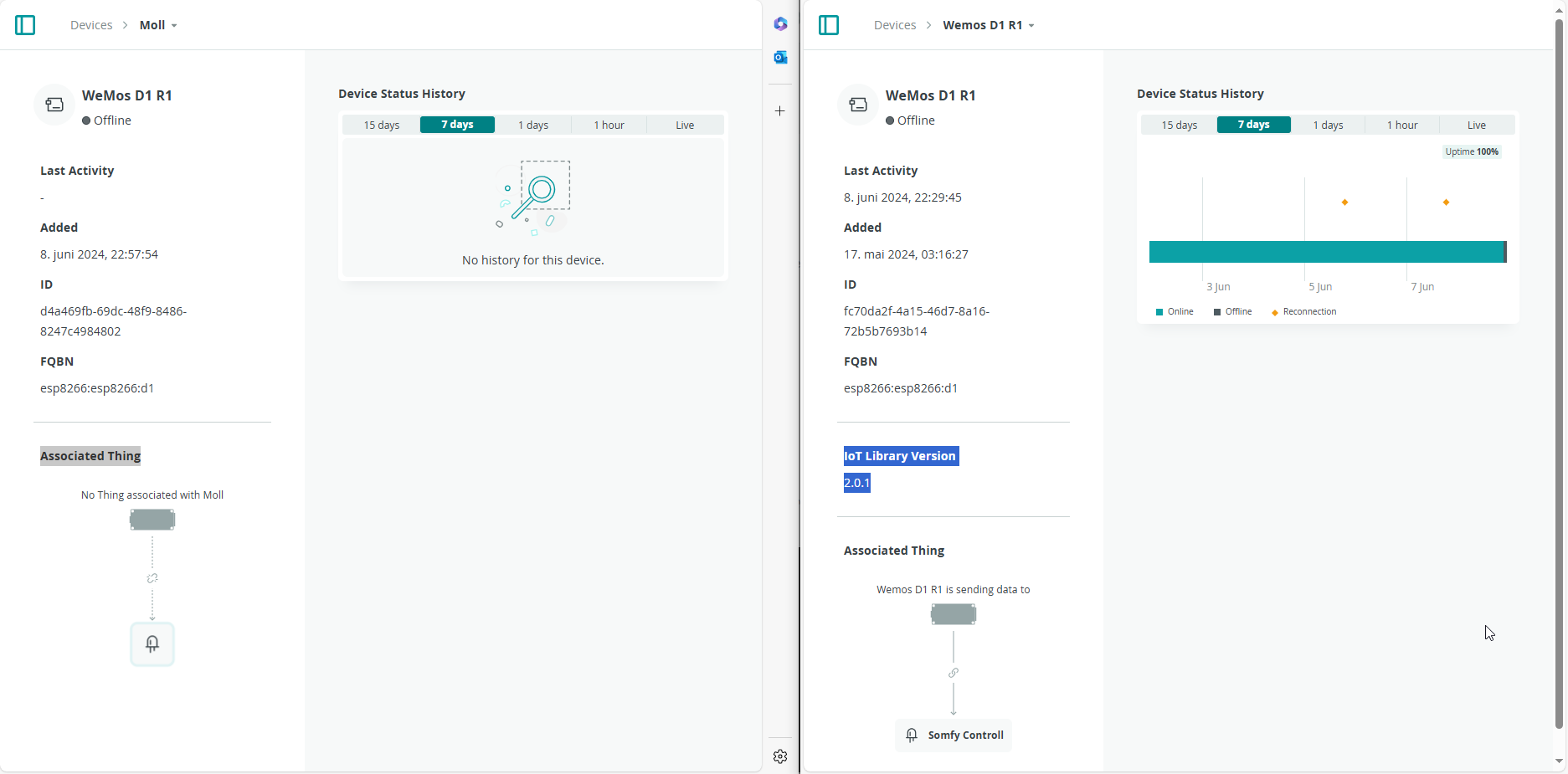
The only difference I see after adding a device is that the working one has a line with text "IoT Library Version 2.0.1" under details and new ones does not.
Anyone familiar with this problem and know a sollution?
Hi @nesogram. Please post your full sketch.
I'll provide instructions you can follow to do that:
- Do an Auto Format on your code by pressing Ctrl+B.
ⓘ This is done to make the code easier for us to read. - Click on the window that contains your sketch code.
- Press the Ctrl+A keyboard shortcut.
This will select all the text. - Press the Ctrl+C keyboard shortcut.
This will copy the selected text to the clipboard. - Open a forum reply here by clicking the "Reply" button.
- Click the
<CODE/>icon on the post composer toolbar.
This will add the forum's code block markup (```) to your reply to make sure the error messages are correctly formatted.

- Press the Ctrl+V keyboard shortcut.
This will paste the copied code into the code block. - Move the cursor outside of the code block markup before you add any additional text to your reply.
- Repeat the above process if your sketch has multiple tabs.
- Click the "Reply" button to post the output.
#include "arduino_secrets.h"
#include "thingProperties.h"
void setup() {
  Serial.begin(9600);
  delay(1500);
pinMode(2,OUTPUT);
  initProperties();
  ArduinoCloud.begin(ArduinoIoTPreferredConnection);
  setDebugMessageLevel(2);
  ArduinoCloud.printDebugInfo();
}
void loop() {}
void onSomfyUpChange()  {
  if(somfyUp==true)
  {
    digitalWrite(2,HIGH);
  }
  else
  {
  digitalWrite(2,LOW);
  }
}
void onSomfyDownChange()  {
  if(somfyDown==true)
   {
  }
}
#include <ArduinoIoTCloud.h>
#include <Arduino_ConnectionHandler.h>

const char DEVICE_LOGIN_NAME[]  = "147be779-df1e-42d6-998f-e5c81a69f74e";

const char SSID[]               = SECRET_SSID;    // Network SSID (name)
const char PASS[]               = SECRET_OPTIONAL_PASS;    // Network password (use for WPA, or use as key for WEP)
const char DEVICE_KEY[]  = SECRET_DEVICE_KEY;    // Secret device password

void onSomfyDownChange();
void onSomfyUpChange();

CloudSwitch somfyDown;
CloudSwitch somfyUp;

void initProperties(){

  ArduinoCloud.setBoardId(DEVICE_LOGIN_NAME);
  ArduinoCloud.setSecretDeviceKey(DEVICE_KEY);
  ArduinoCloud.addProperty(somfyDown, READWRITE, ON_CHANGE, onSomfyDownChange);
  ArduinoCloud.addProperty(somfyUp, READWRITE, ON_CHANGE, onSomfyUpChange);

}

WiFiConnectionHandler ArduinoIoTPreferredConnection(SSID, PASS);
This seems to be the same issue.
Serial Monitor with setDebugMessageLevel(4)
Timestamp,Value,Type
10:50:59.137,"***** Arduino IoT Cloud - configuration info *****\r\n",received
10:50:59.198,"Device ID: 149e35f5-1659-4ca2-bbfc-3911d757b699\r\n",received
10:50:59.222,"MQTT Broker: iot.arduino.cc:8884\r\n",received
Console Output
/usr/local/bin/arduino-cli compile --fqbn esp8266:esp8266:d1 --build-cache-path /tmp --output-dir /tmp/1401319519/build --build-path /tmp/arduino-build-CD11A77C697D4C2F12FF3A966B02DF9B /tmp/1401319519/My_Somfy_jun08a
[info] Sketch uses 421772 bytes (40%) of program storage space. Maximum is 1044464 bytes.
[info] Global variables use 36204 bytes (44%) of dynamic memory, leaving 45716 bytes for local variables. Maximum is 81920 bytes.
Flashing with command:C:/Users/xxxx/.arduino-create/esp8266/esptool/2.5.0-3-20ed2b9/esptool.exe -vv -cd nodemcu -cb 921600 -cp COM3 -ca 0x00000 -cf C:/Users/xxxx/AppData/Local/Temp/arduino-create-agent1960988078/My_Somfy_jun08a.bin
esptool v0.4.13-1-gf80ae31 - (c) 2014 Ch. Klippel ck@atelier-klippel.de
setting board to nodemcu
setting baudrate from 115200 to 921600
setting port from COM1 to COM3
setting address from 0x00000000 to 0x00000000
espcomm_upload_file
espcomm_upload_mem
setting serial port timeouts to 1000 ms
opening bootloader
resetting board
trying to connect
flush start
setting serial port timeouts to 1 ms
setting serial port timeouts to 1000 ms
flush complete
espcomm_send_command: sending command header
espcomm_send_command: sending command payload
read 0, requested 1
trying to connect
flush start
setting serial port timeouts to 1 ms
setting serial port timeouts to 1000 ms
flush complete
espcomm_send_command: sending command header
espcomm_send_command: sending command payload
read 0, requested 1
trying to connect
flush start
setting serial port timeouts to 1 ms
setting serial port timeouts to 1000 ms
flush complete
espcomm_send_command: sending command header
espcomm_send_command: sending command payload
read 0, requested 1
resetting board
trying to connect
flush start
setting serial port timeouts to 1 ms
setting serial port timeouts to 1000 ms
flush complete
espcomm_send_command: sending command header
espcomm_send_command: sending command payload
read 0, requested 1
trying to connect
flush start
setting serial port timeouts to 1 ms
setting serial port timeouts to 1000 ms
flush complete
espcomm_send_command: sending command header
espcomm_send_command: sending command payload
read 0, requested 1
trying to connect
flush start
setting serial port timeouts to 1 ms
setting serial port timeouts to 1000 ms
flush complete
espcomm_send_command: sending command header
espcomm_send_command: sending command payload
read 0, requested 1
resetting board
trying to connect
flush start
setting serial port timeouts to 1 ms
setting serial port timeouts to 1000 ms
flush complete
espcomm_send_command: sending command header
espcomm_send_command: sending command payload
read 0, requested 1
trying to connect
flush start
setting serial port timeouts to 1 ms
setting serial port timeouts to 1000 ms
flush complete
espcomm_send_command: sending command header
espcomm_send_command: sending command payload
espcomm_send_command: receiving 2 bytes of data
espcomm_send_command: receiving 2 bytes of data
espcomm_send_command: receiving 2 bytes of data
espcomm_send_command: receiving 2 bytes of data
espcomm_send_command: receiving 2 bytes of data
espcomm_send_command: receiving 2 bytes of data
espcomm_send_command: receiving 2 bytes of data
espcomm_send_command: receiving 2 bytes of data
Uploading 425920 bytes from C:/Users/xxxx/AppData/Local/Temp/arduino-create-agent1960988078/My_Somfy_jun08a.bin to flash at 0x00000000
erasing flash
size: 067fc0 address: 000000
first_sector_index: 0
total_sector_count: 104
head_sector_count: 16
adjusted_sector_count: 88
erase_size: 058000
espcomm_send_command: sending command header
espcomm_send_command: sending command payload
setting serial port timeouts to 15000 ms
setting serial port timeouts to 1000 ms
espcomm_send_command: receiving 2 bytes of data
writing flash
................................................................................ [ 19% ]
................................................................................ [ 38% ]
................................................................................ [ 57% ]
................................................................................ [ 76% ]
................................................................................ [ 96% ]
................ [ 100% ]
starting app without reboot
espcomm_send_command: sending command header
espcomm_send_command: sending command payload
espcomm_send_command: receiving 2 bytes of data
closing bootloader
flush start
setting serial port timeouts to 1 ms
setting serial port timeouts to 1000 ms
flush complete
Ok
Added "ArduinoCloud.update()" to my code as proposed in other thread. Didn't help.
Why was this missing in the first place? AC bug?
void loop() {
  ArduinoCloud.update();
}
I have tried removing and adding new device several times too.

Nice catch! You might have other problems, but the Device will never connect to Arduino Cloud if the sketch doesn't call ArduinoCloud.update() frequently.
Please upload the corrected sketch to the board and then provide the Serial Monitor output in a reply here on the forum thread, as you did before.
My guess would be that you removed it. Maybe you forgot you did that?
I just created a Thing for a WeMos D1 R1 Device and the ArduinoCloud.update() call was present in the automatically generated sketch, just as expected. So it was not caused by a bug in Arduino Cloud as far as I can tell.
If you can reproduce the problem of the ArduinoCloud.update() call not being added to the automatically generated sketch, please let us know and we'll investigate further.
Started all over. "ArduinoCloud.update()" was included by itself.
#include "thingProperties.h"
void setup() {
  Serial.begin(9600);
  delay(1500);
  pinMode(2,OUTPUT);
  initProperties();
  ArduinoCloud.begin(ArduinoIoTPreferredConnection);
  setDebugMessageLevel(4);
  ArduinoCloud.printDebugInfo();
}
void loop() {
  ArduinoCloud.update();
}
void onSolskjermoppChange()  {
  if(solskjermopp==true)
  {digitalWrite(2,HIGH);}
  else
  {digitalWrite(2,LOW);}
}
void onSolskjermnedChange()  {
}
// Code generated by Arduino IoT Cloud, DO NOT EDIT.

#include <ArduinoIoTCloud.h>
#include <Arduino_ConnectionHandler.h>

const char DEVICE_LOGIN_NAME[]  = "8b1ed30d-6a44-4aff-8323-463464b9260f";

const char SSID[]               = SECRET_SSID;    // Network SSID (name)
const char PASS[]               = SECRET_OPTIONAL_PASS;    // Network password (use for WPA, or use as key for WEP)
const char DEVICE_KEY[]  = SECRET_DEVICE_KEY;    // Secret device password

void onSolskjermnedChange();
void onSolskjermoppChange();

CloudSwitch solskjermned;
CloudSwitch solskjermopp;

void initProperties(){

  ArduinoCloud.setBoardId(DEVICE_LOGIN_NAME);
  ArduinoCloud.setSecretDeviceKey(DEVICE_KEY);
  ArduinoCloud.addProperty(solskjermned, READWRITE, ON_CHANGE, onSolskjermnedChange);
  ArduinoCloud.addProperty(solskjermopp, READWRITE, ON_CHANGE, onSolskjermoppChange);

}

WiFiConnectionHandler ArduinoIoTPreferredConnection(SSID, PASS);
Serial Monitor
*** Arduino IoT Cloud - configuration info ***
Device ID: 8b1ed30d-6a44-4aff-8323-463464b9260f
MQTT Broker: iot.arduino.cc:8884
WiFi.status(): 6
Connection to "Wifi" failed
Retrying in "4000" milliseconds
Connection to "Wifi" failed
Retrying in "4000" milliseconds
Connection to "Wifi" failed
Retrying in "4000" milliseconds
Connection to "Wifi" failed
Retrying in "4000" milliseconds
Connected to "Wifi"
TimeServiceClass::sync Drift: -1717940808 RTC value: 1717940837
Still Offline

Wifi showes ESP_1950D8 as connected.
Do you see anything else in Serial Monitor if you wait longer? The output shows that the board has been able to connect to your Wi-Fi access point and get the time from an NTP server, but there is nothing about the board connecting to the Arduino Cloud server, which happens next.
Even if it can't connect to the Arduino Cloud server, we would expect to see some output about the failure in the Serial Monitor. It does take some time to connect so it might be that you just didn't wait long enough to see that output.
No, nothing.
Yes!
ArduinoIoTCloudTCP::handle_ConnectMqttBroker could not connect to iot.arduino.cc:8884 Error: -2

Your screenshot shows that a different device is now associated with the Thing.
Previously the device name was "Dev2":
and its ID was 8b1ed30d-6a44-4aff-8323-463464b9260f:
The device name in your latest screenshot is "Dev3", with a different Device ID (8fb1ed....):

It is essential that the sketch running on your board has the DEVICE_LOGIN_NAME variable in its thingProperties.h file set to the Device ID of the device that is associated with the Thing.
It is also essential that the sketch running on your board has the "secret key" that was provided when you created the associated Device. This is configured either via the "Secret Key" field of the "Configure network" dialog you can open via the button under the "Network" section of the Thing's "Setup" page, or via the "SECRET_DEVICE_KEY" field of the sketch's "Secret Tab".
Sorry. Bad explanation. Got exited. Added a new device, and noticed it got a library added. Assosiated it with the sketch and uploaded it. Workes for about 3 seconds everytime I upload.
Here's lates sketch and monitor output
Serial monitor
***** Arduino IoT Cloud - configuration info *****
Device ID: 8fb931f0-5c8a-4a73-972d-d7538a648fa3
MQTT Broker: iot.arduino.cc:8884
WiFi.status(): 3
Connected to "Wifi"
TimeServiceClass::sync  Drift: -1717946267 RTC value: 1717946282
Been idle for about 1 hour now. No new output
***** Arduino IoT Cloud - configuration info *****
Device ID: 8fb931f0-5c8a-4a73-972d-d7538a648fa3
MQTT Broker: iot.arduino.cc:8884
WiFi.status(): 3
Connected to "Wifi"
TimeServiceClass::sync Drift: -1717946267 RTC value: 1717946282
#include "thingProperties.h"
void setup() {
  Serial.begin(9600);
  delay(1500);
  pinMode(2,OUTPUT);
  initProperties();
  ArduinoCloud.begin(ArduinoIoTPreferredConnection);
  setDebugMessageLevel(4);
  ArduinoCloud.printDebugInfo();
}
void loop() {
  ArduinoCloud.update();
}
void onSolskjermoppChange()  {
  if(solskjermopp==true)
  {digitalWrite(2,HIGH);}
  else
  {digitalWrite(2,LOW);}
}
void onSolskjermnedChange()  {
}
// Code generated by Arduino IoT Cloud, DO NOT EDIT.

#include <ArduinoIoTCloud.h>
#include <Arduino_ConnectionHandler.h>

const char DEVICE_LOGIN_NAME[]  = "8fb931f0-5c8a-4a73-972d-d7538a648fa3";

const char SSID[]               = SECRET_SSID;    // Network SSID (name)
const char PASS[]               = SECRET_OPTIONAL_PASS;    // Network password (use for WPA, or use as key for WEP)
const char DEVICE_KEY[]  = SECRET_DEVICE_KEY;    // Secret device password

void onSolskjermnedChange();
void onSolskjermoppChange();

CloudSwitch solskjermned;
CloudSwitch solskjermopp;

void initProperties(){

  ArduinoCloud.setBoardId(DEVICE_LOGIN_NAME);
  ArduinoCloud.setSecretDeviceKey(DEVICE_KEY);
  ArduinoCloud.addProperty(solskjermned, READWRITE, ON_CHANGE, onSolskjermnedChange);
  ArduinoCloud.addProperty(solskjermopp, READWRITE, ON_CHANGE, onSolskjermoppChange);

}

WiFiConnectionHandler ArduinoIoTPreferredConnection(SSID, PASS);
My brain is fried, but I finally got one working. Been trying different things for two days now. What seems to work is I have to create device first, then Thing, assosiate device, create sketch and upload in that spesific order.