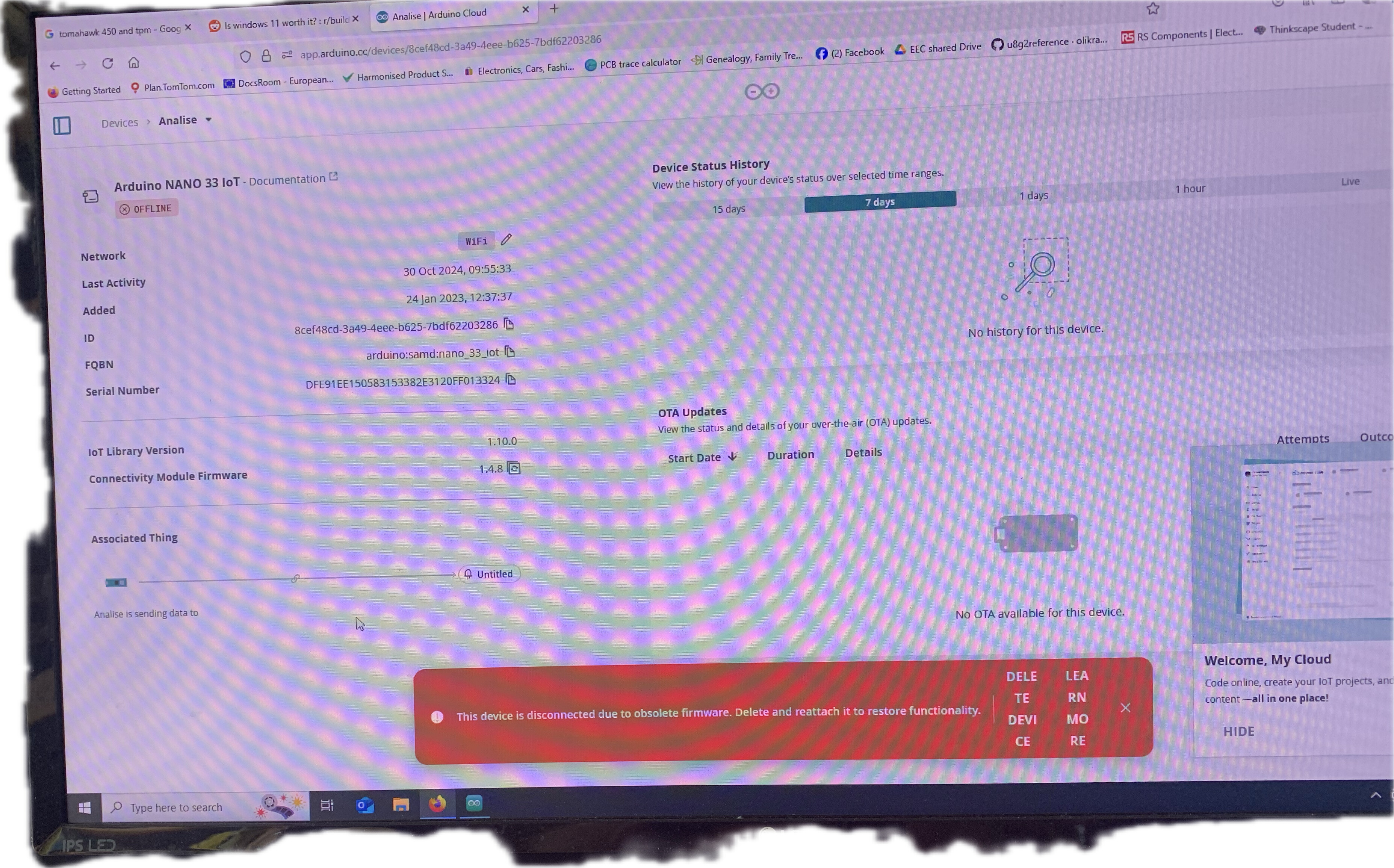
Must be me , opened up my cloud account , added my device as above no problem “ nano etc etc on comport 5 “
Wrote a quick wi fi connect sketch trying out the AI assistant all worked fine , uploaded sketch , ran serial monitor all good .
Now it says device is not connected due to obsolete firm ware , so I updated it to version 2 . Close my browser …
Still says device not connected due to obsolete firmware , ( big red message ) but I can go back to the sketch and upload again , but this time Can’t use serial monitor as the “ port is closing down “ .
Go back to ide 2 , all fine sketch works , serial monitor ok .
Cloud agent running ( keeps asking to install it , then says it’s running )
Back to cloud port is still closing message …device not connected due to obsolete firmware …
Finding this cloud stuff very flakey ! !
(I suspect it was trying to connect over WiFi and not the USB after I’d uploaded the Wi-Fi fi sketch and connected to my network )
But … when I first went into cloud it worked fine and didn’t mention any need to update , it was only after uploading a sketch from the cloud.
Update was successful and I was able to re load my sketch from the cloud even tho it reported not connected due to obsolete firmware
But when I go to upload I get “ connectivity firmware update” . If I click “update” ; it does its thing , then I get the same message when I go to upload again .
3 times around that loop ( no error messages) and it allowed me to upload, having opened and viewed via the serial
Monitor , I can’t now repeat that “ selected port is closing”
Hi @hammy,
the issue here is not with the onboard connectivity firmware (which is required but not sufficient), but with the outdated IoT Library Version which is currently on the device.
As stated in the error notification you need to delete the device and re-provision it, so that it can be connected again to Arduino Cloud (once created, you can reattach the thing and re-flash your sketch, which will contain the updated libraries).
The upload procedure via Arduino IDE will not restore the cloud capabilities; we did offer a way to update affected boards via the Arduino Cloud Editor, but that was deprecated on February 10th, 2025: you can click on the Learn more button in the notification to find out details about this (with additional information in the security bulletins - ASEC-24-002, ASEC-25-001).
I have done the detach/attach thing as the cloud asks you , and I did the updates.
If it says it works , how am I supposed to know otherwise.
After re attaching I could again upload , but it still showed disconnected and gave the firmware error message as I showed and the COM port not available .
You can’t expect users to do work arounds for this , after all this time it should work .
the cloud is not asking to detach the thing, but to delete the device. As you can see from the information, the device was created in Jan 2023 which means the correct procedure has not been followed yet.
Deleting the device, adding it back to the cloud (from the + Device button in the devices page), and then re-attaching the thing to the newly created device will let you flash the sketch from the Cloud Editor and restore connectivity to Arduino Cloud.
Device deleted and added back successfully, so ok thx !!
But …
Now shows 28/8/2025: 10:39:24
Still shows offline .
Now have no device associated with my thing and I have no devices and have to add again, click this and it wants to install the agent again. Did this re added my device , but no devices to add to my thing .
It’s still there if I click on the sketch and I can add to my thing, but returning to the things tab it’s not there .
Second time around I can select the device .
Still shows offline , which I don’t understand .
I appreciate you are trying help, but the main point is that this GUI is far from obvious .
Hi @hammy ,
once the board has been correctly added back, you need to re-attach the thing to the new device.
You can do that by going in the thing detail page, click on attach, and selecting the newly created device.
Once the thing has been attached to the device, you’ll need to insert the network credentials so that it can connect to the internet. You can do that by clicking on the Set Network button, still in the thing page.
Thanks for trying to help , but this has been so frustrating I’m going to keep well away from it for a while - I just don’t get why there has to be so many steps and such misleading clues from the system .
Just read back all the steps you asked me to do …
I went into it to try the AI which does look good , but the experience reminded why it had been so long since I last ventured into Arduino cloud .
Shame really, very disappointing .
Quote from a message I received during this saga
“ I paid for a year when it started, but let it lapse. There was an offer todiscount and all and a a "why you leavin'?" - short answer, too much skrewin' around the obscurant.