Hi. I'am developing a simple project with arduino nano. I selected "Arduino Nano" on menu but under the processor menu there is no option for "ATmega328P (Old Bootloader)". There are two options : ATmega328P and ATmega168. Why can't I see "ATmega328P (Old Bootloader)" option?
Thank you.
Topic moved !! Please do not post in "Uncategorized"; see the sticky topics in https://forum.arduino.cc/c/development-tools/uncategorized/184.
You're using an old version of the AVR board package. In that version the 328P option is what is now known as the 328P (Old Bootloader).
You can upgrade the AVR board package using the boards manager in the IDE. That will give you the 328P (Old Bootloader) option and the 328P option.
Questions:
- What problem are you trying to solve?
- Which version of the IDE are you using?
- Which operating system?
- Do you have a link to the board that you have?
I want to upload my simple code to Arduino Nano. But I always get this error: "avrdude: stk500_recv(): programmer is not responding" I thought it was because the old bootloader was not selected. But I upgraded the AVR board package and now I can select the old bootloader but I still get the same error. I didn't understandt what the problem is.
I use Arduino IDE 1.8.4
Windows 10
Arduino Nano Klon - USB Kablo Hediyeli - (USB Chip CH340) Satın Al | Robotistan (I installed USB Chip CH340 driver)
Thank you very much
Hi @sarigul. I'm going to ask you to provide the full verbose output from an upload attempt.
 This procedure is not intended to solve the problem. The purpose is to gather more information.
Please do this:
- Select File > Preferences... (or Arduino > Settings... for macOS users) from the Arduino IDE menus.
The "Preferences" dialog will open. - Uncheck the box next to "Show verbose output during:
☑compilation" in the "Preferences" dialog. - Check the box next to "Show verbose output during: ☐ upload".
- Click the "OK" button.
The "Preferences" dialog will close. - Attempt an upload, as you did before.
- After the upload fails, you'll see a button on the right side of the orange bar in Arduino IDE: Copy error messages. Click that button.
This copies the full output to the clipboard. - Open a forum reply here by clicking the "Reply" button.
- Click the
<CODE/>icon on the post composer toolbar.
This will add the forum's code block markup (```) to your reply to make sure the error messages are correctly formatted.
- Press the Ctrl+V keyboard shortcut (Command+V for macOS users).
This will paste the error output from the upload into the code block. - Move the cursor outside of the code block markup before you add any additional text to your reply.
- Click the "Reply" button to post the output.

Arduino: 1.8.4 (Windows 10), Board: "Arduino Nano, ATmega328P (Old Bootloader)"

C:\Program Files (x86)\Arduino\arduino-builder -dump-prefs -logger=machine -hardware C:\Program Files (x86)\Arduino\hardware -hardware C:\Users\dell\AppData\Local\Arduino15\packages -tools C:\Program Files (x86)\Arduino\tools-builder -tools C:\Program Files (x86)\Arduino\hardware\tools\avr -tools C:\Users\dell\AppData\Local\Arduino15\packages -built-in-libraries C:\Program Files (x86)\Arduino\libraries -libraries E:\Belgeler\Arduino\libraries -fqbn=arduino:avr:nano:cpu=atmega328old -ide-version=10804 -build-path C:\Users\dell\AppData\Local\Temp\arduino_build_388582 -warnings=none -build-cache C:\Users\dell\AppData\Local\Temp\arduino_cache_206356 -prefs=build.warn_data_percentage=75 -prefs=runtime.tools.avrdude.path=C:\Users\dell\AppData\Local\Arduino15\packages\arduino\tools\avrdude\6.3.0-arduino17 -prefs=runtime.tools.arduinoOTA.path=C:\Users\dell\AppData\Local\Arduino15\packages\arduino\tools\arduinoOTA\1.3.0 -prefs=runtime.tools.avr-gcc.path=C:\Users\dell\AppData\Local\Arduino15\packages\arduino\tools\avr-gcc\7.3.0-atmel3.6.1-arduino7 -verbose E:\Belgeler\Arduino\NanoSwitch\NanoSwitch.ino
C:\Program Files (x86)\Arduino\arduino-builder -compile -logger=machine -hardware C:\Program Files (x86)\Arduino\hardware -hardware C:\Users\dell\AppData\Local\Arduino15\packages -tools C:\Program Files (x86)\Arduino\tools-builder -tools C:\Program Files (x86)\Arduino\hardware\tools\avr -tools C:\Users\dell\AppData\Local\Arduino15\packages -built-in-libraries C:\Program Files (x86)\Arduino\libraries -libraries E:\Belgeler\Arduino\libraries -fqbn=arduino:avr:nano:cpu=atmega328old -ide-version=10804 -build-path C:\Users\dell\AppData\Local\Temp\arduino_build_388582 -warnings=none -build-cache C:\Users\dell\AppData\Local\Temp\arduino_cache_206356 -prefs=build.warn_data_percentage=75 -prefs=runtime.tools.avrdude.path=C:\Users\dell\AppData\Local\Arduino15\packages\arduino\tools\avrdude\6.3.0-arduino17 -prefs=runtime.tools.arduinoOTA.path=C:\Users\dell\AppData\Local\Arduino15\packages\arduino\tools\arduinoOTA\1.3.0 -prefs=runtime.tools.avr-gcc.path=C:\Users\dell\AppData\Local\Arduino15\packages\arduino\tools\avr-gcc\7.3.0-atmel3.6.1-arduino7 -verbose E:\Belgeler\Arduino\NanoSwitch\NanoSwitch.ino
Using board 'nano' from platform in folder: C:\Users\dell\AppData\Local\Arduino15\packages\arduino\hardware\avr\1.8.6
Using core 'arduino' from platform in folder: C:\Users\dell\AppData\Local\Arduino15\packages\arduino\hardware\avr\1.8.6
Detecting libraries used...
"C:\Users\dell\AppData\Local\Arduino15\packages\arduino\tools\avr-gcc\7.3.0-atmel3.6.1-arduino7/bin/avr-g++" -c -g -Os -w -std=gnu++11 -fpermissive -fno-exceptions -ffunction-sections -fdata-sections -fno-threadsafe-statics -Wno-error=narrowing  -flto -w -x c++ -E -CC -mmcu=atmega328p -DF_CPU=16000000L -DARDUINO=10804 -DARDUINO_AVR_NANO -DARDUINO_ARCH_AVR   "-IC:\Users\dell\AppData\Local\Arduino15\packages\arduino\hardware\avr\1.8.6\cores\arduino" "-IC:\Users\dell\AppData\Local\Arduino15\packages\arduino\hardware\avr\1.8.6\variants\eightanaloginputs" "C:\Users\dell\AppData\Local\Temp\arduino_build_388582\sketch\NanoSwitch.ino.cpp" -o "nul"
Generating function prototypes...
"C:\Users\dell\AppData\Local\Arduino15\packages\arduino\tools\avr-gcc\7.3.0-atmel3.6.1-arduino7/bin/avr-g++" -c -g -Os -w -std=gnu++11 -fpermissive -fno-exceptions -ffunction-sections -fdata-sections -fno-threadsafe-statics -Wno-error=narrowing  -flto -w -x c++ -E -CC -mmcu=atmega328p -DF_CPU=16000000L -DARDUINO=10804 -DARDUINO_AVR_NANO -DARDUINO_ARCH_AVR   "-IC:\Users\dell\AppData\Local\Arduino15\packages\arduino\hardware\avr\1.8.6\cores\arduino" "-IC:\Users\dell\AppData\Local\Arduino15\packages\arduino\hardware\avr\1.8.6\variants\eightanaloginputs" "C:\Users\dell\AppData\Local\Temp\arduino_build_388582\sketch\NanoSwitch.ino.cpp" -o "C:\Users\dell\AppData\Local\Temp\arduino_build_388582\preproc\ctags_target_for_gcc_minus_e.cpp"
"C:\Program Files (x86)\Arduino\tools-builder\ctags\5.8-arduino11/ctags" -u --language-force=c++ -f - --c++-kinds=svpf --fields=KSTtzns --line-directives "C:\Users\dell\AppData\Local\Temp\arduino_build_388582\preproc\ctags_target_for_gcc_minus_e.cpp"
Compiling sketch...
"C:\Users\dell\AppData\Local\Arduino15\packages\arduino\tools\avr-gcc\7.3.0-atmel3.6.1-arduino7/bin/avr-g++" -c -g -Os -w -std=gnu++11 -fpermissive -fno-exceptions -ffunction-sections -fdata-sections -fno-threadsafe-statics -Wno-error=narrowing -MMD -flto -mmcu=atmega328p -DF_CPU=16000000L -DARDUINO=10804 -DARDUINO_AVR_NANO -DARDUINO_ARCH_AVR   "-IC:\Users\dell\AppData\Local\Arduino15\packages\arduino\hardware\avr\1.8.6\cores\arduino" "-IC:\Users\dell\AppData\Local\Arduino15\packages\arduino\hardware\avr\1.8.6\variants\eightanaloginputs" "C:\Users\dell\AppData\Local\Temp\arduino_build_388582\sketch\NanoSwitch.ino.cpp" -o "C:\Users\dell\AppData\Local\Temp\arduino_build_388582\sketch\NanoSwitch.ino.cpp.o"
Compiling libraries...
Compiling core...
Using precompiled core
Linking everything together...
"C:\Users\dell\AppData\Local\Arduino15\packages\arduino\tools\avr-gcc\7.3.0-atmel3.6.1-arduino7/bin/avr-gcc" -w -Os -g -flto -fuse-linker-plugin -Wl,--gc-sections -mmcu=atmega328p   -o "C:\Users\dell\AppData\Local\Temp\arduino_build_388582/NanoSwitch.ino.elf" "C:\Users\dell\AppData\Local\Temp\arduino_build_388582\sketch\NanoSwitch.ino.cpp.o"  "C:\Users\dell\AppData\Local\Temp\arduino_build_388582/..\arduino_cache_206356\core\core_arduino_avr_nano_cpu_atmega328old_b900f9c749d61d83f4bb76f3beb6312f.a" "-LC:\Users\dell\AppData\Local\Temp\arduino_build_388582" -lm
"C:\Users\dell\AppData\Local\Arduino15\packages\arduino\tools\avr-gcc\7.3.0-atmel3.6.1-arduino7/bin/avr-objcopy" -O ihex -j .eeprom --set-section-flags=.eeprom=alloc,load --no-change-warnings --change-section-lma .eeprom=0  "C:\Users\dell\AppData\Local\Temp\arduino_build_388582/NanoSwitch.ino.elf" "C:\Users\dell\AppData\Local\Temp\arduino_build_388582/NanoSwitch.ino.eep"
"C:\Users\dell\AppData\Local\Arduino15\packages\arduino\tools\avr-gcc\7.3.0-atmel3.6.1-arduino7/bin/avr-objcopy" -O ihex -R .eeprom  "C:\Users\dell\AppData\Local\Temp\arduino_build_388582/NanoSwitch.ino.elf" "C:\Users\dell\AppData\Local\Temp\arduino_build_388582/NanoSwitch.ino.hex"
Sketch uses 924 bytes (3%) of program storage space. Maximum is 30720 bytes.
Global variables use 9 bytes (0%) of dynamic memory, leaving 2039 bytes for local variables. Maximum is 2048 bytes.
avrdude: stk500_recv(): programmer is not responding
avrdude: stk500_getsync() attempt 1 of 10: not in sync: resp=0x60
avrdude: stk500_recv(): programmer is not responding
avrdude: stk500_getsync() attempt 2 of 10: not in sync: resp=0x60
avrdude: stk500_recv(): programmer is not responding
avrdude: stk500_getsync() attempt 3 of 10: not in sync: resp=0x60
avrdude: stk500_recv(): programmer is not responding
avrdude: stk500_getsync() attempt 4 of 10: not in sync: resp=0x60
avrdude: stk500_recv(): programmer is not responding
avrdude: stk500_getsync() attempt 5 of 10: not in sync: resp=0x60
avrdude: stk500_recv(): programmer is not responding
Problem uploading to board.  See http://www.arduino.cc/en/Guide/Troubleshooting#upload for suggestions.
avrdude: stk500_getsync() attempt 6 of 10: not in sync: resp=0x60
avrdude: stk500_recv(): programmer is not responding
avrdude: stk500_getsync() attempt 7 of 10: not in sync: resp=0x60
avrdude: stk500_recv(): programmer is not responding
avrdude: stk500_getsync() attempt 8 of 10: not in sync: resp=0x60
avrdude: stk500_recv(): programmer is not responding
avrdude: stk500_getsync() attempt 9 of 10: not in sync: resp=0x60
avrdude: stk500_recv(): programmer is not responding
avrdude: stk500_getsync() attempt 10 of 10: not in sync: resp=0x60
Thank you very much
You did the verbose settings the wrong way around. It should look like
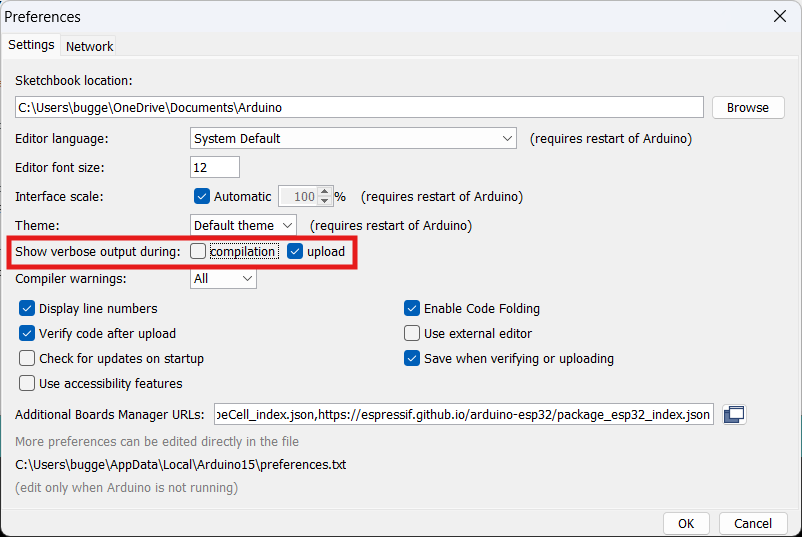
Next perform the upload and post the results here as describe in post #4.
1 Like
Sorry. Result is here :
Arduino: 1.8.4 (Windows 10), Board: "Arduino Nano, ATmega328P (Old Bootloader)"

Sketch uses 924 bytes (3%) of program storage space. Maximum is 30720 bytes.
Global variables use 9 bytes (0%) of dynamic memory, leaving 2039 bytes for local variables. Maximum is 2048 bytes.
C:\Users\dell\AppData\Local\Arduino15\packages\arduino\tools\avrdude\6.3.0-arduino17/bin/avrdude -CC:\Users\dell\AppData\Local\Arduino15\packages\arduino\tools\avrdude\6.3.0-arduino17/etc/avrdude.conf -v -patmega328p -carduino -PCOM6 -b57600 -D -Uflash:w:C:\Users\dell\AppData\Local\Temp\arduino_build_388582/NanoSwitch.ino.hex:i

avrdude: Version 6.3-20190619
         Copyright (c) 2000-2005 Brian Dean, http://www.bdmicro.com/
         Copyright (c) 2007-2014 Joerg Wunsch

         System wide configuration file is "C:\Users\dell\AppData\Local\Arduino15\packages\arduino\tools\avrdude\6.3.0-arduino17/etc/avrdude.conf"

         Using Port                    : COM6
         Using Programmer              : arduino
         Overriding Baud Rate          : 57600
avrdude: stk500_recv(): programmer is not responding
avrdude: stk500_getsync() attempt 1 of 10: not in sync: resp=0x08
avrdude: stk500_recv(): programmer is not responding
avrdude: stk500_getsync() attempt 2 of 10: not in sync: resp=0x08
avrdude: stk500_recv(): programmer is not responding
avrdude: stk500_getsync() attempt 3 of 10: not in sync: resp=0x08
avrdude: stk500_recv(): programmer is not responding
avrdude: stk500_getsync() attempt 4 of 10: not in sync: resp=0x08
avrdude: stk500_recv(): programmer is not responding
avrdude: stk500_getsync() attempt 5 of 10: not in sync: resp=0x08
avrdude: stk500_recv(): programmer is not responding
avrdude: stk500_getsync() attempt 6 of 10: not in sync: resp=0x08
avrdude: stk500_recv(): programmer is not responding
avrdude: stk500_getsync() attempt 7 of 10: not in sync: resp=0x08
avrdude: stk500_recv(): programmer is not responding
avrdude: stk500_getsync() attempt 8 of 10: not in sync: resp=0x08
avrdude: stk500_recv(): programmer is not responding
avrdude: stk500_getsync() attempt 9 of 10: not in sync: resp=0x08
avrdude: stk500_recv(): programmer is not responding
avrdude: stk500_getsync() attempt 10 of 10: not in sync: resp=0x08

avrdude done.  Thank you.

Problem uploading to board.  See http://www.arduino.cc/en/Guide/Troubleshooting#upload for suggestions.

This report would have more information with
"Show verbose output during compilation"
option enabled in File -> Preferences.
Please try this experiment and then report back with the results:
This procedure is not intended to solve the problem. The purpose is to gather more information.
- Connect the Arduino board to your computer with a USB cable.
- Press and release the button on the Arduino board that is marked "RESET".
Now please reply here on the forum thread with the answers to the following questions:
- Did you see the LED marked "L" on the board blink immediately after you released the "RESET" button?
- Did the LED blink only once, or did it blink multiple times quickly immediately after releasing the button?
Did you try the new bootloader after installing the boards package?
Please verify that you have an actual atmega328 based Nano, and not some other variant of the nano board (Nano Every, Nano 33, etc).
Yes, led blinks immediately after I released the "reset" button and it blinks multiple times quickly.
In that case follow the advise in post #9.
If that doesn't solve the problem, try the 168 option. And if that does not help, please try to decipher the text on the main chip on the top of the board and post it here (just drag and drop) or post a clear picture of that chip.
Thanks for your suggestion. Everywhere on the internet it was written that I should choose "ATmega328P (Old Bootloader)" as the processor, but when I chose "ATmega328P" it worked  Thank you very much
post #9 worked. Thank you very much
Even on the product page that you linked it is indicated 
Please mark the topic as solved by clicking the little checkbox button under the most useful post.
This topic was automatically closed 180 days after the last reply. New replies are no longer allowed.