This is the list of parts I’m working with:
1x ESP32‑WROOM
1x Piezo buzzer
1x TCA9548A I²C multiplexer:
4x LPS22HB barometric sensor breakout
1x ~40 cm Long, 2cm wide silicon tube: Need to find
1x 18650 Li‑ion Battery
?x M2/M3 screws, Dupont wires, heat‑shrink (sink?), zip ties, and standoffs: Need to find
1x SSD1306 I2C OLED
The idea was to create a motion tracker inspired by the one from Aliens. It keys off air pressure, and I’ve seen a couple of papers that prove this works. The air pressure idea was also from Alien.
Imagine a room full of floating balls, and you had a device that could detect the density of these balls. Say an object moves through this room and disturbs the balls. You would be able to detect the movement with the device. Now replace floating balls with air, and that’s the idea!
The main issue I’m currently having is the monitor is not displaying anything, and I've narrowed it down to a code issue. Here's the code I've been using.
/* ============================================================
   Aliens-Style Pressure Tracker (UNO/Nano Port, 4 sensors)
   - AVR-friendly (low RAM), page-buffered OLED with U8g2
   - 50 Hz sampling, drift removal, 0.2–10 Hz band-limit
   - Common-mode cancel, simple event score, 2D direction
   Hardware:
     - Arduino UNO/Nano (ATmega328P)
     - TCA9548A I2C mux @ 0x70
     - 4x LPS22HB/LPS22DF sensor breakouts (channels 0..3)
     - SSD1306 128x64 I2C OLED @ 0x3C
   ============================================================ */

#include <Arduino.h>
#include <AceWire.h>
#include <TCA9548A.h>
#include <Adafruit_LPS2X.h>
#include <U8g2lib.h>

// -------- Display (U8g2 page buffer = AVR friendly) ----------
U8G2_SSD1306_128X64_NONAME_F_HW_I2C u8g2(U8G2_R0, U8X8_PIN_NONE);

// -------- I2C Mux & Sensors ---------------------------------
TCA9548A tca;
Adafruit_LPS22 lps[4];  // 0:N, 1:E, 2:S, 3:W

// -------- Pins ----------------------------------------------
const int BUZZ_PIN = 7;       // set to -1 to disable buzzer

// -------- Sampling config -----------------------------------
const float FS = 50.0f;       // 50 Hz per sensor (good on AVR)
const float DT = 1.0f / FS;

// Simple 1st-order filters (lightweight math)
// High-pass ~0.2 Hz
const float HP_FC = 0.2f;
const float HP_ALPHA = (1.0f / (2.0f * 3.14159f * HP_FC)) / ((1.0f / (2.0f * 3.14159f * HP_FC)) + DT);

// Low-pass ~10 Hz
const float LP_FC = 10.0f;
const float LP_ALPHA = DT / ((1.0f / (2.0f * 3.14159f * LP_FC)) + DT);

// Slow EMA for drift removal (~5 s)
const float DC_ALPHA = DT / (5.0f + DT);

// Event detection
float noise_floor = 0.05f;
float thresh_mult = 4.0f;

// Per-channel filter state
struct ChanState {
  float dc;   // slow drift estimate
  float hp;   // high-pass state
  float lp;   // low-pass state
  float xprev;
};
ChanState st[4];

uint8_t chanIdx[4] = {0,1,2,3};  // TCA channels N,E,S,W

// Timing
unsigned long lastTick = 0;
const unsigned long TICK_US = (unsigned long)(DT * 1000000.0f);

void safeBeep(uint16_t ms=25) {
  if (BUZZ_PIN < 0) return;
  digitalWrite(BUZZ_PIN, HIGH);
  delay(ms);
  digitalWrite(BUZZ_PIN, LOW);
}

bool selectChannel(uint8_t ch) {
  tca.closeAll();
  tca.openChannel(ch);
  delayMicroseconds(150);
  return true;
}

bool readPressurePa(uint8_t i, float &p) {
  selectChannel(chanIdx[i]);
  sensors_event_t temp, pres;
  if (!lps[i].getEvent(&pres, &temp)) return false;
  p = pres.pressure * 100.0f;  // hPa -> Pa
  return true;
}

void drawRadar(float vx, float vy, float energy, bool ev) {
  u8g2.clearBuffer();

  // Simple HUD numbers
  u8g2.setFont(u8g2_font_5x8_tf);
  u8g2.setCursor(0, 8);
  u8g2.print(F("E:"));
  u8g2.print(energy, 2);
  u8g2.print(F(" NF:"));
  u8g2.print(noise_floor, 2);

  // Radar at bottom center
  const int cx = 64;
  const int cy = 63;
  const int r  = 26;

  // Ground line
  u8g2.drawHLine(0, cy, 128);
  // Circles
  u8g2.drawCircle(cx, cy, r, U8G2_DRAW_ALL);
  u8g2.drawCircle(cx, cy, r/2, U8G2_DRAW_ALL);

  // Scale vector to fit circle
  float mag = sqrt(vx*vx + vy*vy);
  float scale = (mag > 1e-6f) ? (r * 0.9f / mag) : 0.0f;
  int bx = cx + int(vx * scale);
  int by = cy - int(vy * scale);

  if (ev) {
    u8g2.drawDisc(bx, by, 3, U8G2_DRAW_ALL);
  } else {
    u8g2.drawCircle(bx, by, 2, U8G2_DRAW_ALL);
  }

  // NESW labels (assume +vy is "north" up)
  u8g2.setCursor(60, 12);
  u8g2.print(F("N"));
  u8g2.setCursor(118, 34);
  u8g2.print(F("E"));
  u8g2.setCursor(60, 63 - r - 2);
  // already have circle; optional label for clarity

  u8g2.sendBuffer();
}

void setup()
{
  if (BUZZ_PIN >= 0) {
    pinMode(BUZZ_PIN, OUTPUT);
    digitalWrite(BUZZ_PIN, LOW);
  }

  Wire.begin();
  Wire.setClock(400000); // fast I2C helps

  u8g2.begin();
  u8g2.clearBuffer();
  u8g2.setFont(u8g2_font_6x10_tf);
  u8g2.drawStr(0,12,"Pressure Tracker (AVR)");
  u8g2.sendBuffer();

/* Error, "no matching function for call to 'TCA9548A::begin(int)'"
 openChannel does not work either, "expected primary-expression  before numeric constant" WHAT IS THE PRIMARY EXPRESSION!?!?
  if (!tca.openChannel(uint8_t 0x70 address)) {
    u8g2.clearBuffer();
    u8g2.drawStr(0,12,"TCA9548A not found!");
    u8g2.sendBuffer();
    while(1);
  }
*/
  // Init sensors
  for (uint8_t i=0;i<4;i++) {
    selectChannel(chanIdx[i]);
    if (!lps[i].begin_I2C()) {
      u8g2.clearBuffer();
      u8g2.drawStr(0,12,"LPS22 init fail ch:");
      u8g2.setCursor(110,12); u8g2.print(i);
      u8g2.sendBuffer();
      while(1);
    }
    // 50 Hz ODR is fine (some LPS variants: 25/50/75/100)
    lps[i].setDataRate(LPS22_RATE_50_HZ);
    st[i] = {0,0,0,0};
    delay(10);
  }

  delay(300);
  safeBeep(15);
  lastTick = micros();
}

void loop() {
  unsigned long now = micros();
  if ((now - lastTick) < TICK_US) return;
  lastTick += TICK_US; // keep steady cadence

  // 1) Read sensors
  float raw[4];
  for (uint8_t i=0;i<4;i++) {
    float p;
    if (readPressurePa(i, p)) raw[i] = p;
    else raw[i] = raw[i]; // noop on fail
  }

  // 2) Per-channel: drift removal -> HP -> LP
  float y[4];
  for (uint8_t i=0;i<4;i++) {
    float x = raw[i];

    // Slow DC removal (EMA)
    st[i].dc += DC_ALPHA * (x - st[i].dc);
    float x_dc = x - st[i].dc;

    // 1st-order high-pass (0.2 Hz)
    st[i].hp = HP_ALPHA * (st[i].hp + x_dc - st[i].xprev);
    st[i].xprev = x_dc;

    // 1st-order low-pass (10 Hz) on HP output
    st[i].lp += LP_ALPHA * (st[i].hp - st[i].lp);

    y[i] = st[i].lp;
  }

  // 3) Common-mode rejection
  float mean = 0;
  for (int i=0;i<4;i++) mean += y[i];
  mean *= 0.25f;
  for (int i=0;i<4;i++) y[i] -= mean;

  // 4) Energy (simple L2 norm)
  float energy = 0;
  for (int i=0;i<4;i++) energy += y[i]*y[i];
  energy = sqrt(energy);

  // Auto noise floor (slowly adapts)
  static float nfEMA = 0.05f;
  nfEMA += 0.01f * (energy - nfEMA);
  if (nfEMA < 0.02f) nfEMA = 0.02f;
  noise_floor = nfEMA;

  // 5) Direction vector (E-W, N-S)
  float vx = y[1] - y[3]; // +vx -> East
  float vy = y[0] - y[2]; // +vy -> North

  bool detected = (energy > (thresh_mult * noise_floor));

  // 6) Beep on rising edge
  static bool prev = false;
  if (detected && !prev) safeBeep(15);
  prev = detected;

  // 7) Draw
  drawRadar(vx, vy, energy, detected);
}
Also, here’s an issue with the code I’m having: it won’t let me bug fix. It says there’s something wrong with one of the libraries and stops unexpectedly.
Here's the serial monitor for that.
Waiting for gdb server to start...[2025-11-12T00:07:54.537Z] SERVER CONSOLE DEBUG: onBackendConnect: gdb-server session connected. You can switch to "DEBUG CONSOLE" to see GDB interactions.
"C:\\Users\\Erik\\AppData\\Local\\Arduino15\\packages\\esp32\\tools\\openocd-esp32\\v0.12.0-esp32-20250707/bin/openocd" -c "gdb_port 50000" -c "tcl_port 50001" -c "telnet_port 50002" -s "c:\\Users\\Erik\\Downloads\\sketch_aug25a" -f "C:/Program Files/Arduino IDE/resources/app/plugins/cortex-debug/extension/support/openocd-helpers.tcl" -f board/esp32-wrover-kit-3.3v.cfg
Open On-Chip Debugger v0.12.0-esp32-20250707 (2025-07-06-17:44)
Licensed under GNU GPL v2
For bug reports, read
        http://openocd.org/doc/doxygen/bugs.html
DEPRECATED! use 'gdb port', not 'gdb_port'
DEPRECATED! use 'tcl port' not 'tcl_port'
DEPRECATED! use 'telnet port', not 'telnet_port'
CDRTOSConfigure
Info : Listening on port 50001 for tcl connections
Info : Listening on port 50002 for telnet connections
Error: unable to open ftdi device with description '*', serial '*' at bus location '*'
C:/Users/Erik/AppData/Local/Arduino15/packages/esp32/tools/openocd-esp32/v0.12.0-esp32-20250707/bin/../share/openocd/scripts/target/esp_common.cfg:9: Error:
Traceback (most recent call last):
  File "C:/Users/Erik/AppData/Local/Arduino15/packages/esp32/tools/openocd-esp32/v0.12.0-esp32-20250707/bin/../share/openocd/scripts/target/esp_common.cfg", line 9, in script
[2025-11-12T00:07:55.299Z] SERVER CONSOLE DEBUG: onBackendConnect: gdb-server session closed
GDB server session ended. This terminal will be reused, waiting for next session to start...
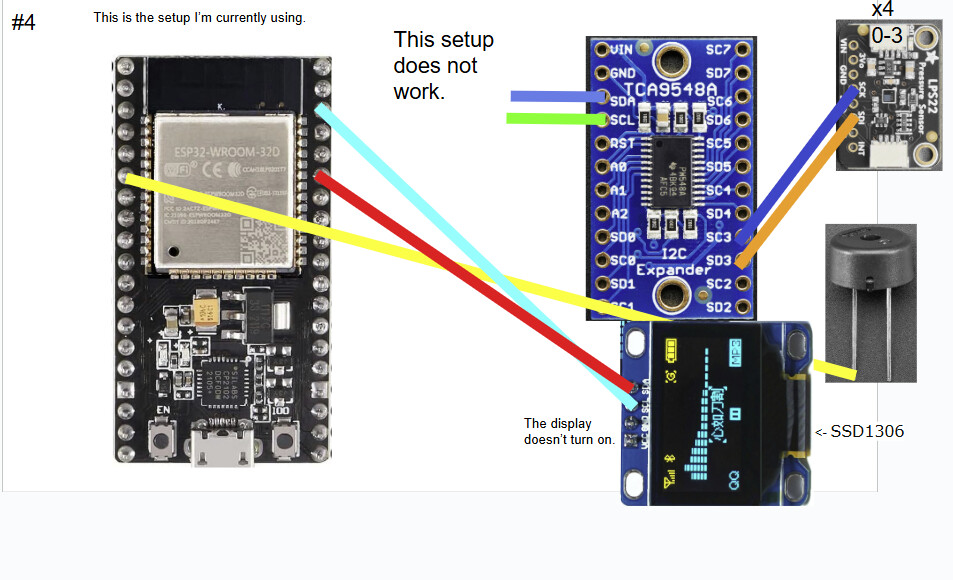
Here are some of the diagrams of the wiring setups I have tried.
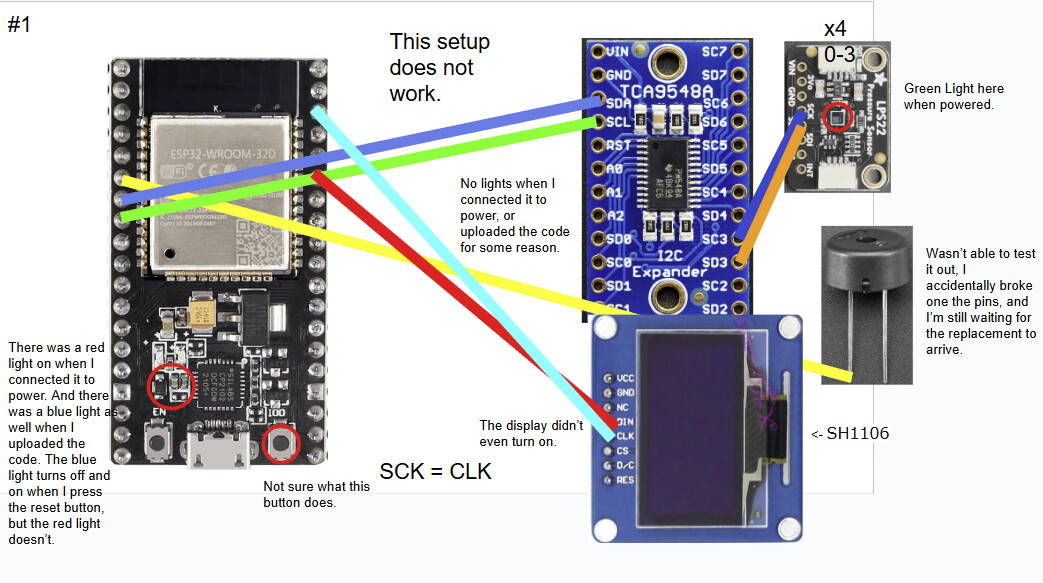

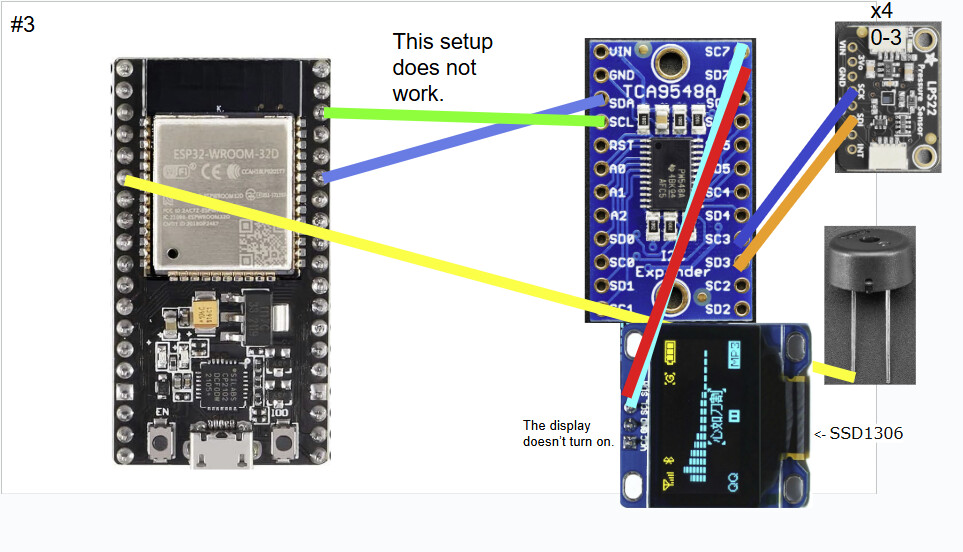
It also includes what went wrong with each iteration. Also for some reason it won't let me post the fourth one. I'll include it in the comments.
If you’re wondering why the monitor is different, it’s because I originally bought the wrong one.
I will say I got the parts and the code from ChatGPT.
Here is the original message I got, sorry if it's a bit lengthy:
Yep! Here’s a memory-safe Arduino (UNO/Nano) version using the U8g2 display library (page-buffered, so it fits on AVR) plus Adafruit’s LPS22 + TCA9548A libs. It samples at ~50 Hz per channel, does drift removal, band-limits, common-mode cancel, and shows a little radar blip. Works on UNO/Nano/Pro Mini (5V or 3V3) as long as your sensors are 3V3-safe (use a level shifter if needed).
Libraries (install via Library Manager)
- U8g2 by olikraus
- Adafruit LPS2X
- Adafruit TCA9548A
- Adafruit BusIO (dependency)
Wiring notes
- I²C: UNO/Nano → SDA (A4), SCL (A5)
- TCA9548A @ 0x70 → 4× LPS22 breakouts on channels 0..3 (N/E/S/W)
- OLED SSD1306 128×64 I²C @ 0x3C
- Optional buzzer on D9 (change pin if needed)
(The code went here)
Quick setup checklist
- Wire UNO → TCA9548A → 4× LPS22 (channels 0..3) and OLED @ 0x3C.
- Install the four libraries listed above.
- Flash the sketch. Let it sit still for ~30–60 s so the noise floor stabilizes.
- Wave your hand a couple of meters away—the blip should lean toward you, and the buzzer should chirp on new events.
- If it’s too twitchy: increase
thresh_multto 5–6, or lengthen your inlet capillaries a bit to attenuate higher-frequency noise.
Want the ESP32 version with richer UI and faster sampling? I can drop that too, but this AVR build is classroom-friendly and runs on the classic boards.
Feel free to ask me any questions.
Also, this is my first time doing a project like this. So if I do something that goes against engineering convention, sorry in advance.