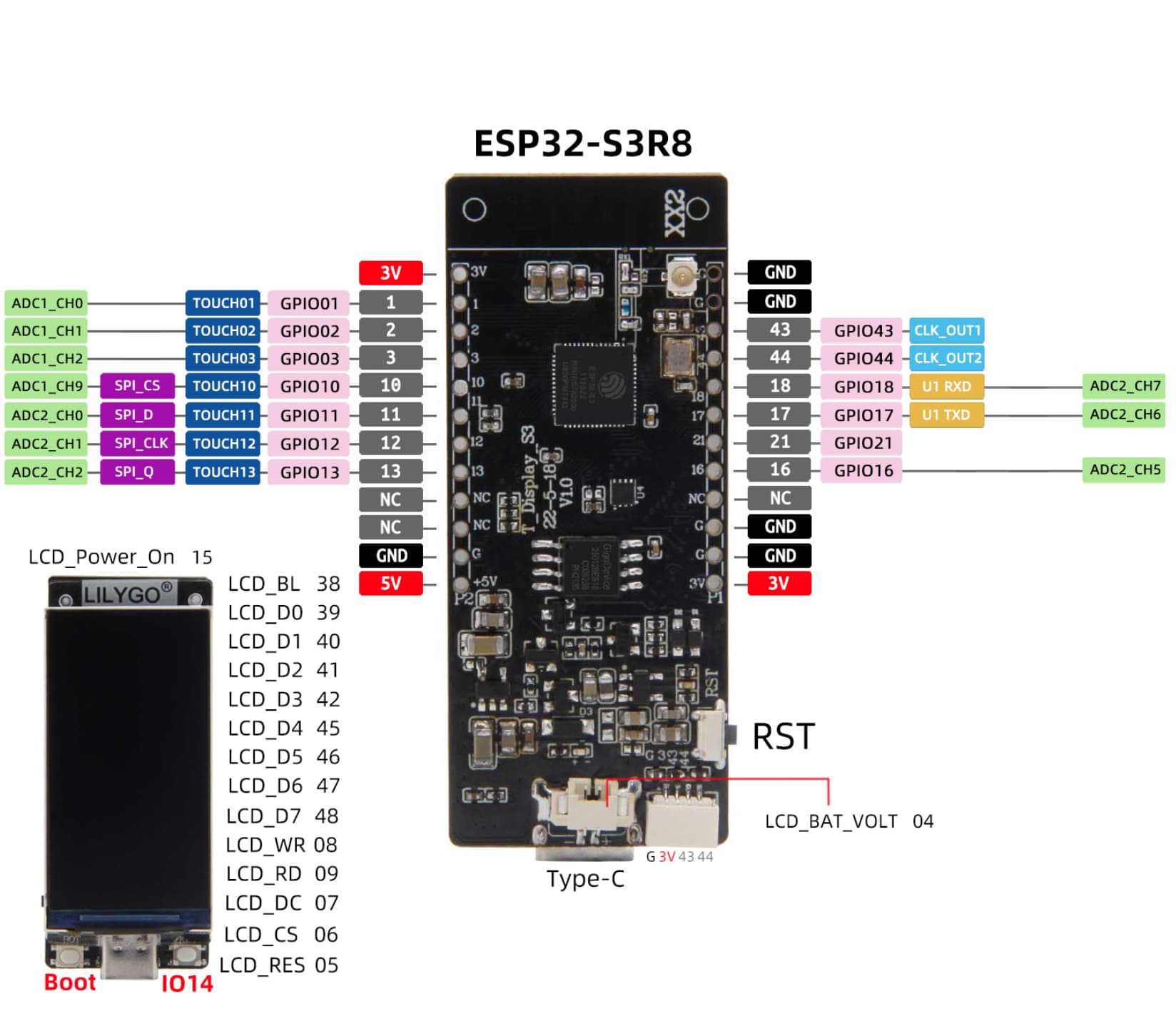
Hi Forum! I am new here and also new to ESP32.
I wanted to connect RFID-reader RC522 to the ESP32-S3 board.
Can someone tell me what to connect to what? Thnx!
Hi Forum! I am new here and also new to ESP32.
I wanted to connect RFID-reader RC522 to the ESP32-S3 board.
Can someone tell me what to connect to what? Thnx!
Welcome to the forum
What sort of interface does the RC522 have ?
Serial, SPI, I2C, something else ?
SPI_CS --> SS
SPI_D --> MOSI
SPI_CLK -- SSK
SPI_Q -->MISO
Any available GPIO -->RST
Great, thank you, I will try this!
Not sure if it works. Uploaded an selftest to the device and it shows an error. I will try other GPIO's...
Unfortunately it does not work. I uploaded a test script to my ESP32s3 and it is telling me its not working:
// RFID Reader
#include <SPI.h>
#include <MFRC522.h>

#define RST_PIN     21 // any available GPIO
#define SS_PIN      10 // SPI_CS -> GPIO 10

MFRC522 mfrc522(SS_PIN, RST_PIN);  // Create MFRC522 instance
bool selftest_result = false;

#include "TFT_eSPI.h"

unsigned colour = 0xFFFF;
TFT_eSPI tft = TFT_eSPI();

void setup() {

  // RFID
  Serial.begin(9600);
  SPI.begin();          // Init SPI bus
  mfrc522.PCD_Init();   // Init MFRC522 module

  delay(100);
  Serial.begin(115200);  // be sure to set USB CDC On Boot: "Enabled"

  //(Serial print slows progres bar Demo)
  delay(100);
  tft.init();
  tft.setRotation(3);
  tft.setSwapBytes(true);
  tft.fillScreen(TFT_BLACK);  //horiz / vert<> position/dimension
  tft.setTextSize(1);
  tft.setTextDatum(4);

  delay(100);
  Serial.println("In setup!");

  delay(2000);

   // RFID selftest
  tft.drawString("MFRC522 Digital self test", 95, 125, 2);
  mfrc522.PCD_DumpVersionToSerial();  // Show version of PCD - MFRC522 Card Reader
  selftest_result = mfrc522.PCD_PerformSelfTest(); // perform the test
  if (selftest_result)
    tft.drawString("Result: OK", 95, 145, 2);
  else
    tft.drawString("Result: Defect or unknown!", 95, 145, 2);

}

//RFID
void accessGranted() {
  tft.drawString("Access Granted", 77, 55, 4);
  delay(3000);
}
void accessRefused() {
   tft.drawString("Access Refused", 77, 55, 4);
   delay(3000);
}


void loop() {

  tft.setTextColor(TFT_WHITE, TFT_BLACK);
  tft.drawString("Ready!", 77, 55, 4);

  if(selftest_result) {
    tft.drawString("selftest_result: OK", 220, 55, 2);
  }
  else {
    tft.drawString("RFID defect or unknown!", 220, 55, 2);
  }


  // RFID
  if ( ! mfrc522.PICC_IsNewCardPresent()) {
    tft.drawString("!PICC_IsNewCardPresent", 150, 180, 2);
    return;
  }
  if ( ! mfrc522.PICC_ReadCardSerial()) {
    tft.drawString("!PICC_ReadCardSeria", 150, 190, 2);
    return;
  }
  tft.drawString(" UID tag:", 77, 55, 4);

  String content= "";
  for (byte i = 0; i < mfrc522.uid.size; i++) {
     Serial.print(mfrc522.uid.uidByte[i] < 0x10 ? " 0" : " ");
     Serial.print(mfrc522.uid.uidByte[i], HEX);
     content.concat(String(mfrc522.uid.uidByte[i] < 0x10 ? " 0" : " "));
     content.concat(String(mfrc522.uid.uidByte[i], HEX));
  }
  content.toUpperCase();
  tft.drawString(" PICC type:", 77, 75, 4);

  MFRC522::PICC_Type piccType = mfrc522.PICC_GetType(mfrc522.uid.sak);
  tft.drawString(mfrc522.PICC_GetTypeName(piccType), 90, 75, 4);

  if (content.substring(1) == "39 7B 02 64" || content.substring(1) == "B2 38 DB 0E") {
    accessGranted();
  }
  else {
    accessRefused();
  }
  // END RFID

  delay(100);
}
Result is: Display shows 'Result: Defect or unknown!'
I checked for cold solder joints. all fine.
Serial is printing
MFRC522 Ready!
In setup!
Firmware Version: 0x0 = (unknown)
WARNING: Communication failure, is the MFRC522 properly connected?
I bought another RC522 and now it works well.