Connection arduino mega and nano through serial coms using rs232 modules

Hi,currently testing a setup which involves a nano and a mega. Im doing this to test the functionality of RS232 modules which i need for another project(Did not work). So now im trying to debug by trying to communicate with a nano to see how the rs232 module works, however, I am getting no response.

MEGA(serial pins)->rs232->db9 cable<-rs232<-NANO(Tx Rx0)

-Ive tried all combinations of rx to tx and vise versa for the arduino pins and rs232 pins so i dont believe that is the issue

-Ive also tested the DB9 cable which also works fine

-both arduinos are powered through individual PCs and serial monitors as well.

rs232 module: https://www.jaycar.com.au/arduino-compatible-rs-232-to-ttl-uart-converter-module/p/XC3724?gad_source=1&gad_campaignid=22127991728&gbraid=0AAAAAD0dvLY_h5RGoKdqprguc_qtlNTCF&gclid=CjwKCAjwvO7CBhAqEiwA9q2YJQ0VYQCYEQ32FGTVEeKuCwmTqET89S_YnV0T7tOcUltKqrUVftXKJRoCb7oQAvD_BwE

MEGA:

void setup() {
  Serial.begin(19200);      // USB debug
  Serial1.begin(19200);     // TX1/RX1 (pins 18/19)
}

void loop() {
  Serial1.print("Hello\r");
  delay(1000);

  while (Serial1.available()) {
    char c = Serial1.read();
    inputBuffer += c;
    if (c == '\r') {
      Serial.println(inputBuffer);
      inputBuffer = "";
    }
  }
}

NANO:

#include <SoftwareSerial.h>
 
SoftwareSerial SerialFromMega(10, 11); // RX, TX
String inputBuffer = "";
 
void setup() {
  Serial.begin(19200);
  SerialFromMega.begin(19200);
}
 
void loop() {
  while (SerialFromMega.available()) {
    char c = SerialFromMega.read();
    inputBuffer += c;
    if (c == '\r') {
      Serial.println(inputBuffer);
      SerialFromMega.print(inputBuffer);
      inputBuffer = "";
    }
  }
}

If anyone has any experience with this module that would be able to shine some light on this issue. TY

At no time in your scenario did you connect the data ground points together.

if that's a question i don't believe so, could you elaborate on what that does?

ALL RS-232 signals are referenced to the data ground pin. The data ground must be connected together to get any RS-232 signal!

A standard RS-232 cable should have a ground wire, so that should ties the grounds together.

Since you are using the hardware serial port on the Mega, you can do a loopback test with the RS-232 module by connecting pins 2 & 3 together on the RS-232 side. This will not work with SoftwareSerial.

I would print the characters as they are received, instead of waiting for the return character.

Just to be sure, since you did not explicitly mention it, did you connect the GND and Vcc of the RS-232 module to the GND and 5V pin of the Mega/Nano?

ive connect the respective rs232 to the 5v and GND of its arduino. however, i dont have the arduinos connected directly to the same ground of thats what the issue is?

The cable between the Arduinos should make that connection.

-Ive also tested the DB9 cable which also works fine

if thats the case, yes ive plugged in all the pins in the rs232 module to their respective pins on the arduino

  • ive also tested the tx and rx pins on both arduinos and they are working

Do the modules' TX LEDs light? The RX?

Are the USB cables for data?

Does data go between PC and module on the 4-wire or the USB?

https://www.jaycar.com.au/arduino-compatible-rs-232-to-ttl-uart-converter-module/p/XC3724

This similar module says 3v3 is used...

I've tested your code.
I didn't have an Arduino Nano available, so I used an Arduino Uno R3 instead.

I found the code for the Mega wouldn't compile, I got the error message:
'inputBuffer' was not declared in this scope

So I added the line: String inputBuffer = ""; borrowed from the Nano code.

On the Nano code, I simply changed the pin numbers to reflect the pins that I was using for SoftwareSerial.
(My RS232 to UART converter was already soldered on to a prototype shield, so I have to use pins 4 and 5.)

Here are the results:

Use the following hardware setup (Fig-1) to test the functionality of your RS232 Module. After that test it using Arduino-1, RS232-1, RS232-2, Arduino-2 setup.


Figure-1:

Ah! @GolamMostafa - your drawing refreshed one of my last brain cells.

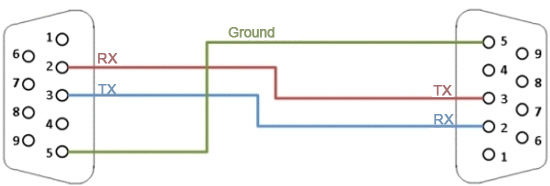
The issue might be with the DB9-DB9 cable... if it is "straight through" (pin 2 to pin 2), as most cables are, then no comms will occur between the modules. It must be "nulled" (pin 2 to pin 3, pin 3 to pin 2).

This was exactly that problem, i tried a different cable and it worked no problem!