Control of servos with Arduino and 16-Channel 12-bit PWM/Servo drive

Hello,

I want control several number of servos with using of some board to plug all together and include into assembly casing box. I think to get Adafruit 16-Channel 12-bit PWM/Servo Driver - I2C interface - PCA9685

To control 2 servos I use pins 9 and 11 with sending of value (in my case with same names "9" and "11") from C# desktop application: myport.WriteLine("9"); myport.WriteLine(trackBar1.Value.ToString()); to loaded code:

Servo servo1;
Servo servo2;
int val;

void setup() {
    Serial.begin(9600);
    servo1.attach(9);
    servo2.attach(11);
}

void loop() { 
  val = Serial.parseInt();
  if(val == 9){
    servo1.write(Serial.parseInt());
  }
  else if(val == 11){
    servo2.write(Serial.parseInt());
  }
}

If I follow this Connecting to the Arduino guide I have to connect 5V and GND from Arduino Uno or Due controller to the GND and VCC of Servo Driver, and Analog In 4 and 5 with SCL and SDA, and additionally I have to power driver separately with 5V and 2 Amp adapter I guess

I'm trying to figure out, if I'm not using pins with this board to control servos, what should be the code for similar separate control of multiple motors with 16-Channel 12-bit PWM/Servo Driver?

Any advice, guide or example would be helpful
Have you downloaded the library for the Adafruit board and looked at the examples that come with it ?

UKHeliBob:
Have you downloaded the library for the Adafruit board and looked at the examples that come with it ?

Hello,

By some reason I can't buy directly from adafruit site, still trying to figure out why

I found this board SMAKN® 16 Channel PWM/Servo Driver IIC interface-PCA9685 I'm not sure, if it is the same, but looks like

So I don't have any device yet, but I've downloaded Adafruit-PWM-Servo-Driver-Library, which contains examples like this one

I have located Adafruit-PWM-Servo-Driver-Library-master folder into C:\arduino-1.8.6\libraries folder, but #include <Adafruit_PWMServoDriver.h> does not appears as included, and I can't see it in Sketch/Included Libraries

This example drives 8 servos, one after the other, but how to control all servos each with separate command value

#include <Adafruit_PWMServoDriver.h> does not appears as included,

It is on line 20 of the example you linked to

but how to control all servos each with separate command value

pwm.setPWM(servonum, 0, pulselen);sets the position of a servo number servonum using the pulselen variable. Use a different value for servonum and pulselen and you can control the position of each servo individually

UKHeliBob:
It is on line 20 of the example you linked to

pwm.setPWM(servonum, 0, pulselen);

sets the position of a servo number servonum using the pulselen variable. Use a different value for servonum and pulselen and you can control the position of each servo individually

Hello,

Thank you for your answer,

I followed this guide Where to Install your Libraries, now I can see library in Examples and Included Libraries. I'm not sure if I have to add additionally to C:\arduino-1.8.6\libraries or it is enough to keep it in C:\Users\User\Documents\Arduino only, but first of all, I'm trying to figure it out with second

Now I have a device on hands Adafruit 16-Channel 12-bit PWM/Servo Driver - I2C interface - PCA9685

As I've said, I followed this Connecting to the Arduino guide, as described above, except powering, because now I have only 2 servos and using controller 5V, temporarily without separate adapter power source

I've uploaded this example without any editing, and connected servos to 0 and 1 channel, but nothing happens

Can you help me to figure out based on given code, how can I get value from C# application in this uploaded code to control two servos separately, equivalent to this example:

#include <Servo.h>
    Servo servo1;
    Servo servo2;
    int val;
    
    void setup() {
        Serial.begin(9600);
        servo1.attach(9); 
        servo2.attach(11);
    }
    
    void loop() { 
      val = Serial.parseInt(); 
      if(val == 9){
        servo1.write(Serial.parseInt()); 
      }
      else if(val == 11){
        servo2.write(Serial.parseInt());
      }
    }

I can't get, how it works and for some reason the downloaded code, as I've said above, also does nothing, which must turn servos without any external command, as it is needed in my case, if I get it right, but anyway, does nothing

What is the format of the serial input you are using ?

UKHeliBob:
What is the format of the serial input you are using ?

In C# 'using System.IO.Ports;' which is 'SerialPort myport = new SerialPort();' initialization, where the serial port variable 'comPort' is a "COM3" with Uno and "COM6" Due:

myport.PortName = comPort;  
myport.BaudRate = 9600;
myport.Open();

and:

if (myport.IsOpen)
{
    myport.WriteLine("9");
    myport.WriteLine(trackBar1.Value.ToString());
}
    myport.WriteLine(trackBar1.Value.ToString());

Does this send an ASCII string or an integer ?

UKHeliBob:

    myport.WriteLine(trackBar1.Value.ToString());

Does this send an ASCII string or an integer ?

Well, If I get you right, from ASCII 1 is 0x31 so I can do serialPort1.Write(0x31); for example, but what the reason of this in my case?

I found this video [Complete guide to PCA9685 16 channel Servo controller for Arduino with code]](https://youtu.be/y8X9X10Tn1k) also uses some different board which looks similar, and uses Adafruit library, but same code does not works form me. Uploading of code to Arduino Uno controller seems successful with TX and RX led

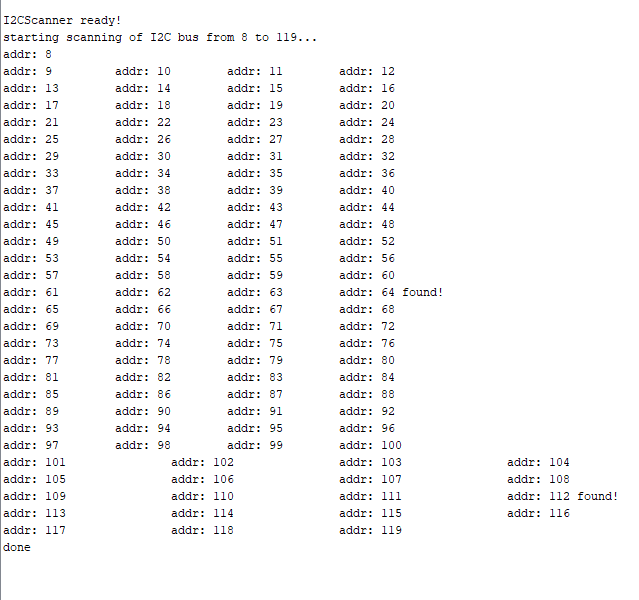
I get I2C scanner sketch result:

Comment near the top of the code you linked explain that it is using the default 0x40, which is the same as 64 decimal that identified. So it seems the problem is not I2C addressing or I2C wiring, but something else