Converting code from LCD to I2C LCD

Hi,
i found this code to count the amout of money inserted into an CH-926 coin acceptor and show it on an LCD display. However, I want to use it with an I2C LCD. I tried changing th code but somehow I am not able to (it should be an easy task). If I now insert a coin the value on my I2C LCD does not change. Could anyone help me?

#include <LiquidCrystal.h>

#define COIN_PIN         2 // Only some pins can be used. Refer to https://www.arduino.cc/en/Reference/attachInterrupt
#define PULSE_TIMEOUT_MS 200 // In fast mode, each pulse is 20ms, with an interval of 100ms

#define LCD_RS_PIN 12
#define LCD_E_PIN 11
#define LCD_D4_PIN 10
#define LCD_D5_PIN 9
#define LCD_D6_PIN 8
#define LCD_D7_PIN 7

// initialize the library with the numbers of the interface pins
LiquidCrystal lcd(LCD_RS_PIN, LCD_E_PIN, LCD_D4_PIN, LCD_D5_PIN, LCD_D6_PIN, LCD_D7_PIN);

volatile int creditInCents = 0;
volatile long lastCreditChangeTime = 0;

byte anim1[8] = {
  B00000,
  B00000,
  B00000,
  B11111,
  B00000,
  B00000,
  B00000,
};
byte anim2[8] = {
  B00000,
  B00000,
  B11111,
  B11111,
  B11111,
  B00000,
  B00000,
};
byte anim3[8] = {
  B00000,
  B11111,
  B11111,
  B11111,
  B11111,
  B11111,
  B00000,
};
byte anim4[8] = {
  B11111,
  B11111,
  B11111,
  B11111,
  B11111,
  B11111,
  B11111,
};
byte anim5[8] = {
  B11111,
  B11111,
  B11111,
  B00000,
  B11111,
  B11111,
  B11111,
};


void setup() {
  // Debugging output
  Serial.begin(115200);
  lcd.begin(16, 2);

  Serial.print("Initializing... ");
  lcd.print("Initializing... ");
  // COIN is just a NO or NC switch to GND according to the switch on the back 
  // so it requires a pull-up 
  pinMode(COIN_PIN, INPUT_PULLUP); 
  // I configured it as NO to reduce power consumption through the pull-up when idle
  // so we trigger the interrupt on falling edge
  attachInterrupt(digitalPinToInterrupt(COIN_PIN), onCoinPulse, FALLING);

  lcd.createChar(1, anim1);
  lcd.createChar(2, anim2);
  lcd.createChar(3, anim3);
  lcd.createChar(4, anim4);
  lcd.createChar(5, anim5);
  lcd.begin(16, 2);  
  resetAnimation();

  // Print a message to the LCD.
  lcd.clear();
  lcd.print("Come and play!");
  displayCredit();
  Serial.println("Ready.");
}


// total amount of money collected, in cents
// Note that using an int instead of float makes sure we have no decimal issues in comparison


// executed for every pulse;
void onCoinPulse() {
  // Make sure this is a real pulse and not a spurious glitch
  delay(1);
  if(digitalRead(COIN_PIN)==LOW) {
    creditInCents += 10;
    lastCreditChangeTime = millis();
  }
  else{
    Serial.println("glitch");
  }
}

long previousCreditInCents = 0;

void loop() {
  if (previousCreditInCents != creditInCents) {
    long now = millis();
    if (now - lastCreditChangeTime > PULSE_TIMEOUT_MS) {
      displayCredit();
      previousCreditInCents = creditInCents;
    }
    else {
      displayCountingAnimation();
    }
  }
}

void displayCredit() {
  resetAnimation();
  String creditInfo = String("Credit: ") + (creditInCents/100.0) + "EUR ";
  
  // set the cursor to column 0, line 1
  // (note: line 1 is the second row, since counting begins with 0):
  lcd.setCursor(0, 1);
  // print the credit:
  lcd.print(creditInfo);
  
  Serial.println(creditInfo);
}

byte animation[16];

void resetAnimation() {
  animation[0]=1;
  animation[1]=1;
  animation[2]=1;
  animation[3]=1;
  animation[4]=1;
  animation[5]=1;
  animation[6]=1;
  animation[7]=1;
  animation[8]=2;
  animation[9]=3;
  animation[10]=4;
  animation[11]=5;
  animation[12]=5;
  animation[13]=4;
  animation[14]=3;
  animation[15]=2;
}
void displayCountingAnimation() {
  Serial.print(".");
  
  // print an animation on LCD
  lcd.setCursor(0, 1);
  byte firstChar = animation[0];
  for (int i = 0; i < 15; i++) {
    animation[i] = animation[i+1];
    lcd.write(animation[i]);
  }
  animation[15] = firstChar;
  lcd.write(animation[15]);
  delay(200);
}
Hello krl_fie974

Take a view to gain the knowledge:

Have a nice day and enjoy coding in C++.

2 Likes

pretty easy..

UnoCoinCounter

have fun..~q

2 Likes

Here is your sketch using the hd44780 library which, I think, is a better library than LiquidCrystal_I2C. The hd44780 library automatically detects the display I2C address and the pin mapping between the LCD and the I2C backpack. Install the hd44780 library using the IDE library manager. Tested on and works on real hardware.

//#include <LiquidCrystal.h>
#include <Wire.h>
#include <hd44780.h>                       // main hd44780 header
#include <hd44780ioClass/hd44780_I2Cexp.h> // i2c expander i/o class header


#define COIN_PIN         2 // Only some pins can be used. Refer to https://www.arduino.cc/en/Reference/attachInterrupt
#define PULSE_TIMEOUT_MS 200 // In fast mode, each pulse is 20ms, with an interval of 100ms

// initialize the library with the numbers of the interface pins
//LiquidCrystal lcd(LCD_RS_PIN, LCD_E_PIN, LCD_D4_PIN, LCD_D5_PIN, LCD_D6_PIN, LCD_D7_PIN);
hd44780_I2Cexp lcd;

const int LCD_COLS = 16;
const int LCD_ROWS = 2;

volatile int creditInCents = 0;
volatile long lastCreditChangeTime = 0;

byte anim1[8] =
{
   B00000,
   B00000,
   B00000,
   B11111,
   B00000,
   B00000,
   B00000,
};
byte anim2[8] =
{
   B00000,
   B00000,
   B11111,
   B11111,
   B11111,
   B00000,
   B00000,
};
byte anim3[8] =
{
   B00000,
   B11111,
   B11111,
   B11111,
   B11111,
   B11111,
   B00000,
};
byte anim4[8] =
{
   B11111,
   B11111,
   B11111,
   B11111,
   B11111,
   B11111,
   B11111,
};
byte anim5[8] =
{
   B11111,
   B11111,
   B11111,
   B00000,
   B11111,
   B11111,
   B11111,
};


void setup()
{
   // Debugging output
   Serial.begin(115200);
   //lcd.begin(16, 2);
   lcd.begin(LCD_COLS, LCD_ROWS);

   Serial.print("Initializing... ");
   lcd.print("Initializing... ");
   // COIN is just a NO or NC switch to GND according to the switch on the back
   // so it requires a pull-up
   pinMode(COIN_PIN, INPUT_PULLUP);
   // I configured it as NO to reduce power consumption through the pull-up when idle
   // so we trigger the interrupt on falling edge
   attachInterrupt(digitalPinToInterrupt(COIN_PIN), onCoinPulse, FALLING);

   lcd.createChar(1, anim1);
   lcd.createChar(2, anim2);
   lcd.createChar(3, anim3);
   lcd.createChar(4, anim4);
   lcd.createChar(5, anim5);
   lcd.begin(16, 2);
   resetAnimation();

   // Print a message to the LCD.
   lcd.clear();
   lcd.print("Come and play!");
   displayCredit();
   Serial.println("Ready.");
}


// total amount of money collected, in cents
// Note that using an int instead of float makes sure we have no decimal issues in comparison


// executed for every pulse;
void onCoinPulse()
{
   // Make sure this is a real pulse and not a spurious glitch
   delay(1);
   if (digitalRead(COIN_PIN) == LOW)
   {
      creditInCents += 10;
      lastCreditChangeTime = millis();
   }
   else
   {
      Serial.println("glitch");
   }
}

long previousCreditInCents = 0;

void loop()
{
   if (previousCreditInCents != creditInCents)
   {
      long now = millis();
      if (now - lastCreditChangeTime > PULSE_TIMEOUT_MS)
      {
         displayCredit();
         previousCreditInCents = creditInCents;
      }
      else
      {
         displayCountingAnimation();
      }
   }
}

void displayCredit()
{
   resetAnimation();
   String creditInfo = String("Credit: ") + (creditInCents / 100.0) + "EUR ";

   // set the cursor to column 0, line 1
   // (note: line 1 is the second row, since counting begins with 0):
   lcd.setCursor(0, 1);
   // print the credit:
   lcd.print(creditInfo);

   Serial.println(creditInfo);
}

byte animation[16];

void resetAnimation()
{
   animation[0] = 1;
   animation[1] = 1;
   animation[2] = 1;
   animation[3] = 1;
   animation[4] = 1;
   animation[5] = 1;
   animation[6] = 1;
   animation[7] = 1;
   animation[8] = 2;
   animation[9] = 3;
   animation[10] = 4;
   animation[11] = 5;
   animation[12] = 5;
   animation[13] = 4;
   animation[14] = 3;
   animation[15] = 2;
}
void displayCountingAnimation()
{
   Serial.print(".");

   // print an animation on LCD
   lcd.setCursor(0, 1);
   byte firstChar = animation[0];
   for (int i = 0; i < 15; i++)
   {
      animation[i] = animation[i + 1];
      lcd.write(animation[i]);
   }
   animation[15] = firstChar;
   lcd.write(animation[15]);
   delay(200);
}

If you replace the display with a similar 16x2 I2C enabled display you would not have to
re-compile even if the I2C address and pin mapping were different.

2 Likes

Here are two LCD simulations for you to compare SPI with I2C:

SPI:

I2C:

1 Like

The hd4780 library wiki has a page for the hd44780_I2Cexp i/o class.
On that page there is a section for how to convert from other libraries to the hd44780 library using the hd44780_I2Cexp i/o class:

https://github.com/duinoWitchery/hd44780/wiki/ioClass:-hd44780_I2Cexp#conversion-from-other-libraries

Scroll down to the section:

To switch from LiquidCrystal to hd44780_I2Cexp

--- bill

1 Like

Hi,
sorry for answering so late, I wasn't at home the past week.
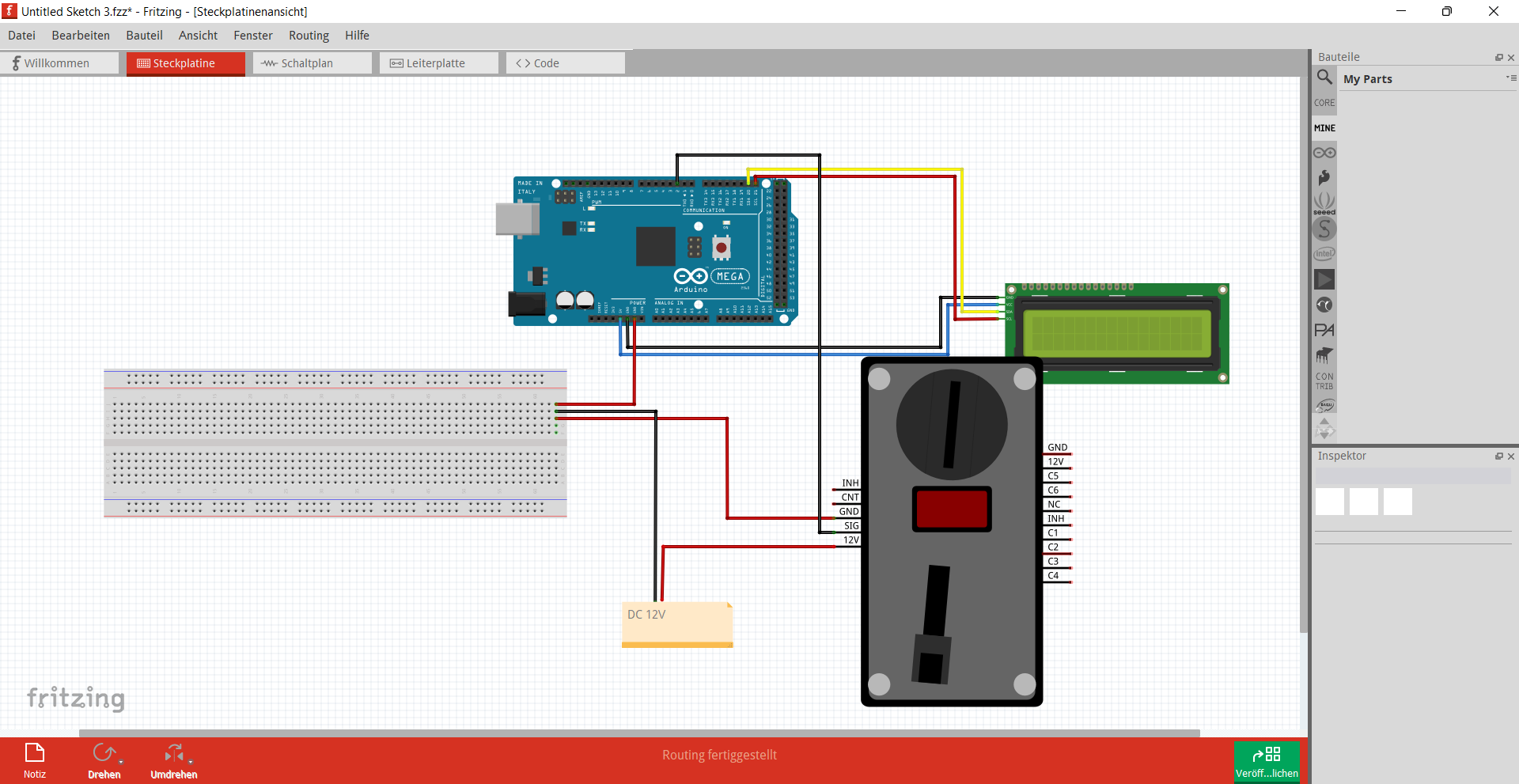
I think I have a problem with the coin acceptor, as sometimes coins are recognized (and shown on the LCD), even though no coin is inserted. However the coin acceptor does recognize the coin all the time (shows type of coin on the coin acceptors display), but nothing is shown on the LCD. (Maybe my coin acceptor is broken?) I'll attach a screenshot of my connections. I set the coin acceptor, so that it gives 1 pulse for 10 ct, 2 pulses for 20 ct, 5 pulses for 50ct, 10 pulses for 1€ and 20 pulses for 2€.
Does anyone have an idea, why it does not work?

First, test the coin acceptor using provided examples and Serial.print(). Add the LCD code later, when you are convinced that the coin acceptor is working properly.

When posting wiring diagrams, hand drawn pictures, with pins and parts clearly labeled, are much more useful and helpful than illegible screen shots, like the above.

Curious, what is the output voltage level, I'm seeing 12vdc, which would be too high for the mega, max is 5vdc..
Grab a volt meter and see what the device is putting out..

Do you have a decent datasheet for your device, didn't care for the one I found on google??

Curious about CNT and INH..

good luck.. ~q

This topic was automatically closed 180 days after the last reply. New replies are no longer allowed.