Debug logic circuit

I builder the circuit that I already done in app Proto (I will provide a print screen) in thinkercad, but aren't working, it always brokes an component or give error in multimeter. Here's the thinkercad link

And the picture

The circuit are working on Proto I ensure

That's not the complete picture - is it?

First off, tidy up that diagram!

Then carefully check your actual wiring against the diagram - a highlighter pen can help here.

The picture shows no power connections - so ensure you have all of them correct.

Then probe your actual circuit and see where the behaviour differs from the simulation.

This is the same thing, isn't it:

It happens to be the same circuit that I mentioned in this answer, but the subject is completely different. It's buggy in thinkercad and that's the topic

But

What do you mean by that?

But
I want help to debug it.

What do you mean by that?
That is to say, it is working in the simulation made in APP Proto, but it does not work in thinkercad. I just talked about this it this because I want to refer it in confident way

OK, so you haven't built any actual hardware - you're just using two different simulators.

Then what I said in Post #2 still applies - just change "hardware" to "TinkerCAD":

First off, tidy up that diagram!

Then carefully check your actual TinkerCAD wiring against the diagram - a highlighter pen can help here.

The picture shows no power connections - so ensure you have all of them correct.

Then probe your actual TinkerCAD circuit and see where the behaviour differs from the other simulation.

A source of well designed and drawn circuits is the

Texas Instruments Logic Pocket Guide/Data Book

I use it since the 70s.

2 Likes

In the app PROTO I used for all inputs a component called Logic input . The input of that component is a bit. Maybe if I replace that component with one more identically I can more easily discover what is the bug.
Mas não sei bem qual o mais parecido.

You've marked Post #3 as the solution - are you saying this is now all fixed?

I puted this by mistake

You know you can un-push it?

Done

The circuit is redone in an more similar way. I did it in two stages.In the first step I used one IC for each NAND gate and powered all iICs in series .In the second step to save ic I I used the maximum NAND gates of each IC as possible and powered all ICs in parallel. In the first stage the circuit worked, but in the second it no longer worked. So it still buggy, but now we know that we don't need any more component I think

Are you talking real hardware now, or still just simulators?

Yet on thinkercad

What do you mean, please show a diagram.
ALL ICs should be powered in parallel across the power supply.

Can you please tell us your electronics, programming, arduino, hardware experience?

Thanks.. Tom... :grinning: :+1: :coffee: :australia:

This is the diagram of the circuit that I'm trying to build(simulate on tinkercad)


As a test, I added 6 switches and an LED. The difference between the switches is the wire color.
I used two select bits with one the other color is to say, if it is to turn on the LED, or not. So that means maybe I made a mistake with the data connection. I have enough experience to build this circuit, after all I already built it in simulation and it worked, but I must have made a mistake in some connection, but I'm having difficulty finding the connection where I made a mistake.
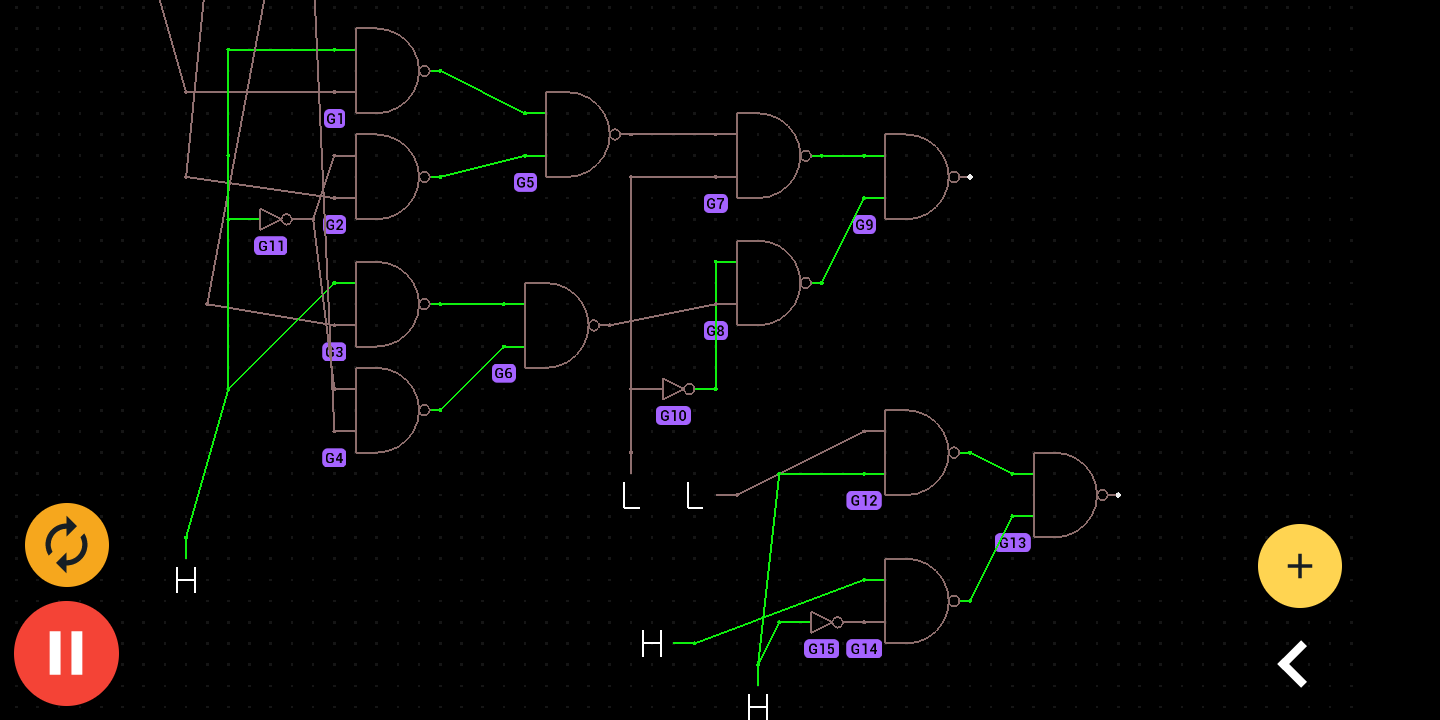
How are you generating the SEL0' and SEL1' signals?
(presumably complements of SEL0 and SEL1 ?)

Show your full test setup - including all the switches & LED.

Again, trace it through connection-by-connection.

Surely, the simulator must let you see the state of each node?
If not, put an LED on each node to see its state.

Print the diagram out onto paper and use a highlighter pen to mark where you've checked.

image

Check the thinkercad link here

Nice suggestion today I can't do it, because I'm without computer and thinkercad don't work on mobile devices.

SEL0' is the inverse of SEL0 and SEL1' is the inverse of SEL1