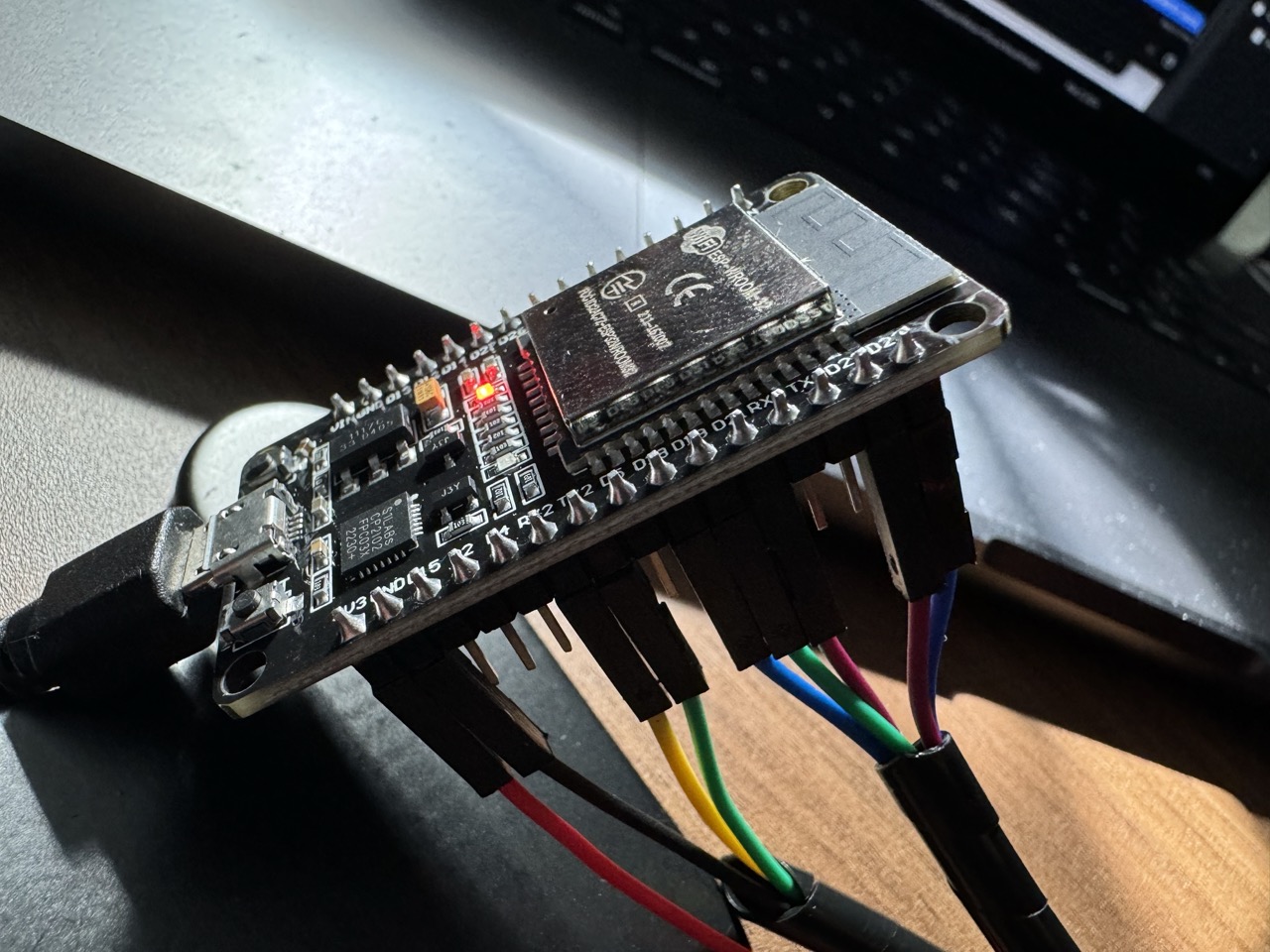
Photos of wiring attached. I've got both ground pins. The ESP32 supplies 3.3v so I don't have a resistor on RX of the DFPlayerMini.
Again, sometimes it works fine, but other times not at all. I have a few of these DFPlayer Mini's and they are all the same amount of unreliable. Is this just the nature of this chip? Is there a better chip I should be using?
Example serial log output
playing 2
Sent Stack:
7E FF 6 6 0 0 1E FE D7 EF

Sent Stack:
7E FF 6 3 0 0 2 FE F6 EF

RFID UID: F313EFFD
369309
playing 2
Sent Stack:
7E FF 6 6 0 0 1E FE D7 EF

Sent Stack:
7E FF 6 3 0 0 2 FE F6 EF

RFID UID: F313EFFD
378214
playing 2
Sent Stack:
7E FF 6 6 0 0 1E FE D7 EF

Sent Stack:
7E FF 6 3 0 0 2 FE F6 EF
How does the trouble show up?
The length of the wires can be contributing.
How is the player module powered? The source of its power? Caps on its power input?
A DFPlayer is power-hungry, and can draw half an Amp or more depending on the speaker impedance. Way too much for the 3.3volt regulator of the ESP32 and USB 2. And then there is the RFID. Not saying it's the cause of your problem, but I think you should try to power your project a different way.
Leo..
When I ground pin 11, it does play. I did buy a two pack off Amazon and they didn’t work at all, but this one seems to be genuine and works on its own. I will say I powered it with 5 V from an Arduino instead of the 3.3 from the ESP 32 when I did that test
So maybe this is just a consumption issue i’m going to try powering it with four AA batteries tonight
super interesting update. I didn't get a chance to splice the battery yet, but when I lower the volume to 15, it works. So it really does feel like a power issue.
edit: it worked for a few minutes, now with no changes, it doesn't. Maybe in 10 minutes it will work again. Ill still the 4 AA soon.
The reason I shared photos is because there's always a possibility I've drawn the schematic wrong. But here's the wiring diagram. I'm pretty confident in it as I've re-wired this entire circuit to twice now.
The current state of things is that everything works. However when commands are sent to the DF Player, they just are ignored most of the time.
I would say commands work about 20% of the time. I can verify via serial that my buttons and RFID are working just fine. It's just the DF Player that seems to be shotty.
I've bought a new one and it has the same issue. So I'm not sure what it could be. But so far It just ignores most commands.
Yes this is still using the DFPPlayer Fast library. Most recent Code below
#include "DFPlayerMini_Fast.h"
#include <MFRC522.h>
#include <SPI.h>
#include <NfcAdapter.h>
#include <Regexp.h>
#include <ButtonDebounce.h>

#define RXD2 16
#define TXD2 17
#define SIZE_BUFFER     18
#define MAX_SIZE_BLOCK  16
#define SS_PIN 21
#define RST_PIN 22
#define NDEF_USE_SERIAL true

int RFID_SDA = 21;
int RFID_RST = 22;
int RFID_SCK = 18;
int RFID_MOSI = 23;
int RFID_MISO = 19;

int bd = 115200;
int serial2_baud = 9600;
int playPauseButtonPin = 5;
int volumeButtonPin = 4;
int isPaused = 0;
int volume = 10;

MFRC522 mfrc522(RFID_SDA, RFID_RST);
NfcAdapter nfc = NfcAdapter(&mfrc522);
DFPlayerMini_Fast myMP3;
MatchState ms;
ButtonDebounce playPauseButton(playPauseButtonPin, 250);
ButtonDebounce volumeButton(volumeButtonPin, 250);

void setup() {
  Serial.begin(bd);
  while(!Serial);
  initButtons();
  initMp3Player();
  initNfcReader();
}

void loop() {
  buttonsLoop();
  nfcLoop();
  delay(100);
}

void buttonsLoop() {
  playPauseButton.update();
  volumeButton.update();
}

void handlePlayPauseButton(const int state) {
  Serial.println("handle play pause button");
  if (state == LOW) {
    if (isPaused) {
      myMP3.resume();
      Serial.println("resume");
      isPaused = 0;
    } else {
      myMP3.pause();
      Serial.println("pause");
      isPaused = 1;
    }
  }
}

void handleVolumeButton(const int state) {
  Serial.println("handle volume");
  if (state == LOW) {
    if (volume == 30) {
      Serial.println("dec volume");
      volume = 10;
    } else {
      volume = volume + 10;
      Serial.println("inc volume");
    }
    myMP3.volume(volume);
  }
}

void initButtons() {
  pinMode(playPauseButtonPin, INPUT_PULLUP);
  pinMode(volumeButtonPin, INPUT_PULLUP);
  playPauseButton.setCallback(handlePlayPauseButton);
  volumeButton.setCallback(handleVolumeButton);
}

void initNfcReader() {
  SPI.begin(RFID_SCK, RFID_MISO, RFID_MOSI, RFID_SDA);
  mfrc522.PCD_Init();
  nfc.begin(true);
  delay(4);
  Serial.println("RFID Ready");
}

void initMp3Player() {
  Serial2.begin(serial2_baud, SERIAL_8N1, RXD2, TXD2);
  while(!Serial2);
  myMP3.begin(Serial2);
  myMP3.volume(volume);
  Serial.println("Mp3 ready");
  delay(100);
  myMP3.playFromMP3Folder(1);
}

void nfcLoop() {

  if (nfc.tagPresent()) {

    // extract the NDEF text
    NfcTag tag = nfc.read();
    NdefMessage msg = tag.getNdefMessage();
    NdefRecord record = msg.getRecord(0);
    char* ndefText = (char*)record.getPayload();

    // extract the track number from the raw ndef text
    ms.Target(ndefText);
    char result = ms.Match("(%d+)");
    char buf [100];
    if (result == REGEXP_MATCHED) {
      String trackNumber = ms.GetMatch(buf);
      Serial.println("Playing: " + trackNumber);
      myMP3.playFromMP3Folder(trackNumber.toInt());
    }
  }
}
"The current state of things is that everything works. However when commands are sent to the DF Player, they just are ignored most of the time."
Bit of a contradiction there.
I tried several libraries when I started using the DFR player a couple of years ago. I found DFPlayerMini_Fast buggy and rather inflexible. The great majority here and elsewhere use the manufacturer's own library, DFRobotDFPlayerMini, as I do. Apart from anything else, you'll find far more sketch examples, discussions, tutorials etc on it than the one you're using. So I recommend you switch.
. https://wiki.dfrobot.com/DFPlayer_Mini_SKU_DFR0299
Are you sure that the DFPlayerMini_Fast supports the ESP32? Have you run basic sketches that play successfully?
Yea I’ll try that next. I know it works because sometimes the commands do work. 20% of the time isn’t great, but it does tell me that the wiring is right. Otherwise it wouldn’t work at all.
The other weird thing is that this project worked better (80% commands going through) with the same hardware before in”cleaned up” and switched from raw wires to a breadboard. I was able to connect the DFplayer to the ESP32 with small bojack wires.
So same connections, same hardware, but using the breadboard. It works, but still the commands ignored problem.
Maybe some kind of “noise” prevents the player from listening to the commands?
So after switching to the manufacturer's library here are the results.
Example log of holding the NFC card on the read.
Time Out!
Playing: 13
Time Out!
Playing: 13
Time Out!
Playing: 13
Time Out!
Playing: 13
Time Out!
Playing: 13
Time Out!
Playing: 13
Time Out!
Playing: 13
Time Out!
Playing: 13
Time Out!
Stack Wrong!
Playing: 13
Playing: 13
Stack Wrong!
Playing: 13
Time Out!
It did play after holding it there for 3-5 seconds.
Similar issue with play/pause button. It took about 15 presses. Here's the log you can see it sent the signal to the player each of the 15 times, and only on the 15th time did it actually do it.
Time Out!
handle play pause button
handle play pause button
resume
Time Out!
handle play pause button
handle play pause button
pause
Time Out!
handle play pause button
handle play pause button
resume
Time Out!
handle play pause button
handle play pause button
pause
Time Out!
handle play pause button
handle play pause button
resume
Time Out!
handle play pause button
handle play pause button
pause
Stack Wrong!
Current code is here
#include "DFRobotDFPlayerMini.h"
#include <MFRC522.h>
#include <SPI.h>
#include <NfcAdapter.h>
#include <Regexp.h>
#include <ButtonDebounce.h>

#define RXD2 16
#define TXD2 17
#define SIZE_BUFFER     18
#define MAX_SIZE_BLOCK  16
#define SS_PIN 21
#define RST_PIN 22
#define NDEF_USE_SERIAL true

int RFID_SDA = 21;
int RFID_RST = 22;
int RFID_SCK = 18;
int RFID_MOSI = 23;
int RFID_MISO = 19;

int bd = 115200;
int serial2_baud = 9600;
int playPauseButtonPin = 5;
int volumeButtonPin = 4;
int isPaused = 0;
int volume = 10;

MFRC522 mfrc522(RFID_SDA, RFID_RST);
NfcAdapter nfc = NfcAdapter(&mfrc522);
DFRobotDFPlayerMini myMP3;
MatchState ms;
ButtonDebounce playPauseButton(playPauseButtonPin, 250);
ButtonDebounce volumeButton(volumeButtonPin, 250);

void setup() {
  Serial.begin(bd);
  while(!Serial);
  initButtons();
  initMp3Player();
  initNfcReader();
}

void loop() {
  buttonsLoop();
  nfcLoop();

  if (myMP3.available()) {
    printDetail(myMP3.readType(), myMP3.read());
  }
  delay(100);
}

void buttonsLoop() {
  playPauseButton.update();
  volumeButton.update();
}

void handlePlayPauseButton(const int state) {
  Serial.println("handle play pause button");
  if (state == LOW) {
    if (isPaused) {
      myMP3.start();
      Serial.println("resume");
      isPaused = 0;
    } else {
      myMP3.pause();
      Serial.println("pause");
      isPaused = 1;
    }
  }
}

void handleVolumeButton(const int state) {
  Serial.println("handle volume");
  if (state == LOW) {
    if (volume == 30) {
      Serial.println("dec volume");
      volume = 10;
    } else {
      volume = volume + 10;
      Serial.println("inc volume");
    }
    myMP3.volume(volume);
  }
}

void initButtons() {
  pinMode(playPauseButtonPin, INPUT_PULLUP);
  pinMode(volumeButtonPin, INPUT_PULLUP);
  playPauseButton.setCallback(handlePlayPauseButton);
  volumeButton.setCallback(handleVolumeButton);
}

void initNfcReader() {
  SPI.begin(RFID_SCK, RFID_MISO, RFID_MOSI, RFID_SDA);
  mfrc522.PCD_Init();
  nfc.begin(true);
  delay(4);
  Serial.println("RFID Ready");
}

void initMp3Player() {
  Serial2.begin(serial2_baud, SERIAL_8N1, RXD2, TXD2);
  while(!Serial2);
  myMP3.begin(Serial2, true, true);
  myMP3.volume(volume);
  Serial.println("Mp3 ready");
  myMP3.setTimeOut(500);
  delay(100);
  myMP3.playMp3Folder(1);
}

void nfcLoop() {

  if (nfc.tagPresent()) {

    // extract the NDEF text
    NfcTag tag = nfc.read();
    NdefMessage msg = tag.getNdefMessage();
    NdefRecord record = msg.getRecord(0);
    char* ndefText = (char*)record.getPayload();

    // extract the track number from the raw ndef text
    ms.Target(ndefText);
    char result = ms.Match("(%d+)");
    char buf [100];
    if (result == REGEXP_MATCHED) {
      String trackNumber = ms.GetMatch(buf);
      Serial.println("Playing: " + trackNumber);
      myMP3.playMp3Folder(trackNumber.toInt());
    }
  }
}

void printDetail(uint8_t type, int value){
  switch (type) {
    case TimeOut:
      Serial.println(F("Time Out!"));
      break;
    case WrongStack:
      Serial.println(F("Stack Wrong!"));
      break;
    case DFPlayerCardInserted:
      Serial.println(F("Card Inserted!"));
      break;
    case DFPlayerCardRemoved:
      Serial.println(F("Card Removed!"));
      break;
    case DFPlayerCardOnline:
      Serial.println(F("Card Online!"));
      break;
    case DFPlayerUSBInserted:
      Serial.println("USB Inserted!");
      break;
    case DFPlayerUSBRemoved:
      Serial.println("USB Removed!");
      break;
    case DFPlayerPlayFinished:
      Serial.print(F("Number:"));
      Serial.print(value);
      Serial.println(F(" Play Finished!"));
      break;
    case DFPlayerError:
      Serial.print(F("DFPlayerError:"));
      switch (value) {
        case Busy:
          Serial.println(F("Card not found"));
          break;
        case Sleeping:
          Serial.println(F("Sleeping"));
          break;
        case SerialWrongStack:
          Serial.println(F("Get Wrong Stack"));
          break;
        case CheckSumNotMatch:
          Serial.println(F("Check Sum Not Match"));
          break;
        case FileIndexOut:
          Serial.println(F("File Index Out of Bound"));
          break;
        case FileMismatch:
          Serial.println(F("Cannot Find File"));
          break;
        case Advertise:
          Serial.println(F("In Advertise"));
          break;
        default:
          break;
      }
      break;
    default:
      break;
  }

}
So yea, it "works" But it's just ignoring the commands most of the time. I'm not sure why it's saying timeout so often.
Yea Ill try that next. It doesn't quite sound like a wiring issue though, because I can see in Serial that the commands are being sent to the DFPlayer. Which means the buttons and RFID are all doing their thing. So if there was loose wiring, it would be on the DFPlayer side, But the DFPlayer is the one part that is on the breadboard with the ESP32. Nothing other than the speakers are "plugged in"
So perhaps it's a breadboard issue. The ESP32 is a terrible form factor for a breadboard. I had to use 2 breadboards with some rails taken out to get it to fit.