When running readHumidity() and readTemperature() it returns NAN for both. It initializes the float f as NAN but then doesnt activate the if statement for read(force)){} and instead just returns f so I know my library is working correctly. I've double checked the wiring but just in-case, attached is the diagram as well as a photo of the actual board


unplug everything and rewire the DHT22 and test it alone with a clean and direct wiring.
Please, post the sketch that you have tried. In the meantime, follow the advice made in post #2 by @J-M-L to make a setup similar to the following (Fig-1).
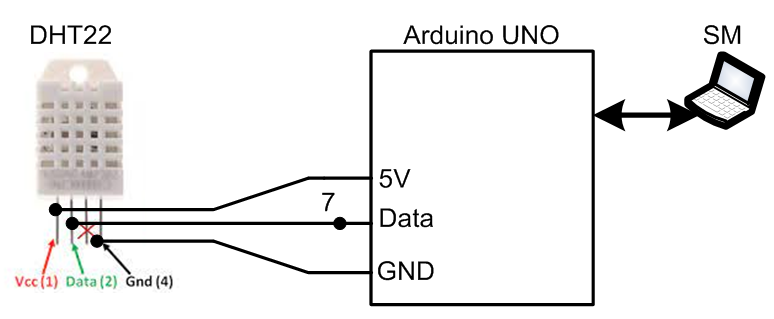
Figure-1:
Thanks for the feedback so far, here is the code i used.
#include <LiquidCrystal.h>
#include <DHT.h>

// Initialize the DHT sensor
#define DHTPIN 2          // DHT22 sensor is connected to pin 2
#define DHTTYPE DHT22     // DHT22 type
DHT dht(DHTPIN, DHTTYPE);

// Initialize the LCD
// The LCD is connected to pins 7, 8, 9, 10, 11, 12
#define LCD_RS 8
#define LCD_E  7
#define LCD_D4 3
#define LCD_D5 4
#define LCD_D6 5
#define LCD_D7 6
LiquidCrystal lcd(LCD_RS, LCD_E, LCD_D4, LCD_D5, LCD_D6, LCD_D7);
void setup() {
  // Begin serial communication
  Serial.begin(9600);

  // Begin LCD communication
  lcd.begin(16, 2);

  // Start the DHT sensor
  dht.begin();
}

void loop() {
  // Reading temperature and humidity
  float temp = dht.readTemperature(false, true); // Read temperature as Celsius
  Serial.print(dht.read(true));
  //float humidity = dht.readHumidity(true); // Read humidity
  //Serial.print(temp);

  // Check if any readings failed and exit early (to try again).5
  if (isnan(temp)) {
    lcd.clear();
    lcd.print("Failed to read");
    return;
  }

  // Display the readings
  lcd.clear(); // Clear the display
  lcd.print("Temp: ");
  lcd.print(temp);
  lcd.print((char)223); // Degree symbol
  lcd.print("C");
  lcd.setCursor(0, 1); // Move to the start of the second line
  //lcd.print("Humidity: ");
  //lcd.print(humidity);
  lcd.print("%");

  // Check for alarm condition
  if (temp > 100.0 && temp < 15.0) {
    // Trigger an alarm
    // For demonstration purposes, we'll just print an alert message
    // You could extend this to activate a physical alarm, LED, etc.
    lcd.clear();
    lcd.print("ALARM: Temp &");
    lcd.setCursor(0, 1);
    lcd.print("Humidity High!");
  }

  delay(2001); // Wait for 2 seconds before reading again
}
Verify the logical operator in this line.
Thanks for the sketch:
1. Build the circuit of Fig-1 of post #3 using only DHT22.
2. Upload the following sketch whch is made from your sketch of post #4 to test the functionality of DHT22 sensor.
#include <DHT.h>
#define DHTPIN 2          // DHT22 sensor is connected to pin 2
#define DHTTYPE DHT22     // DHT22 type
DHT dht(DHTPIN, DHTTYPE);

void setup()
 {
   Serial.begin(9600);
   dht.begin();
}

void loop()
{
  // Reading temperature and humidity
  float temp = dht.readTemperature();
  Serial.print("Temperature is: "); Serial.println(temp, 1));

  float humidity = dht.readHumidity();
  Serial.print("Humidity is: ");  Serial.println(humidity);
  Serial.println("=============================");

  delay(2000); // Wait for 2 seconds before reading again
}
3. Check that the Serial Monitor shows reasonable values.
You seem to have a 10K pull-up resistor on the DHT22 data output connected to pin 2.
Try removing it. The library already uses a pull-up.
Change your code from:
  float temp = dht.readTemperature(false, true); // Read temperature as Celsius
  Serial.print(dht.read(true));
  //float humidity = dht.readHumidity(true); // Read humidity
to:
  // Reading temperature and humidity
  float temp = dht.readTemperature(); // Read temperature as Celsius
  float humidity = dht.readHumidity(); // Read humidity
and uncomment
  lcd.print("Humidity: ");
  lcd.print(humidity);
I moved some pins around to work with the attached breadboard, but the above are the only code changes.
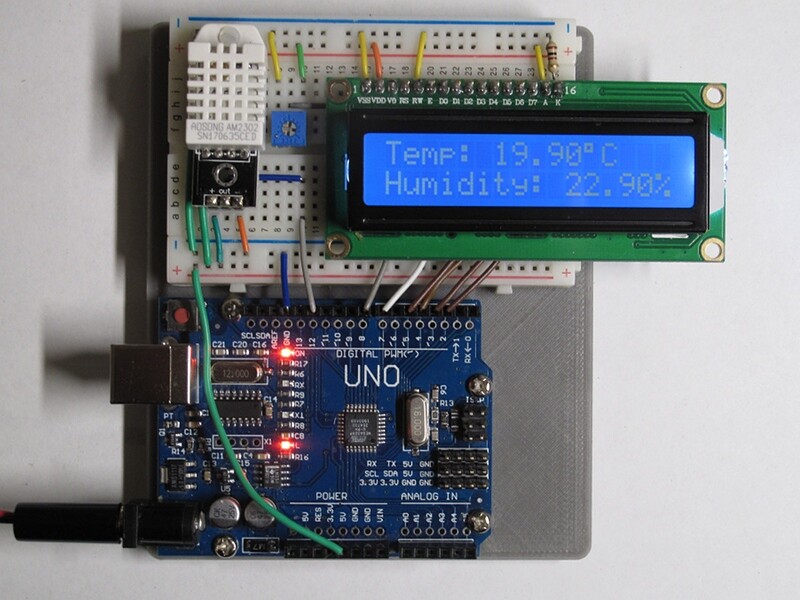
Do i need the same configuration as you for this to work, and if so what is that black piece under the dht22 and what is the blue piece beside the screen?
Did you even try following the previous instructions?
Yes I did, and it still reads "Failed to read"
Your code, with the modifications I showed, worked for me. The pins I used are irrelevant; as long as your sketch matches your wiring, and your sensor isn't broken (which wouldn't be at the top of my list of worries in your place), the sketch should work for you. Perhaps following some of the good advice in posts 2, 3 and 7 would be a good thing to try.
Did you follow what @J-M-L suggested in Post #2?
Some DHT sensors come with really thin pins. Make sure it is well seated on the protoboard
Your DHT data leg is not connected (through a wire to Arduino pin 2).
I moved it around a little and that got it to work. Thank you all so much for the help!!