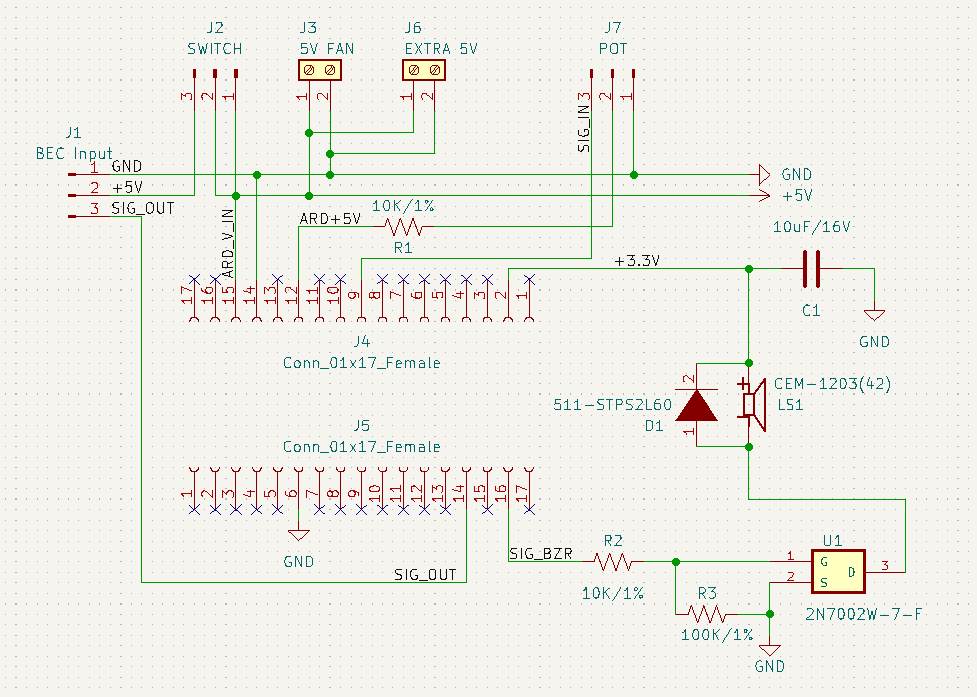
Hi there. I'm making a circuit described by the schematic below. It is worth noting that the circuit worked fine prior to adding the parts associated with the CEM-1203(42) piezo buzzer. The only difference from the schematic and the stuffed PCB I have is that I'm using a 10 uF/50V electrolytic capacitor instead of a 10 uF/16V.
When I plugged in the micro for the first time and uploaded the code, it uploaded fine, but the program would not run (evident by the fact that the programmed sound would not play). After the initial upload, my computer (MacOS) would no longer detect the micro on the USB ports, so I am unable to upload to the board anymore.
The net +3.3V is connected to the 3.3V power pin of the Arduino micro
The net SIG_BZR is connected to digital PWM pin 11 of the Arduino Micro
I uploaded the code on a second arduino micro, and the issue did not present itself. I could upload as much as I want and as long as it wasn't placed into the PCB my computer would continue to detect it via USB. As soon as I uploaded the code to the new micro while on the PCB, the same thing happened. The USB is briefly detected, for about 1 second, and then becomes unrecognizable by the computer. If I unplug the USB and plug it back into the micro, it again recognizes it for one second before it disappears again.
I suspect the circuit is designed poorly on my part. I'd like to know what the likely cause is and how to correct it.
So, because it's electromagnetic, it cannot be connected to the +3.3 port of the arduino, no matter what?
Is the best solution in this case to power it from the 5V bus and use a voltage divider to step down the voltage to 3.3V, or would I be better off using a voltage regulator or something else?
It looks OK, however R3 should be connected to SIG_BZR, not the gate. Also, I would add a 33R resistor between the 3.3V pin and C1/buzzer to further reduce buzzer-induced electrical noise in the 3.3V rail. Remove the MCU, activate the buzzer, and use a scope to examine noise in the 3.3V rail.
If the PCB is correct, you should look for other possible causes for the failure.
EDIT: the buzzer coil resistance is ~42R, which means it will draw 78 mA from a 3.3V supply. Have you verified that the 3.3V output can safely provide this much current?
It appears like it's not safe to draw that much current. Per the Arduino Micro product page, it looks like 50 mA is the limit. I suppose drawing too much current would cause something like this to happen to the controller?
If so, how best should I avoid this? Can I keep it connected to the 3.3V pin of the Arduino if I introduce a current limiting resistor before the cap, per your earlier suggestion? Or, is the safest/most optimal option to use a regulator to step down to 3.3V from the 5V bus and avoid using the 3.3V pin on the Arduino entirely?
Maybe. It can provide more current, usually. Why are you convinced that the buzzer must run on 3.3V? Thus, that you must use a regulator?
If the board has problems when it boots, if the buzzer circuit is not active (i.e. the 2N700x transistor is turned off), then there is some flaw in the wiring or an incorrect component. Because, the schematic looks fine, at least as far as that is concerned.
Again, if you have problems before even activating the buzzer, then the problem is not the buzzer load or supply at all. It's more likely in the buzzer drive circuit.
Is SIG_BZR configured and set low at boot time? Have you measured any voltage levels around the drive circuit with a DMM? That would be the textbook troubleshooting step.
Buzzer rated for 3.5 volts. Drive it with NPN transistor, or Mosfet. But yes, you'll need to beef up your 3.3V power, or maybe drive the buzzer with a suitable resistor between it and the 5V source. The buzzer draws 35 ma, you want to drop 1.7 volts, sounds like around 50 ohms would do it.
C
The buzzer is just a coil, with the previously mentioned DC resistance of about 42 Ohms. The buzzer power supply must be capable of handling much more than the steady state current draw of 78 mA at 3.3V, and must be well decoupled from the MCU power supply.
Leave the electrolytic cap where it is, buzzer (+) to ground, but place the 50 ohm resistor between that junction, and 5V.
There will be a "chirp" of a few cycles when it turns on, but nobody will be able to hear it, and it won't exceed the max voltage rating of the buzzer, 5.0V.
It will save you the cost and complexity hit from using a 3.3V regulator. The cap and feed resistor will help isolate the buzzer EMI from the rest of the circuit.
I'm not very experienced with this, but I haven't been able to find an obvious difference in my PCB traces compared to the wiring schematic. If you can help me identify any flaws in the attached PCB design, please let me know how to address them. The unconnected ground nets are connected when the top copper zone is filled, but I've removed the fill zone for the purpose of the screenshot here.
I'd also like to clarify that even when I remove the Arduino board from the PCB, it will no longer be recognized by the computer once plugged in. So, yes, the buzzer is not active and it still cannot be programmed, but it cannot be programmed even while it's not on the board at all, either.
@jremington You're recommending to not use the 3.3V Arduino pin at all, but @camsysca is saying it's okay as long as it's inline with a current limiting resistor. Can either of you elaborate on why one approach is "better" than the other, if at all?
...or drawing too much current from the 5V output if that is what you use for the supply... I don't believe that the buzzer absolutely demands a 3V supply... it's designed for it, but it is the current that really matters. You can derive the correct current from any voltage supply. The 3.5V rating of the buzzer expresses the right supply voltage when no current limiting resistor or circuit is used.
The 3.3V supply of many Arduinos is very weak in delivering current. So it's best to just avoid using it for anything power-hungry if you can.
yes, the buzzer is not active and it still cannot be programmed
Then, you are chasing the wrong problem. None of the buzzer circuits we are discussing should do that. You posted a layout and that is great, but the problem could also be in the component selection or a difficult to see flaw like a solder short.
Also you need to get in there with a DMM and report back to us the findings.
Edit- why is there a 10k resistor in series with the MOSFET gate drive? That will increase the power dissipation due to slower switching.
So just to hammer in a point, rarely are such potential flaws solved by inspection. You have to do some step by step confirmation of all the traces, for continuity and also for unintended shorts using a DMM as well as visual inspection. Sometimes the measured voltages can provide a clue, even when the device won't work.
Sometimes it's a component issue, for example the pin out or polarity of some part is not what you expected. Welcome to the fast lane.
@anon57585045 I just went through with the DMM and found the following:
No shorts to ground detected
All traces that should be connected were
Could not find any traces connected that shouldn't be
The voltage across the cap was constantly @ 3.3V while power was supplied
Vgs of mosfet was always zero
Vds of mosfet was always 3.3V
The last two points may be moot since if the controller isn't operating correctly it's probably not sending out the right signal from Pin 11. I measured the voltage across Pin 11 and ground and the output was very inconsistent, bouncing between 0 and 2V, with no value popping up consistently.
@madmark2150 I double checked the capacitor polarity and it is soldered in the correct orientation. Additionally, the crossed red traces are all from the same 5V bus on the PCB region you mention. The trace connecting to the Arduino is the Vin pin. The traces leading to the molex connector are both on the +5V net. They are all from the same power bus, so I traced them accordingly on the PCB. Is this not correct?
Edit: I've tried to round up the suggestions for altering the buzzer circuit thus far into the schematic below. Is what I have correct? The Vgs threshold for the mosfet is only 1V, but the PWM output is 5V - should I not include a voltage divider?
I was about to say that the capacitor is unnecessary, but it may actually be advantageous in isolating the pulsatile current from the buzzer from the rest of the circuit. Its connections to the buzzer and the FET ground must be as short as possible. 100 µF better.
What it will do is to charge to 5 V when the FET is off so that when it turns on, the buzzer will initially be powered with the full 5 V, however for an electromechanical buzzer this will not be harmful.