Do any of you have a recommendation for an available cable (i.e. that I won't need to make) that can connect between a pin on the arduino pin to a DIN connector ?
That would be very unusual. The closest you will get is just to cut the cable, strip it and solder it to some pinheaders that will go into the Arduino.
// Per.
noamga:
Do any of you have a recommendation for an available cable (i.e. that I won't need to make) that can connect between a pin on the arduino pin to a DIN connector ?
"DIN connector" could mean various things, can you clarify?
I want to send a signal from the arduino to a PowerLab recording unit (i.e. PowerLab 8/35) that has two types of analog input connectors: (1) BNC connectors and (2) Pod (DIN) connectors.
I was just wondering what would be the best cable to purchase for this purpose.
I apologize if this is a dumb question - I'm still kind of new at this.
No idea that a powerlab recording unit is, nor what a "Pod" DIN connector is. You need to provide detail (links, not description). Don't expect people to google, provide the concrete information so there's no ambiguity please.
noamga:
I apologize if this is a dumb question - I'm still kind of new at this.
It's not a dumb question. It's just insanely vague. It forces us to ask for more info, or as i did, answer just as vaguely.
Now my question is, why do you want to connect the Arduino to this equipment? There is no analog outputs on most Arduino's.
// Per.
From:-
A DIN connector is an electrical connector that was originally standardized in the early 1970s[1] by the Deutsches Institut für Normung (DIN), the German national standards organization. There are DIN standards for various different connectors, therefore the term "DIN connector" alone does not unambiguously identify any particular type of connector unless the document number of the relevant DIN standard is added (e.g., "DIN 45322 connector"). Some DIN connector standards are:
DIN 41524, for circular connectors often used for audio signals or some digital signals like MIDI
DIN 41612, rectangular connectors used to connect plug-in cards to a back plane or motherboard
DIN 41652 D-subminiature connectors used for computer data and video
DIN 41585 automotive coaxial connectors
Also:-
that can connect between a pin on the arduino pin to a DIN connector
Just one connection is insufficient, to connect two pieces of equipment together you need at least a signal and a ground, so that is two. As DIN connectors also come in a number of different connector, the old Round DIN 41524 connector can have between 2 and 9 connectors. And I think you can get up to 9 with a DIN 41652 and that is a bugger to wire up.
So please can you supply more information or a photograph of the one you want to use.
Thank you so much for your willingness to help.
I apologize for the extra work I've caused you all due to the lack of clarity on my part.
A picture of the unit's panel is attached, as well as its lab manual. Here's a website link to the unit: PowerLab (DAQ) Data Acquisition Hardware Device | DAQ Equipment | ADI
The arduino and computer are already hooked up to each other, as well as to an additional laser source. I just wanted to add an additional element to the code. More specifically, I want the arduino to send a trigger to this program whenever the LED light is on.
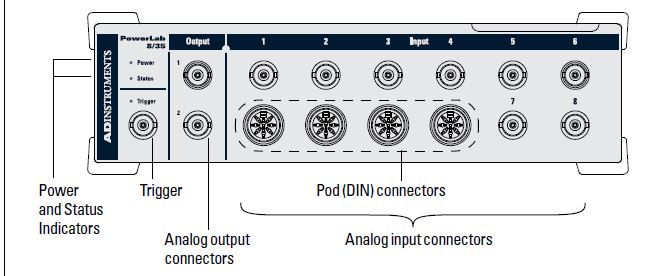
PowerLab_35_Series_OG.pdf (1.49 MB)
More specifically, I want the arduino to send a trigger to this program whenever the LED light is on.
Page 31 shows the trigger connection as a BNC connector but you asked about a DIN connector. The analogue inputs pin out is shown on page 32.
There is this 8 pin DIN but you will have to solder a wire to it.
As mentioned before you could cut a cable in half like this one https://www.ebay.co.uk/itm/FULLY-WIRED-MK2-Powerlink-8-pin-din-Speaker-Cable-FITS-Bang-Olufsen-BEOLAB-1M/292213283354
But then you would have to find the wires you want by using a continuity meter. Note that this cable is described as "fully wired" which means there is a wire connected to each pin. It is possible to get cables that have only a few wires connected up for a specific application but these never seem to say "partially wired".