Display with SSD1680Z driver not giving expected results, no matter what code

I got this e-ink display from aliexpress https://it.aliexpress.com/item/1005006339967597.html
I then linked it to my esp32 board as follows: SCL to 23, SDA to 18, RES to 16, DC to 17, CS to 5 and BUSY to 4. Using the Adafruit_SSD1680.h library i'm able to have a simple hello world work decently, altought the refresh rate is still uncontrollable. I wanted to use the GxEPD2 library instead, but can't make it work properly no matter what: i cant show text, and if i want to fill the display in with a single color, it ignores my color chioce, and paints it red anyway. Could it be because i'm using a different driver, that isn't an SSD1680? Any suggestions are really really welcome.

#include <GxEPD2_BW.h>
#include <GxEPD2_3C.h>
#include <Fonts/FreeMonoBold9pt7b.h>
#include "FreeMonoBoldOblique24pt7b.h"
// select the display class and display driver class in the following file (new style):
//#include "GxEPD2_display_selection_new_style.h"

// or select the display constructor line in one of the following files (old style):
//#include "GxEPD2_display_selection.h"
//#include "GxEPD2_display_selection_added.h"
// Connections for e.g. LOLIN D32
static const uint8_t EPD_BUSY = 4;  // to EPD BUSY
static const uint8_t EPD_CS   = 5;  // to EPD CS
static const uint8_t EPD_RST  = 16; // to EPD RST
static const uint8_t EPD_DC   = 17; // to EPD DC
static const uint8_t EPD_SCK  = 18; // to EPD CLK
static const uint8_t EPD_MISO = -1; // Master-In Slave-Out not used, as no data from display
static const uint8_t EPD_MOSI = 23; // to EPD DIN
//GxEPD2_BW<GxEPD2_290, GxEPD2_290::HEIGHT> display(GxEPD2_290(/*CS=D8*/ EPD_CS, /*DC=D3*/ EPD_DC, /*RST=D4*/ EPD_RST, /*BUSY=D2*/ EPD_BUSY));
GxEPD2_BW<GxEPD2_290_T94, GxEPD2_290_T94::HEIGHT> display(GxEPD2_290_T94(/*CS=D8*/ EPD_CS, /*DC=D3*/ EPD_DC, /*RST=D4*/ EPD_RST, /*BUSY=D2*/ EPD_BUSY)); // GDEM029T94 128x296, SSD1680
// alternately you can copy the constructor from GxEPD2_display_selection.h or GxEPD2_display_selection_added.h to here
// e.g. for Wemos D1 mini:t
//GxEPD2_BW<GxEPD2_154_D67, GxEPD2_154_D67::HEIGHT> display(GxEPD2_154_D67(/*CS=D8*/ SS, /*DC=D3*/ 0, /*RST=D4*/ 2, /*BUSY=D2*/ 4)); // GDEH0154D67
//GxEPD2_BW<GxEPD2_290_T5, GxEPD2_290_T5::HEIGHT> display(GxEPD2_290_T5(/*CS=D1*/ SS, /*DC=D3*/ 0, /*RST=D4*/ 2, /*BUSY=D2*/ 4)); // GDEW029T5 128x296, UC8151 (IL0373)
void setup()
{
  display.init(115200);
  helloWorld();
  display.hibernate();
}

const char HelloWorld[] = "Hello World!";

void helloWorld()
{
  display.setRotation(1);
  //display.setFont(&FreeMonoBold9pt7b);
  display.setFont(&FreeMonoBoldOblique24pt7b);
  display.setTextColor(GxEPD_WHITE);
  int16_t tbx, tby; uint16_t tbw, tbh;
  display.getTextBounds(HelloWorld, 0, 0, &tbx, &tby, &tbw, &tbh);
  // center the bounding box by transposition of the origin:
  uint16_t x = ((display.width() - tbw) / 2) - tbx;
  uint16_t y = ((display.height() - tbh) / 2) - tby;
  display.setFullWindow();
  display.firstPage();
  do
  {
    display.fillScreen(GxEPD_WHITE);
    display.setCursor(x, y);
    display.print(HelloWorld);
  }
  while (display.nextPage());
}

void loop() {};

Please post a picture of your display, and your connection to the esp32 board.
And report the inking on the flexible connector of the panel.

Of course! The cable is a FPC-A005, here are the pictures of wiring, and screen behaviour: in the first pic, the screen is flashing white quickly, then settles to deep red in the second picture.


Hi @crashdown96 , welcome to the forum!

You have a 3-color e-paper panel mounted on a board that has the required booster circuit.
I would guess your board has the Waveshare logo on its backside.

But you use the b/w display class of GxEPD2 with a b/w driver class.
This explains the strange behavior.
If it were the b/w panel version, then you would need to use this driver class:

//#define GxEPD2_DRIVER_CLASS GxEPD2_290_GDEY029T94 // GDEY029T94 128x296, SSD1680, (FPC-A005 20.06.15)

according to the inking.

I don't have a 2.9" 3-color display with this inking, so your display is not supported by GxEPD2.
You could try with

//#define GxEPD2_DRIVER_CLASS GxEPD2_290_C90c // GDEM029C90  128x296, SSD1680, (FPC-7519 rev.b)

which has the same controller, but a different variant than SSD1680Z.
-jz-

Hello @ZinggJM and thank you for your time!
My "3 color" display, to begin with, was advertised by the vendor as two colors, and learn about it being able to display 3 by using the adafruit library. Also the board isn't a waveshare, i looked everywhere. Alas, using the class you suggested, the behaviour is as expected: i now get the output i want, altought the refresh rate is a bit on the slow side, around 3spf. Partial refresh doesn't work as expected with the following code: With all 3 methods, even with 60 seconds delays added between each other, the whole screen refreshes anyway after the partial refresh, making it useless. Am i getting something wrong?

Edit: this was a senseless message since i forgot to add the code i found for testing

#include <GxEPD2_3C.h>
#include <Fonts/FreeMonoBold9pt7b.h>
#include "FreeMonoBoldOblique24pt7b.h"
#include "bitmaps/Bitmaps3c128x296.h"
#define ENABLE_GxEPD2_GFX 0

// Connections for e.g. LOLIN D32
static const uint8_t EPD_BUSY = 4;  // to EPD BUSY
static const uint8_t EPD_CS   = 5;  // to EPD CS
static const uint8_t EPD_RST  = 16; // to EPD RST
static const uint8_t EPD_DC   = 17; // to EPD DC
static const uint8_t EPD_SCK  = 18; // to EPD CLK
static const uint8_t EPD_MISO = -1; // Master-In Slave-Out not used, as no data from display
static const uint8_t EPD_MOSI = 23; // to EPD DIN
static const bool hasPartialUpdate = true;
static const bool usePartialUpdateWindow = false; // set false for better image
static const bool hasFastPartialUpdate = true;

// Define the display class and driver
GxEPD2_3C<GxEPD2_290_C90c, GxEPD2_290_C90c::HEIGHT> display(GxEPD2_290_C90c(EPD_CS, EPD_DC, EPD_RST, EPD_BUSY));


void setup()
{
  Serial.begin(115200);
  Serial.println();
  Serial.println("setup");
  delay(100);
  display.init(115200); // default 10ms reset pulse, e.g. for bare panels with DESPI-C02
  //display.init(115200, true, 2, false); // USE THIS for Waveshare boards with "clever" reset circuit, 2ms reset pulse
  //display.init(115200, true, 10, false, SPI0, SPISettings(4000000, MSBFIRST, SPI_MODE0)); // extended init method with SPI channel and/or settings selection
  // first update should be full refresh
  helloWorld();
  delay(1000);
  // partial refresh mode can be used to full screen,
  // effective if display panel hasFastPartialUpdate
  helloFullScreenPartialMode();
  delay(1000);
  //stripeTest(); return; // GDEH029Z13 issue
  helloArduino();
  delay(1000);
  helloEpaper();
  delay(1000);
}

void loop()
{
}

const char HelloWorld[] = "Hello World!";
const char HelloArduino[] = "Hello Arduino!";
const char HelloEpaper[] = "Hello E-Paper!";
const int16_t rotation = 1;

void helloWorld()
{
  Serial.println("helloWorld");
  //display.setRotation(1);
  display.setRotation(rotation);
  display.setFont(&FreeMonoBold9pt7b);
  if (display.epd2.WIDTH < 104) display.setFont(0);
  display.setTextColor(GxEPD_BLACK);
  int16_t tbx, tby; uint16_t tbw, tbh;
  display.getTextBounds(HelloWorld, 0, 0, &tbx, &tby, &tbw, &tbh);
  // center bounding box by transposition of origin:
  uint16_t x = ((display.width() - tbw) / 2) - tbx;
  uint16_t y = ((display.height() - tbh) / 2) - tby;
  display.setFullWindow();
  display.firstPage();
  do
  {
    display.fillScreen(GxEPD_WHITE);
    display.setCursor(x, y);
    display.print(HelloWorld);
  }
  while (display.nextPage());
  //Serial.println("helloWorld done");
}

void helloFullScreenPartialMode()
{
  Serial.println("helloFullScreenPartialMode");
  const char fullscreen[] = "full screen update";
  const char fpm[] = "fast partial mode";
  const char spm[] = "slow partial mode";
  const char npm[] = "no partial mode";
  display.setPartialWindow(0, 0, display.width(), display.height());
  //display.setRotation(1);
  display.setRotation(rotation);
  display.setFont(&FreeMonoBold9pt7b);
  if (display.epd2.WIDTH < 104) display.setFont(0);
  //display.setTextColor(GxEPD_BLACK);
  display.setTextColor(GxEPD_WHITE);
  const char* updatemode;
  if (display.epd2.hasFastPartialUpdate)
  {
    updatemode = fpm;
  }
  else if (display.epd2.hasPartialUpdate)
  {
    updatemode = spm;
  }
  else
  {
    updatemode = npm;
  }
  // do this outside of the loop
  int16_t tbx, tby; uint16_t tbw, tbh;
  // center update text
  display.getTextBounds(fullscreen, 0, 0, &tbx, &tby, &tbw, &tbh);
  uint16_t utx = ((display.width() - tbw) / 2) - tbx;
  uint16_t uty = ((display.height() / 4) - tbh / 2) - tby;
  // center update mode
  display.getTextBounds(updatemode, 0, 0, &tbx, &tby, &tbw, &tbh);
  uint16_t umx = ((display.width() - tbw) / 2) - tbx;
  uint16_t umy = ((display.height() * 3 / 4) - tbh / 2) - tby;
  // center HelloWorld
  display.getTextBounds(HelloWorld, 0, 0, &tbx, &tby, &tbw, &tbh);
  uint16_t hwx = ((display.width() - tbw) / 2) - tbx;
  uint16_t hwy = ((display.height() - tbh) / 2) - tby;
  display.firstPage();
  do
  {
    //display.fillScreen(GxEPD_WHITE);
    display.fillScreen(GxEPD_BLACK);
    display.setCursor(hwx, hwy);
    display.print(HelloWorld);
    display.setCursor(utx, uty);
    display.print(fullscreen);
    display.setCursor(umx, umy);
    display.print(updatemode);
  }
  while (display.nextPage());
  //Serial.println("helloFullScreenPartialMode done");
}

void helloArduino()
{
  Serial.println("helloArduino");
  //display.setRotation(1);
  display.setRotation(rotation);
  display.setFont(&FreeMonoBold9pt7b);
  if (display.epd2.WIDTH < 104) display.setFont(0);
  display.setTextColor(display.epd2.hasColor ? GxEPD_RED : GxEPD_BLACK);
  int16_t tbx, tby; uint16_t tbw, tbh;
  // align with centered HelloWorld
  display.getTextBounds(HelloWorld, 0, 0, &tbx, &tby, &tbw, &tbh);
  uint16_t x = ((display.width() - tbw) / 2) - tbx;
  // height might be different
  display.getTextBounds(HelloArduino, 0, 0, &tbx, &tby, &tbw, &tbh);
  uint16_t y = ((display.height() / 4) - tbh / 2) - tby; // y is base line!
  // make the window big enough to cover (overwrite) descenders of previous text
  uint16_t wh = FreeMonoBold9pt7b.yAdvance;
  uint16_t wy = (display.height() / 4) - wh / 2;
  display.setPartialWindow(0, wy, display.width(), wh);
  display.firstPage();
  do
  {
    display.fillScreen(GxEPD_WHITE);
    //display.drawRect(x, y - tbh, tbw, tbh, GxEPD_BLACK);
    display.setCursor(x, y);
    display.print(HelloArduino);
  }
  while (display.nextPage());
  delay(1000);
  //Serial.println("helloArduino done");
}

void helloEpaper()
{
  Serial.println("helloEpaper");
  //display.setRotation(1);
  display.setRotation(rotation);
  display.setFont(&FreeMonoBold9pt7b);
  if (display.epd2.WIDTH < 104) display.setFont(0);
  display.setTextColor(display.epd2.hasColor ? GxEPD_RED : GxEPD_BLACK);
  int16_t tbx, tby; uint16_t tbw, tbh;
  // align with centered HelloWorld
  display.getTextBounds(HelloWorld, 0, 0, &tbx, &tby, &tbw, &tbh);
  uint16_t x = ((display.width() - tbw) / 2) - tbx;
  // height might be different
  display.getTextBounds(HelloEpaper, 0, 0, &tbx, &tby, &tbw, &tbh);
  uint16_t y = ((display.height() * 3 / 4) - tbh / 2) - tby; // y is base line!
  // make the window big enough to cover (overwrite) descenders of previous text
  uint16_t wh = FreeMonoBold9pt7b.yAdvance;
  uint16_t wy = (display.height() * 3 / 4) - wh / 2;
  display.setPartialWindow(0, wy, display.width(), wh);
  display.firstPage();
  do
  {
    display.fillScreen(GxEPD_WHITE);
    display.setCursor(x, y);
    display.print(HelloEpaper);
  }
  while (display.nextPage());
  //Serial.println("helloEpaper done");
}

-Lorenzo
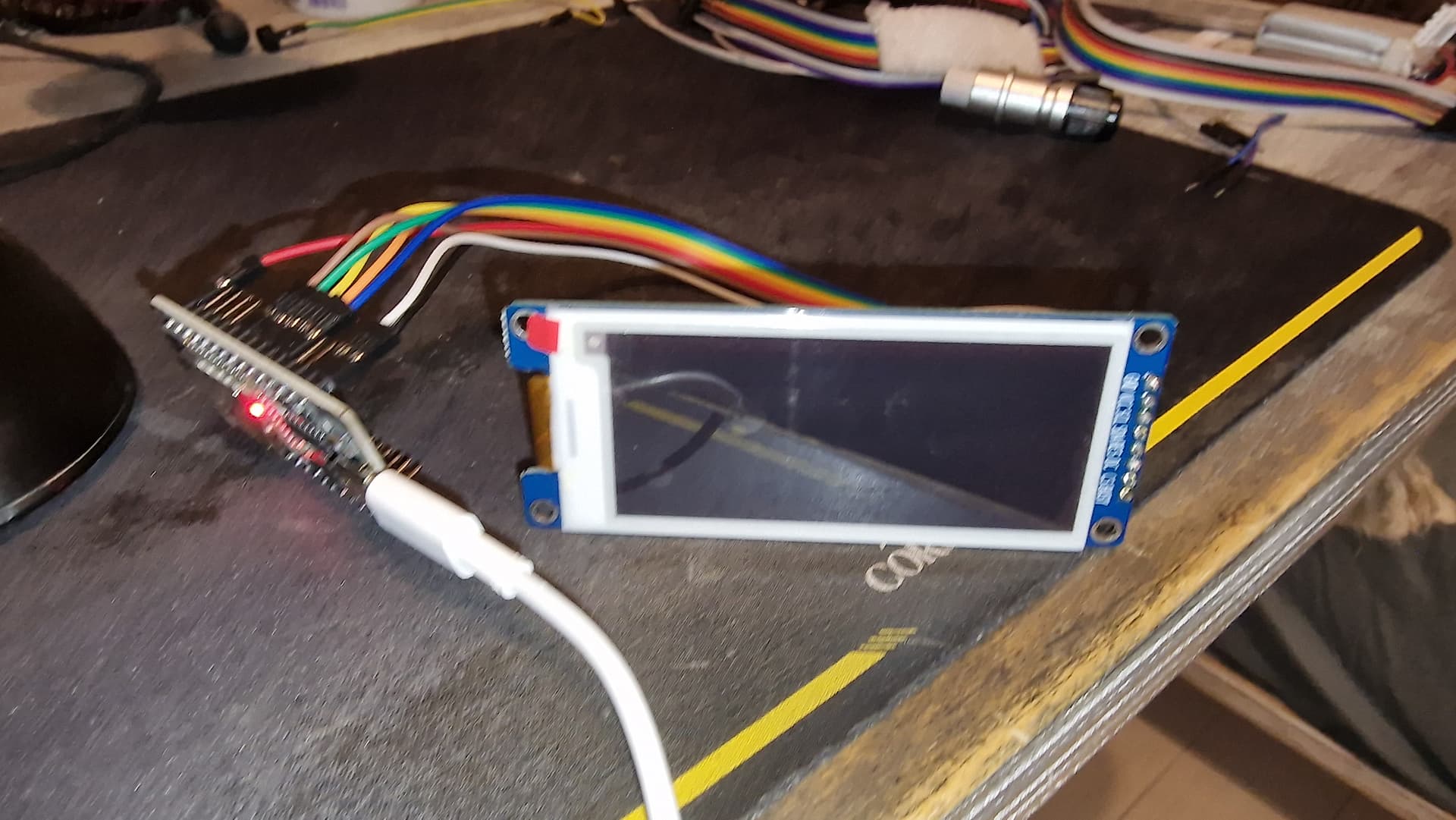
I would be interested to see a picture of the backside of your display board.
Just to see if it has level converters on board.

SSD e-paper controllers usually have partial window addressing capability, but no partial window update. On b/w panels you don't notice that with fast partial update (differential refresh), as parts with no change don't flash.

Some 3-color displays can be used with differential refresh with b/w only content.
But either the controller would need waveform tables for differential refresh, or the controller registers would need to be loaded with such a waveform table.
You could try this with driver classes GxEPD2_290_T94_V2 or GxEPD2_290_BS, which load a differential waveform table.
-jz-

These declarations have no effect, as the local declarations in the class header are used.

Once I'm home I'll give you the backside picture, but i see what you mean. I'll try the different controller, and check if only using BW can help me with the refresh, I'll keep you updated!

Backside of the board:

Edit: unfortunately both the drivers you suggested only display a red screen if i use them instead of GxEPD2_290_C90c

#include <GxEPD2_3C.h>
#include <Fonts/FreeMonoBold9pt7b.h>
#include "FreeMonoBoldOblique24pt7b.h"
#include "bitmaps/Bitmaps3c128x296.h"
#define ENABLE_GxEPD2_GFX 0

// Connections for e.g. LOLIN D32
static const uint8_t EPD_BUSY = 4;  // to EPD BUSY
static const uint8_t EPD_CS   = 5;  // to EPD CS
static const uint8_t EPD_RST  = 16; // to EPD RST
static const uint8_t EPD_DC   = 17; // to EPD DC
static const uint8_t EPD_SCK  = 18; // to EPD CLK
static const uint8_t EPD_MISO = -1; // Master-In Slave-Out not used, as no data from display
static const uint8_t EPD_MOSI = 23; // to EPD DIN

// Define the display class and driver
GxEPD2_BW<GxEPD2_290_BS, GxEPD2_290_BS::HEIGHT> display(GxEPD2_290_BS(EPD_CS, EPD_DC, EPD_RST, EPD_BUSY));


void setup()
{
  Serial.begin(115200);
  Serial.println();
  Serial.println("setup");
  delay(100);
  display.init(115200); // default 10ms reset pulse, e.g. for bare panels with DESPI-C02
  //display.init(115200, true, 2, false); // USE THIS for Waveshare boards with "clever" reset circuit, 2ms reset pulse
  //display.init(115200, true, 10, false, SPI0, SPISettings(4000000, MSBFIRST, SPI_MODE0)); // extended init method with SPI channel and/or settings selection
  // first update should be full refresh
  helloWorld();
  delay(1000);
  // partial refresh mode can be used to full screen,
  // effective if display panel hasFastPartialUpdate
  helloFullScreenPartialMode();
  delay(100000);
}

void loop()
{
}

const char HelloWorld[] = "Hello World!";
const char HelloArduino[] = "Hello Arduino!";
const char HelloEpaper[] = "Hello E-Paper!";
const int16_t rotation = 1;

void helloWorld()
{
  Serial.println("helloWorld");
  //display.setRotation(1);
  display.setRotation(rotation);
  display.setFont(&FreeMonoBold9pt7b);
  if (display.epd2.WIDTH < 104) display.setFont(0);
  display.setTextColor(GxEPD_BLACK);
  int16_t tbx, tby; uint16_t tbw, tbh;
  display.getTextBounds(HelloWorld, 0, 0, &tbx, &tby, &tbw, &tbh);
  // center bounding box by transposition of origin:
  uint16_t x = ((display.width() - tbw) / 2) - tbx;
  uint16_t y = ((display.height() - tbh) / 2) - tby;
  display.setFullWindow();
  display.firstPage();
  do
  {
    display.fillScreen(GxEPD_WHITE);
    display.setCursor(x, y);
    display.print(HelloWorld);
  }
  while (display.nextPage());
  //Serial.println("helloWorld done");
}

void helloFullScreenPartialMode()
{
  Serial.println("helloFullScreenPartialMode");
  const char fullscreen[] = "full screen update";
  const char fpm[] = "fast partial mode";
  const char spm[] = "slow partial mode";
  const char npm[] = "no partial mode";
  display.setPartialWindow(0, 0, display.width(), display.height());
  //display.setRotation(1);
  display.setRotation(rotation);
  display.setFont(&FreeMonoBold9pt7b);
  if (display.epd2.WIDTH < 104) display.setFont(0);
  //display.setTextColor(GxEPD_BLACK);
  display.setTextColor(GxEPD_WHITE);
  const char* updatemode;
  if (display.epd2.hasFastPartialUpdate)
  {
    updatemode = fpm;
  }
  else if (display.epd2.hasPartialUpdate)
  {
    updatemode = spm;
  }
  else
  {
    updatemode = npm;
  }
  // do this outside of the loop
  int16_t tbx, tby; uint16_t tbw, tbh;
  // center update text
  display.getTextBounds(fullscreen, 0, 0, &tbx, &tby, &tbw, &tbh);
  uint16_t utx = ((display.width() - tbw) / 2) - tbx;
  uint16_t uty = ((display.height() / 4) - tbh / 2) - tby;
  // center update mode
  display.getTextBounds(updatemode, 0, 0, &tbx, &tby, &tbw, &tbh);
  uint16_t umx = ((display.width() - tbw) / 2) - tbx;
  uint16_t umy = ((display.height() * 3 / 4) - tbh / 2) - tby;
  // center HelloWorld
  display.getTextBounds(HelloWorld, 0, 0, &tbx, &tby, &tbw, &tbh);
  uint16_t hwx = ((display.width() - tbw) / 2) - tbx;
  uint16_t hwy = ((display.height() - tbh) / 2) - tby;
  display.firstPage();
  do
  {
    //display.fillScreen(GxEPD_WHITE);
    display.fillScreen(GxEPD_BLACK);
    display.setCursor(hwx, hwy);
    display.print(HelloWorld);
    display.setCursor(utx, uty);
    display.print(fullscreen);
    display.setCursor(umx, umy);
    display.print(updatemode);
  }
  while (display.nextPage());
  //Serial.println("helloFullScreenPartialMode done");
}

void helloArduino()
{
  Serial.println("helloArduino");
  //display.setRotation(1);
  display.setRotation(rotation);
  display.setFont(&FreeMonoBold9pt7b);
  if (display.epd2.WIDTH < 104) display.setFont(0);
  display.setTextColor(display.epd2.hasColor ? GxEPD_RED : GxEPD_BLACK);
  int16_t tbx, tby; uint16_t tbw, tbh;
  // align with centered HelloWorld
  display.getTextBounds(HelloWorld, 0, 0, &tbx, &tby, &tbw, &tbh);
  uint16_t x = ((display.width() - tbw) / 2) - tbx;
  // height might be different
  display.getTextBounds(HelloArduino, 0, 0, &tbx, &tby, &tbw, &tbh);
  uint16_t y = ((display.height() / 4) - tbh / 2) - tby; // y is base line!
  // make the window big enough to cover (overwrite) descenders of previous text
  uint16_t wh = FreeMonoBold9pt7b.yAdvance;
  uint16_t wy = (display.height() / 4) - wh / 2;
  display.setPartialWindow(0, wy, display.width(), wh);
  display.firstPage();
  do
  {
    display.fillScreen(GxEPD_WHITE);
    //display.drawRect(x, y - tbh, tbw, tbh, GxEPD_BLACK);
    display.setCursor(x, y);
    display.print(HelloArduino);
  }
  while (display.nextPage());
  delay(1000);
  //Serial.println("helloArduino done");
}

void helloEpaper()
{
  Serial.println("helloEpaper");
  //display.setRotation(1);
  display.setRotation(rotation);
  display.setFont(&FreeMonoBold9pt7b);
  if (display.epd2.WIDTH < 104) display.setFont(0);
  display.setTextColor(display.epd2.hasColor ? GxEPD_RED : GxEPD_BLACK);
  int16_t tbx, tby; uint16_t tbw, tbh;
  // align with centered HelloWorld
  display.getTextBounds(HelloWorld, 0, 0, &tbx, &tby, &tbw, &tbh);
  uint16_t x = ((display.width() - tbw) / 2) - tbx;
  // height might be different
  display.getTextBounds(HelloEpaper, 0, 0, &tbx, &tby, &tbw, &tbh);
  uint16_t y = ((display.height() * 3 / 4) - tbh / 2) - tby; // y is base line!
  // make the window big enough to cover (overwrite) descenders of previous text
  uint16_t wh = FreeMonoBold9pt7b.yAdvance;
  uint16_t wy = (display.height() * 3 / 4) - wh / 2;
  display.setPartialWindow(0, wy, display.width(), wh);
  display.firstPage();
  do
  {
    display.fillScreen(GxEPD_WHITE);
    display.setCursor(x, y);
    display.print(HelloEpaper);
  }
  while (display.nextPage());
  //Serial.println("helloEpaper done");
}

These driver classes don't set the Panel Settings register (to b/w mode). So this setting is taken from OTP values. This explains why you get red content and can't use these driver classes.

Thank you for the picture; it shows that the board just has the booster circuit and the required capacitors.

Your panel may be this one:
2.9 inch Tri-color ePaper display supporting monochrome Partial update 296x128, GDEY029Z95_Good Display (good-display.com)
-jz-

supporting monochrome Partial update

I should take a look at this, sooner or later, when I find time for it.

I've tried using the code given by the manifacturer, for esp32 (yet i was forced to put pgmspace.h into an avr folder in the ESP32 core folder, otherwise i'd get a compilation error. Regardless, i tried uploading the code, but absolutely nothing is showing on the screen: it's actually still stuck on the state of "hello world" of a previous attempt. I'll now try using some other drivers and pray that one works, or will go with the B/W attempt. Thanks so far!

Edit: regarding the panel settings register, if it isn't set by the driver class choice, i don't understand how could it be done? Are these OTP values (which i have no idea what they are) editable somehow? Sorry if i sound ignorant, I'm trying to learn, and truly appreciate your help

#include <SPI.h>
//EPD
#include "Display_EPD_W21_spi.h"
#include "Display_EPD_W21.h"
#include "Ap_29demo.h"  
// Connections for e.g. LOLIN D32
static const uint8_t EPD_BUSY = 4;  // to EPD BUSY
static const uint8_t EPD_CS   = 5;  // to EPD CS
static const uint8_t EPD_RST  = 16; // to EPD RST
static const uint8_t EPD_DC   = 17; // to EPD DC
static const uint8_t EPD_SCK  = 18; // to EPD CLK
static const uint8_t EPD_MISO = -1; // Master-In Slave-Out not used, as no data from display
static const uint8_t EPD_MOSI = 23; // to EPD DIN
void setup() {
   pinMode(EPD_BUSY, INPUT);  //BUSY
   pinMode(EPD_RST, OUTPUT); //RES 
   pinMode(EPD_DC, OUTPUT); //DC   
   pinMode(EPD_CS, OUTPUT); //CS   
   //SPI
   SPI.beginTransaction(SPISettings(10000000, MSBFIRST, SPI_MODE0)); 
   SPI.begin ();  
}

//Tips//
/*
1.Flickering is normal when EPD is performing a full screen update to clear ghosting from the previous image so to ensure better clarity and legibility for the new image.
2.There will be no flicker when EPD performs a partial refresh.
3.Please make sue that EPD enters sleep mode when refresh is completed and always leave the sleep mode command. Otherwise, this may result in a reduced lifespan of EPD.
4.Please refrain from inserting EPD to the FPC socket or unplugging it when the MCU is being powered to prevent potential damage.)
5.Re-initialization is required for every full screen update.
6.When porting the program, set the BUSY pin to input mode and other pins to output mode.
*/
void loop() {
   unsigned char i = 0;
#if 1 //Full screen refresh, fast refresh, and partial refresh demostration.

			EPD_HW_Init(); //Full screen refresh initialization.
		  EPD_WhiteScreen_ALL(gImage_BW1,gImage_RW1); //To Display one image using full screen refresh.
		  EPD_DeepSleep(); //Enter the sleep mode and please do not delete it, otherwise it will reduce the lifespan of the screen.
			delay(3000); //Delay for 3s.
									
    #if 0 // Fast refresh demostration.
			EPD_HW_Init_Fast(); //Full screen refresh initialization.
		  EPD_WhiteScreen_ALL_Fast(gImage_BW1,gImage_RW1); //To Display one image using full screen refresh.
		  EPD_DeepSleep(); //Enter the sleep mode and please do not delete it, otherwise it will reduce the lifespan of the screen.
			delay(3000); //Delay for 3s.
	
    #endif		
	#if 1 //Partial refresh demostration.
	//Partial refresh demo support displaying a clock at 5 locations with 00:00.  If you need to perform partial refresh more than 5 locations, please use the feature of using partial refresh at the full screen demo.
	//After 5 partial refreshes, implement a full screen refresh to clear the ghosting caused by partial refreshes.
	//////////////////////Partial refresh time demo/////////////////////////////////////
		  EPD_HW_Init(); //Electronic paper initialization.	
			EPD_SetRAMValue_BaseMap(gImage_BWbasemap,gImage_RWbasemap); //Please do not delete the background color function, otherwise it will cause unstable display during partial refresh.

			for(i=0;i<6;i++)
			EPD_Dis_Part_Num(32,180+32*0,Num[5-i],         //x-A,y-A,DATA-A
												32,180+32*1,Num[i],         //x-B,y-B,DATA-B
												32,180+32*2,gImage_dot, //x-C,y-C,DATA-C
												32,180+32*3,Num[1],32,64); //x-D,y-D,DATA-D,Resolution  32*64
			EPD_Dis_Part_Num(32,180+32*0,Num[8],         //x-A,y-A,DATA-A
										32,180+32*1,Num[1],         //x-B,y-B,DATA-B
										32,180+32*2,gImage_dot, //x-C,y-C,DATA-C
										32,180+32*3,Num[2],32,64); //x-D,y-D,DATA-D,Resolution  32*64										
										
		  EPD_DeepSleep();  //Enter the sleep mode and please do not delete it, otherwise it will reduce the lifespan of the screen.
      delay(3000); //Delay for 3s.
		//Full screen update clear the screen.
		EPD_HW_Init(); //Full screen refresh initialization.
		EPD_WhiteScreen_White(); //Clear screen function.
		EPD_DeepSleep(); //Enter the sleep mode and please do not delete it, otherwise it will reduce the lifespan of the screen.
		delay(3000); //Delay for 3s.
 #endif	
	
	
	#if 0 //Demonstration of full screen refresh with 180-degree rotation, to enable this feature, please change 0 to 1.
		/************Full display(2s)*******************/
		EPD_HW_Init_180(); //Full screen refresh initialization.
		EPD_WhiteScreen_ALL(gImage_BW1,gImage_RW1); //To Display one image using full screen refresh.
		EPD_DeepSleep(); //Enter the sleep mode and please do not delete it, otherwise it will reduce the lifespan of the screen.
		delay(3000); //Delay for 3s.
	#endif							
#endif
  while(1); // The program stops here   
}

It is Sunday, and I have not time to investigate. I can only provide short answers.
Look at method Init_display() or similar in the demo code. Command code 0x00 is for panel settings. And there is a link for panel specs, as well for controller spec, that has all command codes and parameter values.
-jz-

You may have the same panel as the one from Good Display. But even then, the Good Display one may be enhanced by panel specific OTP values (One Time Programmable memory).
This may be needed for the demo code to work with the panel.

Naturally, don-t worry about having other stuff to do, i can wait! What you've done so far is already amazing

Edit: In any case, as a friendly reccomendation would you suggest me to give up with this panel? The only real issue i have at this point is that it seemingly power cycles after most actions, leading to it constantly powering on and off

Anyway, if anyone has anything to say, please be my guest, looking forward to any tip, cheers!