Problem GxEPD2 partial update on 2,9" b/w/r e-paper

Hi Arduino user,

as my knowledge is limited (to some experiance to python and javascript coding with some raspberry pi projects) i need your help for my new project.

I bought a waveshare E-Paper ESP8266 Driver board (https://www.waveshare.com/wiki/E-Paper_ESP8266_Driver_Board) and a 2,9" b/w/r e-paper Module (https://www.waveshare.com/wiki/2.9inch_e-Paper_Module_(B)).

I read some topics and got close to my target.
I want to connect the ESP8266 via wifi and MQTT to my ioBroker (running on pi3 in the same network).

Here is my problem:

  • I write static text on e-paper by display.setFullWindow() - works
  • i refresh dynamic data received by mqtt with partial refresh display.setPartialWindow - works partly. This only works, if y position of partial refresh is between 0-31. Every higher value then 31 end in blanking a area on top of the display, full width and 25% height (see pictures)

Pictures: (as new user i only can upload one picture)

Here is my code:

#include <ESP8266WiFi.h>
#include <PubSubClient.h>
#define ENABLE_GxEPD2_GFX 0
#include <GxEPD2_3C.h>
#include <Fonts/FreeMonoBold9pt7b.h>

GxEPD2_3C<GxEPD2_290c, GxEPD2_290c::HEIGHT> display(GxEPD2_290c(/*CS=15*/ SS, /*DC=4*/ 4, /*RST=2*/ 2, /*BUSY=5*/ 5)); // GDEW029Z10
 
const char* ssid = "A";
const char* password =  "8";
const char* mqttServer = "192.168.yy.xx";
const int mqttPort = 1883;
const char* mqttUser = "";
const char* mqttPassword = "";
const char* topic1 = "esp/PVaktuelleLeistung";
const char* topic2 = "esp/currentPowerConsumption";

WiFiClient espClient;
PubSubClient client(espClient);

void connectToMQTT() {
  if (client.connect("ESP8266Client") ) {
    Serial.println("MQTT connected");
  }
}

void setup() {
 
  display.init(115200);
  helloWorld2();
  //helloFullScreenPartialMode();
  display.hibernate();
  
  Serial.begin(115200);
 
  WiFi.begin(ssid, password);
  
  while (WiFi.status() != WL_CONNECTED) {
    delay(500);
    Serial.println("Connecting to WiFi..");
  }
  Serial.println("Connected to the WiFi network");

  client.setServer(mqttServer, mqttPort);
  client.setCallback(callback);
 
  while (!client.connected()) {
    Serial.println("Connecting to MQTT...");
 
    if (client.connect("ESP8266Client", mqttUser, mqttPassword )) {
 
      Serial.println("connected");  
 
    } else {
 
      Serial.print("failed with state ");
      Serial.print(client.state());
      delay(2000);
 
    }
  }
 
  client.publish("esp/test", "Hello from ESP8266");
  client.subscribe(topic1);
  client.subscribe(topic2);

}

//e-Paper Test
const char HelloWorld[] = "Hello Worls";

void helloWorld()
{
  display.setRotation(1);
  display.setFont(&FreeMonoBold9pt7b);
  display.setTextColor(GxEPD_BLACK);
  int16_t tbx, tby; uint16_t tbw, tbh;
  display.getTextBounds(HelloWorld, 0, 0, &tbx, &tby, &tbw, &tbh);
  // center the bounding box by transposition of the origin:
  uint16_t x = ((display.width() - tbw) / 2) - tbx;
  uint16_t y = ((display.height() - tbh) / 2) - tby;
  display.setFullWindow();
  display.firstPage();
  do
  {
    display.fillScreen(GxEPD_WHITE);
    display.setCursor(x, y);
    display.print(HelloWorld);
  }
  while (display.nextPage());
}

void helloWorld2()
{
  display.setRotation(1);
  display.setFont(&FreeMonoBold9pt7b);
  display.setTextColor(GxEPD_BLACK);
  int16_t tbx, tby; uint16_t tbw, tbh;
  //display.getTextBounds(HelloWorld, 0, 0, &tbx, &tby, &tbw, &tbh);
  // center the bounding box by transposition of the origin:
  //uint16_t x = ((display.width() - tbw) / 2) - tbx;
  //uint16_t y = ((display.height() - tbh) / 2) - tby;
  display.setFullWindow();
  display.firstPage();
  do
  {
    display.fillScreen(GxEPD_WHITE);
    //display.setCursor(x, y);
    display.setCursor(1, 16);
    //display.setTextColor(GxEPD_RED);
    display.print("PV-Leistung: ");
    //display.setTextColor(GxEPD_BLACK);
    display.setCursor(1, 81);
    display.print("Verbrauch aktuell: ");
    display.setCursor(1, 121);
    display.print("aktualisiert: ");
  }
  while (display.nextPage());
}

void Display_write_partial2(String str_In, uint16_t x, uint16_t y, uint16_t colorText, uint16_t colorBack)
{
  int  int_Len = str_In.length();
  char chr_Text[int_Len];
  str_In.toCharArray(chr_Text, int_Len+1);
  display.setRotation(1);
  display.setFont(&FreeMonoBold9pt7b);
  display.setTextColor(colorText);
  int16_t tbx, tby; uint16_t tbw, tbh;
  display.getTextBounds(chr_Text, x, y, &tbx, &tby, &tbw, &tbh);
  // center the bounding box by transposition of the origin:
  //uint16_t x = ((display.width() - tbw) / 2) - tbx;
  //uint16_t y = ((display.height() - tbh) / 2) - tby;
  display.setPartialWindow(x, y, tbw, tbh); //x,y,width,height
  Serial.print("x:");
  Serial.println(x);
  Serial.print("y:");
  Serial.println(y);
  Serial.print("tbx:");
  Serial.println(tbx);
  Serial.print("tby:");
  Serial.println(tby);
  Serial.print("tbw:");
  Serial.println(tbw);
  Serial.print("tbh:");
  Serial.println(tbh);
  display.firstPage();
  do
  {
    if (tby >= 0) {
      display.setCursor(x, y+tbh);
    } else {
      display.setCursor(x, tby*(-1));
    }
    display.fillScreen(colorBack);
    display.print(chr_Text);
  }
  while (display.nextPage());
}

void helloFullScreenPartialMode()
{
  //Serial.println("helloFullScreenPartialMode");
  const char fullscreen[] = "full screen update";
  const char fpm[] = "fast partial mode";
  const char spm[] = "slow partial mode";
  const char npm[] = "no partial mode";
  display.setPartialWindow(0, 0, display.width(), display.height());
  display.setRotation(1);
  display.setFont(&FreeMonoBold9pt7b);
  if (display.epd2.WIDTH < 104) display.setFont(0);
  display.setTextColor(GxEPD_BLACK);
  const char* updatemode;
  if (display.epd2.hasFastPartialUpdate)
  {
    updatemode = fpm;
  }
  else if (display.epd2.hasPartialUpdate)
  {
    updatemode = spm;
  }
  else
  {
    updatemode = npm;
  }
  // do this outside of the loop
  int16_t tbx, tby; uint16_t tbw, tbh;
  // center update text
  display.getTextBounds(fullscreen, 0, 0, &tbx, &tby, &tbw, &tbh);
  uint16_t utx = ((display.width() - tbw) / 2) - tbx;
  uint16_t uty = ((display.height() / 4) - tbh / 2) - tby;
  // center update mode
  display.getTextBounds(updatemode, 0, 0, &tbx, &tby, &tbw, &tbh);
  uint16_t umx = ((display.width() - tbw) / 2) - tbx;
  uint16_t umy = ((display.height() * 3 / 4) - tbh / 2) - tby;
  // center HelloWorld
  display.getTextBounds(HelloWorld, 0, 0, &tbx, &tby, &tbw, &tbh);
  uint16_t hwx = ((display.width() - tbw) / 2) - tbx;
  uint16_t hwy = ((display.height() - tbh) / 2) - tby;
  display.firstPage();
  do
  {
    display.fillScreen(GxEPD_WHITE);
    display.setCursor(hwx, hwy);
    display.print(HelloWorld);
    display.setCursor(utx, uty);
    display.print(fullscreen);
    display.setCursor(umx, umy);
    display.print(updatemode);
  }
  while (display.nextPage());
  //Serial.println("helloFullScreenPartialMode done");
}

void callback(char* topic, byte* payload, unsigned int length) {
 
  Serial.print("Message arrived in topic: ");
  Serial.println(topic);
 
  Serial.print("Message:");
  payload[length] = '\0'; // Null terminator used to terminate the char array
  String msg = (char*)payload;
  msg += " Watt";
  for (int i = 0; i < length; i++) {
    Serial.print((char)payload[i]);
  }
 
  Serial.println(); //e-Paper Test
  Serial.println(msg); //e-Paper Test
  Serial.println();
  Serial.println("-----------------------");
  
  if (strcmp(topic, topic1) == 0) {
    Serial.println("richtiger Topic");
    Display_write_partial2(msg, 131, 0, GxEPD_BLACK, GxEPD_WHITE);//e-Paper Test
    //Display_write_partial2(msg, 131, 32, GxEPD_BLACK, GxEPD_WHITE);//e-Paper Test ab y>=32 geht der partial refresh nicht richtig
  }

  if (strcmp(topic, topic2) == 0) {
  //if (strcmp(topic, "esp/currentPowerConsumption") == 0) {
    Serial.println("richtiger Topic");
    Display_write_partial2(msg, 199, 70, GxEPD_BLACK, GxEPD_WHITE);//e-Paper Test
    //Display_write_partial2(msg, 199, 31, GxEPD_BLACK, GxEPD_WHITE);//e-Paper Test
  }
 
}
 
void loop() {
  client.loop();
  if (!client.connected()) {
    connectToMQTT();
  } 
}

Maybe someone can help me or give me useful tipps or sources where i can get further informations.

Thanks in advance.

AxLED
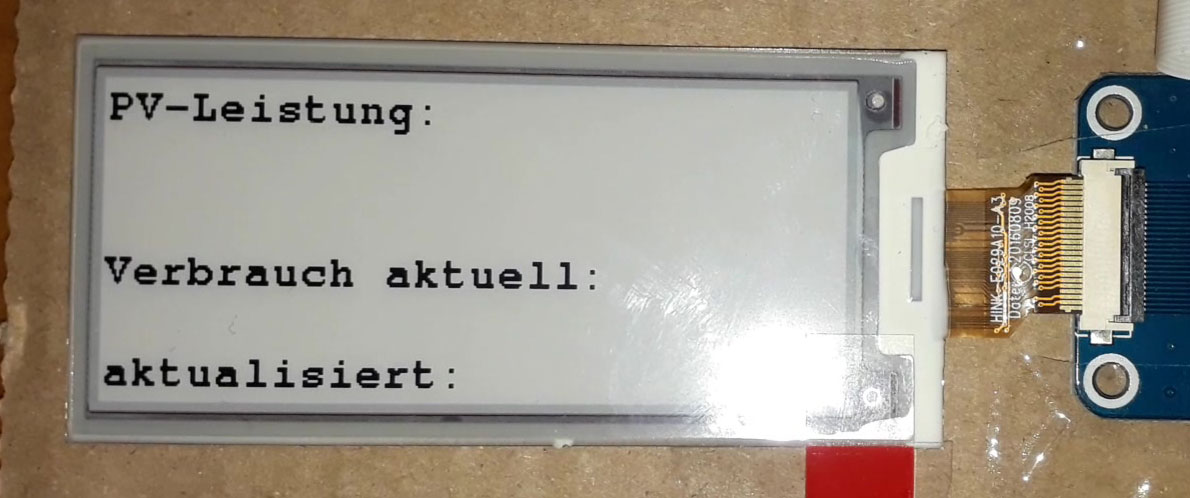
@axled, Hi, welcome to the forum!

This looks like a problem with the controller of your display. But it might also be an error in GxEPD2.

Did you test with GxEPD2_Example.ino, and do the partial updates work correctly in all 4 rotations?

I am currently busy with other work. So I have no time for detective work.
If you can provide a minimal example that shows the effect, either I or an other user could verify.
The minimum example should not use any other library or resources, and clearly show what works correctly and what doesn't.

Please also read How to get the best out of this forum if you haven't done yet.

Jean-Marc

About the versions

The 2.9inch e-Paper (B) raw panel was updated to the V3 version. The controller and the driver codes are different and the codes of the two versions are not compatible with each other. Except for the software, the outline of the two versions is the same. If you are the regulars of this display, please note that you need to update your driver codes with the new version refer to our new examples for the V3 version. if your the first time buy and use this display, just need to download and use the new V3 examples. The V2 version has a "V3" sticker on the backside of the display panel. Please confirm the version by the sticker.

Maybe it is not supported in GxEPD2. Did you try with all 3 versions?

//#define GxEPD2_DRIVER_CLASS GxEPD2_290c     // GDEW029Z10  128x296, UC8151 (IL0373)
//#define GxEPD2_DRIVER_CLASS GxEPD2_290_Z13c // GDEH029Z13  128x296, UC8151D
//#define GxEPD2_DRIVER_CLASS GxEPD2_290_C90c // GDEM029C90  128x296, SSD1680

@ZinggJM

thanks for your quick response, here are some answers.

  • i tried the code with all 3 versions of GxEPD2_DRIVER_CLASS GxEPD2_290 (1 is working, 1 is working partly (no partial update at all), 1 isnt working)
  • there is a v3 sticker on the backsite of the e-paper panel, so how do i update the driver codes (as suggested)?

next steps:

  • i will try GxEPD2_Example.ino with partial updates in 4 rotations and give feedback
  • making a minimum code example to reproduce the error

Thanks

AxLED

This was a quote from the Waveshare wiki page. It means you need to use the updated version if you use the Waveshare library. The only Waveshare 2.9" 3-color version I have is with panel GDEW029Z10.

@ZinggJM

thanks for your tipps.
I copied and cropped some test code (based on GxEPD2_Example.ino) . I inverted text and background so the problem can be identified better.

Here are my findings: (with 2,9" b/w/r V3 e-paper display)

  • With rotation 0 and 2 the partial update works expected
  • with rotation 1 and 3 it has the problem from my first topic

Here is the testcode (minimal example):

#define ENABLE_GxEPD2_GFX 0
#include <GxEPD2_3C.h>
#include <Fonts/FreeMonoBold9pt7b.h>

//partial update works in some rotations (0 and 2)
GxEPD2_3C<GxEPD2_290c, GxEPD2_290c::HEIGHT> display(GxEPD2_290c(/*CS=15*/ SS, /*DC=4*/ 4, /*RST=2*/ 2, /*BUSY=5*/ 5)); // GDEW029Z10

//partial update dont work, always do a full update
//GxEPD2_3C<GxEPD2_290_Z13c, GxEPD2_290_Z13c::HEIGHT> display(GxEPD2_290_Z13c(/*CS=15*/ SS, /*DC=4*/ 4, /*RST=2*/ 2, /*BUSY=5*/ 5)); // GDEH029Z13

//doesnt work at all
//GxEPD2_3C<GxEPD2_290_C90c, GxEPD2_290_C90c::HEIGHT> display(GxEPD2_290_C90c(/*CS=15*/ SS, /*DC=4*/ 4, /*RST=2*/ 2, /*BUSY=5*/ 5)); // GDEM029C90

void setup()
{
  Serial.begin(115200);
  Serial.println();
  Serial.println("setup");
  delay(100);
  display.init(115200); // default 10ms reset pulse, e.g. for bare panels with DESPI-C02
  //display.init(115200, true, 2, false); // USE THIS for Waveshare boards with "clever" reset circuit, 2ms reset pulse
  //display.init(115200, true, 10, false, SPI0, SPISettings(4000000, MSBFIRST, SPI_MODE0)); // extended init method with SPI channel and/or settings selection
  // first update should be full refresh
  helloWorld();
  delay(1000);
  // partial refresh mode can be used to full screen,
  // effective if display panel hasFastPartialUpdate
  helloFullScreenPartialMode();
  delay(1000);
  //stripeTest(); return; // GDEH029Z13 issue
  helloArduino();
  delay(1000);
  helloEpaper();
  delay(1000);
}

void loop()
{
}

const char HelloWorld[] = "Hello World!";
const char HelloArduino[] = "Hello Arduino!";
const char HelloEpaper[] = "Hello E-Paper!";
const int16_t rotation = 1;

void helloWorld()
{
  Serial.println("helloWorld");
  //display.setRotation(1);
  display.setRotation(rotation);
  display.setFont(&FreeMonoBold9pt7b);
  if (display.epd2.WIDTH < 104) display.setFont(0);
  display.setTextColor(GxEPD_BLACK);
  int16_t tbx, tby; uint16_t tbw, tbh;
  display.getTextBounds(HelloWorld, 0, 0, &tbx, &tby, &tbw, &tbh);
  // center bounding box by transposition of origin:
  uint16_t x = ((display.width() - tbw) / 2) - tbx;
  uint16_t y = ((display.height() - tbh) / 2) - tby;
  display.setFullWindow();
  display.firstPage();
  do
  {
    display.fillScreen(GxEPD_WHITE);
    display.setCursor(x, y);
    display.print(HelloWorld);
  }
  while (display.nextPage());
  //Serial.println("helloWorld done");
}

void helloFullScreenPartialMode()
{
  Serial.println("helloFullScreenPartialMode");
  const char fullscreen[] = "full screen update";
  const char fpm[] = "fast partial mode";
  const char spm[] = "slow partial mode";
  const char npm[] = "no partial mode";
  display.setPartialWindow(0, 0, display.width(), display.height());
  //display.setRotation(1);
  display.setRotation(rotation);
  display.setFont(&FreeMonoBold9pt7b);
  if (display.epd2.WIDTH < 104) display.setFont(0);
  //display.setTextColor(GxEPD_BLACK);
  display.setTextColor(GxEPD_WHITE);
  const char* updatemode;
  if (display.epd2.hasFastPartialUpdate)
  {
    updatemode = fpm;
  }
  else if (display.epd2.hasPartialUpdate)
  {
    updatemode = spm;
  }
  else
  {
    updatemode = npm;
  }
  // do this outside of the loop
  int16_t tbx, tby; uint16_t tbw, tbh;
  // center update text
  display.getTextBounds(fullscreen, 0, 0, &tbx, &tby, &tbw, &tbh);
  uint16_t utx = ((display.width() - tbw) / 2) - tbx;
  uint16_t uty = ((display.height() / 4) - tbh / 2) - tby;
  // center update mode
  display.getTextBounds(updatemode, 0, 0, &tbx, &tby, &tbw, &tbh);
  uint16_t umx = ((display.width() - tbw) / 2) - tbx;
  uint16_t umy = ((display.height() * 3 / 4) - tbh / 2) - tby;
  // center HelloWorld
  display.getTextBounds(HelloWorld, 0, 0, &tbx, &tby, &tbw, &tbh);
  uint16_t hwx = ((display.width() - tbw) / 2) - tbx;
  uint16_t hwy = ((display.height() - tbh) / 2) - tby;
  display.firstPage();
  do
  {
    //display.fillScreen(GxEPD_WHITE);
    display.fillScreen(GxEPD_BLACK);
    display.setCursor(hwx, hwy);
    display.print(HelloWorld);
    display.setCursor(utx, uty);
    display.print(fullscreen);
    display.setCursor(umx, umy);
    display.print(updatemode);
  }
  while (display.nextPage());
  //Serial.println("helloFullScreenPartialMode done");
}

void helloArduino()
{
  Serial.println("helloArduino");
  //display.setRotation(1);
  display.setRotation(rotation);
  display.setFont(&FreeMonoBold9pt7b);
  if (display.epd2.WIDTH < 104) display.setFont(0);
  display.setTextColor(display.epd2.hasColor ? GxEPD_RED : GxEPD_BLACK);
  int16_t tbx, tby; uint16_t tbw, tbh;
  // align with centered HelloWorld
  display.getTextBounds(HelloWorld, 0, 0, &tbx, &tby, &tbw, &tbh);
  uint16_t x = ((display.width() - tbw) / 2) - tbx;
  // height might be different
  display.getTextBounds(HelloArduino, 0, 0, &tbx, &tby, &tbw, &tbh);
  uint16_t y = ((display.height() / 4) - tbh / 2) - tby; // y is base line!
  // make the window big enough to cover (overwrite) descenders of previous text
  uint16_t wh = FreeMonoBold9pt7b.yAdvance;
  uint16_t wy = (display.height() / 4) - wh / 2;
  display.setPartialWindow(0, wy, display.width(), wh);
  display.firstPage();
  do
  {
    display.fillScreen(GxEPD_WHITE);
    //display.drawRect(x, y - tbh, tbw, tbh, GxEPD_BLACK);
    display.setCursor(x, y);
    display.print(HelloArduino);
  }
  while (display.nextPage());
  delay(1000);
  //Serial.println("helloArduino done");
}

void helloEpaper()
{
  Serial.println("helloEpaper");
  //display.setRotation(1);
  display.setRotation(rotation);
  display.setFont(&FreeMonoBold9pt7b);
  if (display.epd2.WIDTH < 104) display.setFont(0);
  display.setTextColor(display.epd2.hasColor ? GxEPD_RED : GxEPD_BLACK);
  int16_t tbx, tby; uint16_t tbw, tbh;
  // align with centered HelloWorld
  display.getTextBounds(HelloWorld, 0, 0, &tbx, &tby, &tbw, &tbh);
  uint16_t x = ((display.width() - tbw) / 2) - tbx;
  // height might be different
  display.getTextBounds(HelloEpaper, 0, 0, &tbx, &tby, &tbw, &tbh);
  uint16_t y = ((display.height() * 3 / 4) - tbh / 2) - tby; // y is base line!
  // make the window big enough to cover (overwrite) descenders of previous text
  uint16_t wh = FreeMonoBold9pt7b.yAdvance;
  uint16_t wy = (display.height() * 3 / 4) - wh / 2;
  display.setPartialWindow(0, wy, display.width(), wh);
  display.firstPage();
  do
  {
    display.fillScreen(GxEPD_WHITE);
    display.setCursor(x, y);
    display.print(HelloEpaper);
  }
  while (display.nextPage());
  //Serial.println("helloEpaper done");
}

I am looking forward hearing from you

Regards

AxLED

@axled

Your code extract works fine on all 3 of my 2.9" 3-color displays.
This comes as no surprise, as it is essentially an extract of the code I use to test my library.

I just added the constructors for my wiring with Wemos LOLIN32 Lite, e.g.:

//GxEPD2_3C<GxEPD2_290c, GxEPD2_290c::HEIGHT> display(GxEPD2_290c(/*CS=5*/ SS, /*DC=*/ 17, /*RST=*/ 16, /*BUSY=*/ 4)); // GDEW029Z10
GxEPD2_3C<GxEPD2_290_Z13c, GxEPD2_290_Z13c::HEIGHT> display(GxEPD2_290_Z13c(/*CS=5*/ SS, /*DC=*/ 17, /*RST=*/ 16, /*BUSY=*/ 4)); // GDEH029Z13
//GxEPD2_3C<GxEPD2_290_C90c, GxEPD2_290_C90c::HEIGHT> display(GxEPD2_290_C90c(/*CS=5*/ SS, /*DC=*/ 17, /*RST=*/ 16, /*BUSY=*/ 4)); // GDEM029C90

My panel GDEH029Z13 has exactly the same inking as on your picture.
I don't understand why GDEH029Z13 doesn't work for you.

Do you use the official/actual version of GxEPD2, installed and updated through Library Manager?

Jean-Marc

@ZinggJM

i used the latest version of GxEPD2 (1.4.5) installed via arduino IDE library manager.
Today i bricked my e-paper by intensive re-connecting the ribbon cable, so that nothing is displayed anymore. Maybe the ribbon cable was my initial problem.
So i will buy a spare e-paper panel and come back to this topic after delievery.

Thanks so far for all your help.

AxLED

Don't use force to connect or disconnect. Lift the black lever to vertical with your fingernail to loosen the connection, then remove or insert the flex connector. Push down the lever to fasten the connection.

Jean-Marc

@ZinggJM

i bought an new display (same type) and made the following discovery. The e-paper display (2,9" b/w/r) and/or Waveshare e-paper ESP8266 DriverBoard has a problem with partial refresh. If you have the e-paper in landscape format in front of you (ribbon cable right) the upper 32 rows (=25%) are affected (x, y = 0, 0 to x, y = 296, 32).
When does it happen? When the partial refresh range is outside the 32 rows mentioned above.

As a workaround, I have now changed my project to portrait orientation and make sure that the partial refresh range takes the above problem into account.

AxLED

@ZinggJM,

i played a little around with some settings and made the following finding.
If i change to the b/w definition

#include <GxEPD2_BW.h>
GxEPD2_BW<GxEPD2_290_T5, GxEPD2_290_T5::HEIGHT> display(GxEPD2_290_T5(/*CS=15*/ SS, /*DC=4*/ 4, /*RST=2*/ 2, /*BUSY=5*/ 5));
  • the partial refresh works (even at rotation 1 and 3)
  • the partial refresh is much faster than with the 3 color definition
  • limitation: only black and white is used (even if the display has 3 colors)

Here is the sample code for b/w:

#define ENABLE_GxEPD2_GFX 0
#include <GxEPD2_3C.h>
#include <Fonts/FreeMonoBold9pt7b.h>


//partial update works in some rotations (0 and 2)
//GxEPD2_3C<GxEPD2_290c, GxEPD2_290c::HEIGHT> display(GxEPD2_290c(/*CS=15*/ SS, /*DC=4*/ 4, /*RST=2*/ 2, /*BUSY=5*/ 5)); // GDEW029Z10

//partial update dont work, always do a full update
//GxEPD2_3C<GxEPD2_290_Z13c, GxEPD2_290_Z13c::HEIGHT> display(GxEPD2_290_Z13c(/*CS=15*/ SS, /*DC=4*/ 4, /*RST=2*/ 2, /*BUSY=5*/ 5)); // GDEH029Z13

//doesnt work at all
//GxEPD2_3C<GxEPD2_290_C90c, GxEPD2_290_C90c::HEIGHT> display(GxEPD2_290_C90c(/*CS=15*/ SS, /*DC=4*/ 4, /*RST=2*/ 2, /*BUSY=5*/ 5)); // GDEM029C90

#include <GxEPD2_BW.h>
GxEPD2_BW<GxEPD2_290_T5, GxEPD2_290_T5::HEIGHT> display(GxEPD2_290_T5(/*CS=15*/ SS, /*DC=4*/ 4, /*RST=2*/ 2, /*BUSY=5*/ 5)); // GDEW029T5 (works 2 color)
void setup()
{
  Serial.begin(115200);
  Serial.println();
  Serial.println("setup");
  delay(100);
  display.init(115200); // default 10ms reset pulse, e.g. for bare panels with DESPI-C02
  //display.init(115200, true, 2, false); // USE THIS for Waveshare boards with "clever" reset circuit, 2ms reset pulse
  //display.init(115200, true, 10, false, SPI0, SPISettings(4000000, MSBFIRST, SPI_MODE0)); // extended init method with SPI channel and/or settings selection
  // first update should be full refresh
  helloWorld();
  delay(1000);
  // partial refresh mode can be used to full screen,
  // effective if display panel hasFastPartialUpdate
  helloFullScreenPartialMode();
  delay(1000);
  //stripeTest(); return; // GDEH029Z13 issue
  helloArduino();
  delay(1000);
  helloEpaper();
  delay(1000);
}

void loop()
{
}

const char HelloWorld[] = "Hello World!";
const char HelloArduino[] = "Hello Arduino!";
const char HelloEpaper[] = "Hello E-Paper!";
const int16_t rotation = 1;

void helloWorld()
{
  Serial.println("helloWorld");
  //display.setRotation(1);
  display.setRotation(rotation);
  display.setFont(&FreeMonoBold9pt7b);
  if (display.epd2.WIDTH < 104) display.setFont(0);
  display.setTextColor(GxEPD_BLACK);
  int16_t tbx, tby; uint16_t tbw, tbh;
  display.getTextBounds(HelloWorld, 0, 0, &tbx, &tby, &tbw, &tbh);
  // center bounding box by transposition of origin:
  uint16_t x = ((display.width() - tbw) / 2) - tbx;
  uint16_t y = ((display.height() - tbh) / 2) - tby;
  display.setFullWindow();
  display.firstPage();
  do
  {
    display.fillScreen(GxEPD_WHITE);
    display.setCursor(x, y);
    display.print(HelloWorld);
  }
  while (display.nextPage());
  //Serial.println("helloWorld done");
}

void helloFullScreenPartialMode()
{
  Serial.println("helloFullScreenPartialMode");
  const char fullscreen[] = "full screen update";
  const char fpm[] = "fast partial mode";
  const char spm[] = "slow partial mode";
  const char npm[] = "no partial mode";
  display.setPartialWindow(0, 0, display.width(), display.height());
  //display.setRotation(1);
  display.setRotation(rotation);
  display.setFont(&FreeMonoBold9pt7b);
  if (display.epd2.WIDTH < 104) display.setFont(0);
  //display.setTextColor(GxEPD_BLACK);
  display.setTextColor(GxEPD_WHITE);
  const char* updatemode;
  if (display.epd2.hasFastPartialUpdate)
  {
    updatemode = fpm;
  }
  else if (display.epd2.hasPartialUpdate)
  {
    updatemode = spm;
  }
  else
  {
    updatemode = npm;
  }
  // do this outside of the loop
  int16_t tbx, tby; uint16_t tbw, tbh;
  // center update text
  display.getTextBounds(fullscreen, 0, 0, &tbx, &tby, &tbw, &tbh);
  uint16_t utx = ((display.width() - tbw) / 2) - tbx;
  uint16_t uty = ((display.height() / 4) - tbh / 2) - tby;
  // center update mode
  display.getTextBounds(updatemode, 0, 0, &tbx, &tby, &tbw, &tbh);
  uint16_t umx = ((display.width() - tbw) / 2) - tbx;
  uint16_t umy = ((display.height() * 3 / 4) - tbh / 2) - tby;
  // center HelloWorld
  display.getTextBounds(HelloWorld, 0, 0, &tbx, &tby, &tbw, &tbh);
  uint16_t hwx = ((display.width() - tbw) / 2) - tbx;
  uint16_t hwy = ((display.height() - tbh) / 2) - tby;
  display.firstPage();
  do
  {
    //display.fillScreen(GxEPD_WHITE);
    display.fillScreen(GxEPD_BLACK);
    display.setCursor(hwx, hwy);
    display.print(HelloWorld);
    display.setCursor(utx, uty);
    display.print(fullscreen);
    display.setCursor(umx, umy);
    display.print(updatemode);
  }
  while (display.nextPage());
  //Serial.println("helloFullScreenPartialMode done");
}

void helloArduino()
{
  Serial.println("helloArduino");
  //display.setRotation(1);
  display.setRotation(rotation);
  display.setFont(&FreeMonoBold9pt7b);
  if (display.epd2.WIDTH < 104) display.setFont(0);
  //display.setTextColor(display.epd2.hasColor ? GxEPD_RED : GxEPD_BLACK);
  display.setTextColor(display.epd2.hasColor ? GxEPD_BLACK : GxEPD_BLACK);
  int16_t tbx, tby; uint16_t tbw, tbh;
  // align with centered HelloWorld
  display.getTextBounds(HelloWorld, 0, 0, &tbx, &tby, &tbw, &tbh);
  uint16_t x = ((display.width() - tbw) / 2) - tbx;
  // height might be different
  display.getTextBounds(HelloArduino, 0, 0, &tbx, &tby, &tbw, &tbh);
  uint16_t y = ((display.height() / 4) - tbh / 2) - tby; // y is base line!
  // make the window big enough to cover (overwrite) descenders of previous text
  uint16_t wh = FreeMonoBold9pt7b.yAdvance;
  uint16_t wy = (display.height() / 4) - wh / 2;
  display.setPartialWindow(0, wy, display.width(), wh);
  display.firstPage();
  do
  {
    display.fillScreen(GxEPD_WHITE);
    //display.drawRect(x, y - tbh, tbw, tbh, GxEPD_BLACK);
    display.setCursor(x, y);
    display.print(HelloArduino);
  }
  while (display.nextPage());
  delay(1000);
  //Serial.println("helloArduino done");
}

void helloEpaper()
{
  Serial.println("helloEpaper");
  //display.setRotation(1);
  display.setRotation(rotation);
  display.setFont(&FreeMonoBold9pt7b);
  if (display.epd2.WIDTH < 104) display.setFont(0);
  //display.setTextColor(display.epd2.hasColor ? GxEPD_RED : GxEPD_BLACK);
  display.setTextColor(display.epd2.hasColor ? GxEPD_BLACK : GxEPD_BLACK);
  int16_t tbx, tby; uint16_t tbw, tbh;
  // align with centered HelloWorld
  display.getTextBounds(HelloWorld, 0, 0, &tbx, &tby, &tbw, &tbh);
  uint16_t x = ((display.width() - tbw) / 2) - tbx;
  // height might be different
  display.getTextBounds(HelloEpaper, 0, 0, &tbx, &tby, &tbw, &tbh);
  uint16_t y = ((display.height() * 3 / 4) - tbh / 2) - tby; // y is base line!
  // make the window big enough to cover (overwrite) descenders of previous text
  uint16_t wh = FreeMonoBold9pt7b.yAdvance;
  uint16_t wy = (display.height() * 3 / 4) - wh / 2;
  display.setPartialWindow(0, wy, display.width(), wh);
  display.firstPage();
  do
  {
    display.fillScreen(GxEPD_WHITE);
    display.setCursor(x, y);
    display.print(HelloEpaper);
  }
  while (display.nextPage());
  //Serial.println("helloEpaper done");
}

Maybe this is useful for someone.

AxLED

See also GxEPD2/README.md at master · ZinggJM/GxEPD2 · GitHub :

Version 1.3.2

  • added support for GDEW0213T5D 104x212 b/w e-paper panel
  • added support for GDEW029T5D 128x296 b/w e-paper panel
  • added support for GDEW0213Z19 104x212 b/w/r e-paper panel
  • added support for GDEW029Z13 128x296 b/w/r e-paper panel
  • both GDEW0213Z19 and GDEW029Z13 support only full screen refresh (controller issue)

Jean-Marc

@ZinggJM
thanks you for your work and for clarification, you are right, i didnt see the hint in your readme.

What i found out:
Works, 3 colors (but no partial update, as you mentioned in your readme):
GxEPD2_3C<GxEPD2_290_Z13c, GxEPD2_290_Z13c::HEIGHT> display(GxEPD2_290_Z13c(/*CS=15*/ SS, /*DC=4*/ 4, /*RST=2*/ 2, /*BUSY=5*/ 5)); // GDEH029Z13

xxxxxxxxxxxxxxxxxxxxxxxxxxxxxxxxxxxxxxxxxxxxxxxxxxxxx

Works, 3 colors (incl. slow partial update), see limitation:
GxEPD2_3C<GxEPD2_290c, GxEPD2_290c::HEIGHT> display(GxEPD2_290c(/*CS=15*/ SS, /*DC=4*/ 4, /*RST=2*/ 2, /*BUSY=5*/ 5)); // GDEW029Z10
Limitation: If you have the e-paper in landscape format in front of you (ribbon cable right) the upper 32 rows (=25%) are affected (x, y = 0, 0 to x, y = 296, 32).
When does it happen? When the partial refresh range is outside the 32 rows mentioned above.

xxxxxxxxxxxxxxxxxxxxxxxxxxxxxxxxxxxxxxxxxxxxxxxxxxxxx

Works, b/w (incl. fast partial update):
GxEPD2_BW<GxEPD2_290_T5, GxEPD2_290_T5::HEIGHT> display(GxEPD2_290_T5(/*CS=15*/ SS, /*DC=4*/ 4, /*RST=2*/ 2, /*BUSY=5*/ 5)); // GDEW029T5

xxxxxxxxxxxxxxxxxxxxxxxxxxxxxxxxxxxxxxxxxxxxxxxxxxxxx

AxLED

Thanks for your relevant contribution. You could mark this topic as solved.