ESP8266 + multiple analog sensors used with ADS1115

Hello! I'm currently working on an air quality monitoring system that makes use of multiple analog sensors such as MQ135 and MQ131. However, my ESP8266 only has one analog pin, so I made use of ADS1115 as an analog extender. The main problem is, I can't seem to figure out how ADS1115 is used in such a way that the sensors will give off calibrated readings from the library.

It seems that the library is assuming that the reading comes from the sensor that is connected to the main board, and not the ADS1115. Can you please help? Here's my code

#include "ADS1X15.h"

ADS1115 ADS(0x48);


void setup() 
{
  Serial.begin(115200);
  Serial.println(__FILE__);
  Serial.print("ADS1X15_LIB_VERSION: ");
  Serial.println(ADS1X15_LIB_VERSION);

  ADS.begin();
}


void loop() 
{
  ADS.setGain(0);

  int16_t val_0 = ADS.readADC(0);  
  int16_t val_1 = ADS.readADC(1);  
  int16_t val_2 = ADS.readADC(2);  
  int16_t val_3 = ADS.readADC(3);  

  float f = ADS.toVoltage(1);  // voltage factor

  Serial.print("\tMQ135: "); Serial.print(val_0);
  Serial.print("\tMQ131: "); Serial.println(val_1);
  // Serial.print("\tAnalog1: "); Serial.print(val_1); Serial.print('\t'); Serial.println(val_1 * f, 3);
  // Serial.print("\tAnalog2: "); Serial.print(val_2); Serial.print('\t'); Serial.println(val_2 * f, 3);
  // Serial.print("\tAnalog3: "); Serial.print(val_3); Serial.print('\t'); Serial.println(val_3 * f, 3);
  Serial.println();

  delay(1000);
}

which library ?
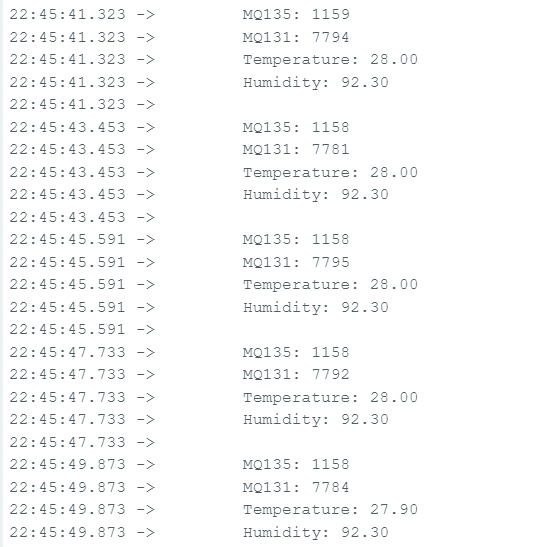
does the serial monitor display sensor readings? upload a copy of the serial monitor output
if you do a web search for arduino MQ135 you will get plenty of links

Hello! Thank you for responding. Here is the library that I used: "ADS1X15.h"

avoid posting screen shots of serial monitor output - copy the text and post that
the serial monitor output in post 3 does not look as though it comes from the program of post 1?
post your latest code?
do the temperature and humidity reading displayed in post 3 look realistic? they seem high?
do the readings change as temperature etc change?

#include "ADS1X15.h"
#include "DHT.h"

#define DHTPIN 14
#define DHTTYPE DHT22

ADS1115 ADS(0x48); 
               
// Initialize DHT sensor.
DHT dht(DHTPIN, DHTTYPE);                

float Temperature;
float Humidity;


void setup() 
{
  Serial.begin(115200);
  Serial.println(__FILE__);
  Serial.print("ADS1X15_LIB_VERSION: ");
  Serial.println(ADS1X15_LIB_VERSION);

  ADS.begin();

  pinMode(DHTPIN, INPUT);

  dht.begin(); 
}


void loop() 
{
  ADS.setGain(0);

  int16_t val_0 = ADS.readADC(0);  
  int16_t val_1 = ADS.readADC(1);  
  int16_t val_2 = ADS.readADC(2);  
  int16_t val_3 = ADS.readADC(3); 
  Temperature = dht.readTemperature(); // Gets the values of the temperature
  Humidity = dht.readHumidity(); // Gets the values of the humidity  

  float f = ADS.toVoltage(1);  // voltage factor

  Serial.print("\tMQ135: "); Serial.println(val_0);
  Serial.print("\tMQ131: "); Serial.println(val_1);
  Serial.print("\tTemperature: "); Serial.println(Temperature);
  Serial.print("\tHumidity: "); Serial.println(Humidity);
  // Serial.print("\tAnalog1: "); Serial.print(val_1); Serial.print('\t'); Serial.println(val_1 * f, 3);
  // Serial.print("\tAnalog2: "); Serial.print(val_2); Serial.print('\t'); Serial.println(val_2 * f, 3);
  // Serial.print("\tAnalog3: "); Serial.print(val_3); Serial.print('\t'); Serial.println(val_3 * f, 3);
  Serial.println();

  delay(2000);
}


here is the latest code

Your code is not doing anything with the Adc values. They look like just the raw adc values, so you have to convert the digital readings to voltages. Then based on your sensors you have to convert the voltage values to measurement values.

Should be in setup(), not in loop().

Are you powering the ADS from 5volt, and have an I2C level converter,
or do you power the ADS from 3.3volt, in which case Gain(0) is wrong.
How do you power the MQ sensors.
They draw 150mA each, and must be powered with 5volt ± 0.1volt for a stable readout.
USB to power the ESP and two sensors might not be good enough.
Connection diagram please.
Leo..
This topic was automatically closed 180 days after the last reply. New replies are no longer allowed.