Hi, I am making a lightshow and am making a flag for it. its a 32x16 node RGB led flag. I can make the flag but I think it will be cool to make it waving. Does anybody know of a library or any logical way to make the flag wave? Because I don't want to just have 512 lines of code for each LED and then an additional 512 for every wave of the flag. I would rather have a more logical code with loops so if there is a way to make the flag wave either with loops or with a library, please let me know.
Maybe have a small ripple (one LED?) move across the matrix?
Take a look at 595 shift register.
Which one (or a few)?

I want to have an American and Israeli Flag (dont see the Israeli one). Ill take a look at that 595 shift register. How does it work? Is it supposed to shift leds or something like that?
Flags corrected.
For your project... Have you wired the 32x16 LEDs or will you be using a MAX7219 matrix?
https://www.amazon.com/Sinbrilgt-Addressable-Flexible-programmable-Suitable/dp/B0C6G76MTP
LEDs. Im using a strands of WS2811 RGB LEDs. I have a frame for the 32x16 LEDs to fit in. I have code for the LEDs but I don't have a flag waving code.
Is the strand continuous and in an S pattern? (or is it 16 sections of 32 neopix) Also... does your WS2811 have three Neopixels acting as one (three pix doing the same thing, so a string of 30 programs like a string of 10)?
I have strands of 50 LEDs and have to connect 10 strings to get the ideal number of LEDs. (technically 11 but whatever). It's like an RGB strip but its LEDs instead of a strip. I don't know what you mean by continuous or in an S pattern. It is just 512 LEDs arranged in a matrix formation. And also there should be similar parts of the flag. if you look at the Israeli flag the top and bottom and are just lines and so I have the top 4 and bottom 4 just be a straight line. It's the center I have the problem with but generally most colors will be the same. I am not sure what you mean by three Neopixels acting as one.

50 x 11 = 550 ... arranged in 32 x 16 (512) - okay. Getting all those numbers into an array will be... fun... US flag will have three colors, IS flag two colors...
[EDIT] These 16 x 16 ASCII art flag arrays can be mapped to Neopixel (if memory allows) by reading the character at [x][y] and sending it to Neopixel [x][y]... with a little math to determine the Neopixel row and column.
(edit: corrected line numbering)
char *flagUS[] = {
  "________________", // 0 - off
  "-#-#-#-@@@@@@@@@", // 1 - blu/wht/red
  "#-#-#-#---------", // 2
  "-#-#-#-@@@@@@@@@", // 3
  "#-#-#-#---------", // 4
  "-#-#-#-@@@@@@@@@", // 5
  "#-#-#-#---------", // 6
  "-#-#-#-@@@@@@@@@", // 7
  "----------------", // 8 - wht
  "@@@@@@@@@@@@@@@@", // 9 - red
  "----------------", // 10
  "@@@@@@@@@@@@@@@@", // 11
  "----------------", // 12
  "@@@@@@@@@@@@@@@@", // 13
  "________________", // 14
  "________________"  // 15
};

char *flagIS[] = {
  "________________", // 0 - off
  "----------------", // 1 - wht
  "################", // 2 - blu
  "----------------", // 3
  "------##--------", // 4
  "--##########----", // 5
  "---#-#--#-#-----", // 6
  "----#----#------", // 7
  "---#-#--#-#-----", // 8
  "--##########----", // 9
  "------##--------", // 10
  "----------------", // 11
  "################", // 12
  "----------------", // 13
  "________________", // 14
  "________________"  // 15
};
Ah I see what you mean by S pattern, yes it will be an S pattern. So how would I implement this into code? would I simply say flagUS[2] = digitalWrite(6, HIGH); and then the entire 3rd row lights up or there is more to it than that?
For the moment, the grid counts from left to right, top to bottom, 32 blocks wide (0 to 31) by 16 tall. Starting from the top-left, 0, 1, 2, 3... 15 will be the last number in the first row of the first flag. 16 will be the "zero" of the second flag. The first block on the next row for the first flag will be 0 (previous row, first block) + 32 (number of blocks in a row), or 16 (first block of second flag) + 16 (number of blocks in the second flag). I will make a grid. The pattern takes a little time to get used to counting in base 32 (as if we had 16 fingers per hand).
You are using Neopixels, so it is not a matter of writing to a pin to light an LED digitalWrite(pin, HIGH);... but using a library to address each Neopixel leds[x]=(redvalue, greenvalue, bluevalue);
(added "s" turns)
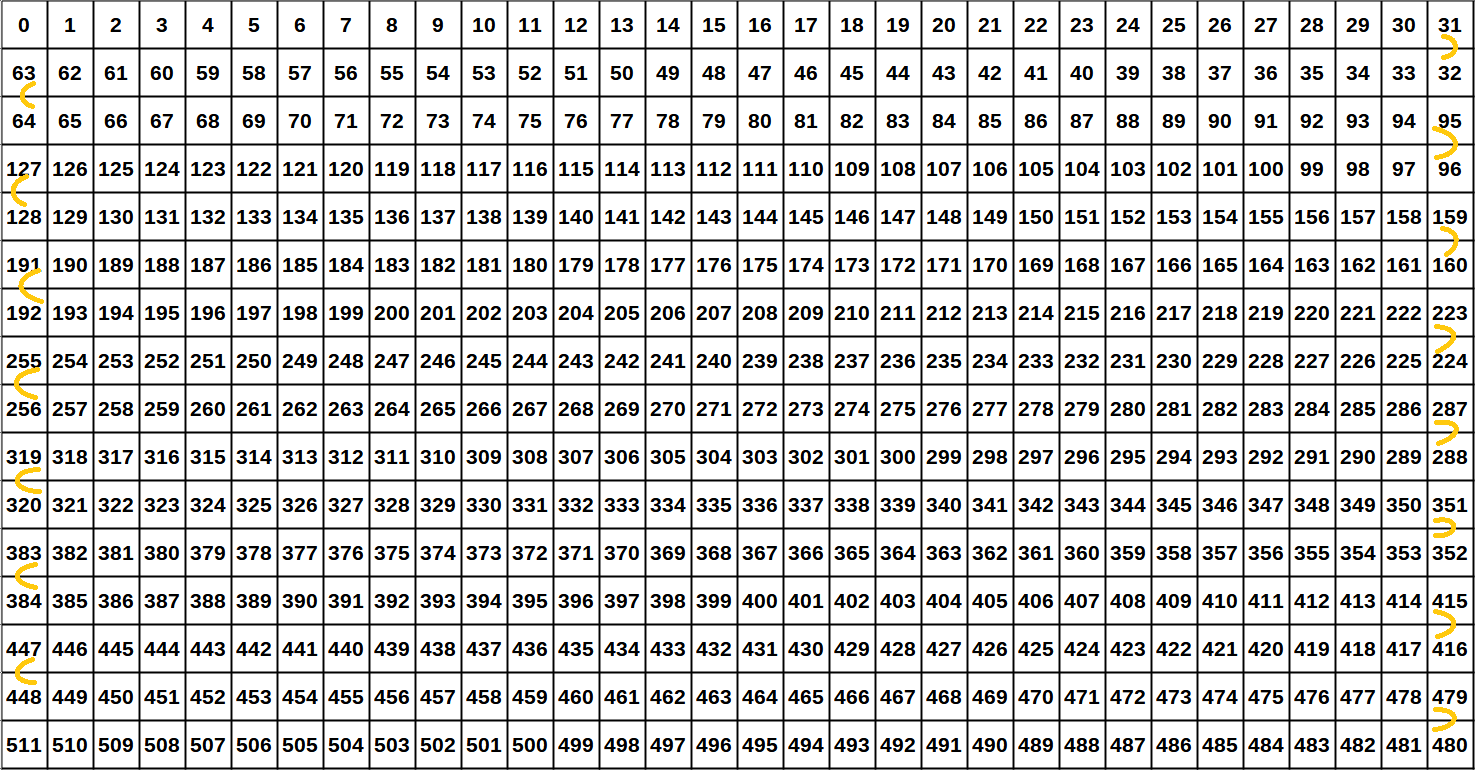
Memory usage is a problem with these arrays. I can only get it to compile with only one array... looking for other methods of defining 512 individual neopixels.
So this is my current, bad code.
#include <FastLED.h>
#define LED_PIN 13
#define LED_COUNT 10
CRGB leds[LED_COUNT];
void setup()
{
FastLED.addLeds<WS2811, LED_PIN>(leds, LED_COUNT);
}
void loop()
{
/*
(255,0,0) = Red
(0,255,0) = Green
(0,0,255) = Blue
*/
for (byte n = 0; n < LED_COUNT; n++)
{
leds[n] = CRGB(255, 255, 255);
}
FastLED.show();
delay(1000); // lengthened the delay so the change will better show
for (byte n = 0; n < LED_COUNT; n++)
{
leds[n] = CRGB(0, 0, 255);
}
FastLED.show();
delay(1000); // ***************** added delay
}
It's just a test before making the actual frame. I only defined 10 LEDs instead of 512 just for testing and have 2 for loops to turn them all white and then blue. By adding the ASCII art flags like the US one:
char flagUS[] = {
"", // 0 - off
"-#-#-#-@@@@@@@@@", // 1 - blu/wht/red
"#-#-#-#---------", // 2
"-#-#-#-@@@@@@@@@", // 3
"#-#-#-#---------", // 4
"-#-#-#-@@@@@@@@@", // 5
"#-#-#-#---------", // 6
"-#-#-#-@@@@@@@@@", // 7
"----------------", // 8 - wht
"@@@@@@@@@@@@@@@@", // 9 - red
"----------------", // 10
"@@@@@@@@@@@@@@@@", // 11
"----------------", // 12
"@@@@@@@@@@@@@@@@", // 13
"", // 14
"________________" // 15
};
I can locate which LED I want it to be on so I write something like:
leds[164] = CRGB(255, 255, 255);?
If it works, it is GOOD! : )
By the way...
Edit your post to put the code into a code block for easier reading, like this:
- Open a reply.
- Click the < CODE > button
- Paste your code (and errors) where you see type or paste code here
type or paste code here

Which will make your code look like this...
#include <FastLED.h>
#define LED_PIN 13
#define LED_COUNT 10

char flagUS[] = {
  "________________", // 0 - off
  "-#-#-#-@@@@@@@@@", // 1 - blu/wht/red
  "#-#-#-#---------", // 2
  "-#-#-#-@@@@@@@@@", // 3
  "#-#-#-#---------", // 4
  "-#-#-#-@@@@@@@@@", // 5
  "#-#-#-#---------", // 6
  "-#-#-#-@@@@@@@@@", // 7
  "----------------", // 8 - wht
  "@@@@@@@@@@@@@@@@", // 9 - red
  "----------------", // 10
  "@@@@@@@@@@@@@@@@", // 11
  "----------------", // 12
  "@@@@@@@@@@@@@@@@", // 13
  "________________", // 14
  "________________" // 15
};

CRGB leds[LED_COUNT];

void setup()
{
  FastLED.addLeds<WS2811, LED_PIN>(leds, LED_COUNT);
}
void loop()
{
  /*
    (255,0,0) = Red
    (0,255,0) = Green
    (0,0,255) = Blue
  */
  for (byte n = 0; n < LED_COUNT; n++)
  {
    leds[n] = CRGB(255, 255, 255);
  }
  FastLED.show();

  delay(1000); // lengthened the delay so the change will better show

  for (byte n = 0; n < LED_COUNT; n++)
  {
    leds[n] = CRGB(0, 0, 255);
  }
  FastLED.show();

  delay(1000); // ***************** added delay
}
Also, you lost "line 0" and "line 14" - they are just two double-quotes and no "off" indicator.
I mentioned in Post #11 that memory size was becoming an issue, and here is what the errors looked like when compiling (note: 100% dynamic memory used - this needs to be much less than that):
Sketch uses 5562 bytes (18%) of program storage space. Maximum is 30720 bytes.
Global variables use 2054 bytes (100%) of dynamic memory, leaving -6 bytes for local variables. Maximum is 2048 bytes
So I tried putting all the array elements into PROGMEM (into flash memory, unloading dynamic memory) like the following, but the same memory usage occurs:
  int arraySizeIS = sizeof(flagIS)/sizeof(flagIS[0]);
  for (int i = 0; i < arraySizeIS; i++) {
    const char flagUS[i] PROGMEM = {flagUS[i]};
    const char flagIS[i] PROGMEM = {flagIS[i]};
  }

  int arraySizeUS = sizeof(flagUS)/sizeof(flagUS[0]);
  for (int i = 0; i < arraySizeIS; i++) {
    const char flagUS[i] PROGMEM = {flagUS[i]};
    const char flagIS[i] PROGMEM = {flagIS[i]};
  }
I probably did the PROGMEM at the wrong time, by trying to use a loop inside setup() (when it probably must be done as a definition), because the alternative - which might be the ONLY way to do it - is to put each line of each array into PROGMEM (which I will do... later, after exhausting all attempts)... that is to say, each "flag" line will look like this:
const char flagIS[0] PROGMEM = "________________"; // 0 - off
Followed by one more PROGMEM line, putting all the individual arrays into a table of arrays.
This is my reference (see Array of strings):
[edit] FastLED is filling the memory. Without FastLED, only 16% dynamic memory is used. With FastLED, 100% is used.
I have been thinking about ways to "wave"
- Vertical lines of increasing and decreasing brightness.
- move across the pixels (for example 0 to 32), brightest in the middle, dimmest +1 and -1 pixel
- same to other rows +0x2..32x2, +0x3..32x3... +0x15..32x15 (sort of... remembering the "S" shape)
- Using the upper "off" and lower two "off" lines for pixel colors to "ascend and descend" into (maybe combine pixel movement with pixel brightness in the "trough")
- Both flags work with 13 rows. Removing three rows of 32x1 neopixels would save memory space.
Whoa! You did so much. Thank you so much, I didn't expect this at all. I didn't know what PROGMEM was so thank you for including that reference. I like your idea about decreasing brightness. Learning which specific LEDs will come from me just analyzing flags through the wind and lower and brighten wherever it needs to be but I didn't think of decreasing brightness, that definitely makes things a lot easier thank you for that suggestion. I have the gist of everything you have taught me, it already had me making adjustments and changing problems with my original version for an ever better one. Thank you so much, I really appreciate your help and work.
I posted a bit too soon. Still having memory issues. Trying to find how to use PROGMEM with ASCII-art flags for the Neopixels (maybe not possible) and the Serial Monitor output (maybe possible).
("edited" part of this post probably viewable by clicking the pencil)
// https://forum.arduino.cc/t/circular-matrix/1164773/

#include <FastLED.h>
#include<avr/pgmspace.h>

#define STRING_NUM 16
#define STRING_LENGTH 32
#define NUM_LEDS (STRING_NUM * STRING_LENGTH)
#define MATRIX_PIN 2
#define BRIGHTNESS 255

CRGB leds[NUM_LEDS];

const char *flagUS[] = {
  "________________", // 0 - off
  "-#-#-#-@@@@@@@@@", // 1 - blu/wht/red
  "#-#-#-#---------", // 2
  "-#-#-#-@@@@@@@@@", // 3
  "#-#-#-#---------", // 4
  "-#-#-#-@@@@@@@@@", // 5
  "#-#-#-#---------", // 6
  "-#-#-#-@@@@@@@@@", // 7
  "----------------", // 8 - wht
  "@@@@@@@@@@@@@@@@", // 9 - red
  "----------------", // 10
  "@@@@@@@@@@@@@@@@", // 11
  "----------------", // 12
  "@@@@@@@@@@@@@@@@", // 13
  "________________", // 14
  "________________"  // 15
};

const char *flagIS[] = {
  "________________", // 0 - off
  "----------------", // 1 - wht
  "################", // 2 - blu
  "----------------", // 3
  "------##--------", // 4
  "--##########----", // 5
  "---#-#--#-#-----", // 6
  "----#----#------", // 7
  "---#-#--#-#-----", // 8
  "--##########----", // 9
  "------##--------", // 10
  "----------------", // 11
  "################", // 12
  "----------------", // 13
  "________________", // 14
  "________________"  // 15
};

void setup() {
  // progmem(); // an attempt to store pixel data in flash. no effect

  FastLED.addLeds<WS2812B, MATRIX_PIN, GRB>(leds, NUM_LEDS);
  FastLED.setBrightness(BRIGHTNESS); // Adjust the brightness value as needed
  FastLED.clear();
  FastLED.show();
  randomSeed(analogRead(A0));

  Serial.begin(115200);

  // showUS(); // in work
  // showIS(); // in work
  // corners();
  // serial();
  // wave();

  FastLED.show();
}

void loop() {
  // randomPixels(); FastLED.show();
}

void progmem() { // put the array into flash memory
  int arraySizeIS = sizeof(flagIS)/sizeof(flagIS[0]);
  for (int i = 0; i < arraySizeIS; i++) {
    const char flagIS[i] PROGMEM = {flagIS[i]};
  }

  int arraySizeUS = sizeof(flagUS)/sizeof(flagUS[0]);
  for (int i = 0; i < arraySizeIS; i++) {
    const char flagUS[i] PROGMEM = {flagUS[i]};
  }
}

void wave() { // change brightness in columns to show waving flag
}

void showUS() { // US flag in neopixels
    for (int j = 0; j < 16; j++) { // row
    for (int i = 0; i < 16; i++) { // col
      if (flagUS[j][i] == '-')
        leds[j*16+i] =  CRGB(255, 255, 255);
      if (flagUS[j][i] == '#')
        leds[j*16+i] =  CRGB(0, 0, 255);
      if (flagUS[j][i] == '@')
        leds[j*16+i] =  CRGB(255, 0, 0);
    }
  Serial.println();
  }
}

void showIS() { // IS flag in neopixels
    for (int j = 0; j < 16; j++) { // rows
    for (int i = 0; i < 16; i++) { // cols
      if (flagIS[j][i] == '-')
        leds[j*16+i] =  CRGB(255, 255, 255);
      if (flagIS[j][i] == '#')
        leds[j*16+i] =  CRGB(0, 0, 255);
    }
  Serial.println();
  }
}

void corners() { // show the four corners of the neopixels
  leds[ 0 * 32 + 00] =  CRGB(255, 0, 0); // first flag, first row, first column
  leds[ 0 * 32 + 15] =  CRGB(255, 0, 0); // first flag, first row, last column
  leds[ 0 * 32 + 16] =  CRGB(255, 255, 0); // second flag, first row, first column
  leds[ 0 * 32 + 31] =  CRGB(255, 255, 0); // second flag, first row, last column
  leds[15 * 32 + 00] =  CRGB(0, 255, 0); // first flag, last row, first column
  leds[15 * 32 + 15] =  CRGB(0, 255, 0); // first flag, last row, last column
  leds[15 * 32 + 16] =  CRGB(0, 0, 255); // second flag, last row, first column
  leds[15 * 32 + 31] =  CRGB(0, 0, 255); // second flag, last row, last column
}

void serial() { // show flags in Serial Monitor
  for (int j = 0; j < 16; j++) {
    for (int i = 0; i < 16; i++) {
      Serial.print(flagUS[j][i]);
    }
    Serial.println();
  }
  for (int j = 0; j < 16; j++) {
    for (int i = 0; i < 16; i++) {
      Serial.print(flagIS[j][i]);
    }
    Serial.println();
  }
}

void randomPixels() {
  leds[random(16) * random(32) + random(32)] = CRGB(random(255), random(255), random(255));
}
Ooooh. I really want to try this. What pins did you use to work this? My pins were just 5v, GND, and D13 but I see on your code you use A0.
A0 was just to create a more random value for the "randomPixels" function.
The sketch is using D2 (but you can change the code to D13) for the Neopixel signal pin.
After some reading, I found a workaround to putting the flag-ascii-art, double-subscripts (array of strings) into PROGMEM, so now it compiles and fits in memory.
Sketch uses 5800 bytes (18%) of program storage space. Maximum is 30720 bytes.
Global variables use 1816 bytes (88%) of dynamic memory, leaving 232 bytes for local variables. Maximum is 2048 bytes.
I made each flag-ascii-art as one string, so the flag colors start at 0 and ending at 256 (16x16). Then, the algorithm to place the pixel colors needed updating to remove the double-subscript. I sort-of got that to work... with a funny outcome (check out the simulation).
https://wokwi.com/projects/379519935149294593
... so the last leg of this will be to nudge the flags one column left, and flip them vertically.
// https://forum.arduino.cc/t/circular-matrix/1164773/

#include <FastLED.h>
#include<avr/pgmspace.h>

#define STRING_NUM 16
#define STRING_LENGTH 32
#define NUM_LEDS (STRING_NUM * STRING_LENGTH)
#define MATRIX_PIN 2
#define BRIGHTNESS 255

CRGB leds[NUM_LEDS];

PROGMEM const char flagUS[] = {
  "________________" // 0 - off
  "#-#-#-#@@@@@@@@@" // 1 - blu/wht/red
  "-#-#-#----------" // 2
  "#-#-#-#@@@@@@@@@" // 3
  "-#-#-#----------" // 4
  "#-#-#-#@@@@@@@@@" // 5
  "-#-#-#----------" // 6
  "#-#-#-#@@@@@@@@@" // 7
  "----------------" // 8 - wht
  "@@@@@@@@@@@@@@@@" // 9 - red
  "----------------" // 10
  "@@@@@@@@@@@@@@@@" // 11
  "----------------" // 12
  "@@@@@@@@@@@@@@@@" // 13
  "________________" // 14
  "________________" // 15
};

PROGMEM const char flagIS[] = {
  "________________" // 0 - off
  "----------------" // 1 - wht
  "################" // 2 - blu
  "----------------" // 3
  "------##--------" // 4
  "--##########----" // 5
  "---#-#--#-#-----" // 6
  "----#----#------" // 7
  "---#-#--#-#-----" // 8
  "--##########----" // 9
  "------##--------" // 10
  "----------------" // 11
  "################" // 12
  "----------------" // 13
  "________________" // 14
  "________________" // 15
};

void setup() {
  FastLED.addLeds<WS2812B, MATRIX_PIN, GRB>(leds, NUM_LEDS);
  FastLED.setBrightness(BRIGHTNESS); // Adjust the brightness value as needed
  FastLED.clear();
  FastLED.show();
  randomSeed(analogRead(A0));
  Serial.begin(9600);

  showUS(); // in work
  showIS(); // in work
  // flagcorners();
  // corners();
  // serial();
  // wave(); // not started

  FastLED.show();
}

void loop() {
  // randomPixels(); FastLED.show(); // for random neopixels on 32x16
}

void showUS() { // US flag in neopixels
  int column = 0, row = 0;
  for (int i = 0; i < strlen(flagUS); i++) {
    column++;
    if (column % 16 == 0)
      row++;
    int pix = pgm_read_byte_near(flagUS + i);
    if (pix == '-')
      leds[i + row * 16] =  CRGB(255, 255, 255);
    if (pix == '#')
      leds[i + row * 16] =  CRGB(0, 0, 255);
    if (pix == '@')
      leds[i + row * 16] =  CRGB(255, 0, 0);
  }
}

void showIS() { // US flag in neopixels
  int column = 0, row = 0;
  for (int i = 0; i < strlen(flagIS); i++) {
    column++;
    if (column % 16 == 0)
      row++;
    int pix = pgm_read_byte_near(flagIS + i);
    if (pix == '-')
      leds[i + row * 16 + 16] =  CRGB(255, 255, 255);
    if (pix == '#')
      leds[i + row * 16 + 16] =  CRGB(0, 0, 255);
  }
}

void wave() { // change brightness in columns to show waving flag
}

void serial() { // show flags in Serial Monitor
  for (int i = 0; i < strlen(flagUS); i++) {
    if (i % 16 == 0)
    Serial.println();
    int c = pgm_read_byte_near(flagUS + i);
    Serial.write(c);
  }

  for (int i = 0; i < strlen(flagIS); i++) {
    if (i % 16 == 0)
    Serial.println();
    int c = pgm_read_byte_near(flagIS + i);
    Serial.write(c);
  }
}

void flagcorners() { // show the four corners of the neopixels
  leds[ 0 * 32 +  0] =  CRGB(255, 0, 0); // first flag, first row, first column
  leds[ 0 * 32 + 15] =  CRGB(255, 0, 0); // first flag, first row, last column
  leds[ 0 * 32 + 16] =  CRGB(255, 255, 0); // second flag, first row, first column
  leds[ 0 * 32 + 31] =  CRGB(255, 255, 0); // second flag, first row, last column
  leds[15 * 32 +  0] =  CRGB(0, 255, 0); // first flag, last row, first column
  leds[15 * 32 + 15] =  CRGB(0, 255, 0); // first flag, last row, last column
  leds[15 * 32 + 16] =  CRGB(0, 0, 255); // second flag, last row, first column
  leds[15 * 32 + 31] =  CRGB(0, 0, 255); // second flag, last row, last column
}

void corners() {
  leds[0]   =  CRGB(255, 255, 0); // second flag, first row, last column
  leds[31]  =  CRGB(255, 255, 0); // second flag, first row, last column
  leds[480] =  CRGB(255, 255, 0); // second flag, first row, last column
  leds[511] =  CRGB(255, 255, 0); // second flag, first row, last column
}

void randomPixels() {
  leds[random(16) * random(32) + random(32)] = CRGB(random(255), random(255), random(255));
}