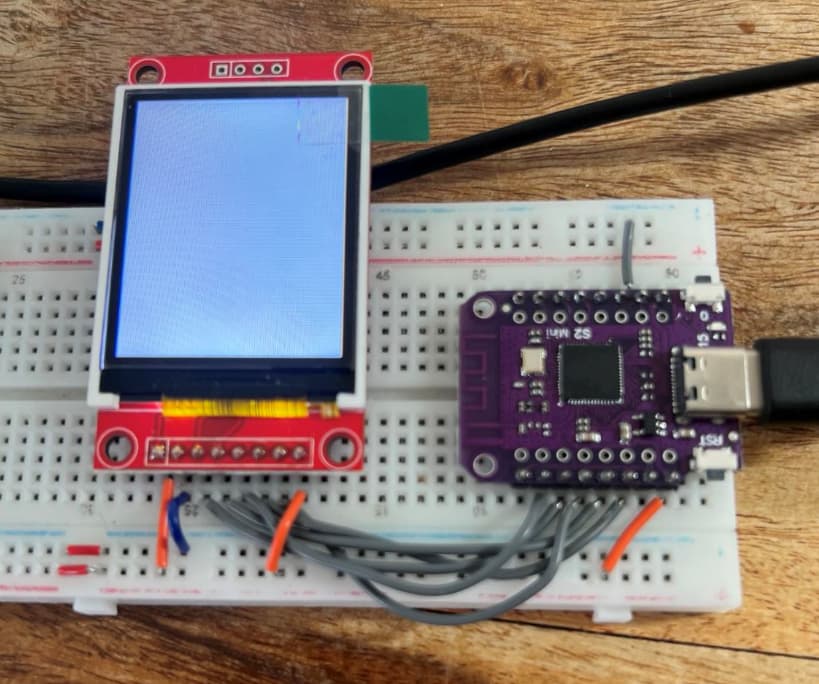
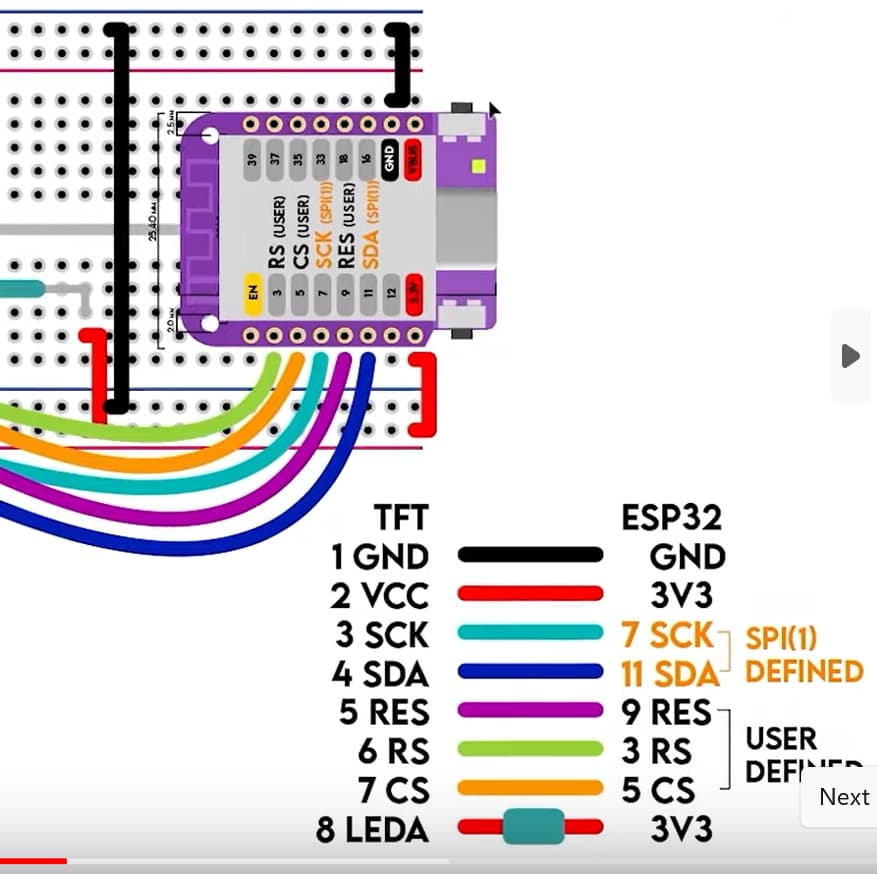
I am trying to control a 1.8 tft spi display with a esp32 s2 mini. It works great with the Adafruit_ST7735.h library, but I cannot get it to work with either TFT_eSPI or LovyanGFX libraries. I am trying to use the examples that come with each library. For some reason I cannot get the TFT_eSPI to initialise.
I would love some suggestions or help to find what is going wrong.
Thanks
Code for adaruit library - works fine
/**************************************************************************
  This is a library for several Adafruit displays based on ST77* drivers.

  Works with the Adafruit 1.8" TFT Breakout w/SD card
    ----> http://www.adafruit.com/products/358
  The 1.8" TFT shield
    ----> https://www.adafruit.com/product/802

#include <Adafruit_GFX.h>    // Core graphics library
#include <Adafruit_ST7735.h> // Hardware-specific library for ST7735
//#include <Adafruit_ST7789.h> // Hardware-specific library for ST7789
#include <SPI.h>


  // For the breakout board, you can use any 2 or 3 pins.
  // These pins will also work for the 1.8" TFT shield.
  #define TFT_CS        5
  #define TFT_RST        9 // Or set to -1 and connect to Arduino RESET pin
  #define TFT_DC         3

// OPTION 1 (recommended) is to use the HARDWARE SPI pins, which are unique
// to each board and not reassignable. For Arduino Uno: MOSI = pin 11 and
// SCLK = pin 13. This is the fastest mode of operation and is required if
// using the breakout board's microSD card.

// For 1.44" and 1.8" TFT with ST7735 use:
Adafruit_ST7735 tft = Adafruit_ST7735(TFT_CS, TFT_DC, TFT_RST);


// OPTION 2 lets you interface the display using ANY TWO or THREE PINS,
// tradeoff being that performance is not as fast as hardware SPI above.
//#define TFT_MOSI 11  // Data out
//#define TFT_SCLK 13  // Clock out

// For ST7735-based displays, we will use this call
//Adafruit_ST7735 tft = Adafruit_ST7735(TFT_CS, TFT_DC, TFT_MOSI, TFT_SCLK, TFT_RST);


float p = 3.1415926;

void setup(void) {
  Serial.begin(9600);
  Serial.print(F("Hello! ST77xx TFT Test"));

  // Use this initializer if using a 1.8" TFT screen:
  tft.initR(INITR_BLACKTAB);      // Init ST7735S chip, black tab


  Serial.println(F("Initialized"));

  uint16_t time = millis();
  tft.fillScreen(ST77XX_BLACK);
  time = millis() - time;

  Serial.println(time, DEC);
  delay(500);

  // large block of text
  tft.fillScreen(ST77XX_BLACK);
  testdrawtext("Lorem ipsum dolor sit amet, consectetur adipiscing elit. Curabitur adipiscing ante sed nibh tincidunt feugiat. Maecenas enim massa, fringilla sed malesuada et, malesuada sit amet turpis. Sed porttitor neque ut ante pretium vitae malesuada nunc bibendum. Nullam aliquet ultrices massa eu hendrerit. Ut sed nisi lorem. In vestibulum purus a tortor imperdiet posuere. ", ST77XX_WHITE);
  delay(1000);


  Serial.println("done");
  delay(1000);
}

void loop() {

}
TFT_eSPI code not working
custome User setup in library
user_setup.h
// User_Setup.h

// Uncomment the driver for ST7735
#define ST7735_DRIVER

// Define the display dimensions
#define TFT_WIDTH  128
#define TFT_HEIGHT 160

// Define the pin connections for your ESP32 S2 Mini
#define TFT_CS     5    // Chip Select
#define TFT_RST    9    // Reset
#define TFT_DC     3    // Data/Command (A0)

// SPI pins
#define TFT_SCLK   7    // Clock (SCK)
#define TFT_MOSI  11    // Data out (SDA)
#define TFT_MISO  -1    // Not used

// Optional: Define the backlight pin and set it to HIGH to turn on the backlight
#define TFT_BL     -1   // LED back-light (not controlled by GPIO since connected to 3.3V)

// Define SPI frequency
#define SPI_FREQUENCY  20000000  // Can be adjusted based on your display's capability
#define SPI_MODE  SPI_MODE0  // Default is SPI_MODE0
And the example code (basically the same as the Adafruit)
/*
 Adapted from the Adafruit graphicstest sketch.

 This sketch uses the GLCD font (font 1) only. Disable other fonts to make
 the sketch fit in an UNO!

 Make sure all the display driver and pin connections are correct by
 editing the User_Setup.h file in the TFT_eSPI library folder.

 Note that yield() or delay(0) must be called in long duration for/while
 loops to stop the ESP8266 watchdog triggering.

 #########################################################################
 ###### DON'T FORGET TO UPDATE THE User_Setup.h FILE IN THE LIBRARY ######
 #########################################################################
 */


#include <TFT_eSPI.h> // Hardware-specific library
#include <SPI.h>

TFT_eSPI tft = TFT_eSPI();       // Invoke custom library

float p = 3.1415926;

void setup(void) {
  Serial.begin(9600);
  Serial.print("Hello! ST7735 TFT Test");

  // Use this initializer if you're using a 1.8" TFT
  tft.init();   // initialize a ST7735S chip

  Serial.println("Initialized");

  uint16_t time = millis();
  tft.fillScreen(TFT_BLACK);
  time = millis() - time;

  Serial.println(time, DEC);
  delay(500);

  // large block of text
  tft.fillScreen(TFT_BLACK);
  testdrawtext("Lorem ipsum dolor sit amet, consectetur adipiscing elit. Curabitur adipiscing ante sed nibh tincidunt feugiat. Maecenas enim massa, fringilla sed malesuada et, malesuada sit amet turpis. Sed porttitor neque ut ante pretium vitae malesuada nunc bibendum. Nullam aliquet ultrices massa eu hendrerit. Ut sed nisi lorem. In vestibulum purus a tortor imperdiet posuere. ", TFT_WHITE);
  delay(1000);

  // tft print function!
  tftPrintTest();
  delay(4000);

  // a single pixel
  tft.drawPixel(tft.width()/2, tft.height()/2, TFT_GREEN);
  delay(500);

  // line draw test
  testlines(TFT_YELLOW);
  delay(500);

  // optimized lines
  testfastlines(TFT_RED, TFT_BLUE);
  delay(500);

  testdrawrects(TFT_GREEN);
  delay(500);

  testfillrects(TFT_YELLOW, TFT_MAGENTA);
  delay(500);

  tft.fillScreen(TFT_BLACK);
  testfillcircles(10, TFT_BLUE);
  testdrawcircles(10, TFT_WHITE);
  delay(500);

  testroundrects();
  delay(500);

  testtriangles();
  delay(500);

  mediabuttons();
  delay(500);

  Serial.println("done");
  delay(1000);
}

void loop() {
  tft.invertDisplay(true);
  delay(500);
  tft.invertDisplay(false);
  delay(500);
}

void testlines(uint16_t color) {
  tft.fillScreen(TFT_BLACK);
  for (int16_t x=0; x < tft.width(); x+=6) {
    tft.drawLine(0, 0, x, tft.height()-1, color);
  }
  for (int16_t y=0; y < tft.height(); y+=6) {
    tft.drawLine(0, 0, tft.width()-1, y, color);
  }

  tft.fillScreen(TFT_BLACK);
  for (int16_t x=0; x < tft.width(); x+=6) {
    tft.drawLine(tft.width()-1, 0, x, tft.height()-1, color);
  }
  for (int16_t y=0; y < tft.height(); y+=6) {
    tft.drawLine(tft.width()-1, 0, 0, y, color);
  }

  tft.fillScreen(TFT_BLACK);
  for (int16_t x=0; x < tft.width(); x+=6) {
    tft.drawLine(0, tft.height()-1, x, 0, color);
  }
  for (int16_t y=0; y < tft.height(); y+=6) {
    tft.drawLine(0, tft.height()-1, tft.width()-1, y, color);
  }

  tft.fillScreen(TFT_BLACK);
  for (int16_t x=0; x < tft.width(); x+=6) {
    tft.drawLine(tft.width()-1, tft.height()-1, x, 0, color);
  }
  for (int16_t y=0; y < tft.height(); y+=6) {
    tft.drawLine(tft.width()-1, tft.height()-1, 0, y, color);
  }
}

void testdrawtext(char *text, uint16_t color) {
  tft.setCursor(0, 0);
  tft.setTextColor(color);
  tft.setTextWrap(true);
  tft.print(text);
}

void testfastlines(uint16_t color1, uint16_t color2) {
  tft.fillScreen(TFT_BLACK);
  for (int16_t y=0; y < tft.height(); y+=5) {
    tft.drawFastHLine(0, y, tft.width(), color1);
  }
  for (int16_t x=0; x < tft.width(); x+=5) {
    tft.drawFastVLine(x, 0, tft.height(), color2);
  }
}

void testdrawrects(uint16_t color) {
  tft.fillScreen(TFT_BLACK);
  for (int16_t x=0; x < tft.width(); x+=6) {
    tft.drawRect(tft.width()/2 -x/2, tft.height()/2 -x/2 , x, x, color);
  }
}

void testfillrects(uint16_t color1, uint16_t color2) {
  tft.fillScreen(TFT_BLACK);
  for (int16_t x=tft.width()-1; x > 6; x-=6) {
    tft.fillRect(tft.width()/2 -x/2, tft.height()/2 -x/2 , x, x, color1);
    tft.drawRect(tft.width()/2 -x/2, tft.height()/2 -x/2 , x, x, color2);
  }
}

void testfillcircles(uint8_t radius, uint16_t color) {
  for (int16_t x=radius; x < tft.width(); x+=radius*2) {
    for (int16_t y=radius; y < tft.height(); y+=radius*2) {
      tft.fillCircle(x, y, radius, color);
    }
  }
}

void testdrawcircles(uint8_t radius, uint16_t color) {
  for (int16_t x=0; x < tft.width()+radius; x+=radius*2) {
    for (int16_t y=0; y < tft.height()+radius; y+=radius*2) {
      tft.drawCircle(x, y, radius, color);
    }
  }
}

void testtriangles() {
  tft.fillScreen(TFT_BLACK);
  int color = 0xF800;
  int t;
  int w = tft.width()/2;
  int x = tft.height()-1;
  int y = 0;
  int z = tft.width();
  for(t = 0 ; t <= 15; t+=1) {
    tft.drawTriangle(w, y, y, x, z, x, color);
    x-=4;
    y+=4;
    z-=4;
    color+=100;
  }
}

void testroundrects() {
  tft.fillScreen(TFT_BLACK);
  int color = 100;
  int i;
  int t;
  for(t = 0 ; t <= 4; t+=1) {
    int x = 0;
    int y = 0;
    int w = tft.width()-2;
    int h = tft.height()-2;
    for(i = 0 ; i <= 16; i+=1) {
      tft.drawRoundRect(x, y, w, h, 5, color);
      x+=2;
      y+=3;
      w-=4;
      h-=6;
      color+=1100;
    }
    color+=100;
  }
}

void tftPrintTest() {
  tft.setTextWrap(false);
  tft.fillScreen(TFT_BLACK);
  tft.setCursor(0, 30);
  tft.setTextColor(TFT_RED);
  tft.setTextSize(1);
  tft.println("Hello World!");
  tft.setTextColor(TFT_YELLOW);
  tft.setTextSize(2);
  tft.println("Hello World!");
  tft.setTextColor(TFT_GREEN);
  tft.setTextSize(3);
  tft.println("Hello World!");
  tft.setTextColor(TFT_BLUE);
  tft.setTextSize(4);
  tft.print(1234.567);
  delay(1500);
  tft.setCursor(0, 0);
  tft.fillScreen(TFT_BLACK);
  tft.setTextColor(TFT_WHITE);
  tft.setTextSize(0);
  tft.println("Hello World!");
  tft.setTextSize(1);
  tft.setTextColor(TFT_GREEN);
  tft.print(p, 6);
  tft.println(" Want pi?");
  tft.println(" ");
  tft.print(8675309, HEX); // print 8,675,309 out in HEX!
  tft.println(" Print HEX!");
  tft.println(" ");
  tft.setTextColor(TFT_WHITE);
  tft.println("Sketch has been");
  tft.println("running for: ");
  tft.setTextColor(TFT_MAGENTA);
  tft.print(millis() / 1000);
  tft.setTextColor(TFT_WHITE);
  tft.print(" seconds.");
}

void mediabuttons() {
  // play
  tft.fillScreen(TFT_BLACK);
  tft.fillRoundRect(25, 10, 78, 60, 8, TFT_WHITE);
  tft.fillTriangle(42, 20, 42, 60, 90, 40, TFT_RED);
  delay(500);
  // pause
  tft.fillRoundRect(25, 90, 78, 60, 8, TFT_WHITE);
  tft.fillRoundRect(39, 98, 20, 45, 5, TFT_GREEN);
  tft.fillRoundRect(69, 98, 20, 45, 5, TFT_GREEN);
  delay(500);
  // play color
  tft.fillTriangle(42, 20, 42, 60, 90, 40, TFT_BLUE);
  delay(50);
  // pause color
  tft.fillRoundRect(39, 98, 20, 45, 5, TFT_RED);
  tft.fillRoundRect(69, 98, 20, 45, 5, TFT_RED);
  // play color
  tft.fillTriangle(42, 20, 42, 60, 90, 40, TFT_GREEN);
}