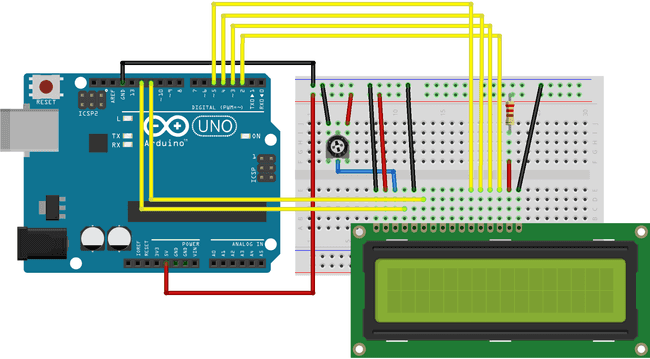
hi there. im completely new to displays in general. i wanted to start learning how to use a 16x2 lcd using my uno. i spent two days just to get the first row of black boxes to show up, not knowing what contrast control is. then, since i dont have a potentiometer, i used a fixed resistance on pin 3 for contrast. i did a lot of trial and error, and a combination of 4k + 220 ohm seems to be giving me the most faint, barely noticeable boxes. this was where i was stuck. i was uploading the built in liquidcrystal hello world example code. and i wasnt getting anything to show up, besides the first row fully filled with boxes. today i redid all the connections, and somehow i seem to be picking up on an alien transmission of some sorts. the symbols keep changing in what seems to be a random pattern. an image showing the exact model for my lcd is also attached.
#include <LiquidCrystal.h>

// initialize the library by associating any needed LCD interface pin
// with the arduino pin number it is connected to
const int rs = 12, en = 11, d4 = 5, d5 = 4, d6 = 3, d7 = 2;
LiquidCrystal lcd(rs, en, d4, d5, d6, d7);

void setup() {

  // set up the LCD's number of columns and rows:
  lcd.begin(16, 2);
  // Print a message to the LCD.
  lcd.print("hello, world!");
}

void loop() {
  // set the cursor to column 0, line 1
  // (note: line 1 is the second row, since counting begins with 0):
  lcd.setCursor(0, 1);
  // print the number of seconds since reset:
  lcd.print(millis() / 1000);
  delay(1000);
}
the circuit daigram is the same as in the arduino docs here, with just the potentiometer swapped for fixed resistance as mentioned before.
please avoid only telling me to get a potentiometer, i realise that its important and plan to get one soon. seeing as how symbols are showing up instead of blocks suggests to me that this isnt a contrast issue at all anyways.
Agreed, not a contrast issue, a pot would only allow optimization, and it looks like you’ve done a good job of that.
I’d suspect a loose connection, or even a misconnection at this point. Best to walk down the LCD pin row, verifying each and every connection to the Arduino.
edit - If you did the soldering of the pin header on the LCD, perhaps give us a good, well focused photo of that, as one possibility is a poor solder joint providing intermittent connection. Analyzing the characters displayed using an ASCII table might identify exactly which pin is a problem, but let’s start with hardware inspection.
edit2 - 4k, by the way, isn’t a known common resistance value(unless it was actually 2k + 2k); for completeness, please recheck, as 4.2 k sounds high.
hi!! thanks for the welcome. i did ensure all my connections are snug and tight and went over them like a million times to make sure ive not done anything incorrectly. and no, it wasn't me who soldered the pins, this lcd was a part of an Arduino kit that i bought more than five years ago but am only now beginning to properly learn beyond just blinking leds lmao.
hi!! i went over the connections multiple times to make sure it's nothing like a error with some wires being swapped. everything is connected the way i believe it is supposed to be.
warning: my information in this post is incorrect. Leaving it here for continuity.
The quotient will be a number that will not be a (printable) ASCII character until "32". .. and "32" is the size of your LCD screen (16x2)... so you will never see "valid" characters.
 0 - 7	User defined characters
 8 - 31	Blank characters
use lcd.write() when you want an ASCII character, alpha-numeric or special, OR if you want to define up to eight characters and use your user-defined characters.
use lcd.print() for "string literal" (normal words), like, "Hello, World!"
Is the gibberish truly random, or the same junk every time you press reset? The latter would suggest an intermittent wire, or miswired control signal, whereas the former would suggest miswired data lines. Sorry to harp on “miswired”, but if it’s not a poor solder joint or intermittent wire, there aren’t many other possibilities. Other than @xfpd ‘s excellent observation (which should still result in repetitive errors), there’s nothing obvious with your code.
See the liquid crystal library example "Hello World"
/*
  LiquidCrystal Library - Hello World

 Demonstrates the use a 16x2 LCD display.  The LiquidCrystal
 library works with all LCD displays that are compatible with the
 Hitachi HD44780 driver. There are many of them out there, and you
 can usually tell them by the 16-pin interface.

 This sketch prints "Hello World!" to the LCD
 and shows the time.

  The circuit:
 * LCD RS pin to digital pin 12
 * LCD Enable pin to digital pin 11
 * LCD D4 pin to digital pin 5
 * LCD D5 pin to digital pin 4
 * LCD D6 pin to digital pin 3
 * LCD D7 pin to digital pin 2
 * LCD R/W pin to ground
 * LCD VSS pin to ground
 * LCD VCC pin to 5V
 * 10K resistor:
 * ends to +5V and ground
 * wiper to LCD VO pin (pin 3)

 Library originally added 18 Apr 2008
 by David A. Mellis
 library modified 5 Jul 2009
 by Limor Fried (http://www.ladyada.net)
 example added 9 Jul 2009
 by Tom Igoe
 modified 22 Nov 2010
 by Tom Igoe
 modified 7 Nov 2016
 by Arturo Guadalupi

 This example code is in the public domain.

 http://www.arduino.cc/en/Tutorial/LiquidCrystalHelloWorld

*/

// include the library code:
#include <LiquidCrystal.h>

// initialize the library by associating any needed LCD interface pin
// with the arduino pin number it is connected to
const int rs = 12, en = 11, d4 = 5, d5 = 4, d6 = 3, d7 = 2;
LiquidCrystal lcd(rs, en, d4, d5, d6, d7);

void setup() {
  // set up the LCD's number of columns and rows:
  lcd.begin(16, 2);
  // Print a message to the LCD.
  lcd.print("hello, world!");
}

void loop() {
  // set the cursor to column 0, line 1
  // (note: line 1 is the second row, since counting begins with 0):
  lcd.setCursor(0, 1);
  // print the number of seconds since reset:
  lcd.print(millis() / 1000);
}
Brain fart. There was no issue with the code.
Keep in mind that the Print class print() and write() functions are different.
The value of the integer quotient will be printed as decimal digits by print() because the print() function in the Print class is overloaded.
(multiple versions of the print() function that take different arguments)
When an integer argument is passed to print(), a print() function that knows how to print integer numbers will be used.