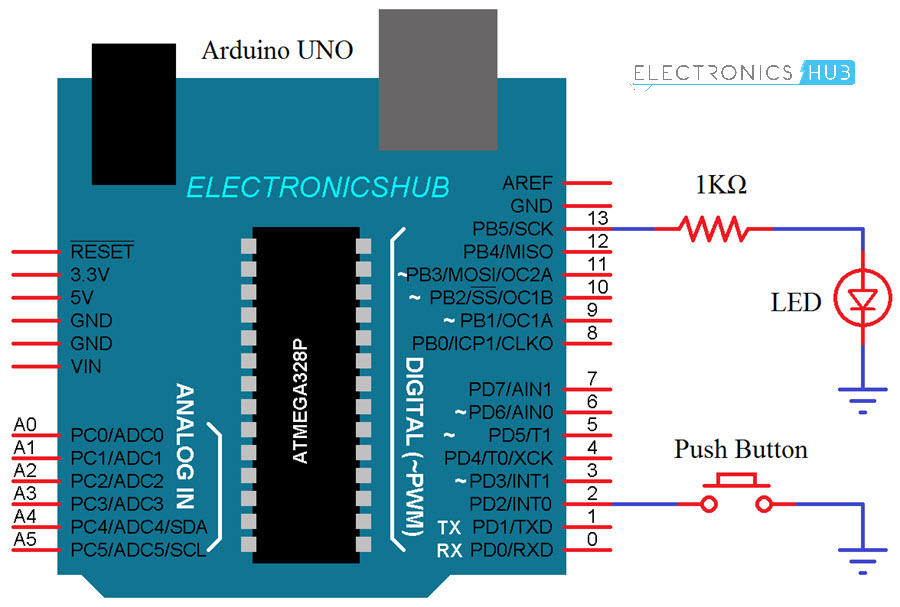
I am using an Arduino Uno with the following code:
#define buttonPin    2
#define ledPin      13
volatile bool buttonFlag = false;

void setup() {
 // Serial.begin(9600);

  pinMode(buttonPin, INPUT_PULLUP);
  attachInterrupt(digitalPinToInterrupt(buttonPin), buttonPin, CHANGE);
  pinMode(ledPin, OUTPUT);

}

void loop()
{
//  Serial.print("buttonFlag: "); Serial.println(buttonFlag);
  digitalWrite(ledPin, LOW);
  if (buttonFlag) {
    doSomething();
  }
}

void buttonPin_ISR() {
  buttonFlag = !buttonFlag;
}

void doSomething() {
  //  Serial.println("Doing something");
    digitalWrite(ledPin, HIGH);
    delay(500);
    digitalWrite(ledPin, LOW);
    delay(500);
}
This is how I think it should work but I am obviously mistaken:
- A CHANGE interrupt is attached to pin 2
- At the start, nothing happens because the buttonFlag is false
- If button on pin 2 is pressed, the interrupt is called toggling buttonFlag to true
- the doSomething function then runs, flashing the LED on pin 13.
- if the button on pin 2 is pressed again, buttonFlag is toggled again, becoming false meaning that the doSomething function is not executed again.
I am set up as below but using the internal LED light (13).
https://www.electronicshub.org/wp-content/uploads/2018/06/Arduino-Interrupts-Tutorial-Circuit-Diagram.jpg
All that happens is that when I press the button, my serial.print statements stop and the onboard LED 13 turns on (it turns on no matter what pin I use for the LED).
I have also tried removing the serial parts in case this was interfering.
Is buttonPin the name of the ISR?
FRom the attachInterrupt() reference.
Syntax
attachInterrupt(digitalPinToInterrupt(pin), ISR, mode) (recommended)
You want
attachInterrupt(digitalPinToInterrupt(buttonPin), buttonPin_ISR, CHANGE);
and not
attachInterrupt(digitalPinToInterrupt(buttonPin), buttonPin, CHANGE);
One thing you should know is that push buttons tend have contact bounce, so one press ends up being several, a millisecond or so apart. So it probably won't work quite like you expect, but it should be good enough to see if interrupts work. Just don't expect it to perform reliably.
Since the interrupt will be called on both press and release, you can always differentiate between the two within the ISR itself by reading the pin:
void buttonPin_ISR() {
    buttonFlag = ! digitalRead(buttonPin);
}
Thanks for that.... I just didn't pick that up; was reading what I wanted to see and not what was there.
Thanks for that.. yeah not too worried about the bounce here. All working now 
Actually since you have the interrupt to be generated on CHANGE you will get an interrupt when you press the button AND release the button. Also be aware that mechanical switches will bounce. Most people choose NOT to use an interrupt for buttons, although I understand this is probably just an exercise for you. You might find it interesting to increment a counter inside the interrupt to see how many times the switch bounces.
You can debounce in software, but a quick fix is to put a 0.1uF cap across the switch for hardware debounce.
Try making the counter as @ ToddL1962 said without the cap and with the cap and note the difference.
Ah, I like that approach Thanks for sharing.
In my final product the button is going to be an output from another arduino so I can just send a quick pulse.