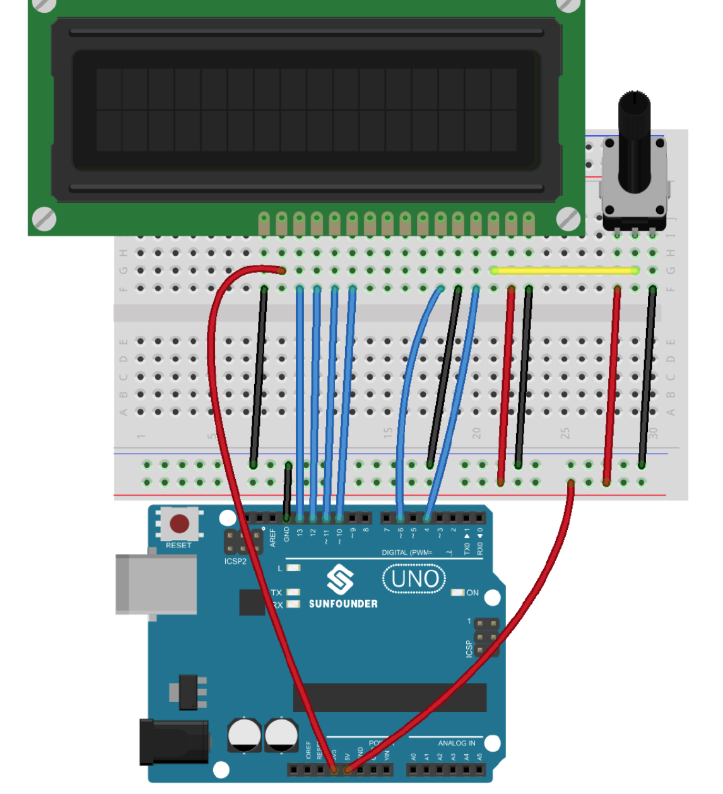
Hello,
I am a complete beginner to Arduino and need help with the following issue:
I've attached all the images in the following Google Doc: LCDwiring - Google Docs
#include <LiquidCrystal.h>

LiquidCrystal lcd (4, 6, 10, 11, 12, 13);

void setup() {
    lcd.begin(16, 2);

    lcd.print("a");
    delay(2500);

    lcd.print("b");
    delay(2500);
}

void loop() {}
Check your wiring. Since you didn't specify RW in the declaration, is it connected to GND?
rsmls
June 15, 2024, 10:09pm
3
Shall we have a look at a schematic of your project and some clear photographs, then?
Yeah, I've attached them in the following Google Docs: LCDwiring - Google Docs
My bad, I'm still super new to this system. The GND wire connects on the same column as the A pin on the LCD. Would this be the issue?
Hi, @ryanne2000
The yellow is not connected to the potentiometer wiper.
The wiper terminal in your project is connected to the red or blue bus along the edge of the proto board.
Do you have a DMM? (Digital MultiMeter)
You can post your images directly into your post.
See also FAQ - Arduino Forum for general rules on forum behavior and etiquette.
Hello,
Welcome to the Arduino Forum.
This guide explains how to get the best out of this forum. Please read and follow the instructions below.
Being new here you might think this is having rules for the sake of rules, but that is not the case. If you don’t follow the guidelines all that happens is there is a long exchange of posts while we try to get you to tell us what we need in order to help you, which is frus…
Thanks. Tom..