one of this
the link is a demo how i wanna
please if someone have the code i wanna to run 3 4 5 led strips with delay on each other like in video
one of this
the link is a demo how i wanna
please if someone have the code i wanna to run 3 4 5 led strips with delay on each other like in video
Files for WOKWI.COM
#include <FastLED.h>

#define NUM_LEDS 256
#define MATRIX_PIN 6
#define MAXBRIGHT 255

CRGB leds[NUM_LEDS];

void setup() {
  FastLED.addLeds<WS2812B, MATRIX_PIN, GRB>(leds, NUM_LEDS);
  FastLED.setBrightness(MAXBRIGHT);
  FastLED.clear();
  FastLED.show();
}
void loop() {
  for (int whiteLed = 0; whiteLed < NUM_LEDS; whiteLed = whiteLed + 1) {
    leds[whiteLed] = CRGB::White;
    FastLED.show();
    delay(100);
  }
  for (int whiteLed = 0; whiteLed < NUM_LEDS; whiteLed = whiteLed + 1) {
    leds[whiteLed] = CRGB::Black;
    FastLED.show();
    delay(100);
  }
}
{
  "version": 1,
  "author": "Anonymous maker",
  "editor": "wokwi",
  "parts": [
    { "type": "wokwi-arduino-nano", "id": "nano", "top": 0, "left": 0, "attrs": {} },
    {
      "type": "wokwi-led-ring",
      "id": "ring1",
      "top": -1625.61,
      "left": -720.73,
      "attrs": { "pixels": "256" }
    }
  ],
  "connections": [
    [ "nano:6", "ring1:DIN", "green", [ "v0" ] ],
    [ "nano:GND.2", "ring1:GND", "black", [ "v-14.4", "h-67.7" ] ],
    [ "nano:5V", "ring1:VCC", "red", [ "v-33.6", "h-58.1" ] ]
  ],
  "dependencies": {}
}
i wanna to use 3 4 5 led strips with this code but i need to put delay to every strip,
to be like in the video. if i put some modification i get a 20 30 second delay to start da no 2 led strip.
i can add more led strips to this code
"Timing" (to reach "n" pixels) , "memory" (to buffer "n" pixels) and "power" (to supply "n" pixels in a series with adequate power) have limits. The lights-displays that have 20,000 LEDs will need a lot of subject knowledge (power, code, timing).
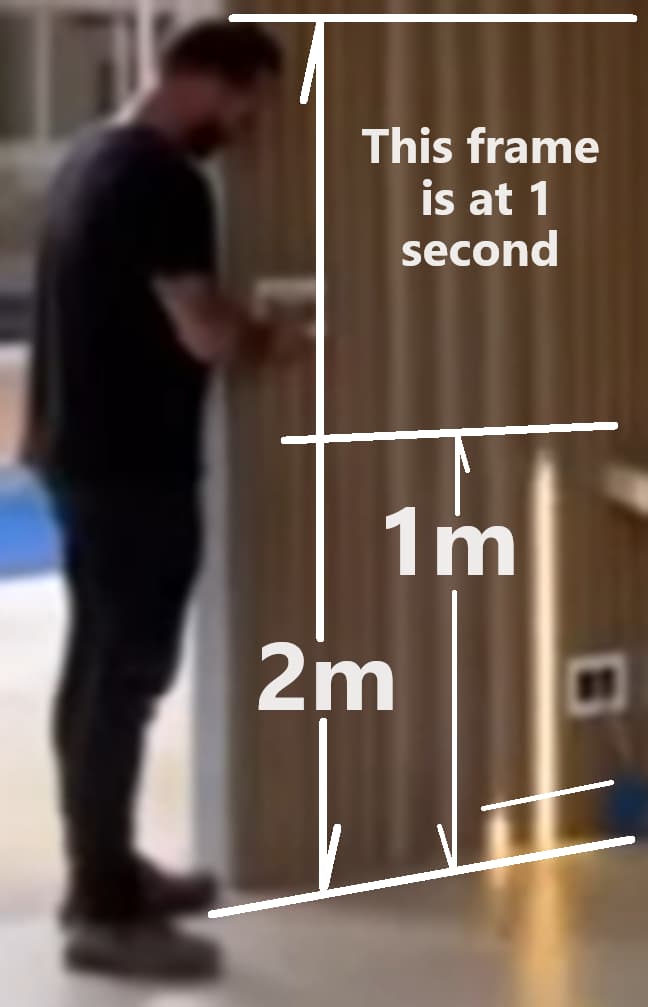
Your code would wait for the number of pixels (or amount of time) to pass before starting the next strip. If the strips have 30pix/m, and reach 1m at 1sec (see picture of 2m man and 1m pixels), you can either wait for "pixels" to reach 30, or a timing loop to reach one second to start the second, third, next, next strips.
if u can ad more led strips. and the animation start with delay for every led strip . thanks best regards and thanks. i have power supply ok and the ws2812 with 60 leds on meter. i wanna to make something like that what u see on video. thanks
Each color of the Neopixel uses 20mA at full brightness. Each pixel has three colors, so 3 x 20 = 60mA per pixel. For one meter of 60pix/m * 60mA/pix = 3600 mA/m (3.6Amp). Also, length of the strip will take from the initial voltage level. I used 12vdc for 5m of neopixels without problems, which looks like the videos are 5m (5 seconds * 1m/second)
Here is a start sketch for your project. (most of the sketch is about reading the button)
hi bro how i can setup the light to stay turned on not to relay reverse light. to get reverse only if i press the button
This is how I would "wrap" your code in a "button press."
byte buttonPin = 2; // wired pin to button then button to ground
byte effect; // indicate which effect to use

void setup() {
  Serial.begin(115200);
  pinMode(buttonPin, INPUT_PULLUP); // HIGH when not pressed
}
void loop() {
  if (digitalRead(buttonPin) == 0) {
    delay(150); // this is a quick "button debounce"
    if (effect == 0) {
      effect0(); // call your first effect function
    }
    if (effect == 1) {
      effect1(); // call your second effect function
    }
    effect = !effect; // change from 1 to 0 or 0 to 1
  }
}

void effect0 () {
      Serial.println("Show first effect"); // this is your lights effect
}

void effect1() {
      Serial.println("Show second effect"); // this is your lights effect

}
i have a question. if i need to have the light open when i press the button to not stop or other kind of loop on it to stay always open after the animation and when i press the button for second time to stop the lights with animation?
is ok this script.
I do not understand. Would you use "translate.google.com" and copy/paste the English translation here? Sorry.
The sketch in post #9 waits for a button press, then runs the correct function/effect until the function/effect is complete - the lights extend up. The next button press will run the next effect.
I have lost track of the code that I posted. Would you post that code here?
I watched the second video again and here is the timing I saw... I do not recall if the original sketch made these two effects.
WS2812 START SPEED LENGTH START SPEED PIXEL TOTAL WATTS
 LEDs  EFCT1 (M/S)  (M)   EFCT2 (M/S) per M PIXEL NEED
  #1   0.0s    1    10    6.0s    2    30    300  18.0A
  #2   0.5s    1    11    4.0s    2    30    330  19.8A
  #3   1.0s    1    12    2.0s    2    30    360  21.6A
  #4   1.5s    1    13    0.0s    2    30    390  23.4A
Files for wokwi.com
// waterfal.ino
// https://youtu.be/IwoQO7lnJRE?t=6
// https://forum.arduino.cc/t/hi-i-need-a-white-color-water-run-effect-for-arduino-when-arduino-starts-run-the-effect-and-stay-the-light-on/1186544/
// - Four LED strands of increasing length
// - Start extending at 1m/s with the shortest strand
// - Finish with the last, longest strand
// - Start retracting at 2m/s with the longest strand
// >> move strip repetition into arrays/structures

#include <FastLED.h>

#define LEDs_per_meter 10
int stripLEDStart[] = {0, 100, 210, 330};
int stripLEDCount[] = {100, 110, 120, 130}; // 10 meters, 11m, 12m, 13m
#define totalLEDs 460
#define MULTIPLIER 1 // change to 3 for 1380 Neopixels at 30 LEDs per meter

float paceExtend[] = {0, .5, 1.0, 1.5};
float paceRetract[] = {6, 4, 2, 0};

int buttonPin = 2; // select the effect
bool effect = 0; // 0 (extend) or 1 (retract)

#define MATRIX_PIN 5
#define BRIGHTNESS 255

// colors
#define r 255, 223, 223
#define g 223, 255, 223
#define b 223, 223, 255
#define c 223, 255, 255
#define y 255, 255, 223
#define n 255, 223, 255
#define w 255, 255, 255

int i = 0, j = 0, k = 0, l = 0, m = 0; // counters

CRGB leds[totalLEDs];

void setup() {
  Serial.begin(115200);
  FastLED.addLeds<WS2812B, MATRIX_PIN, GRB>(leds, totalLEDs * MULTIPLIER);
  FastLED.setBrightness(BRIGHTNESS);
  FastLED.clear();
  FastLED.show();

  for (int i = 0; i > 4; i++) {
    paceExtend[i] = paceExtend[i] * LEDs_per_meter;
    paceRetract[i] = paceRetract[i] * LEDs_per_meter;
  }

  pinMode(buttonPin, INPUT_PULLUP); // start button on pin 2
  Serial.print("Press the red button.  ");
}

void loop() {
  checkButton();
  // randomize();
}

void checkButton() {
  if (digitalRead(buttonPin) == 0) {
    delay(150); // debounce
    if (effect == 0) {
      Serial.println("Extend.");
      extend();
    }
    if (effect == 1) {
      Serial.println("Retract.");
      retract();
    }
    effect = !effect;
  }
}

void extend() { // start with the shortest string in intervals of half a second
  for (int i = 0; i < stripLEDCount[3] + LEDs_per_meter * 1.5; i++) {
    if (i >= LEDs_per_meter * 0.0 && i < stripLEDCount[0] + LEDs_per_meter * 0) { // first strip
      leds[j + stripLEDStart[0]] = CRGB(r);
      j++;
    }

    if (i >= LEDs_per_meter * 0.5 && i < stripLEDCount[1] + LEDs_per_meter * .5) { // second strip
      leds[k + stripLEDStart[1]] = CRGB(g);
      k++;
    }

    if (i >= LEDs_per_meter * 1.0 && i < stripLEDCount[2] + LEDs_per_meter * 1.0) { // third strip
      leds[l + stripLEDStart[2]] = CRGB(b);
      l++;
    }

    if (i >= LEDs_per_meter * 1.5 && i < stripLEDCount[3] + LEDs_per_meter * 1.5) { // fourth strip
      leds[m + stripLEDStart[3]] = CRGB(y);
      m++;
    }
    FastLED.show();
  }
  // counterCheck();
  i = 0, j = 0, k = 0, l = 0, m = 0; // clear global variables for next use
  Serial.print("Press the red button.  ");
}

void retract() { // start with the longest string in intervals of two meters
  for (int i = 0; i < stripLEDCount[3] + LEDs_per_meter * 3; i++) {
    if (i >= LEDs_per_meter * 6.0 && i < stripLEDCount[0] + LEDs_per_meter * 6.0) { // first strip
      leds[stripLEDStart[0] + stripLEDCount[0] - j - 1] = CRGB(0, 0, 0);
      j++;
    }
    if (i >= LEDs_per_meter * 4.0 && i < stripLEDCount[1] + LEDs_per_meter * 4.0) { // second strip
      leds[stripLEDStart[1] + stripLEDCount[1] - k - 1] = CRGB(0, 0, 0);
      k++;
    }
    if (i >= LEDs_per_meter * 2.0 && i < stripLEDCount[2] + LEDs_per_meter * 2.0) { // third strip
      leds[stripLEDStart[2] + stripLEDCount[2] - l - 1] = CRGB(0, 0, 0);
      l++;
    }
    if (i >= LEDs_per_meter * 0.0 && i < stripLEDCount[3] + LEDs_per_meter * 0.0) { // fourth strip
      leds[stripLEDStart[3] + stripLEDCount[3] - m - 1] = CRGB(0, 0, 0);
      m++;
    }
    FastLED.show();
  }
  // counterCheck();
  i = 0, j = 0, k = 0, l = 0, m = 0; // clear global variables for next use
  Serial.print("Press the red button.  ");
}

void counterCheck() {
  Serial.print(" e "); Serial.print(effect);
  Serial.print(" j "); Serial.print(j);
  Serial.print(" k "); Serial.print(k);
  Serial.print(" l "); Serial.print(l);
  Serial.print(" m "); Serial.print(m);
  Serial.print(" S0 "); Serial.print(stripLEDStart[0]);
  Serial.print(" C0 "); Serial.print(stripLEDCount[0]);
  Serial.print(" S1 "); Serial.print(stripLEDStart[1]);
  Serial.print(" C1 "); Serial.print(stripLEDCount[1]);
  Serial.print(" S2 "); Serial.print(stripLEDStart[2]);
  Serial.print(" C2 "); Serial.print(stripLEDCount[2]);
  Serial.print(" S3 "); Serial.print(stripLEDStart[3]);
  Serial.print(" C3 "); Serial.print(stripLEDCount[3]);
  Serial.println();
}

void randomize() {
  for (int i = 1; i < totalLEDs; i++) {
    leds[i] = CRGB(random(255), random(255), random(255));
  }
  FastLED.show();
}
{
  "version": 1,
  "author": "Anonymous maker",
  "editor": "wokwi",
  "parts": [
    { "type": "wokwi-arduino-nano", "id": "nano", "top": 81.6, "left": 114.7, "attrs": {} },
    { "type": "wokwi-gnd", "id": "gnd1", "top": 67.2, "left": 287.4, "attrs": {} },
    { "type": "wokwi-vcc", "id": "vcc1", "top": 10.36, "left": 278.4, "attrs": {} },
    {
      "type": "wokwi-led-ring",
      "id": "ring2",
      "top": -715.91,
      "left": -126.68,
      "attrs": { "pixels": "100" }
    },
    {
      "type": "wokwi-led-ring",
      "id": "ring1",
      "top": -747.27,
      "left": -156.76,
      "attrs": { "pixels": "110" }
    },
    {
      "type": "wokwi-led-ring",
      "id": "ring3",
      "top": -778.63,
      "left": -186.84,
      "attrs": { "pixels": "120" }
    },
    {
      "type": "wokwi-led-ring",
      "id": "ring4",
      "top": -809.99,
      "left": -216.92,
      "attrs": { "pixels": "130" }
    },
    {
      "type": "wokwi-pushbutton",
      "id": "btn1",
      "top": 25.4,
      "left": 307.2,
      "attrs": { "color": "red" }
    }
  ],
  "connections": [
    [ "gnd1:GND", "nano:GND.2", "black", [ "v-28.8", "h-57.6" ] ],
    [ "vcc1:VCC", "nano:5V", "red", [ "v9.96", "h-96", "v105.24", "h48" ] ],
    [ "nano:5", "ring2:DIN", "green", [ "v0" ] ],
    [ "ring2:DOUT", "ring1:DIN", "green", [ "v0" ] ],
    [ "ring1:DOUT", "ring3:DIN", "green", [ "v0" ] ],
    [ "ring3:DOUT", "ring4:DIN", "green", [ "v0" ] ],
    [ "ring2:GND", "ring1:GND", "black", [ "v0" ] ],
    [ "ring1:GND", "ring3:GND", "black", [ "v0" ] ],
    [ "ring3:GND", "ring4:GND", "black", [ "v0" ] ],
    [ "ring4:GND", "nano:GND.2", "black", [ "v9.6", "h57.6" ] ],
    [ "ring2:VCC", "ring1:VCC", "red", [ "v0" ] ],
    [ "ring1:VCC", "ring3:VCC", "red", [ "v0" ] ],
    [ "ring3:VCC", "ring4:VCC", "red", [ "v0" ] ],
    [ "ring4:VCC", "vcc1:VCC", "red", [ "v19.2", "h115.2" ] ],
    [ "nano:GND.2", "btn1:1.l", "black", [ "v-48", "h67.2" ] ],
    [ "nano:2", "btn1:2.l", "green", [ "v0" ] ]
  ],
  "dependencies": {}
}
This topic was automatically closed 180 days after the last reply. New replies are no longer allowed.