Hi everybody,
I've got some trouble with an IMU 9250 10 DOF.
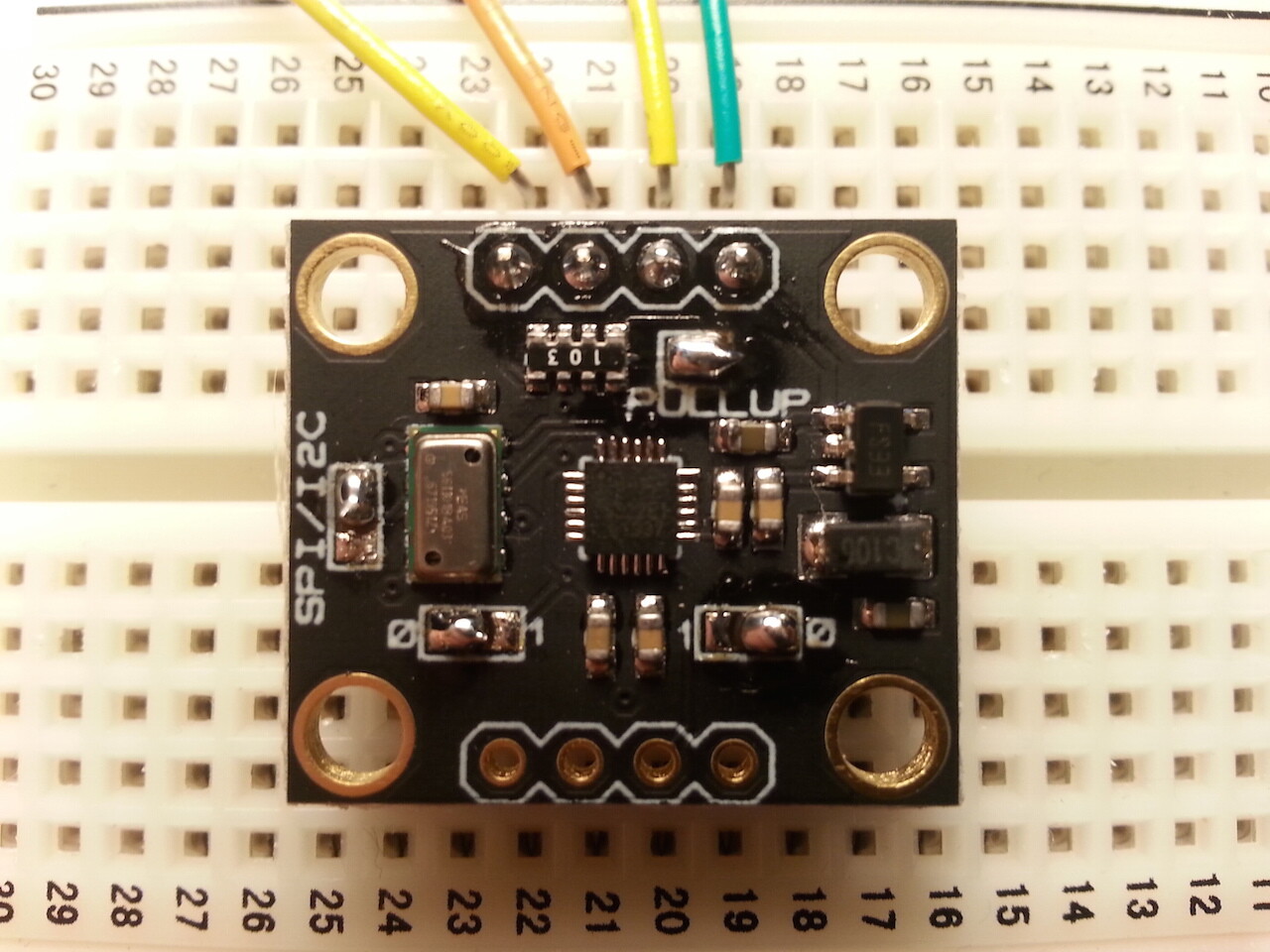
I've done 4 welds, visible in the attachments:
- SPI/I2C
- PULL UP
- Address MPU9250 (set to 0)
- Address MS5611 (set to 0)
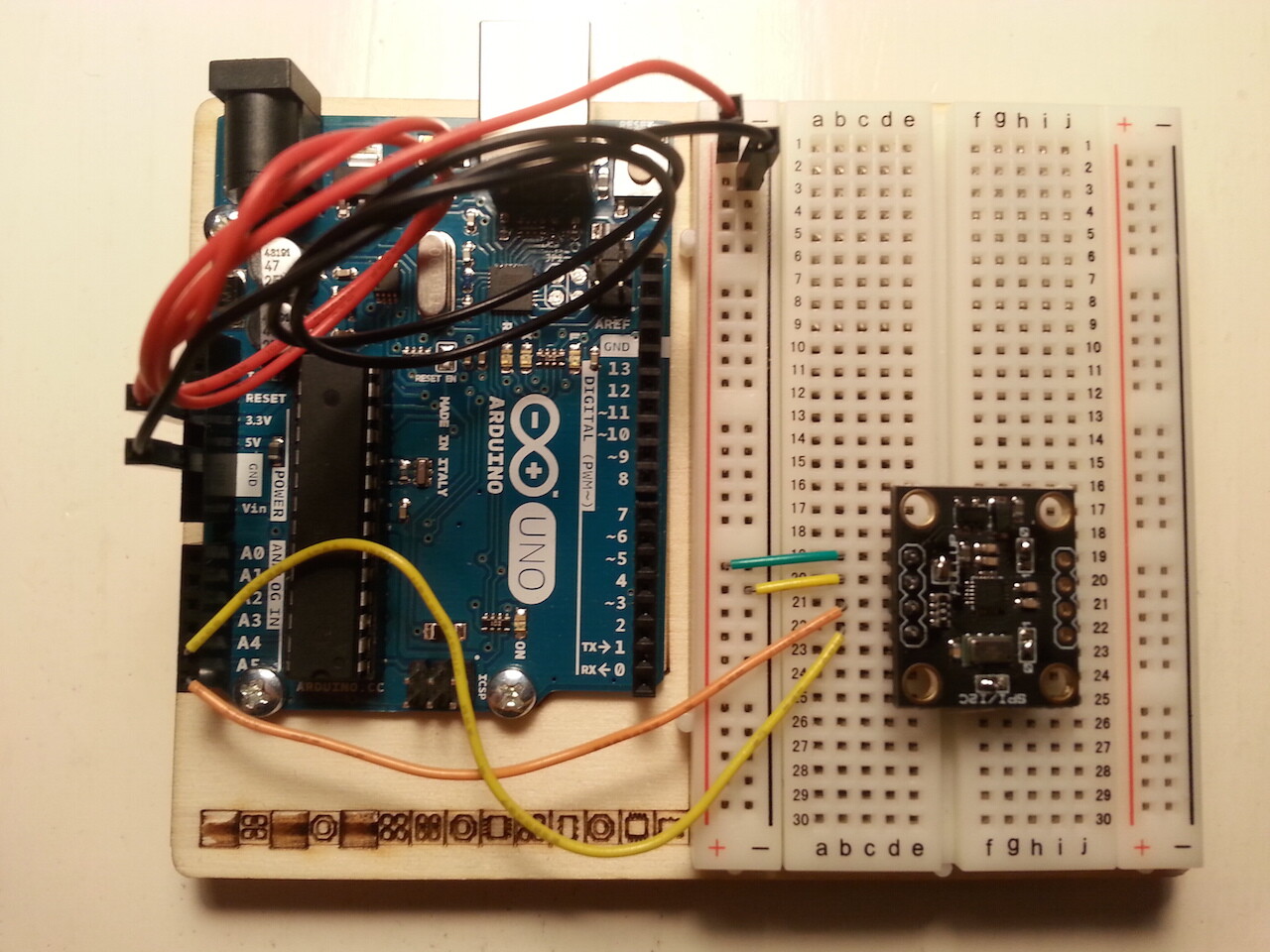
Then I linked the sensor at my Arduino Uno (3.3 V).
I used two I2C Scanner
The first is this one:
// --------------------------------------
// i2c_scanner
//
// Version 1
//    This program (or code that looks like it)
//    can be found in many places.
//    For example on the Arduino.cc forum.
//    The original author is not know.
// Version 2, Juni 2012, Using Arduino 1.0.1
//     Adapted to be as simple as possible by Arduino.cc user Krodal
// Version 3, Feb 26  2013
//    V3 by louarnold
// Version 4, March 3, 2013, Using Arduino 1.0.3
//    by Arduino.cc user Krodal.
//    Changes by louarnold removed.
//    Scanning addresses changed from 0...127 to 1...119,
//    according to the i2c scanner by Nick Gammon
//    http://www.gammon.com.au/forum/?id=10896
// Version 5, March 28, 2013
//    As version 4, but address scans now to 127.
//    A sensor seems to use address 120.
//
//
// This sketch tests the standard 7-bit addresses
// Devices with higher bit address might not be seen properly.
//

#include <Wire.h>


void setup()
{
  Wire.begin();

  Serial.begin(9600);
  Serial.println("\nI2C Scanner");
}


void loop()
{
  byte error, address;
  int nDevices;

  Serial.println("Scanning...");

  nDevices = 0;
  for(address = 1; address < 127; address++ )
  {
    // The i2c_scanner uses the return value of
    // the Write.endTransmisstion to see if
    // a device did acknowledge to the address.
    Wire.beginTransmission(address);
    error = Wire.endTransmission();

    if (error == 0)
    {
      Serial.print("I2C device found at address 0x");
      if (address<16)
        Serial.print("0");
      Serial.print(address,HEX);
      Serial.println("  !");

      nDevices++;
    }
    else if (error==4)
    {
      Serial.print("Unknow error at address 0x");
      if (address<16)
        Serial.print("0");
      Serial.println(address,HEX);
    }
  }
  if (nDevices == 0)
    Serial.println("No I2C devices found\n");
  else
    Serial.println("done\n");

  delay(5000);           // wait 5 seconds for next scan
}
and the result is visible in the Attachment "Risultato 1"
The second is this one:
/**
 * I2CScanner.ino -- I2C bus scanner for Arduino
 *
 * 2009,2014, Tod E. Kurt, http://todbot.com/blog/
 *
 */

#include "Wire.h"
extern "C" {
#include "utility/twi.h"  // from Wire library, so we can do bus scanning
}

// Scan the I2C bus between addresses from_addr and to_addr.
// On each address, call the callback function with the address and result.
// If result==0, address was found, otherwise, address wasn't found
// (can use result to potentially get other status on the I2C bus, see twi.c)
// Assumes Wire.begin() has already been called
void scanI2CBus(byte from_addr, byte to_addr,
                void(*callback)(byte address, byte result) )
{
  byte rc;
  byte data = 0; // not used, just an address to feed to twi_writeTo()
  for( byte addr = from_addr; addr <= to_addr; addr++ ) {
    rc = twi_writeTo(addr, &data, 0, 1, 0);
    callback( addr, rc );
  }
}

// Called when address is found in scanI2CBus()
// Feel free to change this as needed
// (like adding I2C comm code to figure out what kind of I2C device is there)
void scanFunc( byte addr, byte result ) {
  Serial.print("addr: ");
  Serial.print(addr,DEC);
  Serial.print( (result==0) ? " found!":"       ");
  Serial.print( (addr%4) ? "\t":"\n");
}


byte start_address = 1;
byte end_address = 100;

// standard Arduino setup()
void setup()
{
    Wire.begin();

    Serial.begin(19200);
    Serial.println("\nI2CScanner ready!");

    Serial.print("starting scanning of I2C bus from ");
    Serial.print(start_address,DEC);
    Serial.print(" to ");
    Serial.print(end_address,DEC);
    Serial.println("...");

    // start the scan, will call "scanFunc()" on result from each address
    scanI2CBus( start_address, end_address, scanFunc );

    Serial.println("\ndone");
}

// standard Arduino loop()
void loop()
{
    // Nothing to do here, so we'll just blink the built-in LED
    digitalWrite(13,HIGH);
    delay(300);
    digitalWrite(13,LOW);
    delay(300);
}
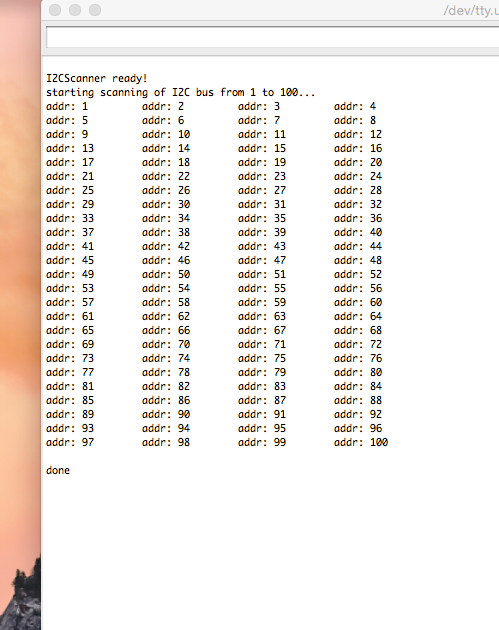
and the result is the attachment "Risultato 2"
If I use the MPU9250_raw.ino (the sketch below), I'll obtain only zeros.
There's another strange thing, i.e. I must to write #include <SPI.h> or I can't uploading my sketch.
#include <SPI.h>


// I2C device class (I2Cdev) demonstration Arduino sketch for MPU9250
// 1/4/2013 original by Conor Forde <me@conorforde.com> at https://github.com/Snowda/MPU9250
//
// Changelog:
//     2014-03-27 - initial release

/* ============================================
I2Cdev device library code is placed under the MIT license

Permission is hereby granted, free of charge, to any person obtaining a copy
of this software and associated documentation files (the "Software"), to deal
in the Software without restriction, including without limitation the rights
to use, copy, modify, merge, publish, distribute, sublicense, and/or sell
copies of the Software, and to permit persons to whom the Software is
furnished to do so, subject to the following conditions:

The above copyright notice and this permission notice shall be included in
all copies or substantial portions of the Software.

THE SOFTWARE IS PROVIDED "AS IS", WITHOUT WARRANTY OF ANY KIND, EXPRESS OR
IMPLIED, INCLUDING BUT NOT LIMITED TO THE WARRANTIES OF MERCHANTABILITY,
FITNESS FOR A PARTICULAR PURPOSE AND NONINFRINGEMENT. IN NO EVENT SHALL THE
AUTHORS OR COPYRIGHT HOLDERS BE LIABLE FOR ANY CLAIM, DAMAGES OR OTHER
LIABILITY, WHETHER IN AN ACTION OF CONTRACT, TORT OR OTHERWISE, ARISING FROM,
OUT OF OR IN CONNECTION WITH THE SOFTWARE OR THE USE OR OTHER DEALINGS IN
THE SOFTWARE.
===============================================
*/

// Arduino Wire library is required if I2Cdev I2CDEV_ARDUINO_WIRE implementation
// is used in I2Cdev.h
#include "Wire.h"

// I2Cdev and MPU9150 must be installed as libraries, or else the .cpp/.h files
// for both classes must be in the include path of your project
#include "I2Cdev.h"
#include "MPU9250.h"

// class default I2C address is 0x68
// specific I2C addresses may be passed as a parameter here
// AD0 low = 0x68 (default for InvenSense evaluation board)
// AD0 high = 0x69
MPU9250 accelgyro;

int16_t ax, ay, az;
int16_t gx, gy, gz;
int16_t mx, my, mz;

#define LED_PIN 13
bool blinkState = false;

void setup() {
    // join I2C bus (I2Cdev library doesn't do this automatically)
    Wire.begin();

    // initialize serial communication
    // (38400 chosen because it works as well at 8MHz as it does at 16MHz, but
    // it's really up to you depending on your project)
    Serial.begin(19200);

    // initialize device
    Serial.println("Initializing I2C devices...");
    accelgyro.initialize();

    // verify connection
    Serial.println("Testing device connections...");
    Serial.println(accelgyro.testConnection() ? "MPU9250 connection successful" : "MPU9250 connection failed");

    // configure Arduino LED for
    pinMode(LED_PIN, OUTPUT);
}

void loop() {
    // read raw accel/gyro measurements from device
    accelgyro.getMotion9(&ax, &ay, &az, &gx, &gy, &gz, &mx, &my, &mz);

    // these methods (and a few others) are also available
    //accelgyro.getAcceleration(&ax, &ay, &az);
    //accelgyro.getRotation(&gx, &gy, &gz);

    // display tab-separated accel/gyro x/y/z values
    Serial.print("a/g/m:\t");
    Serial.print(ax); Serial.print("\t");
    Serial.print(ay); Serial.print("\t");
    Serial.print(az); Serial.print("\t");
    Serial.print(gx); Serial.print("\t");
    Serial.print(gy); Serial.print("\t");
    Serial.print(gz); Serial.print("\t");
    Serial.print(mx); Serial.print("\t");
    Serial.print(my); Serial.print("\t");
    Serial.println(mz);

    // blink LED to indicate activity
    blinkState = !blinkState;
    digitalWrite(LED_PIN, blinkState);
}
What is wrong?
(I apologize for my english)