After long searching, I have found newer firmware with bootloader for the HM-10 (v550).
CC2541hm10v550.zip (79.8 KB)
After long searching, I have found newer firmware with bootloader for the HM-10 (v550).
CC2541hm10v550.zip (79.8 KB)
Hi there,
I've allready had flashed two fake HM-10 successfully, but this time I tried it with some out of the same lot again and the only thing that show's up in the cmd is "Waiting for respond form Arduino..." if I disconnect the HM-10 from the arduino then it knows nothing is there, any advise from you guys? The LED of the fake HM-10 which normaly blinked is now steady on and the AT commands do not work after the unsuccessfull flash 
I'm using:
I haven't changed any of my equipment in comparison to the last time...
Greets Simon
I've successfully flashed the firmware, thank you!
But now it seems like the state pin isn't working anymore. Is there a way to bring this function back? Which pin on the chip (not the daughter board) should indicate an active connection?
(Also the onboard led is always off...)
Thanks in advance
Torsten
andrejd:
After long searching, I have found newer firmware with bootloader for the HM-10 (v550).
Thank you so much for posting this. It really helped me out of a jam.
I needed to get a demo up and running quickly on a BLE113 surface-mount module (which also uses the CC2541). I was able to successfully load and run the v550 firmware on the BLE113 module!
For anyone else that needs to know, the v550 firmware uses the following pins of the CC2541 for Txd and Rxd:
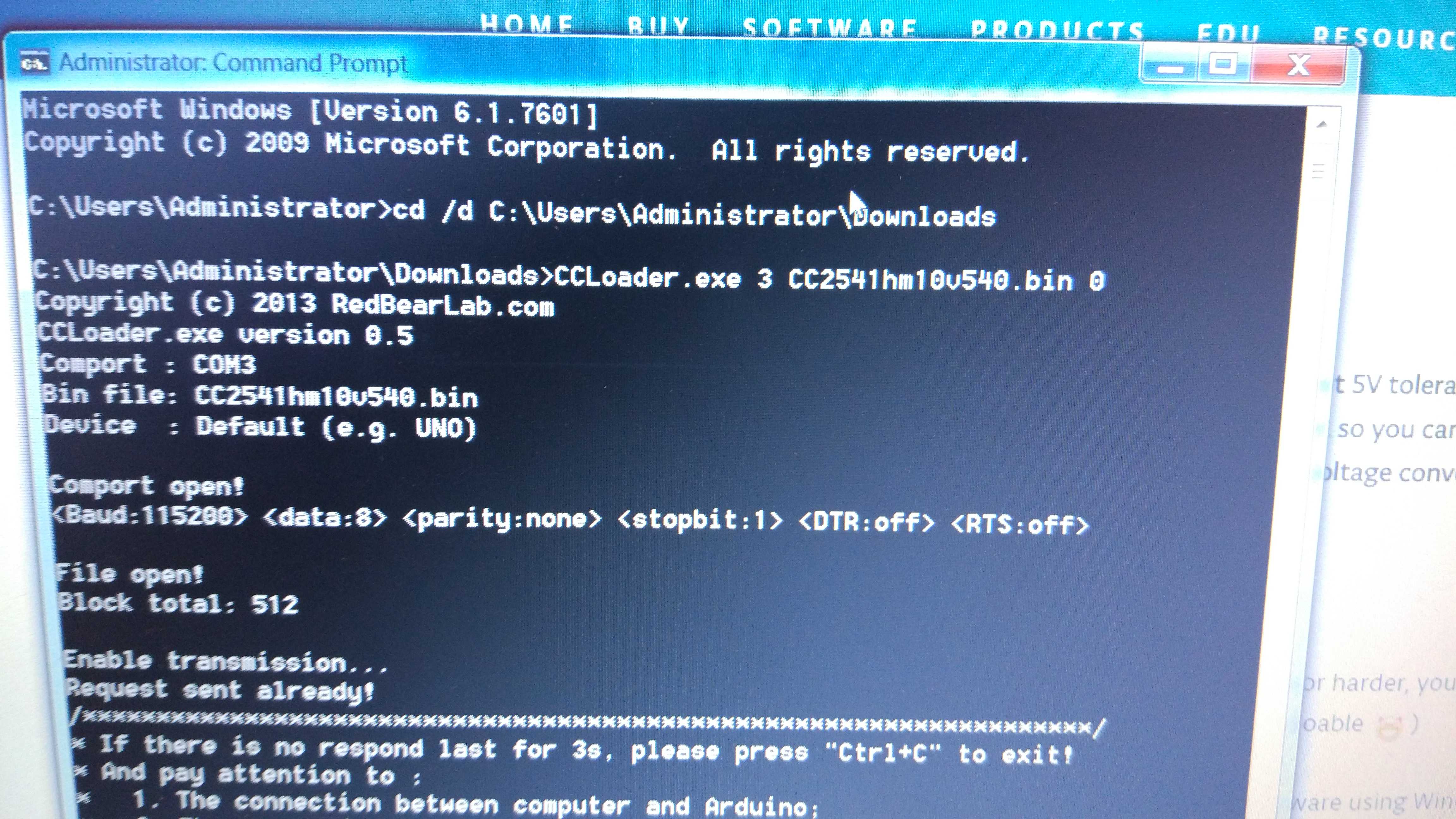
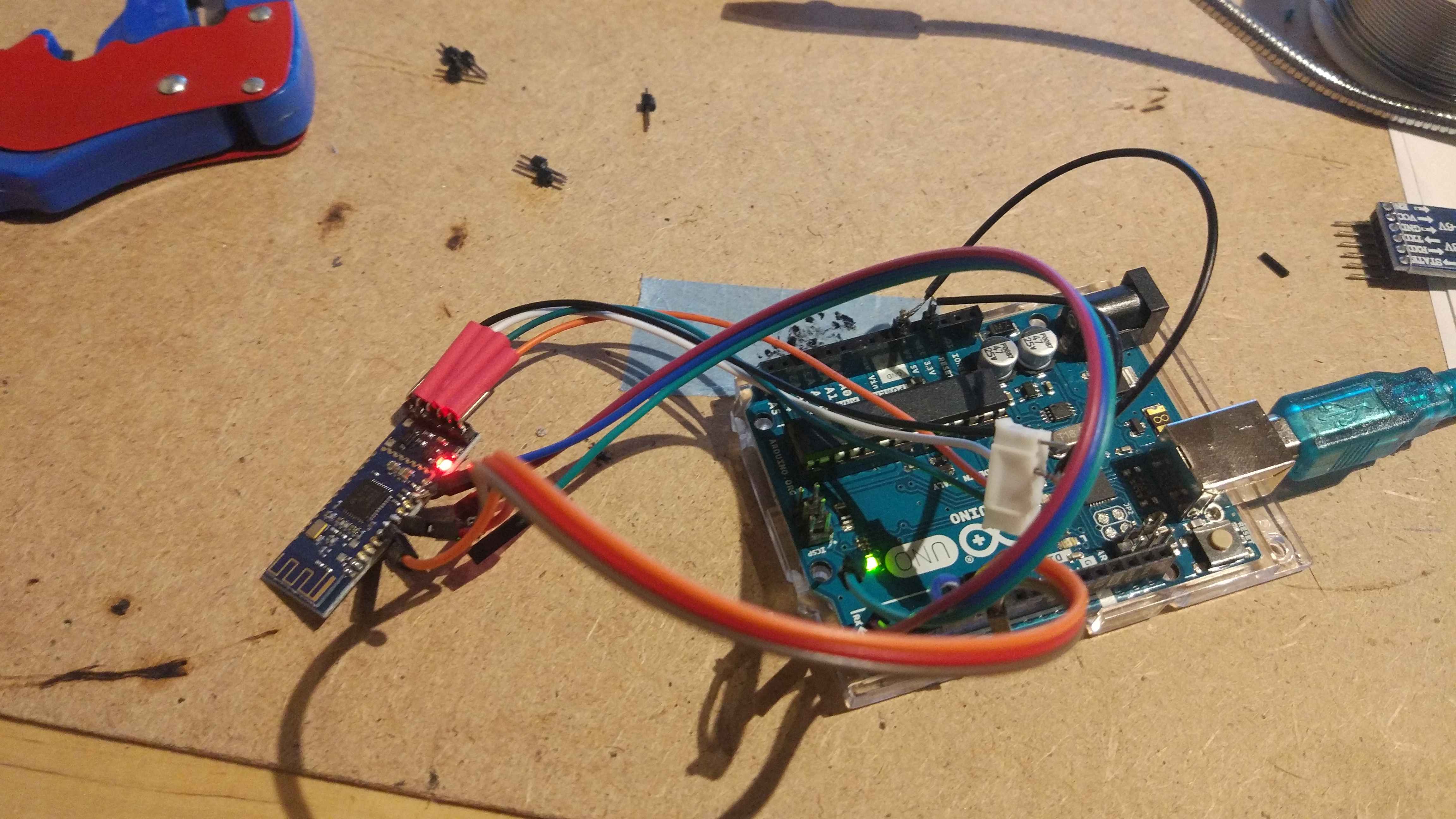
Guys! I really need your help! I was trying for the whole evening to flash a clone HM-10 module (https://www.aliexpress.com/item/Bluetooth-4-0-For-Arduino-Android-IOS-HM-10-BLE-CC2540-CC2541-Serial-Wireless-Module/32659958252.html?spm=a2g0s.9042311.0.0.27424c4daBAUBc) with the original HM-10 firmware since the lack in connectivity with Oreo devices. I have to say that I am new to arduino world. I only used it few times. So I apologise if I say something really stupid.
Basically I follow the different step but I get stock at the point when in the promt window the update should start. Below the pictures. I used an arduino uno and connected it following the scheme reported in the tutorial CC2541 / Arduino Uno
PIN 7 / 5
8 / 6
11 / 4
Does someone know how can I do it to make it work with windows 7 and an arduino uno?
Thank you very much.
Up...
If someone got it worked with my same hardware, please share the trick...
Thx!
Hi, guys,
I was successful.
Thank you very much!
You who put 5V directly are very crazy! Or very brave!
I put a 1k resistor between the Arduino and the HM-10.
Now the site has firmware version 603, someone tried to upgrade?
[HM-10 HM-11 firmware V603 released (2017/11/14 10:44:51)]
My antivirus blocked the download:
http://www.jnhuamao.cn/rom/HMSoft-10-2541-V603.zip
---> HMSoft-10-2541-V603.zip\HMConfigAssistant.exe Win32:Malware-gen <---
Some online antivirus are reporting viruses as well:
The v603 did not work here! 
The CCLoader.exe program shows the CC2540 chip.
The PDF document provided by the manufacturer says that the CC2540 chip is not the same as the CC2541, maybe the v603 firmware is for the CC2541 chip.
Due to the problem with antivirus, I could not follow the method described by the manufacturer, I used CCLoader, and after v603 I turned the v540.
The strange thing is that the site shows the details of the board with the firmware: V605, and download has only v603. ???
Note: When opening the port the Arduino Nano was reset, so I waited about 3 seconds and tried again (CTRL+C --> "^C"). In this way began the progressive counting of blocks, arrived at 512 for v540, and a little less for v603
For v540:
D:\Arduino\Bluetooth\Flash>CCLoader.exe 2 Firmware.bin 0
Copyright (c) 2013 RedBearLab.com
CCLoader.exe version 0.5
Comport : COM2
Bin file: Firmware.bin
Device : Default (e.g. UNO)Comport open!
Baud:115200 <data:8> parity:none stopbit:1 DTR:off RTS:offFile open!
Block total: 512Enable transmission...
Request sent already!
/********************************************************************/
- If there is no respond last for 3s, please press "Ctrl+C" to exit!
- And pay attention to :
- The connection between computer and Arduino;
- The connection between Arduino and CC2540;
- Whether the device you using is Leonardo or not;
- Other unexpected errors.
/********************************************************************/Waiting for respond from Arduino...
^C
D:\Arduino\Bluetooth\Flash>CCLoader.exe 2 Firmware.bin 0
Copyright (c) 2013 RedBearLab.com
CCLoader.exe version 0.5
Comport : COM2
Bin file: Firmware.bin
Device : Default (e.g. UNO)Comport open!
Baud:115200 <data:8> parity:none stopbit:1 DTR:off RTS:offFile open!
Block total: 512Enable transmission...
Request sent already!
/********************************************************************/
- If there is no respond last for 3s, please press "Ctrl+C" to exit!
- And pay attention to :
- The connection between computer and Arduino;
- The connection between Arduino and CC2540;
- Whether the device you using is Leonardo or not;
- Other unexpected errors.
/********************************************************************/Waiting for respond from Arduino...
Uploading firmware...
1 2 3 4 5 6 7 8 9 10 11 12 13 14 15 16 17 18 19 20 21 22 2
3 24 25 26 27 28 29 30 31 32 33 34 35 36 37 38 39 40 41 42 4
3 44 45 46 47 48 49 50 51 52 53 54 55 56 57 58 59 60 61 62 6
3 64 65 66 67 68 69 70 71 72 73 74 75 76 77 78 79 80 81 82 8
3 84 85 86 87 88 89 90 91 92 93 94 95 96 97 98 99 100 101 102
103 104 105 106 107 108 109 110 111 112 113 114 115 116 117 118
119 120 121 122 123 124 125 126 127 128 129 130 131 132 133 134
135 136 137 138 139 140 141 142 143 144 145 146 147 148 149 150
151 152 153 154 155 156 157 158 159 160 161 162 163 164 165 166
167 168 169 170 171 172 173 174 175 176 177 178 179 180 181 182
183 184 185 186 187 188 189 190 191 192 193 194 195 196 197 198
199 200 201 202 203 204 205 206 207 208 209 210 211 212 213 214
215 216 217 218 219 220 221 222 223 224 225 226 227 228 229 230
231 232 233 234 235 236 237 238 239 240 241 242 243 244 245 246
247 248 249 250 251 252 253 254 255 256 257 258 259 260 261 262
263 264 265 266 267 268 269 270 271 272 273 274 275 276 277 278
279 280 281 282 283 284 285 286 287 288 289 290 291 292 293 294
295 296 297 298 299 300 301 302 303 304 305 306 307 308 309 310
311 312 313 314 315 316 317 318 319 320 321 322 323 324 325 326
327 328 329 330 331 332 333 334 335 336 337 338 339 340 341 342
343 344 345 346 347 348 349 350 351 352 353 354 355 356 357 358
359 360 361 362 363 364 365 366 367 368 369 370 371 372 373 374
375 376 377 378 379 380 381 382 383 384 385 386 387 388 389 390
391 392 393 394 395 396 397 398 399 400 401 402 403 404 405 406
407 408 409 410 411 412 413 414 415 416 417 418 419 420 421 422
423 424 425 426 427 428 429 430 431 432 433 434 435 436 437 438
439 440 441 442 443 444 445 446 447 448 449 450 451 452 453 454
455 456 457 458 459 460 461 462 463 464 465 466 467 468 469 470
471 472 473 474 475 476 477 478 479 480 481 482 483 484 485 486
487 488 489 490 491 492 493 494 495 496 497 498 499 500 501 502
503 504 505 506 507 508 509 510 511 512 Upload successfully!
File closed!
Comport closed!D:\Arduino\Bluetooth\Flash>
Now the Firm v603 has worked as IBEACON:
(P.S.: AT+VERR? and AT+VERS? shows HMSoft V604, Bug?)
1: Install the V540 with CCLoader.exe
2: Upgrade to V603 with HMSoft.exe
After upgrading the firmware, run the AT commands via serial port:
AT+RENEW Restores factory defaults
AT+RESET Reboot HM-10
AT Wait for OK
AT+MARJ0x1234 Set iBeacon Major number to 0x1234 (hexadecimal)
AT+MINO0xFA01 Set iBeacon Minor number to 0xFA01 (hexadecimal)
AT+ADVI5 Set advertising interval to 5 (546.25 milliseconds)
AT+NAMEDOPEY Set HM-10 module name to DOPEY. Make this unique.
AT+ADTY0 Advertising ScanResponse, Connectable
AT+IBEA1 Enable iBeacon mode
10.AT+DELO1 iBeacon Allowed to broadcast and scanning
11.AT+PWRM1 Don’t auto sleep
12.AT+RESET Reboot
Look this:
I tried slave mode and managed to pair with a smartphone, and I was able to send data through the UART serial port, but I could not make the system LED blink, does anyone know how to do it?
I already checked the LED with a multimeter, it turns on and is properly connected to the HM-10 pin
I already tried the command:
AT+PIO10 Set PIO1 output status (System LED)
Unconnected Output: 500ms High 500ms Low,
Connected output: High
To be able to pair with the smartphone:
(Of course the Smartphone must be compatible with Bluetooth LE [BLE: Low Energy])
AT+RENEW
AT+RESETAT+TYPE3 Set Module Bond Mode: Auth with PIN
Default PIN: 000000
To monitor connections:
AT+NOTI1 Set notify information: Notify
Link ESTABLISHED:
OK+CONN string through UART
Link LOSTED:
OK+LOST string through UARTAT+NOTP1 Set notify mode with address
OK+CONN:001122334455 String “001122334455” is the MAC address string
It not works like other simple Bluetooth module like HC-05 and HC-06
I found out what happened that the system LED did not blink,
I made a big mistake,
I soldered all the pins of the HM-10 on the daughter board. :-[
The daughter board has pin connection 24 and 31, so when I soldered, these pins stayed connected, as the pin 31 should be pulling down, the LED does not light up.
I realized this after monitoring the voltage the LED was receiving, it was only 0.006V (6mV), so I tested the continuity.
Fortunately on the daughter board has a track under the board, which makes this connection of these pins, so I had to cut it, and the LED came back to flash. 
I Followed this routine that make cc-41A(Fake board) to HM-10.
but I have a problem with AT command....
it doesn't work....
before I upload the binary file cc2541hm10v540, the AT commands worked
Now the Led on the board is blinking faster than before.
I have many fake board so I tried to upload by CCLoader.exe several times
How can I figure it out?....
I checked RX, TX Line swipping, and version 550 bin file....
This is the HM-10 v604 full firmware (with bootloader) in hex format: HM-10v604_full.hex
BTW, the latest versions of the firmware can be downloaded here http://www.huamaosoft.com/download_rom.asp?id=
What application should I use when connecting with my mobile phone? I do not accept 000000 as my PIN. 123456 accepts and connects. but the android applications do not connect properly? What is the reason?
Today at 06:49 pm
Hii... I faced a peculiar problem while trying to configure my AT-09 BLE Device's baud rate. I used the AT+BAUD2 which has set it to a baud rate of 2400 but now when I run any AT+ Command it prints ERROR twice on the console. But when I just use AT to check the connection the device returns ok. What might be the cause of this problem can anyone please help?
Can you do this in a Mac?
I have been trying to use your guide but I have not been able to do it on my Mac. Do you know what is the command in the terminal?