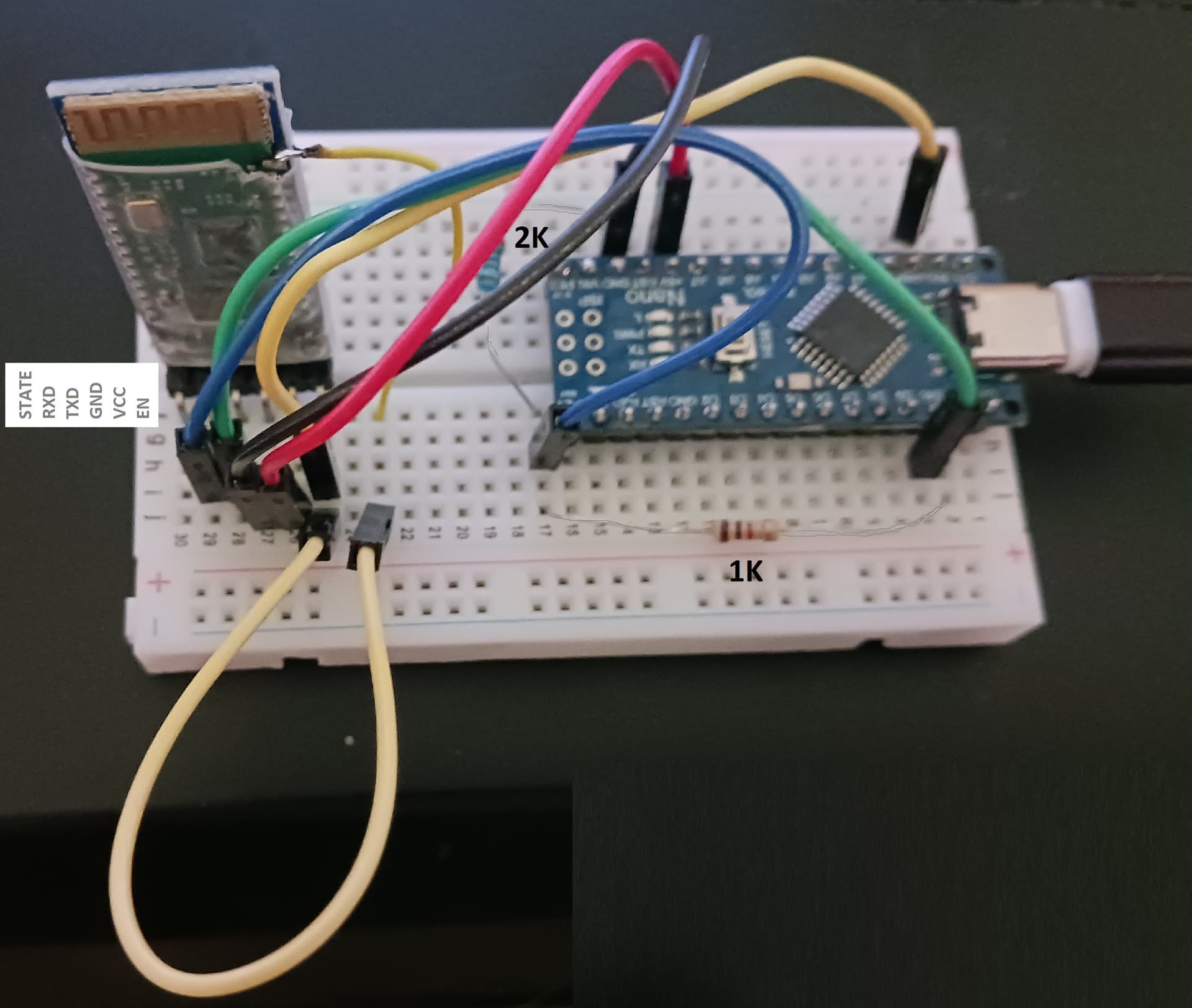
I have been trying to get the HC-05 / zs-040 to see other Bluetooth devices - from Arduino Nano.
See:https://www.martyncurrey.com/connecting-2-arduinos-by-bluetooth-using-a-hc-05-and-a-hc-06-pair-bind-and-link/
I am using Arduino Nano :
Ard: BT:
+3.3V -> +Vcc
-Gnd -> Gnd-
+3.3V -> EN (go into AT Mode)
p10 -> (R1K) -> TX -> ( R2K -> -Gnd )
p11 -> RX
+3.3V -> p34 (go into FULL AT Mode)
But, even though, I am in AT Cmd Mode, it is Not in FULL AT Cmd Mode.
EN enable pin is tied to the +3.3V source.https://www.martyncurrey.com/arduino-with-hc-05-bluetooth-module-at-mode/
Mini AT Cmd modes do work and reply :
But, AT-INIT, AT-INQ, AT-PAIR, AT-BIND, etc - do Not work / reply.
-- I also did connect the p34 to +3.3V via soldered jumper wire to the breadboard.
Lost on this.
Can we assume you have looked at this?
Well, I listed that link in my comment ,
I stated that p34 was connected to +3.3V.
-- It blinks at about 2sec hz.
Do you have anything else in particular ?
Code used :
// : BT_HC05_Master_to_BT-KEYBOARD : //

/*
Ard: BT:
+3.3V -> +Vcc
-Gnd -> Gnd-
+3.3V -> EN (go into AT Mode)
p10 -> -> R1K -> TX -> R2K -> -Gnd
p11 -> RX
+3.3V -> p34 (go into FULL AT Mode)
*/

// - use menu: "old Bootloader Atmega328"
// Bluetooth-Devices : W10: DeviceManagerApp:Bluetooth: M7 : Properties:Details:BluetoothDeviceAddress
// Bluetooth-Keyboard : BT Address = 232F099F0001

//

#include <SoftwareSerial.h>

//

SoftwareSerial mySerial( 10 , 11 ); // RX, TX

//

void setup()
{

Serial.begin(9600);
Serial.println( "\r\n- BT_HC05_Master_to_BT-KEYBOARD - \r\n" );

pinMode( 9 , OUTPUT ); digitalWrite(9,LOW); digitalWrite(9,HIGH);

mySerial.begin( 38400 );

Serial.println("A> Enter AT commands: \n");

mySerial.write( "AT+NAME=John\r\n" );
mySerial.write( "AT+NAME?\r\n" );
mySerial.write( "AT+PSWD?\r\n" );
mySerial.write( "AT+RNAME?\r\n" );
mySerial.write( "AT+VERSION?\r\n" );
mySerial.write( "AT+ADDR?\r\n" );
mySerial.write( "AT+ROLE?\r\n" );
mySerial.write( "AT\r\n" );

Serial.println("");

;

Serial.println("B> connect to BT:KEYBOARD (232F0990001) ");

mySerial.write( "AT\r\n" );
mySerial.write( "AT+RMAAD\r\n" );
mySerial.write( "AT+ROLE=1\r\n" );
mySerial.write( "AT+RESET\r\n" );
mySerial.write( "AT+CMODE=0\r\n" );

mySerial.write( "AT+INQM=0,5,9\r\n" );
mySerial.write( "AT+INIT\r\n" );
mySerial.write( "AT+INQ\r\n" );

mySerial.write( "AT+RNAME?232F,09,9F0001\r\n" );

mySerial.write( "AT+PAIR=232F,09,9F0001\r\n" );

mySerial.write( "AT+BIND=232F,09,9F0001\r\n" );

mySerial.write( "AT+CMODE=1\r\n" );

mySerial.write( "AT+LINK=232F,09,9F0001\r\n" );

mySerial.write( "AT+RNAME?\r\n" );

;

Serial.println("\nAT");

mySerial.write( "AT\r\n" );

Serial.println("");

}

//

void loop()
{

if( mySerial.available() )
{
Serial.write( mySerial.read() );
}

if( Serial.available() )
{
mySerial.write( Serial.read() );
}
}
jlsilicon:
+3.3V -> +Vcc
May not be the cause of the problem, but clearly contrary to instructions, and therefore probably not a good idea.
Just tried tying BT Vcc->+5V.
Also used code : HC-05_02_38400
Tried AT+ cmds repeatedly , while holding BT button.
--
AT+PSWD=1234
--
AT+VERSION?
That link shows there is a great variation of software in the same board id when made by different companies. Does your board fit any if the boards that have limited capability?
jlsilicon:
+PSWD:NO KEY OK
I seem to recall that a recent thread had this and the conclusion was that the module was actually a BLE device.
Purchased from here :
https://www.aliexpress.us/item/3256807225418049.html
The chip looks like the same chip sold anywhere, even all through ebay.
AT+VERSION?
B> AT+NAME?
B> AT+VERSION?
B> AT+RMAAD
B> AT+ROLE=1
B> AT+RESET
B> AT+CMODE=0

B> AT+INQM=0,5,9
B> AT+INIT
B> AT+INQ

B> AT+RNAME?232F,09,9F0001

B> AT+PAIR=232F,09,9F0001
B> AT+BIND=232F,09,9F0001
B> AT+CMODE=1
B> AT+LINK=232F,09,9F0001

B> AT+RNAME?

AT

+NAME:HC-05
+VERSION:hc05V2.3_1e OK
OK
OK
OK
FAIL
FAIL
-- AT+ Cmds (mini) working here : RMAAD , ROLE , RESET , CMODE , RNAME , VERSION
xfpd
April 20, 2025, 3:45pm
10
I read (I do not know) that full mode is entered if you power-on without holding the button/pin34, then after power-on hold the button/pin34 while entering AT mode commands.
I tried holding the button while entering the commands also.
Photo of my test circuit :
+3.3V -> p34
Tested Voltages :
xfpd
April 20, 2025, 3:53pm
13
Pull the wire Put a SPST on the Pin34 wire. I think that is "holding the button."
BLE ?
AT+PSWD=123456
OK

AT+PSWD?
+PSWD:123456 OK
-- so now what ?
I figured that.
How do I get to Full AT Cmds ?
AT+INQ ... etc still do not work.
Except :
AT+BIND?
AT+STATE?
xfpd
April 20, 2025, 4:33pm
17
martyncurry web site has them.
No. No Full AT Cmds - just Mini.
Power up : with EN pin loose NC => blinks at 2hz
mini AT Cmds , but no Full AT Cmds
Power-up with EN=3.3V => blinks at 1hz
mini AT Cmds , but no Full AT Cmds
I connect p34=3.3V => blinks at 2hz
mini AT Cmds , but no Full AT Cmds
Disconnect EN => blinks at 0.5Hz
mini AT Cmds , but no Full AT Cmds
HC-05 :
Tried all combos of EN / p34 -> +3.3V / NC - at Power-up , and after.
I have run through these tests with (3) different Bluetooth modules now - all same results.
Actually, once these chips go into AT mode,
-- Maybe the pin34 has changed ?
xfpd
April 20, 2025, 6:18pm
19
Check continuity from the button to Pin 34.
For reference:
jlsilicon:
123456 OK
That being a response suggests it is a BLE device. Kosher HC-05s have a four-digit password.