I̶f̶ ̶I̶ ̶u̶s̶e̶ ̶a̶ ̶b̶u̶n̶c̶h̶ ̶o̶f̶ ̶D̶u̶P̶o̶n̶t̶ ̶w̶i̶r̶e̶s̶ ̶t̶o̶ ̶c̶o̶n̶n̶e̶c̶t̶ ̶a̶n̶ ̶o̶l̶d̶ ̶k̶e̶y̶b̶o̶a̶r̶d̶ ̶t̶o̶ ̶m̶y̶ ̶M̶e̶g̶a̶ ̶2̶5̶6̶0̶,̶ ̶w̶i̶l̶l̶ ̶i̶t̶ ̶g̶e̶t̶ ̶f̶r̶i̶e̶d̶?̶ outdated, look at most recent post
Maybe yes, maybe no.
Do you have a pinout for that old keyboard's connector?
It outputs a 5-pin DIN, and I have a converter that makes it PS/2. I found some images on the internet about the pinout of the PS/2 interface in general.

Okay. So, you have a compatible voltage (5V), and you have a clock signal and a data signal. So, I'd say you have little risk of harming your Mega by wiring 5V, GND, and the two signals to your Mega. There's plenty of info on the web about wiring, as well as the actual signaling protocols involved. Two that looked helpful to me are:
and
https://allpinouts.org/pinouts/connectors/input_device/mouse-keyboard-ps-2/
Have fun!
I see, by the way, that you're a new visitor here. Welcome!
If you have further questions, please come back and add them in this posting. That way, helpers will know the context of your project.
Have you looked for the mating connector? I bought a package of several on EBAY several years ago while making an Arduino keyboard Morse code sender.
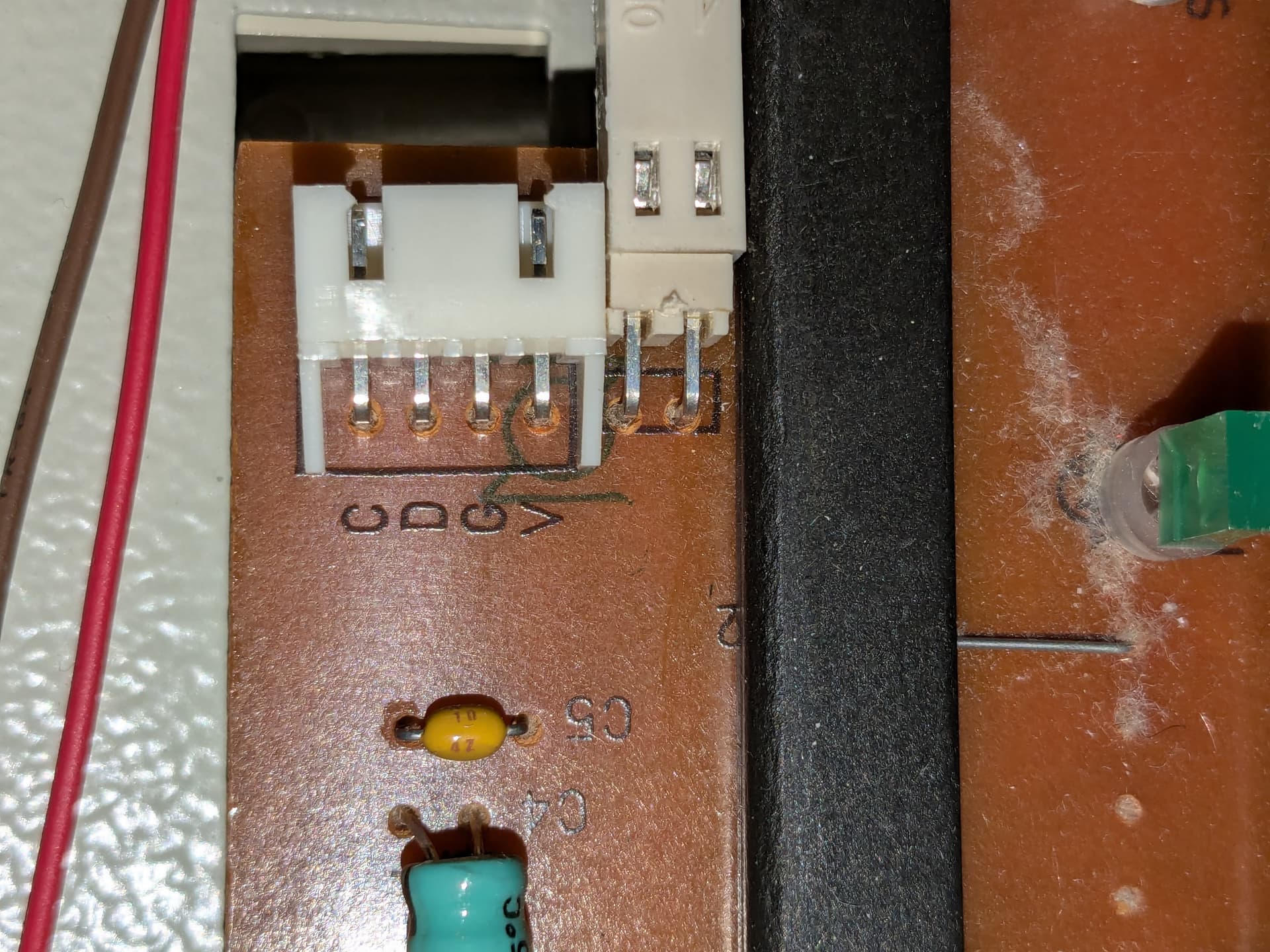
quite likely, the pins are even labeled CDGV - probably means Clock Data Ground Voltage. And the pins should fit female Dupont wires nicely.
Great! It plugs in! Now, I just have to get through the headache of what the heck this thing is, and how to get it working. Thanks!
read through that U of T page I linked for you, and ask questions about things you don't understand.
Well, the capslock keys are going on! Not really doing much else though...
What I need to figure out now is if the Arduino is getting any signals at all. (what have I gotten myself into...)
Sorry, went to bed.
In the Arduino IDE, go to Library Manager and install the library "PS2Keyboard" by Paul Stoffregen. Then look in File|Examples|PS2Keyboard for the example "Simple_Test". You'll need to use the correct pins on the Mega for the interrupt and data connections.
Hope that helps - you should at least be able to get the keyboard input displayed on the Serial Monitor using that. Beyond that, you'll have to tell us what you really want to do next.

Is there any way to see this weird data as hex code (so i could possibly manually translate it)
Is your baud rate in Serial Monitor the same as is set in the sketch? Because if you have a baud rate mismatch, it will often(but not always) appear as garbage like that.
It works! Thanks a ton, you've really helped 